Tag Archives: Uncategorized

Pkg Update: Your Window to the Julia Package Ecosystem

By: ChrisRackauckas

Re-posted from: http://www.pkgupdate.com/?p=18

Introduction to Pkg Update

Welcome to Pkg Update. This new blog focuses on the Julia package ecosystem: how packages/organizations are changing, what new projects you should be aware of, and how Base issues are propagating through the package-sphere. I hope that this will be a nice summary of the vast changes that happen throughout the Julia ecosystem. I want this to be a resource which both package users and package developers could read to get a general understanding of the big movements in the community. The goal is to link together issues/PRs/discussions from the the vast number of repositories to give a coherent idea of what changes to anticipate and congratulate. As Base continues to slim (for those who don’t know, there’s a trend for Base to become slimmer for a leaner install, with more functionality provided by the Julia organizations such as JuliaMath), I hope this helps you stay up to date with where everything is going!

While I try my best to be active throughout the Julia-sphere, this is not something that can be done alone. Please feel free to contact me via email, Twitter, or Gitter to give a summary of what’s going on in your organization / area of expertise. Also, if anyone is willing to join the Pkg Update team, I would be happy to have you! I am looking for correspondents to represent different Julia organizations and to help summarize the changes.

That said, here’s a quick highlight of some recent updates both users and developers might need to know.

JuliaMath: Exciting Developments in LibM.jl

I have to give a shoutout to @musm for his incredible work in Libm.jl. This project started with a discussion on whether Julia should continue to use OpenLibm (Libm is the math library which supplies the approximations for common functions like “sin” and “exp”). From this discussion the ambitious idea of creating a pure-Julia Libm was put forward, and Libm.jl has continued with the momentum.

Sleef is a C library notable for it’s use of SIMD. Libm.jl is largely based on a port of that code to Julia, it also has some added safety and correctness for edge cases over the original code. While the ported code is based on the non-SIMD parts of the C source, it reliably takes advantage f SIMD hardware none-the-less — thanks to LLVM autovectorisation . The code is particularly vectorisation friendly, as it uses next-to-no branches or table lookups Most of the benchmarks for this implementation are within 2x of C programs calling Sleef. In practice, because of how lining and FFI works, this means that using the julia Sleef implementation is significantly faster than ccalling the C sleef library. Not to mention safer.

Other libraries (Musl and Cephes) now have partial ports to Julia as well. There is work being done to use the strategies of these libraries together to build an even better Libm which might be dubbed Amal.jl. This library, being a Julia implementation, will have much broader support for the type system, including native implementations for Float16 and quad-precision floats, leading to a much more robust mathematical foundation.

JuliaStats API Decision: Degrees of Freedom as “dof”

This issue and the associated PR went through rather quickly. It highlighted the fact that until now, degrees of freedom in the stats packages had a tendency to use “df”, which is a naming conflict with using “df” as an instance for a DataFrame (a very common usage). The decision was to change the naming for degrees of freedom to dof. Since this change is in StatsBase, you can expect that this convention will propagate throughout the statistics stack: “df” for dataframes and “dof” for degrees of freedom.

JuliaDiffEq: Upcoming Sundials API Update

Sundials.jl, the interface to the popular ODE suite, has recently undergone a large overhaul to help improve the wrapper and to stop memory leaks. This is being combined with major changes to the “simplified interface” and an upgrade in the Sundials version. Thus the upcoming tag will be a minor release with some breaking but exciting improvements, including the ability to use the Sundials ARKODE solvers.

JunoLab: The Plot Pane is Taking Off

With the Julia v0.5 release, Juno released a new version of their stack which included an updated plot pane. The developers were rallied and many plotting packages now support the plot pane. This includes support from Plots.jl, meaning that the plots will plot in the plot pane if the backend is compatible. While Plotly is not compatible with the plot pane, a recent PR has added plot pane compatibility to PlotlyJS. PyPlot and GR are compatible with the plot pane. Also, compatibility with Gadfly has been added. This means that, at least on the master version of the Juno stack and the plotting packages, the plot pane is all working! For regular users you may want to wait for this all to be released, but if you’re brave, it’s already ready for testing and I have been making good use of it. Note that in Plots.jl you can still use the `gui()` command to open up the non-plot pane window. This can be useful since some plotting backends (like PyPlot) are not interactive in the plot pane.

JuliaML Manifesto Released, and Major Progress Ensues

If you haven’t read Tom Brelof’s JuliaML manifesto, I would take a good look at it. He gives an introduction to JuliaML, the new machine learning based Julia organization, and shows how the Learn ecosystem is leading to an easy-to-use but highly extendable API. If you’re interested in machine learning, this is an organization to start following. Lots of progress is happening over here.

New Package Highlights

Lastly, I would like to finish off each post by highlighting some newer and promising projects. Since this is the first post and there’s lots to say, I picked a few.

ParallelDataTransfer.jl

(Disclaimer: this is one of my own libraries) ParallelDataTransfer.jl has hit the top of the 14-day change chart on Julia Pulse, rapidly picking up steam since it’s new release. The package is pretty simple: it offers a easy-to-use API for performing safe data transfers between processes. The README also shows how to use the library within type-stable functions, giving an easy way to construct highly parallel Julia algorithms.

Query.jl

Another package showing large movement on the Julia Pulse is Query.jl. This package allows you to query from Julia data sources, including any iterable, DataFrames, and Arrays. It even allows for queries through DataStreams sources, effectively connecting the queries to CSVs and SQLite databases. It’s not hard to see the promising future that has.

RNG.jl

A Google Summer of Code project which has caught my attention is RNG.jl. This package does exactly what you’d expect: it implements a bunch of random number generators. The benchmarks show that there are some promising RNGs which are both fast and suitable for parallel usage. I could see this library’s RNGs as becoming a staple for many Julia packages.

That’s the End of the First Post!

Let me know what you think of this new blog. I tried to cover as wide of a range as I could, but to get a better sense of the even larger community, I will need your help. Let me know if you’re willing to be an organization correspondent who can write one of many (multiple) dispatches, or if you don’t have the time, feel free to submit stories when possible.

An Introduction to Structural Econometrics in Julia

By: Bradley Setzler

Re-posted from: http://juliaeconomics.com/2016/02/09/an-introduction-to-structural-econometrics-in-julia/

This tutorial is adapted from my Julia introductory lecture taught in the graduate course Practical Computing for Economists, Department of Economics, University of Chicago.

The tutorial is in 5 parts:

  1. Installing Julia + Juno IDE, as well as useful packages
  2. Defining a structural econometric challenge
  3. Data generation, management, and regression visualization
  4. Numerical simulation of optimal agent behavior under constraints
  5. Parallelized estimation by the Method of Simulated Moments

1. Installing Julia + Juno IDE, as well as useful packages

Perhaps the greatest obstacle to using Julia in the past has been the absence of an easy-to-install IDE. There used to be an IDE called Julia Studio which was as easy to use as the popular RStudio for R. Back then, you could install and run Julia + Julia Studio in 5mins, compared to the hours it could take to install Python and its basic packages and IDE. When Julia version 0.3.X was released, Julia Studio no longer worked, and I recommended the IJulia Notebook, which requires the installation of Python and IPython just to use Julia, so any argument that Julia is more convenient to install than Python was lost.

Now, with Julia version 0.4.X, Juno has provided an excellent IDE that comes pre-bundled with Julia for convenience, and you can install Julia + Juno IDE in 5mins. Here are some instructions to help you through the installation process:

  1. Go to http://julialang.org/downloads/ and look for “Julia + Juno IDE bundles“. Click to download the bundle for your system (Windows, Mac, or Linux).
  2. After the brief download (the entire Julia language + Juno IDE is less than 1GB), open the file and click through the installation instructions.
  3. Open Juno, and try to run a very simple line of code. For example, type 2+2, highlight this text, right-click, and choose the option Evaluate. A bubble should display 4 next to the line of code.
    • Trouble-shooting: On my Mac running OS X Mavericks, 2+2 failed and an unhelpful error was produced. After some searching, I found that the solution was to install the Jewel package. To install Jewel from within Juno, just type Pkg.add(“Jewel”), highlight this text, and Evaluate. After this, 2+2 was successful.
  4. You have successfully installed Julia + Juno IDE, which includes a number of important packages already, such as DataFrames, Gadfly, and Optim. Now, you will want to run the following codes to install some other packages used in the econometric exercises below:
Pkg.update()
Pkg.add("Ipopt")
Pkg.build("Ipopt")
Pkg.add("JuMP")
Pkg.build("JuMP")
Pkg.add("GLM")
Pkg.add("KernelEstimator")

2. Defining a structural econometric challenge

To motivate our application, we consider a very simple economic model, which I have taught previously in the mathematical economics course for undergraduates at the University of Chicago. Although the model is analytically simple, the econometrics become sufficiently complicated to warrant the Method of Simulated Moments, so this serves us well as a teachable case.

Let c_i \geq 0 denote consumption and 0 \leq l_i \leq 1 denote leisure. Consider an agent who wishes to maximize Cobb-Douglas utility over consumption and leisure, that is,

U(c_i,l_i) = c^\gamma_i l^{1-\gamma}_i .

where 0 \leq \gamma \leq 1 is the relative preference for consumption. The budget constraint is given by,

c_i \leq (1-\tau)w_i(1-l_i)+\epsilon_i,

where w_i is the wage observed in the data, \epsilon_i is other income that is not observed in the data, and \tau is the tax rate.

The agent’s problem is to maximize U(c_i,l_i) subject to the budget constraint. We assume that non-labor income is uncorrelated with the wage offer, so that \mathbb{E}[\epsilon_i | w_i]=0. Although this assumption is a bit unrealistic, as we expect high-wage agents to also tend to have higher non-labor income, it helps keep the example simple. The model is also a bit contrived in that we treat the tax rate as unobservable, but this only makes our job more difficult.

The goal of the econometrician is to identify the model parameters \gamma and \tau from the data (c_i,l_i,w_i)^N_{i=1} and the assumed structure. In particular, the econometrician is interested in the policy-relevant parameter \bar\psi \equiv \frac{1}{N}\sum^N_{i=1}\psi(w_i), where,

\psi(w_i) \equiv \mathbb{E}_{\epsilon} \frac{\partial}{\partial \tau} C(w_i,\epsilon; \gamma, \tau),

and C(\cdot) denotes the demand for consumption. \psi(w_i) is the marginal propensity for an agent with wage w_i to consume in response to the tax rate. \bar{\psi} is the population average marginal propensity to consume in response to the tax rate. Of course, we can solve the model analytically to find that \psi(w_i) = -\gamma w_i and \bar\psi = -\gamma \bar{w}, where \bar{w} is the average wage, but we will show that the numerical methods achieve the correct answer even when we cannot solve the model.



3. Data generation, management, and regression visualization

The replication code for this section is available here.

To generate data that follows the above model, we first solve analytically for the demand functions for consumption and leisure. In particular, they are,

C(w_i,\epsilon_i; \gamma, \tau) = \gamma (1-\tau) w_i + \gamma \epsilon_i

L(w_i,\epsilon_i; \gamma, \tau) = (1-\gamma) + \frac{(1-\gamma) \epsilon_i}{ (1-\tau) w_i}

Thus, we need only draw values of w_i and \epsilon_i, as well as choose parameter values for \gamma and \tau, in order to generate the values of c_i and l_i that agents in this model would choose. We implement this in Julia as follows:

####### Set Simulation Parameters #########
srand(123)           # set the seed to ensure reproducibility
N = 1000             # set number of agents in economy
gamma = .5           # set Cobb-Douglas relative preference for consumption
tau = .2             # set tax rate

####### Draw Income Data and Optimal Consumption and Leisure #########
epsilon = randn(N)                                               # draw unobserved non-labor income
wage = 10+randn(N)                                               # draw observed wage
consump = gamma*(1-tau)*wage + gamma*epsilon                     # Cobb-Douglas demand for c
leisure = (1.0-gamma) + ((1.0-gamma)*epsilon)./((1.0-tau)*wage)  # Cobb-Douglas demand for l

This code is relatively self-explanatory. Our parameter choices are N=1000, \epsilon_i \sim \mathcal{N}(0,1), \gamma=1/2, and \tau=1/5. We draw the wage to have distribution w_i \sim \mathcal{N}(10,1), but this is arbitrary.

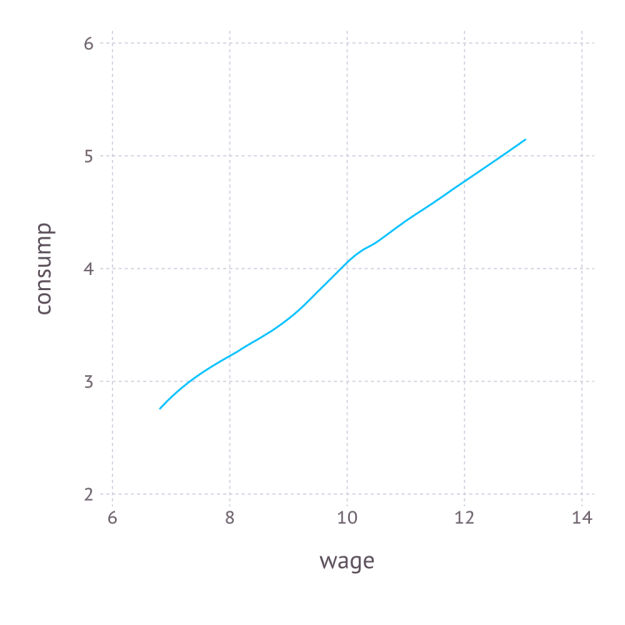
We combine the variables into a DataFrame, and export the data as a CSV file. In order to better understand the data, we also non-parametrically regress c_i on w_i, and plot the result with Gadfly. The Julia code is as follows:

####### Organize, Describe, and Export Data #########
using DataFrames
using Gadfly
df = DataFrame(consump=consump,leisure=leisure,wage=wage,epsilon=epsilon)  # create data frame
plot_c = plot(df,x=:wage,y=:consump,Geom.smooth(method=:loess))            # plot E[consump|wage] using Gadfly
draw(SVG("plot_c.svg", 4inch, 4inch), plot_c)                              # export plot as SVG
writetable("consump_leisure.csv",df)                                       # export data as CSV

Again, the code is self-explanatory. The regression graph produced by the plot function is:

plot_c


4. Numerical simulation of optimal agent behavior under constraints

The replication code for this section is available here.

We now use constrained numerical optimization to generate optimal consumption and leisure data without analytically solving for the demand function. We begin by importing the data and the necessary packages:

####### Prepare for Numerical Optimization #########

using DataFrames
using JuMP
using Ipopt
df = readtable("consump_leisure.csv")
N = size(df)[1]

Using the JuMP syntax for non-linear modeling, first we define an empty model associated with the Ipopt solver, and then add N values of c_i and N values of l_i to the model:

m = Model(solver=IpoptSolver())    # define empty model solved by Ipopt algorithm
@defVar(m, c[i=1:N] >= 0)       # define positive consumption for each agent
@defVar(m, 0 <= l[i=1:N] <= 1)  # define leisure in [0,1] for each agent 

This syntax is especially convenient, as it allows us to define vectors of parameters, each satisfying the natural inequality constraints. Next, we define the budget constraint, which also follows this convenient syntax:

 @addConstraint(m, c[i=1:N] .== (1.0-t)*(1.0-l[i]).*w[i] + e[i] )        # each agent must satisfy the budget constraint 

Finally, we define a scalar-valued objective function, which is the sum of each individual’s utility:

 @setNLObjective(m, Max, sum{ g*log(c[i]) + (1-g)*log(l[i]) , i=1:N } )  # maximize the sum of utility across all agents 

Notice that we can optimize one objective function instead of optimizing N objective functions because the individual constrained maximization problems are independent across individuals, so the maximum of the sum is the sum of the maxima. Finally, we can apply the solver to this model and extract optimal consumption and leisure as follows:

 status = solve(m)                                                       # run numerical optimization c_opt = getValue(c)                                                     # extract demand for c l_opt = getValue(l)                                                     # extract demand for l 

To make sure it worked, we compare the consumption extracted from this numerical approach to the consumption we generated previously using the true demand functions:

cor(c_opt,array(df[:consump]))
0.9999999998435865

Thus, we consumption values produced by the numerically optimizer’s approximation to the demand for consumption are almost identical to those produced by the true demand for consumption. Putting it all together, we create a function that can solve for optimal consumption and leisure given any particular values of \gamma, \tau, and \epsilon:

 function hh_constrained_opt(g,t,w,e)      m = Model(solver=IpoptSolver())                                         # define empty model solved by Ipopt algorithm
  @defVar(m, c[i=1:N] >= 0)                                               # define positive consumption for each agent
  @defVar(m, 0 <= l[i=1:N] <= 1)                                          # define leisure in [0,1] for each agent
  @addConstraint(m, c[i=1:N] .== (1.0-t)*(1.0-l[i]).*w[i] + e[i] )        # each agent must satisfy the budget constraint
  @setNLObjective(m, Max, sum{ g*log(c[i]) + (1-g)*log(l[i]) , i=1:N } )  # maximize the sum of utility across all agents
  status = solve(m)                                                       # run numerical optimization
  c_opt = getValue(c)                                                     # extract demand for c
  l_opt = getValue(l)                                                     # extract demand for l
  demand = DataFrame(c_opt=c_opt,l_opt=l_opt)                             # return demand as DataFrame
end

hh_constrained_opt(gamma,tau,array(df[:wage]),array(df[:epsilon]))          # verify that it works at the true values of gamma, tau, and epsilon

5. Parallelized estimation by the Method of Simulated Moments

The replication codes for this section are available here.

We saw in the previous section that, for a given set of model parameters \gamma and \tau and a given draw of \epsilon_{i} for each i, we have enough information to simulation c_{i} and l_{i}, for each i. Denote these simulated values by \hat{c}_{i}\left(\epsilon;\gamma,\tau\right) and \hat{l}_{i}\left(\epsilon;\gamma,\tau\right). With these, we can define the moments,

\hat{m}\left(\gamma,\tau\right)=\mathbb{E}_{\epsilon}\left[\begin{array}{c} \frac{1}{N}\sum_{i}\left[\hat{c}_{i}\left(\epsilon\right)-c_{i}\right]\\ \frac{1}{N}\sum_{i}\left[\hat{l}_{i}\left(\epsilon\right)-l_{i}\right] \end{array}\right]

which is equal to zero under the model assumptions. A method of simulated moments (MSM) approach to estimate \gamma and \tau is then,

\left(\hat{\gamma},\hat{\tau}\right)=\arg\min_{\gamma\in\left[0,1\right],\tau\in\left[0,1\right]}\hat{m}\left(\gamma,\tau\right)'W\hat{m}\left(\gamma,\tau\right)

where W is a 2\times2 weighting matrix, which is only relevant when the number of moments is greater than the number of parameters, which is not true in our case, so W can be ignored and the method of simulated moments simplifies to,

\left(\hat{\gamma},\hat{\tau}\right)=\arg\min_{\gamma\in\left[0,1\right],\tau\in\left[0,1\right]}\left\{ \mathbb{E}_{\epsilon}\left[\frac{1}{N}\sum_{i}\left[\hat{c}_{i}\left(\epsilon\right)-c_{i}\right]\right]\right\} ^{2}+\left\{ \mathbb{E}_{\epsilon}\left[\frac{1}{N}\sum_{i}\left[\hat{l}_{i}\left(\epsilon\right)-l_{i}\right]\right]\right\} ^{2}

Assuming we know the distribution of \epsilon_i, we can simply draw many values of \epsilon_i for each i, and average the moments together across all of the draws of \epsilon_i. This is Monte Carlo numerical integration. In Julia, we can create this objective function with a random draw of \epsilon as follows:

function sim_moments(params)
  this_epsilon = randn(N)                                                     # draw random epsilon
  ggamma,ttau = params                                                        # extract gamma and tau from vector
  this_demand = hh_constrained_opt(ggamma,ttau,array(df[:wage]),this_epsilon) # obtain demand for c and l
  c_moment = mean( this_demand[:c_opt] ) - mean( df[:consump] )               # compute empirical moment for c
  l_moment = mean( this_demand[:l_opt] ) - mean( df[:leisure] )               # compute empirical moment for l
  [c_moment,l_moment]                                                         # return vector of moments
end

In order to estimate \hat{m}\left(\gamma,\tau\right), we need to run sim_moments(params) many times and take the unweighted average across them to achieve the expectation across \epsilon_i. Because each calculation is computer-intensive, it makes sense to compute the contribution of \hat{m}\left(\gamma,\tau\right) for each draw of \epsilon_i on a different processor and then average across them.

Previously, I presented a convenient approach for parallelization in Julia. The idea is to initialize processors with the addprocs() function in an “outer” script, then import all of the needed data and functions to all of the different processors with the require() function applied to an “inner” script, where the needed data and functions are already managed by the inner script. This is incredibly easy and much simpler than the manual spawn-and-fetch approaches suggested by Julia’s official documentation.

In order to implement the parallelized method of simulated moments, the function hh_constrained_opt() and sim_moments() are stored in a file called est_msm_inner.jl. The following code defines the parallelized MSM and then minimizes the MSM objective using the optimize command set to use the Nelder-Mead algorithm from the Optim package:

####### Prepare for Parallelization #########

addprocs(3)                   # Adds 3 processors in parallel (the first is added by default)
print(nprocs())               # Now there are 4 active processors
require("est_msm_inner.jl")   # This distributes functions and data to all active processors

####### Define Sum of Squared Residuals in Parallel #########

function parallel_moments(params)
  params = exp(params)./(1.0+exp(params))   # rescale parameters to be in [0,1]
  results = @parallel (hcat) for i=1:numReps
    sim_moments(params)
  end
  avg_c_moment = mean(results[1,:])
  avg_l_moment = mean(results[2,:])
  SSR = avg_c_moment^2 + avg_l_moment^2
end

####### Minimize Sum of Squared Residuals in Parallel #########

using Optim
function MSM()
  out = optimize(parallel_moments,[0.,0.],method=:nelder_mead,ftol=1e-8)
  println(out)                                       # verify convergence
  exp(out.minimum)./(1.0+exp(out.minimum))           # return results in rescaled units
end

Parallelization is performed by the @parallel macro, and the results are horizontally concatenated from the various processors by the hcat command. The key tuning parameter here is numReps, which is the number of draws of \epsilon to use in the Monte Carlo numerical integration. Because this example is so simple, a small number of repetitions is sufficient, while a larger number would be needed if \epsilon entered the model in a more complicated manner. The process is run as follows and requires 268 seconds to run on my Macbook Air:

numReps = 12                                         # set number of times to simulate epsilon
gamma_MSM, tau_MSM = MSM()                           # Perform MSM
gamma_MSM
0.49994494921381816
tau_MSM
0.19992279518894465

Finally, given the MSM estimates of \gamma and \tau, we define the numerical derivative, \frac{df(x)}{dx} \approx \frac{f(x+h)-f(x-h)}{2h}, for some small h, as follows:

function Dconsump_Dtau(g,t,h)
  opt_plus_h = hh_constrained_opt(g,t+h,array(df[:wage]),array(df[:epsilon]))
  opt_minus_h = hh_constrained_opt(g,t-h,array(df[:wage]),array(df[:epsilon]))
  (mean(opt_plus_h[:c_opt]) - mean(opt_minus_h[:c_opt]))/(2*h)
end

barpsi_MSM = Dconsump_Dtau(gamma_MSM,tau_MSM,.1)
-5.016610457903023

Thus, we estimate the policy parameter \bar\psi to be approximately -5.017 on average, while the true value is \bar\psi = -\gamma \bar{w} = -(1/2)\times 10=-5, so the econometrician’s problem is successfully solved.


Bradley Setzler


GLVisualize Benchmark

By: Simon Danisch

Re-posted from: http://randomfantasies.com/2015/05/glvisualize-benchmark/

This is a benchmark comparing GLVisualize against some popular scientific visualization libraries, namely Mayavi, Vispy and Matlab.

There is also a chapter on IJulia, which is not really a plotting library, but can incorporate plots from other libraries.

The biggest problem with bench marking 3D rendering speed is, that there is no library which will allow to exactly reproduce similar conditions and measures.
Additionally, without extensive knowledge of the library, it is difficult to foresee what gets bench marked.
As an example of why it is difficult to measure the frame rate we can look at Vispy. When you enable to measure the frame rate, it will show very low frame rates, as it only creates a new frame on demand.
In contrast, GLVisualize has a fixed render loop, which renders as much frames as possible, leading to totally different amount of rendered frames per second (which is admittedly a total waste of GPU time and will change in the future).
This is why it was decided, to use the threshold at which a similar 3D scene is still conceived as enjoyable and interactive. Usually the minimal amount of frames per second for perceiving movements as smooth is roughly around 25.
So the benchmark was executed in the way, that the number regulating the complexity of the 3D scene was increased until one could not move the camera without stutters. The recorded last enjoyable threshold is than the result of the Benchmark.

vispy_mayavi_romeo

First benchmark is an animated and still 3D surface plot. The libraries offering this functionality where Vispy, Mayavi and Matlab.

Library Still Animated
Vispy  300  80
Mayavi 800 150
Matlab 800 450
GLVisualize 900 600
Speed up Vispy 9x  56x
Speed up Mayavi 1.26x 16x
Speed up Matlab 1.26x 1.7x

(Speed up of GLVisualize)
Vispy had some issues, as the camera was never really smooth for the surface example. Also the normals were missing and there was no option to colorize the surface depending on the height.
It was decided to use the threshold of going from a little stutter to unpleasant stutters, making vispy not completely fail this benchmark.
For Vispy it was found out, that the normals where calculated on the CPU resulting in a major slow down. The same can be expected for Mayavi, but Mayavi seems to be faster at calculating the normals.
There is not much information available on how Matlab renders their visualization, as it is closed source. It has to be noted, that Matlab did some additional calculations to always fit the drawing ideally into the borders.

On the other hand, Matlab is using a gouraud shading model, which needs quite a bit less processing power than phong-blinn shading, which is used by GLVisualize.


romeo_mayavi_particles2

The next benchmark is only between GLVisualize and Mayavi, as the other libraries did not offer a comparable solution. Matlab does not allow to use cubes as particle primitives and Vispy only had an example, where you needed to write your own shader, which can not be seen as a serious option. This is a benchmark for easy to use and high level plotting libraries. It is always possible to write an optimal version yourself in some framework, but what really interesting is, how well you can solve a problem with the tools the library has readily available.

Library  Still  Animated
Mayavi 90000 2500
GLVisualize 1000000 40000
Speed up 11x 16x

GLVisualize is an order of magnitude faster in this specific benchmark. This is most likely due to the fact that GLVisualize uses OpenGL’s native instance rendering.

On a side note, GLVisualize was the only library that allowed to use any arbitrary mesh as a particle.


IJulia

It was not possible to compare IJulia directly with GLVisualize, as the feature set for plotting is too different.

But there are certain factors, which indicate, that is hard to reach optimal performance with IJulia.
First of all, IJulia uses ZMQ to bridge the web interface with the Julia kernel.
ZMQ is a messaging system using different sockets for communication like inproc, IPC, TCP, TIPC and multicas.
While it is very fast at it’s task of sending messages, it can not compete with the native performance of staying inside one language.
This is not very important as long as there does not have to be much communication between Julia and the IPython kernel.

This changes drastically for animations, where big memory chunks have to be streamed to the rendering engine of the browser. It can be expected, that this will always be a weakness of IJulia.
On the other hand, GPU accelerated rendering in a web browser is also limited.
It relies on WebGL, which offers only a subset of OpenGL’s functionality. So while the execution speed of OpenGL can be expected to be similar, there are a lot of new techniques missing, which can speed up rendering.

To investigate this another benchmark has been created.
It is between GLVisualize and Compose3D, which was the only library found to be able to display 3D models created with Julia directly from the IJulia notebook.
This benchmark is not entirely fair, as Compose3D is just a rough prototype so far which wasn’t even published yet.
But there seems to be no other library with which you can easily create and display interactive 3D graphics in the IJulia or IPython notebook.
This benchmark creates a sierpinsky gasket and Compose3D displays it in the IJulia notebook while GLVisualize displays it natively in a window.

sierpinsky - Copy

Compose3D 15625
GLVisualize 1953125
Speed up 125x

Again, GLVisualize is an order of magnitude faster. This can change in the future when Compose3D matures.
But one needs to notice, that GLVisualize utilizes OpenGL’s instancing to gain this speed. Native instancing is not yet available in WebGL, which means that this optimization will not be available for the IPython notebook in the near future.


All in all, this looks pretty promising for GLVisualize.

It must be said though, that the numbers need to be treated with care, as it is quite hard to benchmark 3D scenes without the full control over the libraries. It might be, that I did something wrong in the setup, or that the library actually offers a lot more than GLVisualize, which in turn slows it down.

But it can definitely be said, that these are solid results for a pretty fresh prototype, competing with pretty mature libraries.


The Code is in my Github repository.