Tag Archives: Data Science

Using Julia As A ‘Glue’ Language

By: randyzwitch - Articles

Re-posted from: http://randyzwitch.com/julia-odbc-jl/

While much of the focus in the Julia community has been on the performance aspects of Julia relative to other scientific computing languages, Julia is also perfectly suited to ‘glue’ together multiple data sources/languages. In this blog post, I will cover how to create an interactive plot using Gadfly.jl, by first preparing the data using Hadoop and Teradata Aster via ODBC.jl.

The example problem I am going to solve is calculating and visualizing the number of airplanes by hour in the air at any given time in the U.S. for the year 1987. Because of the structure and storage of the underlying data, I will need to write some custom Hive code, upload the data to Teradata Aster via a command-line utility, re-calculate the number of flights per hour using a built-in Aster function, then using Julia to visualize the data.

Step 1: Getting Data From Hadoop

In a prior set of blog posts, I talked about loading the airline dataset into Hadoop, then analyzing the dataset using Hive or Pig. Using ODBC.jl, we can use Hive via Julia to submit our queries. The hardest part of setting up this process is making sure that you have the appropriate Hive drivers for your Hadoop cluster and credentials (which isn’t covered here). Once you have your DSN set up, running Hive queries is as easy as the following:In this code, I’ve written my query as a Julia string, to keep my code easily modifiable. Then, I pass the Julia string object to the query() function, along with my ODBC connection object. This query runs on Hadoop through Hive, then streams the result directly to my local hard drive, making this a very RAM efficient (though I/O inefficient!) operation.

Step 2: Shelling Out To Load Data To Aster

Once I created the file with my Hadoop results in it, I now have a decision point: I can either A) do the rest of the analysis in Julia or B) use a different tool for my calculations. Because this is a toy example, I’m going to use Teradata Aster to do my calculations, which provides a convenient function called ‘burst()’ to regularize timestamps into fixed intervals. But before I can use Aster to ‘burst’ my data, I first need to upload it to the database.

While I could loop over the data within Julia and insert each record one at a time, Teradata provides a command-line utility to upload data in parallel. Running command-line scripts from within Julia is as easy as using the run() command, with each command surrounded in backticks:While I could’ve run this at the command-line, having all of this within an IJulia Notebook keeps all my work together, should I need to re-run this in the future.

Step 3: Using Aster For Calculations

With my data now loaded in Aster, I can normalize the timestamps to UTC, then ‘burst’ the data into regular time intervals. Again, all of this can be done via ODBC from within Julia:Since it might not be clear what I’m doing here, the ‘burst()’ function in Aster takes a row of data with a start and end timestamp, and potentially returns multiple rows which normalize the time between the timestamps. If you’re familiar with pandas in Python, it’s a similar functionality to ‘resample’ on a series of timestamps.

Step 4: Download Smaller Data Into Julia, Visualize

Now that the data has been processed from Hadoop to Aster through a series of queries, we now have a much smaller dataset that can be loaded into RAM and processed by Julia:The Gadfly code above produces the following plot (using a d3.js backend for interactivity):

Since this chart is in UTC, it might not be obvious what the interpretation is of the trend. Because the airline dataset represents flights either leaving or returning to the United States, there are many fewer planes in the air overnight and the early morning hours (UTC 7-10, 2-5am Eastern). During the hours when the airports are open, there appears to be a limit of roughly 2500 planes per hour in the sky.

Why Not Do All Of This In Julia?

At this point, you might be tempted to wonder why go through all of this effort? Couldn’t this all be done in Julia?

Yes, you probably could do all of this work in Julia with a sufficiently large amount of RAM. As a proof-of-concept, I hope I’ve shown that there is much more to Julia than micro-benchmarking Julia’s speed relative to other scientific programming languages. You’ll notice that in none of my code have I used any type annotations, as none would really make sense (nor would they improve performance).  And although this is a toy example purposely using multiple systems, I much more frequently use Julia in this manner at work than doing linear algebra or machine learning.

So next time you’re tempted to use Python or R or shell scripting or whatever, consider Julia as well. Julia is just as at-home as a scripting language as a scientific computing language.

 

An Introduction to Decision Trees with Julia

Decision trees have played a significant role in data mining and machine learning since the 1960′s. They generate white-box classification and regression models which can be used for feature selection and sample prediction. The transparency of these models is a big advantage over black-box learners, in that the models are easy to understand and interpret, and that they can be readily extracted and implemented into any programming language (with nested if-else statements) for use in production environments. Furthermore, decision trees require almost no data preparation (i.e. normalization) and can handle both numerical and nominal/categorical data. Decision trees can also be … Keep reading

Fun With Just-In-Time Compiling: Julia, Python, R and pqR

By: randyzwitch - Articles

Re-posted from: http://randyzwitch.com/python-pypy-julia-r-pqr-jit-just-in-time-compiler/

Recently I’ve been spending a lot of time trying to learn Julia by doing the problems at Project Euler. What’s great about these problems is that it gets me out of my normal design patterns, since I don’t generally think about prime numbers, factorials and other number theory problems during my normal workday. These problems have also given me the opportunity to really think about how computers work, since Julia allows the programmer to pass type declarations to the just-in-time compiler (JIT).

As I’ve been working on optimizing my Julia code, I decided to figure out how fast this problem can be solved using any of the languages/techniques I know. So I decided to benchmark one of the Project Euler problems using Julia, Python, Python with NumbaPyPy, R, R using the compiler package, pqR and pqR using the compiler package. Here’s what I found…

Problem

The problem I’m using for the benchmark is calculating the smallest number that is divisible by all of the numbers in a factorial. For example, for the numbers in 5!, 60 is the smallest number that is divisible by 2, 3, 4 and 5. Here’s the Julia code:

All code versions follow this same pattern: the outside loop will run from 1 up to n!, since by definition the last value in the loop will be divisible by all of the numbers in the factorial. The inner loops go through and do a modulo calculation, checking to see if there is a remainder after division. If there is a remainder, break out of the loop and move to the next number. Once the state occurs where there is no remainder on the modulo calculation and the inner loop value of j equals the last number in the factorial (i.e. it is divisible by all of the factorial numbers), we have found the minimum number.

Benchmarking – Overall

Here are the results of the eight permutations of languages/techniques (see this GitHub Gist for the actual code used, this link for results file, and this GitHub Gist for the ggplot2 code):

jit-comparison

Across the range of tests from 5! to 20!, Julia is the fastest to find the minimum number. Python with Numba is second and PyPy is third. pqR fares better than R in general, but using the compiler package can narrow the gap.

To make more useful comparisons, in the next section I’ll compare each language to its “compiled” function state.

Benchmarking – Individual

Python

JITpython

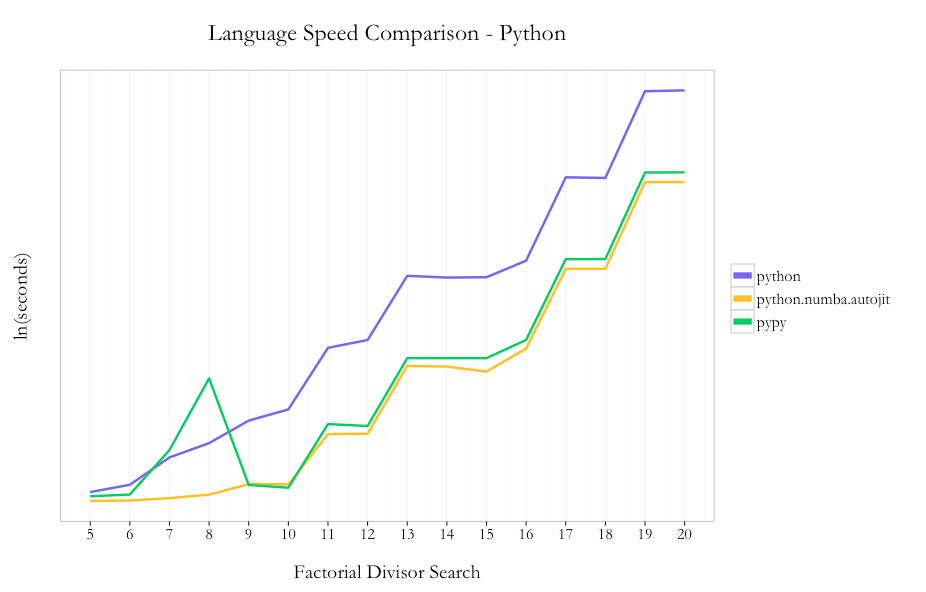
Amongst the native Python code options, I saw a 16x speedup by using PyPy instead of Python 2.7.6 (10.62s vs. 172.06s at 20!). Using Numba with Python instead of PyPy nets an incremental ~40% speedup using the @autojit decorator (7.63s vs. 10.63 at 20!).

So in the case of Python, using two lines of code with the Numba JIT compiler you can get substantial improvements in performance without needing to do any code re-writes. This is a great benefit given that you can stay in native Python, since PyPy doesn’t support all existing packages within the Python ecosystem.

R/pqR

JITr

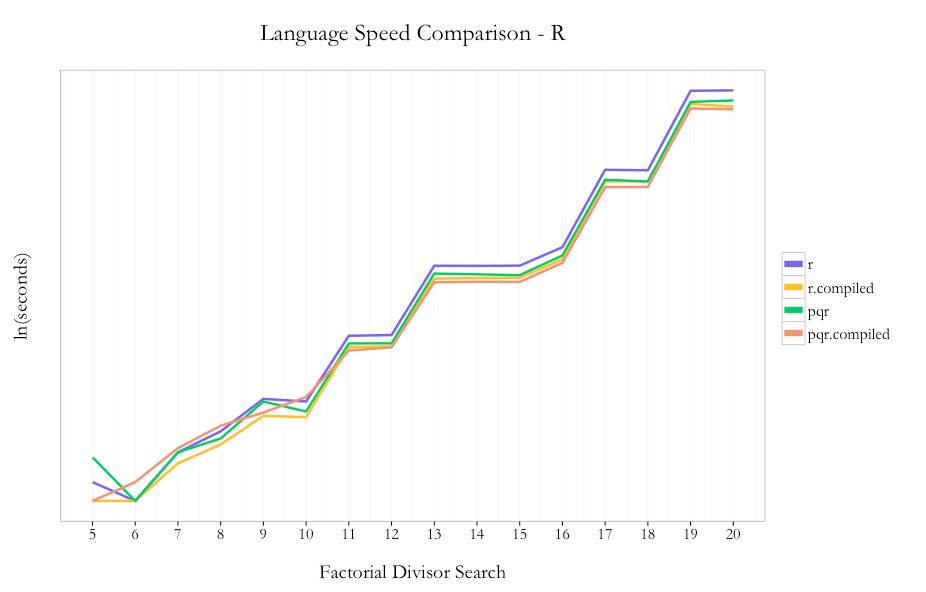
It’s understood in the R community that loops are not a strong point of the language. In the case of this problem, I decided to use loops because 1) it keeps the code pattern similar across languages and 2) I hoped I’d see the max benefit from the compiler package by not trying any funky R optimizations up front.

As expected, pqR is generally faster than R and using the compiler package is faster than not using the compiler. I saw ~30% improvement using pqR relative to R and ~20% incremental improvement using the compiler package with pqR. Using the compiler package within R showed ~35% improvement.

So unlike the case with Python, where you could just use Python with Numba and stay within the same language/environment, if you can use pqR and the compiler package, you can get a performance benefit from using both.

Summary

For a comparison like I’ve done above, it’s easy to get carried away and extrapolate the results from one simple test to all programming problems ever. “Julia is the best language for all cases ever!!!11111eleventy!” would be easy to proclaim, but all problems aren’t looping problems using simple division. Once you get into writing longer programs, other tasks such string manipulation and accessing APIs, using a technique from a package only available in one ecosystem but not another, etc., which tool is “best” for solving a problem becomes a much more difficult decision. The only way to know how much improvement you can see from different techniques & tools is to profile your program(s) and experiment.

The main thing that I took away from this exercise is that no matter which tool you are comfortable with to do analysis, there are potentially large performance improvements that can be made just by using a JIT without needing to dramatically re-write your code. For those of us who don’t know C (and/or are too lazy to re-write our code several times to wring out a little extra performance), that’s a great thing.