Tag Archives: Data Science

Visualizing Analytics Languages With VennEuler.jl

By: randyzwitch - Articles

Re-posted from: http://randyzwitch.com/visualizing-analytics-languages-venneuler-jl/

It often doesn’t take much to get me off track, and on a holiday weekend…well, I was just begging for a fun way to shirk. Enter Harlan Harris:

Hey, I’m someone looking for something to do! And I like writing Julia code! So let’s have a look at recreating this diagram in Julia using VennEuler.jl (IJulia Notebook link):

Source: Revolution R/KDNuggets

http://blog.revolutionanalytics.com/2014/08/r-tops-kdnuggets-data-analysis-software-poll-for-4th-consecutive-year.html

Installing VennEuler.jl

Because VennEuler.jl is not in METADATA as of the time of writing, instead of using Pkg.add() you’ll need to run:

 Pkg.clone("https://github.com/HarlanH/VennEuler.jl.git")

Note that VennEuler uses some of the more exotic packages (at least to me) like NLopt and Cairo, so you might need to have a few additional dependencies installed with the package.

Data

The data was a bit confusing to me at first, since the percentages add up to more than 100% (people could vote multiple times). In order to create a dataset to use, I took the percentages, multiplied by 1000, then re-created the voting pattern. The data for the graph can be downloaded from this link.

Code – Circles

With a few modifications, I basically re-purposed Harlan’s code from the package test files. The circle result is as follows:

venneulercircles

Since the percentage of R, SAS, and Python users isn’t too dramatically different (49.81%, 33.42%, 40.97% respectively) and the visualizations are circles, it’s a bit hard to tell that R is about 16% points higher than SAS and 9% points higher than Python.

Code – Rectangles

Alternatively, we can use rectangles to represent the areas:
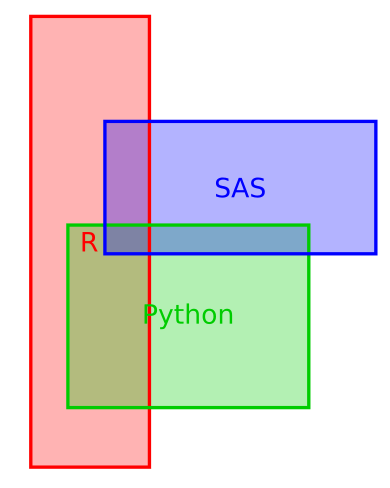
venneulerrectangles

Here, it’s a slight bit easier to see that SAS and Python are about the same area-wise and that R is larger, although the different dimensions do obscure this fact a bit.

Summary

If I spent more time with this package, I’m sure I could make something even more aesthetically pleasing. And for that matter, it’s still a pre-production package that will no doubt get better in the future. But at the very least, there is a way to create an area-accurate representation of relationships using VennEuler.jl in Julia.

Julia for Data Science

Julia is a great language for doing data science. With its C-like speed, familiar Matlab/Numpy style API, extensive standard library, metaprogramming and parallel processing capabilities, and growing set of machine learning libraries, it is rapidly gaining ground within the data science community. In this IJulia notebook we’ll go through brief introductions to the language and some of the packages available for data wrangling, visualization, analysis and prediction. Stay tuned for more to come.

String Interpolation for Fun and Profit

By: randyzwitch - Articles

Re-posted from: http://randyzwitch.com/string-interpolation-julia/

In a previous post, I showed how I frequently use Julia as a ‘glue’ language to connect multiple systems in a complicated data pipeline. For this blog post, I will show two more examples where I use Julia for general programming, rather than for computationally-intense programs.

String Building: Introduction

The Strings section of the Julia Manual provides a very in-depth treatment of the considerations when using strings within Julia. For the purposes of my examples, there are only three things to know:

      • Strings are immutable within Julia and 1-indexed
      • Strings are easily created through the a syntax familiar to most languages:
        julia> authorname = "randy zwitch"
        "randy zwitch"
      • String interpolation is easiest done using dollar-sign notation. Additionally, parenthesis can be used to avoid symbol ambiguity:
        julia> interpolated = "the author of this blog post is $(authorname)"
        "the author of this blog post is randy zwitch"

If you are using large volumes of textual data, you’ll want to pay attention to the difference between the various string types that Julia provides (UTF8/16/32, ASCII, Unicode, etc), but for the purposes of this blog post we’ll just be using the ASCIIString type by not explicitly declaring the string type and only using ASCII characters.

Example 1: Repetitive Queries

As part of my data engineering responsibilities at work, I often get requests to pull a sample of every table in a new database in our Hadoop cluster. This type of request is usually from the business owner, who wants to evaluate the data set has been imported correctly, but doesn’t actually want to write any sort of queries. So using the ODBC.jl package, I repeatedly do the same ‘select * from <tablename>’ query and save to individual .tab files:While the query is simple, writing/running this hundreds of times would be a waste of effort. So with a simple loop over the array of tables, I can provide a sample of hundreds of tables in .tab files with five lines of code.

Example 2: Generating Query Code

In another task, I was asked to join a handful of Hive tables, then transpose the table from “long” to “wide”, so that each id value only had one row instead of multiple. This is fairly trivial to do using CASE statements in SQL; the problem arises when you have thousands of potential row values to transpose into columns! Instead of getting carpal tunnel syndrome typing out thousands of CASE statements, I decided to use Julia to generate the SQL code itself:

The example here only repeats the CASE statements five times, which wouldn’t really be that much typing. However, for my actual application, the number of possible values was 2153, leading to a query result which was 8157 columns! Suffice to say, I’d still be writing that code if I decided to do it by hand.

Summary

Like my ‘glue language’ post, I hope this post has shown that Julia can be used for more than grunting about microbenchmark performance. Whereas I used to use Python for doing weird string operations like this, I’m finding that the dollar-sign syntax in Julia feels more comfortable for me than the Python string formatting mini-language (although that’s not particularly difficult either). So if you’ve been hesitant to jump into learning Julia because you think it’s only useful for doing Mandelbrot calculations or complex linear algebra, Julia is just as at-home doing quick general programming tasks as well.