By: Dean Markwick's Blog -- Julia
Re-posted from: https://dm13450.github.io/2021/01/01/Fundamental-AlphaVantage.html
AlphaVantage recently made fundamental data for stocks available through their
API and thanks to some new contributors to the AlphaVantage.jl Julia
package you can now easily import this data into your Julia project.
Enjoy these types of posts? Then sign up for my newsletter.
This fundamental data describes the underlying business information
about a company and is more fluid and open to interpretation than the
stock price. I’ll run through each of the new functions and try and
explain what data it returns.
The new data comes in through four different categories and functions:
plus a listing status to see what stocks are active.
The real value add though (if I do say so myself) comes from the
ability to pull out the annual or quarterly time series of a metric of
a stock easily and in a programatic manner. Using the metaprogramming
capabilities of Julia I was able to generate hundreds of functions
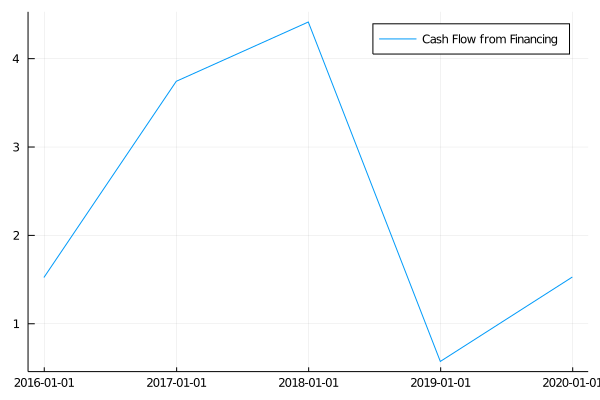
with just a for loop. Using these new functions you can now easily pull the quarterly revenue of Apple, cash flow from financing of Tesla or a timeseries of the current liabilities for Ford.
using AlphaVantage
using DataFrames, DataFramesMeta, Dates
using Plots
Listing Status
Firstly, we can get a list of stocks that are actively trading.
listingData = AlphaVantage.listing_status()
stocks = DataFrame(listingData[1], :auto)
rename!(stocks, Symbol.(vec(listingData[2])))
first(stocks, 5)
| symbol | name | exchange | assetType | ipoDate | delistingDate | |
|---|---|---|---|---|---|---|
| Any | Any | Any | Any | Any | Any | |
| 1 | A | Agilent Technologies Inc | NYSE | Stock | 1999-11-18 | null |
| 2 | AA | Alcoa Corp | NYSE | Stock | 2016-11-01 | null |
| 3 | AAA | AAF First Priority CLO Bond ETF | NYSE ARCA | ETF | 2020-09-09 | null |
| 4 | AAAU | Goldman Sachs Physical Gold ETF | NYSE ARCA | ETF | 2018-08-15 | null |
| 5 | AACG | ATA Inc | NASDAQ | Stock | 2008-01-29 | null |
Over 9000 stocks and ETF’s are listed. Which you can then do some simple sorting to look at the oldest listed stocks.
first(sort!(stocks, :ipoDate), 5)
| symbol | name | exchange | assetType | ipoDate | delistingDate | |
|---|---|---|---|---|---|---|
| Any | Any | Any | Any | Any | Any | |
| 1 | BA | Boeing Company | NYSE | Stock | 1962-01-02 | null |
| 2 | CAT | Caterpillar Inc | NYSE | Stock | 1962-01-02 | null |
| 3 | DD | DuPont de Nemours Inc | NYSE | Stock | 1962-01-02 | null |
| 4 | DIS | Walt Disney Co (The) | NYSE | Stock | 1962-01-02 | null |
| 5 | GE | General Electric Company | NYSE | Stock | 1962-01-02 | null |
When googling some of these stocks though, the IPO date doesn’t appear to be 100% correct. General Electric became a public company in 1896!
@where(stocks, :symbol .== "AAPL")
| symbol | name | exchange | assetType | ipoDate | delistingDate | status | |
|---|---|---|---|---|---|---|---|
| Any | Any | Any | Any | Any | Any | Any | |
| 1 | AAPL | Apple Inc | NASDAQ | Stock | 1980-12-12 | null | Active |
They have correctly recorded Apple’s IPO date though, so it might just
be something about older stocks, or something else I am missing.
Company Overview
The first new function is company_overview which does what it says
on the tin.
co = AlphaVantage.company_overview("AAPL", datatype = "json")
Dict{String,Any} with 59 entries:
  "SharesOutstanding"          => "17102499840"
  "ExDividendDate"             => "2020-11-06"
  "52WeekLow"                  => "52.8225"
  "ReturnOnEquityTTM"          => "0.7369"
  "LatestQuarter"              => "2020-09-30"
  "200DayMovingAverage"        => "111.2946"
  "EVToEBITDA"                 => "27.9399"
  "RevenuePerShareTTM"         => "15.82"
  "Beta"                       => "1.2976"
  "Sector"                     => "Technology"
  "ForwardAnnualDividendYield" => "0.0062"
  "Exchange"                   => "NASDAQ"
  "PercentInsiders"            => "0.066"
  "QuarterlyEarningsGrowthYOY" => "-0.023"
  "Currency"                   => "USD"
  "EBITDA"                     => "77343997952"
  "ShortRatio"                 => "1"
  "DividendYield"              => "0.0062"
  "AnalystTargetPrice"         => "127.11"
  "DilutedEPSTTM"              => "3.28"
  "BookValue"                  => "3.849"
  "LastSplitDate"              => "2020-08-31"
  "SharesFloat"                => "16984460162"
  "PriceToSalesRatioTTM"       => "8.4207"
  "FullTimeEmployees"          => "147000"
Here we get a dictionary with 59 different metrics about the company. There are lots of different quantitate and qualitative values about the company in question and provides a useful overview.
Income Statement
The income statement summarises a companies revenues and expenses. In short it shows where the money was coming in (revenue) and where it was going out (expenses).
is = AlphaVantage.income_statement("AAPL", datatype = "json")
Dict{String,Any} with 3 entries:
  "annualReports"    => Any[Dict{String,Any}("incomeTaxExpense"=>"9680000000","…
  "symbol"           => "AAPL"
  "quarterlyReports" => Any[Dict{String,Any}("incomeTaxExpense"=>"2228000000","…
Both the annual and quarterly results come back. For the annual reports there are the last 5 years. For the quarterly reports, the last 21 quarters.
keys(is["annualReports"][1])
Base.KeySet for a Dict{String,Any} with 29 entries. Keys:
  "incomeTaxExpense"
  "reportedCurrency"
  "otherNonOperatingIncome"
  "minorityInterest"
  "discontinuedOperations"
  "incomeBeforeTax"
  "totalOtherIncomeExpense"
  "interestIncome"
  "researchAndDevelopment"
  "grossProfit"
  "totalRevenue"
  "otherOperatingExpense"
  "taxProvision"
  "extraordinaryItems"
  "ebit"
  "otherItems"
  "netIncomeApplicableToCommonShares"
  "totalOperatingExpense"
  "costOfRevenue"
  "fiscalDateEnding"
  "interestExpense"
  "sellingGeneralAdministrative"
  "operatingIncome"
  "netIncomeFromContinuingOperations"
  "netIncome"
  ⋮
extrema(Date.(get.(is["annualReports"], "fiscalDateEnding", "")))
(Date("2016-09-30"), Date("2020-09-30"))
extrema(Date.(get.(is["quarterlyReports"], "fiscalDateEnding", "")))
(Date("2015-09-30"), Date("2020-09-30"))
Then what I have done is written the functions that allow you to extract any of the fields on a quarterly or annual basis. Which means you can easily plot some graphs and summarise the results.
totalRevenue = AlphaVantage.totalRevenue_quarterlys("AAPL", datatype =
"json")
plot(Date.(totalRevenue[:Date]),
     parse.(Float64, totalRevenue[:totalRevenue]) ./ 1e9,
     label = "Revenue (billions)",
     title = "Apple")
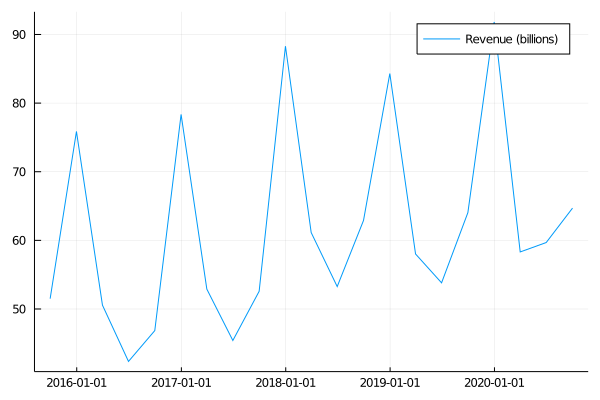
Here we have Apple quarterly total revenue, with a predictable pattern peaking in the first quarter.
Balance Sheet
A balance sheet summarises a companies assets, what it owns and its liabilities, what it owns to other people.
bs = AlphaVantage.balance_sheet("AAPL", datatype = "json")
Dict{String,Any} with 3 entries:
  "annualReports"    => Any[Dict{String,Any}("totalPermanentEquity"=>"None","wa…
  "symbol"           => "AAPL"
  "quarterlyReports" => Any[Dict{String,Any}("totalPermanentEquity"=>"None","wa…
string.(keys(bs["quarterlyReports"][1]))
51-element Array{String,1}:
 "totalPermanentEquity"
 "warrants"
 "negativeGoodwill"
 "preferredStockTotalEquity"
 "accumulatedAmortization"
 "inventory"
 "additionalPaidInCapital"
 "commonStockTotalEquity"
 "longTermInvestments"
 "fiscalDateEnding"
 "netTangibleAssets"
 "cashAndShortTermInvestments"
 "longTermDebt"
 ⋮
 "retainedEarnings"
 "shortTermInvestments"
 "propertyPlantEquipment"
 "goodwill"
 "preferredStockRedeemable"
 "totalLiabilities"
 "otherNonCurrentLiabilities"
 "currentLongTermDebt"
 "intangibleAssets"
 "accumulatedDepreciation"
 "otherCurrentLiabilities"
 "deferredLongTermAssetCharges"
Again, like the income statement, any of these keys can be extracted quarterly or annually.
fCash = AlphaVantage.cashAndShortTermInvestments_quarterlys("F",
datatype = "json")
fLiabilities = AlphaVantage.totalLiabilities_quarterlys("F", datatype
= "json")
cashPlot = plot(Date.(fCash[:Date]),
                parse.(Float64, fCash[:cashAndShortTermInvestments])/1e9,
                label="Cash and Short Term Investments (billions)",
                colour = "green")
liabPlot = plot(Date.(fLiabilities[:Date]),
                parse.(Float64, fLiabilities[:totalLiabilities])/1e9,
                label="Total Liabilities (billions)")
plot(cashPlot, liabPlot)
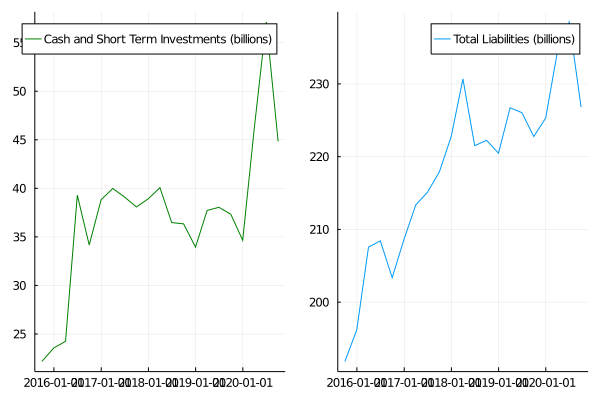
As per the intro I’ve plotted Fords cash and short term investment balance against something the owe, the total liabilities.
Cash Flow
The cash flow statement shows the changes in the balance sheet. It helps judge a companies ability to meet its cash needs, i.e. pay their employers or service their debt.
cf = AlphaVantage.cash_flow("TSLA", datatype = "json")
Dict{String,Any} with 3 entries:
  "annualReports"    => Any[Dict{String,Any}("cashflowFromInvestment"=>"-428900…
  "symbol"           => "AAPL"
  "quarterlyReports" => Any[Dict{String,Any}("cashflowFromInvestment"=>"5531000…
string.(keys(cf["quarterlyReports"][1]))
24-element Array{String,1}:
 "cashflowFromInvestment"
 "changeInInventory"
 "reportedCurrency"
 "changeInAccountReceivables"
 "changeInCashAndCashEquivalents"
 "otherOperatingCashflow"
 "dividendPayout"
 "changeInReceivables"
 "capitalExpenditures"
 "changeInExchangeRate"
 "operatingCashflow"
 "cashflowFromFinancing"
 "changeInLiabilities"
 "stockSaleAndPurchase"
 "otherCashflowFromFinancing"
 "changeInOperatingActivities"
 "depreciation"
 "fiscalDateEnding"
 "changeInCash"
 "netBorrowings"
 "investments"
 "netIncome"
 "changeInNetIncome"
 "otherCashflowFromInvestment"
cashflow = AlphaVantage.cashflowFromFinancing_annuals("TSLA", datatype="json")

plot(Date.(cashflow[:Date]),
     parse.(Float64, cashflow[:cashflowFromFinancing]) ./ 1e9,
     label="Cash Flow from Financing (billions)",
     title = "Tesla")
Earnings
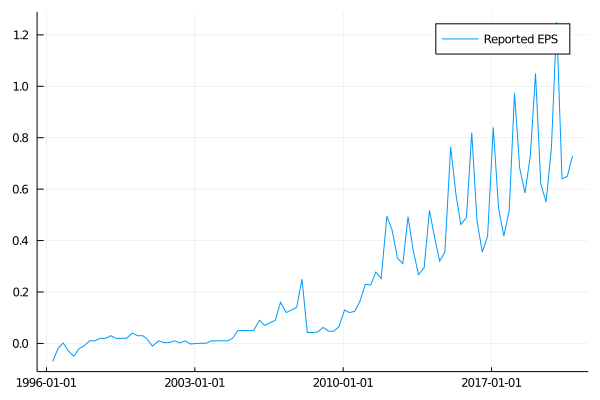
Each company reports their earnings each quarter and summarise their performance of the previous quarter. There are more dates available for earnings, but also slightly different fields for the quarterly and annual results.
earnings = AlphaVantage.earnings("AAPL", datatype = "json")
Dict{String,Any} with 3 entries:
  "annualEarnings"    => Any[Dict{String,Any}("fiscalDateEnding"=>"2020-09-30",…
  "quarterlyEarnings" => Any[Dict{String,Any}("reportedDate"=>"2020-10-29","est…
  "symbol"            => "AAPL"
string.(keys(earnings["annualEarnings"][1]))
2-element Array{String,1}:
 "fiscalDateEnding"
 "reportedEPS"
string.(keys(earnings["quarterlyEarnings"][1]))
6-element Array{String,1}:
 "reportedDate"
 "estimatedEPS"
 "surprise"
 "surprisePercentage"
 "fiscalDateEnding"
 "reportedEPS"
extrema(Date.(get.(earnings["quarterlyEarnings"], "reportedDate", "")))
(Date("1996-04-17"), Date("2020-10-29"))
extrema(Date.(get.(earnings["annualEarnings"], "fiscalDateEnding", "")))
(Date("1996-09-30"), Date("2020-09-30"))
reported = AlphaVantage.reportedEPS_quarterlyEarnings("AAPL",
datatype="json")
plot(Date.(reported[:Date]),
     parse.(Float64, reported[:reportedEPS]),
     label="Reported EPS",
     title = "Apple")
There you go, lots more functions for the package and something
different than just looking at stock prices. This fundamental data
adds another dimension to any quantitate analysis of different stocks
so go grab your free API key from
AlphaVantage and get exploring!
If you are new to AlphaVantage you can also check out my previous post
on getting market data into Julia.