Q: Is there an easy-to-find, easy-to-use searchable website where I can find a comprehensive inventory of Julia packages and Julia package documentation? A: Pkg.julialang.org now includes improved…
Category Archives: Julia
Benchmarking maps, loops, generators and broadcasting in Julia
By: Dean Markwick's Blog -- Julia
Re-posted from: https://dm13450.github.io/2019/05/03/Map-Loop-Generator.html
A few weeks ago I wrote a blog post about the speed differences
between map and loop. I posted it to reddit and got some feedback
on a) why the map was so slow and b) other ways the calculation
could be made which are just as quick as a loop. In this post I’m
writing about these new methods and adding them to the comparison.
Enjoy these types of posts? Then sign up for my newsletter.
Previous Methods
For a more detailed explanation of the problem I’m trying to solve, check out my previous
post
here. For
now I’m just going to recap.
using BenchmarkTools
using Statistics
clusterLabels = [1,1,2,2,3,3,5]
We started off with a simple map.
function pointsPerCluster_map(clusterLabels)
    map(i-> sum(clusterLabels .== i), 1:maximum(clusterLabels))
end

pointsPerCluster_map(clusterLabels)

mapBM = @benchmark pointsPerCluster_map($clusterLabels)
BenchmarkTools.Trial:
  memory estimate:  21.73 KiB
  allocs estimate:  18
  --------------
  minimum time:     2.944 μs (0.00% GC)
  median time:      3.624 μs (0.00% GC)
  mean time:        7.479 μs (44.30% GC)
  maximum time:     9.851 ms (99.91% GC)
  --------------
  samples:          10000
  evals/sample:     8
It turns out this was slow because with each call of the function I
was creating a temporary array with clusterLabels .== i. To improve
on this I wrote the loop explicitly.
function pointsPerCluster_loop(clusterLabels)

    maxSize = maximum(clusterLabels)
    ppc = zeros(Int64, maxSize)

    for i in clusterLabels
        ppc[i] += 1
    end
    ppc
end
pointsPerCluster_loop(clusterLabels)

loopBM = @benchmark pointsPerCluster_loop($clusterLabels)
BenchmarkTools.Trial:
  memory estimate:  128 bytes
  allocs estimate:  1
  --------------
  minimum time:     53.756 ns (0.00% GC)
  median time:      82.478 ns (0.00% GC)
  mean time:        167.708 ns (21.97% GC)
  maximum time:     240.429 μs (99.95% GC)
  --------------
  samples:          10000
  evals/sample:     985
The loop method was the easy winner and orders of magnitudes
quicker. But now we’ve got some new methods to test.
New Methods
The first two methods are from a reddit comment
here. The
final new method is taken from the Performance Tips section of the
Julia documentation.
Generator
First off, we use a generator. This is a better map implementation as
it doesn’t create the temporary array, instead it runs a tally of how
many entries are equal to i for each i we are mapping across.
function pointsPerCluster_gen(clusterLabels)
    map(i-> sum(c == i for c in clusterLabels), 1:maximum(clusterLabels))

end

pointsPerCluster_gen(clusterLabels)

genBM = @benchmark pointsPerCluster_gen($clusterLabels)
BenchmarkTools.Trial:
  memory estimate:  336 bytes
  allocs estimate:  8
  --------------
  minimum time:     128.594 ns (0.00% GC)
  median time:      135.287 ns (0.00% GC)
  mean time:        203.392 ns (26.73% GC)
  maximum time:     131.934 μs (99.77% GC)
  --------------
  samples:          10000
  evals/sample:     891
The results are in the nanosecond range, which is great, same order
of magnitude as the loop.
Broadcasting .
In Julia, to apply a function to each element in a vector you use .
after the function which easy vectorisation. For example sin.(x)
will apply sine to each element of x. Whereas sin(x) would error.
In this case we can create an anonymous function that applies to each
element of our array.
pointsPerCluster_broad(clusterLabels) = (k->mapreduce(i->i==k, +, clusterLabels)).(1:maximum(clusterLabels))

pointsPerCluster_broad(clusterLabels)

broadBM = @benchmark pointsPerCluster_broad($clusterLabels)
BenchmarkTools.Trial:
  memory estimate:  128 bytes
  allocs estimate:  1
  --------------
  minimum time:     96.824 ns (0.00% GC)
  median time:      101.509 ns (0.00% GC)
  mean time:        136.465 ns (13.67% GC)
  maximum time:     94.869 μs (99.85% GC)
  --------------
  samples:          10000
  evals/sample:     947
Again, the average speed is in the nanosecond range so comparable to
the loop.
Inbounds Loop
Another method of improving performance that the official
documentation recommends (with warning) is the @simd macro and the
@inbounds macro. These are compiler level optimisations that turn
off some of the safety features in the name of speed. With the caveat
that misbehaviour of the function could be catastrophic. We decorate
the loop function with these macros and test the results.
function pointsPerCluster_loop_inb(clusterLabels)

    maxSize = maximum(clusterLabels)
    ppc = zeros(Int64, maxSize)

    @simd for i in clusterLabels
        @inbounds ppc[i] += 1
    end
    ppc
end
pointsPerCluster_loop_inb(clusterLabels)

inboundsBM = @benchmark pointsPerCluster_loop_inb($clusterLabels)
BenchmarkTools.Trial:
  memory estimate:  128 bytes
  allocs estimate:  1
  --------------
  minimum time:     51.369 ns (0.00% GC)
  median time:      56.292 ns (0.00% GC)
  mean time:        80.677 ns (24.89% GC)
  maximum time:     87.980 μs (99.89% GC)
  --------------
  samples:          10000
  evals/sample:     986
Again on the nanosecond scale, so all is working well.
Visualising
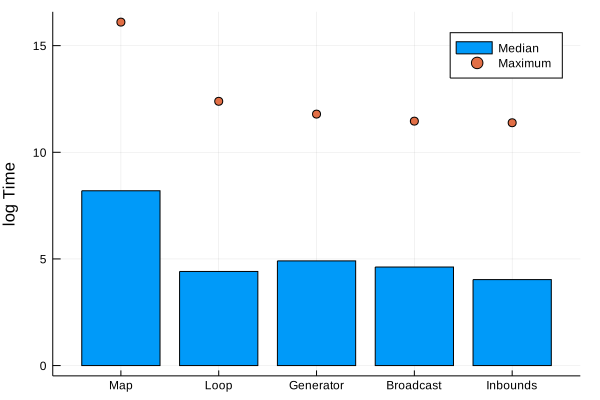
You know what this post needs: graphs. Here we plot the median and
maximum time the benchmarking tool reports.
using Plots
nms = ["Map", "Loop", "Generator", "Broadcast"]
bmList = [mapBM, loopBM ,genBM, broadBM]

timeArray = mapreduce(x -> [minimum(x).time, median(x).time, maximum(x).time], hcat, bmList)'
bar(nms, log.(timeArray[:, 2]), seriestype=:scatter, labels="Median", yaxis=("log Time"))
plot!(nms, log.(timeArray[:, 3]), seriestype=:scatter, labels="Maximum")
bar(nms[2:4], (timeArray[2:4, 2]), seriestype=:scatter, yaxis=("Time"), label="Median")
We have to plot the \(\log\) of the running times as the naive map
is that much slower. The other methods are all about the same though,
so lets remove the map and focus on the fast methods.
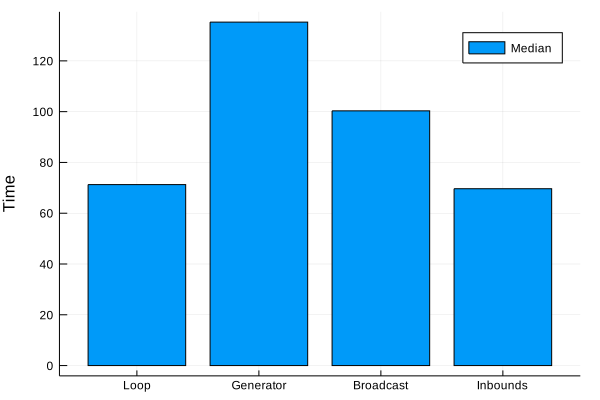
Here we can see that the loop method is still the fastest. The methods
provided in the feedback improve on the naive map but still cannot
compete with the loop. Using the @simd and @inbounds macro don’t change the overall median
value for it to be worth the potential danger.
Overall there are lots of ways to accomplish this task, but the loop
still comes out on top. Even using the “go-faster” macros doesn’t
improve on the runtime significantly.
Getting the value of a pointer in Julia
By: Mosè Giordano
Re-posted from: http://giordano.github.io/blog/2019-05-03-julia-get-pointer-value/
Yesterday a question in the Julia’s Slack
channel (request an invite
here!) prompted a lively discussion about
how to deal with pointers in Julia. As the history of the channel is ephemeral,
I wrote this post to keep note of some interesting points.
In the C world, the operation of getting the value of a pointer is called
dereferencing. When
dealing with C libraries in Julia, we may need to get the value of a pointer
into a Julia object. The Julia manual is quite detailed about accessing data
in
pointers
and I warmly recommend reading that first.
Note that, usually, in Julia it’s not possible to “dereference” a pointer in the
C-sense, because most of the operations we’re going to see will copy the data
into Julia structures.
unsafe_load is
the generic function to access the value of a pointer and copy it to a Julia
object. However, depending on the specific data types involved, there may be
different and more efficient solutions. For example, you can obtain the value
of the pointer to an array with
unsafe_wrap,
while for strings there is
unsafe_string.
Example 1: get the current time
Let’s have a look at a simple time-related example.
julia> result = Ref{Int64}(0)
Base.RefValue{Int64}(0)

julia> ccall((:time, "libc.so.6"), Int64, (Ptr{Int64},), result)
1556838715

julia> result
Base.RefValue{Int64}(1556838715)
By calling the time function from the C standard library, we have saved in
result the current number of seconds since the Unix epoch. We now want to
turn this number into an instance of the C struct
tm. To do this, we can use the
localtime function. However, if we want to later use the tm struct in Julia
we need to define a Julia mutable structure with the same layout as the C one
and define the show method to have a fancy output:
julia> mutable struct Ctm
           sec::Cint
           min::Cint
           hour::Cint
           mday::Cint
           mon::Cint
           year::Cint
           wday::Cint
           yday::Cint
           isdst::Cint
       end

julia> function Base.show(io::IO, t::Ctm)
           print(io, t.year + 1900, "-", lpad(t.mon, 2, "0"), "-",
                 lpad(t.mday, 2, "0"), "T", lpad(t.hour, 2, "0"), ":",
                 lpad(t.min, 2, "0"), ":", lpad(t.sec, 2, "0"))
       end
We are now going to use unsafe_load to copy the result of the call to
localtime into an instance of the Ctm structure:
julia> localtime = ccall((:localtime, "libc.so.6"), Ptr{Ctm}, (Ptr{Int64},), result)
Ptr{Ctm} @0x00007f730fe9d300

julia> unsafe_load(localtime)
2019-04-03T00:11:55

julia> dump(unsafe_load(localtime))
Ctm
  sec: Int32 55
  min: Int32 11
  hour: Int32 0
  mday: Int32 3
  mon: Int32 4
  year: Int32 119
  wday: Int32 5
  yday: Int32 122
  isdst: Int32 1
Of course, if you want to deal with dates you can use the
Dates standard library
instead of playing with system calls. Have also a look at the other
time-related functions in the Base.Libc
module of Julia.
Example 2: copy from a data type to another one
Now that we’ve seen how to use unsafe_load, we can define the following
function to “dereference” a generic pointer to a Julia object (with the caveat
that we’re copying it’s value to the new object!):
julia> dereference(ptr::Ptr) = unsafe_load(ptr)
dereference (generic function with 1 method)

julia> dereference(T::DataType, ptr::Ptr) = unsafe_load(Ptr{T}(ptr))
dereference (generic function with 2 methods)
This dereference function has two arguments: the type that will wrap the data,
and the input pointer. The first argument is optional, and defaults to the type
of the data pointed by ptr. The first method is effectively an alias of the
plain unsafe_load. The second method is interesting because it allows us to
copy the value of a pointer of a certain data type to an object of another type
with the same memory layout.
For example, let’s define a simple Julia mutable structure called Bar, get
an instance of it, and its pointer:
julia> mutable struct Bar
           x::UInt64
       end

julia> b = Bar(rand(UInt64))
Bar(0x55139e3fd61e43a4)

julia> pointer_from_objref(b)
Ptr{Nothing} @0x00007f1f72eb7850

julia> ptr = Ptr{Bar}(pointer_from_objref(b))
Ptr{Bar} @0x00007f1f72eb7850
pointer_from_objref
gave us a pointer to Nothing (that is, the C void), we have then casted it
to a pointer to Bar and assigned this pointer to ptr. We now define another
data structure with the same memory layout as Bar and use
dereference to “dereference” ptr as an instance of the new structure:
julia> mutable struct Foo
           a::UInt16
           b::UInt16
           c::UInt32
       end

julia> f = dereference(Foo, ptr)
Foo(0x43a4, 0xd61e, 0x55139e3f)
Note that
julia> UInt64(f.a) | UInt64(f.b) << 16 | UInt64(f.c) << 32
0x55139e3fd61e43a4

julia> b.x
0x55139e3fd61e43a4
as expected.
Remember that the term “dereference” is a stretch, because data is copied from
the pointer. In fact:
julia> dereference(Foo, ptr) |> pointer_from_objref
Ptr{Nothing} @0x00007f1f72a62440

julia> dereference(Foo, ptr) |> pointer_from_objref
Ptr{Nothing} @0x00007f1f72fb3840

julia> dereference(Bar, ptr) |> pointer_from_objref
Ptr{Nothing} @0x00007f1f730054e0

julia> dereference(Bar, ptr) |> pointer_from_objref
Ptr{Nothing} @0x00007f1f73007340
Conclusions
What we’ve seen here is nothing new for programmers already familiar with the C
language, but at the same time shows how easy and natural can be to communicate
from Julia with C programs.
Special bonus
If you feel really bold and creative, you can even abuse the * operator to do
very weird things like:
julia> Base.:*(ptr::Ptr) = dereference(ptr)

julia> Base.:*(T::DataType, ptr::Ptr) = dereference(T, ptr)

julia> *(ptr)
Bar(0x55139e3fd61e43a4)

julia> Foo *ptr
Foo(0x43a4, 0xd61e, 0x55139e3f)

julia> Bar *ptr
Bar(0x55139e3fd61e43a4)
However, the * operator shouldn’t be really used to mock C syntax is an
awkward way (we’re not actually dereferencing and the syntax Foo *ptr is for
declaration of a pointer rather than actual dereferencing), so don’t tell people
that I told you to use this!