By: Dean Markwick's Blog -- Julia
Re-posted from: https://dm13450.github.io/2019/05/03/Map-Loop-Generator.html
A few weeks ago I wrote a blog post about the speed differences
between map and loop. I posted it to reddit and got some feedback
on a) why the map was so slow and b) other ways the calculation
could be made which are just as quick as a loop. In this post I’m
writing about these new methods and adding them to the comparison.
Enjoy these types of posts? Then sign up for my newsletter.
Previous Methods
For a more detailed explanation of the problem I’m trying to solve, check out my previous
post
here. For
now I’m just going to recap.
using BenchmarkTools
using Statistics
clusterLabels = [1,1,2,2,3,3,5]
We started off with a simple map.
function pointsPerCluster_map(clusterLabels)
    map(i-> sum(clusterLabels .== i), 1:maximum(clusterLabels))
end

pointsPerCluster_map(clusterLabels)

mapBM = @benchmark pointsPerCluster_map($clusterLabels)
BenchmarkTools.Trial:
  memory estimate:  21.73 KiB
  allocs estimate:  18
  --------------
  minimum time:     2.944 μs (0.00% GC)
  median time:      3.624 μs (0.00% GC)
  mean time:        7.479 μs (44.30% GC)
  maximum time:     9.851 ms (99.91% GC)
  --------------
  samples:          10000
  evals/sample:     8
It turns out this was slow because with each call of the function I
was creating a temporary array with clusterLabels .== i. To improve
on this I wrote the loop explicitly.
function pointsPerCluster_loop(clusterLabels)

    maxSize = maximum(clusterLabels)
    ppc = zeros(Int64, maxSize)

    for i in clusterLabels
        ppc[i] += 1
    end
    ppc
end
pointsPerCluster_loop(clusterLabels)

loopBM = @benchmark pointsPerCluster_loop($clusterLabels)
BenchmarkTools.Trial:
  memory estimate:  128 bytes
  allocs estimate:  1
  --------------
  minimum time:     53.756 ns (0.00% GC)
  median time:      82.478 ns (0.00% GC)
  mean time:        167.708 ns (21.97% GC)
  maximum time:     240.429 μs (99.95% GC)
  --------------
  samples:          10000
  evals/sample:     985
The loop method was the easy winner and orders of magnitudes
quicker. But now we’ve got some new methods to test.
New Methods
The first two methods are from a reddit comment
here. The
final new method is taken from the Performance Tips section of the
Julia documentation.
Generator
First off, we use a generator. This is a better map implementation as
it doesn’t create the temporary array, instead it runs a tally of how
many entries are equal to i for each i we are mapping across.
function pointsPerCluster_gen(clusterLabels)
    map(i-> sum(c == i for c in clusterLabels), 1:maximum(clusterLabels))

end

pointsPerCluster_gen(clusterLabels)

genBM = @benchmark pointsPerCluster_gen($clusterLabels)
BenchmarkTools.Trial:
  memory estimate:  336 bytes
  allocs estimate:  8
  --------------
  minimum time:     128.594 ns (0.00% GC)
  median time:      135.287 ns (0.00% GC)
  mean time:        203.392 ns (26.73% GC)
  maximum time:     131.934 μs (99.77% GC)
  --------------
  samples:          10000
  evals/sample:     891
The results are in the nanosecond range, which is great, same order
of magnitude as the loop.
Broadcasting .
In Julia, to apply a function to each element in a vector you use .
after the function which easy vectorisation. For example sin.(x)
will apply sine to each element of x. Whereas sin(x) would error.
In this case we can create an anonymous function that applies to each
element of our array.
pointsPerCluster_broad(clusterLabels) = (k->mapreduce(i->i==k, +, clusterLabels)).(1:maximum(clusterLabels))

pointsPerCluster_broad(clusterLabels)

broadBM = @benchmark pointsPerCluster_broad($clusterLabels)
BenchmarkTools.Trial:
  memory estimate:  128 bytes
  allocs estimate:  1
  --------------
  minimum time:     96.824 ns (0.00% GC)
  median time:      101.509 ns (0.00% GC)
  mean time:        136.465 ns (13.67% GC)
  maximum time:     94.869 μs (99.85% GC)
  --------------
  samples:          10000
  evals/sample:     947
Again, the average speed is in the nanosecond range so comparable to
the loop.
Inbounds Loop
Another method of improving performance that the official
documentation recommends (with warning) is the @simd macro and the
@inbounds macro. These are compiler level optimisations that turn
off some of the safety features in the name of speed. With the caveat
that misbehaviour of the function could be catastrophic. We decorate
the loop function with these macros and test the results.
function pointsPerCluster_loop_inb(clusterLabels)

    maxSize = maximum(clusterLabels)
    ppc = zeros(Int64, maxSize)

    @simd for i in clusterLabels
        @inbounds ppc[i] += 1
    end
    ppc
end
pointsPerCluster_loop_inb(clusterLabels)

inboundsBM = @benchmark pointsPerCluster_loop_inb($clusterLabels)
BenchmarkTools.Trial:
  memory estimate:  128 bytes
  allocs estimate:  1
  --------------
  minimum time:     51.369 ns (0.00% GC)
  median time:      56.292 ns (0.00% GC)
  mean time:        80.677 ns (24.89% GC)
  maximum time:     87.980 μs (99.89% GC)
  --------------
  samples:          10000
  evals/sample:     986
Again on the nanosecond scale, so all is working well.
Visualising
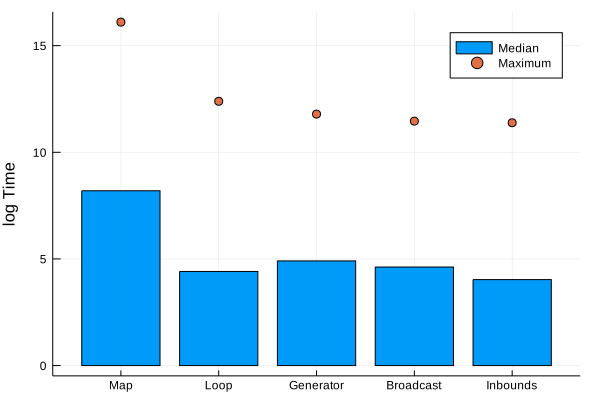
You know what this post needs: graphs. Here we plot the median and
maximum time the benchmarking tool reports.
using Plots
nms = ["Map", "Loop", "Generator", "Broadcast"]
bmList = [mapBM, loopBM ,genBM, broadBM]

timeArray = mapreduce(x -> [minimum(x).time, median(x).time, maximum(x).time], hcat, bmList)'
bar(nms, log.(timeArray[:, 2]), seriestype=:scatter, labels="Median", yaxis=("log Time"))
plot!(nms, log.(timeArray[:, 3]), seriestype=:scatter, labels="Maximum")
bar(nms[2:4], (timeArray[2:4, 2]), seriestype=:scatter, yaxis=("Time"), label="Median")
We have to plot the \(\log\) of the running times as the naive map
is that much slower. The other methods are all about the same though,
so lets remove the map and focus on the fast methods.
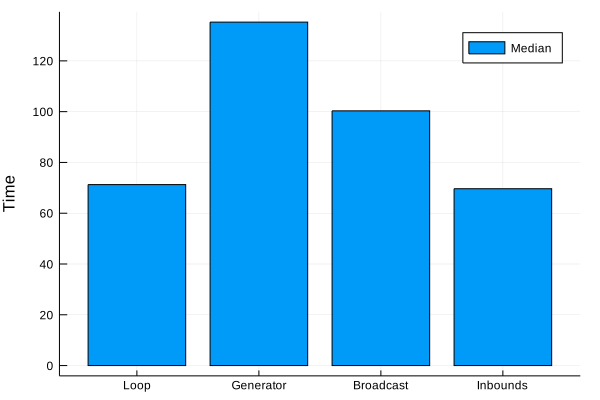
Here we can see that the loop method is still the fastest. The methods
provided in the feedback improve on the naive map but still cannot
compete with the loop. Using the @simd and @inbounds macro don’t change the overall median
value for it to be worth the potential danger.
Overall there are lots of ways to accomplish this task, but the loop
still comes out on top. Even using the “go-faster” macros doesn’t
improve on the runtime significantly.