Author Archives: julia | Victor Boussange

A multi-language overview on how to handle dependencies within a research project

By: julia | Victor Boussange

Re-posted from: https://vboussange.github.io/post/research-project-dependencies/

Your future self and others should be able to recreate the minimal environment to run the scripts in your research project. This is best achieved using package managers and virtual environments.

This post is part of a series of posts on best practices for managing research project code. Much of this material was developed in collaboration with Mauro Werder as part of the Course On Reproducible Research, Data Pipelines, and Scientific Computing (CORDS). If you have experiences to share or spot any errors, please reach out!

Content

Some definitions

What is a dependency?

A dependency is an external package that a project requires to run.

What is a package manager?

A package manager like conda, Pkg or renv automates the process of installing, upgrading, configuring, and managing dependencies. It usually relies on a package repository, which is a central location that stores in one place the source code of packages or where to find it.

What is a virtual environment?

A virtual environment is an isolated environment where you can install and manage dependencies separately from the system-wide installation. This isolation ensures that different projects can have different dependencies and versions of packages without causing conflicts. Why use a virtual environment?

  • For yourself, to best deal with multiple projects and to prevent your code from breaking down overtime.
    • Without specifying a virtual environment, you install packages in your base environment, which is shared across all your projects.
    • Imagine you are working with Project A and Project B, which both depend on Package1 (currently @v1.1).
    • You leave aside Project A for a few months, and focus on Project B.
    • A new feature in Package1 motivate you to upgrade to v1.2, which modifies the API or the behavior of one function used in both projects.
    • You then want to come back to Project A, but now everything is broken! Because your code has been formatted to work with Package1@v1.1.
    • Hence, you want to make sure to compartmentalize environments.
  • To share your environment with others individuals and machines.
    • A virtual environement tracks the minimum dependencies, which can easily be shared and installed on other machines (e.g., a HPC).

Package managers

Multilanguage overview

Python R Julia
Package Manager pip, conda (see also mamba), poetry install.packages() (base R) Pkg
Package Repository PyPI (Python Package Index), conda-forge CRAN (Comprehensive R Archive Network) General registry
Distribution Format .whl (wheel, incl binaries) or tar.gz (source) .tar.gz (source and/or binary) Pkg will git clone from source, and download (binary) artifacts
Virtual Environment venv, virtualenv, conda env renv Built-in in the Pkg module
Dependency Management requirements.txt or Pipfile (pip), or environment.yml (conda env) or pyproject.toml (poetry) DESCRIPTION, NAMESPACE Project.toml, Manifest.toml, Artifacts.toml

This table is very much inspired by The Scientific Coder article on package managers.

Julia or R have built-in package managers which can be called within the REPL but Python package managers are called from outside the language.

conda

conda is a very appropriate package manager for scientific projects in Python. Over its older concurrent pip, it can handle python versions and all sorts non-python dependencies artifacts. With two lines of code, it allows someone to quickly install the virtual environment, without any pre-requiste python installation.

Here are some essential conda commands.

conda create --name myenv # creates new virtual environment
conda activate myenv # activate the environment
conda install numpy -c conda-forge # install a package
conda deactivate

Note that not using -c conda-forge will do just fine, but what is it? conda-forge is a community-driven channel (repository in the python jargon) that often has more up-to-date packages and a broader selection than the default Anaconda repository. You should use for several reasons, but mostly because conda-forge generally has the largest volume of packages and the most up-to-date versions

Note that some packages are only available through PyPi (pip). But you are covered for that: You can install pip packages within a conda env, by first activating the conda env and then normally using pip. pip should be part of your dependencies though. Always try to install packages using conda first.

We highly recommend using mamba as a drop-in replacement for conda, for much faster use.

Some useful resources

renv

Here are some basics on how to use renv, but see the renv vignette and documentation for more advanced usage.

# Initialize renv in your project
renv::init(project = "path/to/environment")

# Install a package and snapshot the environment
install.packages("dplyr")
renv::snapshot()
# Load the renv environment for the project
renv::activate()

# Restore the project's dependencies
renv::restore()

renv::update()
renv::history()
renv::revert()

Pkg

using Pkg

# Create a new project environment
Pkg.activate("path/to/MyProject")

# Add packages to the project environment
Pkg.add("DataFrames")

You can also use the Julia REPL by typing ]

(@v1.10) pkg> add DataFrames

or string macros pkg"add DataFrames"

Not that in Julia, the global shared environment is inherited in custom environment. This can be useful!
It is a good idea to install utility packages that you will use for development but that are not mandatory to run your code in the global environment. For instance, the macro @btime from BenchmarkTools is very handy to profile code. But you may not want to have BenchmarkTools in your dependencies. Just install it in base, and then you will be able to call
julia using BenchmarkTools
within your custom environment.
Other utility packages to consider having in your global environments are

  • Test,
  • TestEnv,
  • Revise
  • LocalRegistry

Environment files

Environment files specify the exact versions of the dependencies in your virtual environment, and are used by package managers to instantiate the environment. They are usually .txt, .toml or .yml files.

Always version control your environment files!

Julia

In Julia, the environment is defined using two files: the Project.toml and Manifest.toml. The Project.toml file lists the direct dependencies, while the Manifest.toml file captures the full dependency graph, including all transitive dependencies. The Manifest.toml file may not be tracked in a project, and will be reconstructed if missing. It specifies the exact version of the environment. For reproducibility, you want to include Manifest.toml in your git repo.
Artifacts.toml is used to handle non-Julia package dependencies.

Project.toml example

authors = ["Some One ",
           "Foo Bar "]
name = "MyEnv"
uuid = "7876af07-990d-54b4-ab0e-23690620f79a" # mandatory for packages
version = "1.2.5"

[deps] DataFrames = “7876af07-990d-54b4-ab0e-23690620f79a” Plots = “8dfed614-e22c-5e08-85e1-65c5234f0b40”

[compat] CUDA = “4.4, 5” julia = “1.10”

When you are located within the project root folder containing the .toml file, start julia with

$ julia --project=.

This will load the environment. If it is the first time that you use it, you need to instantiate it with

(Example) pkg> instantiate

Some useful resources

Python

conda env reads .yml, which can take any names. .yml files are not created automatically! Create environment.yml with

conda env export --name machine-learning-env --from-history --file environment.yml

This creates an environment.yml file

environment.yml example

name: machine-learning-env

channels:

  • pytorch
  • conda-forge

dependencies:

  • pytorch=1.1

Not using --from-history will result in listing all dependencies, those installed explicitly AND implicitly. This may be a bit messier.

To specify pip packages, just insert in the .toml

  - pip=19.1
  - pip:
    - kaggle==1.5
    - yellowbrick==0.9

Note the double ‘==’ instead of ‘=’ for the pip installation and that you should include pip itself as a dependency and then a subsection denoting those packages to be installed via pip. Also, note that --from-history won’t catch the pip dependencies. So the best way to proceed is to specify the dependencies by hand.

Installing from environment.yml

mamba env create --prefix ./.env --file environment.yml

Some additional resources

R

Environments with renv are specified in a renv.lock and DESCRIPTION files. It is a JSON file that has two main components: R and Packages. The R component specifies the R version used and the list of repositories where packages were installed. The Packages component includes a record for each package used in the project, with all necessary details for reinstalling that exact version. These details are derived from the installed package’s DESCRIPTION file and cover installations from any source, including CRAN, Bioconductor, GitHub, Gitlab, and Bitbucket. For more information on supported sources, refer to vignette(“package-sources”).

renv.lock

{
  "R": {
    "Version": "4.3.3",
    "Repositories": [
      {
        "Name": "CRAN",
        "URL": "https://cloud.r-project.org"
      }
    ]
  },
  "Packages": {
    "markdown": {
      "Package": "markdown",
      "Version": "1.0",
      "Source": "Repository",
      "Repository": "CRAN",
      "Hash": "4584a57f565dd7987d59dda3a02cfb41"
    },
    "mime": {
      "Package": "mime",
      "Version": "0.12.1",
      "Source": "GitHub",
      "RemoteType": "github",
      "RemoteHost": "api.github.com",
      "RemoteUsername": "yihui",
      "RemoteRepo": "mime",
      "RemoteRef": "main",
      "RemoteSha": "1763e0dcb72fb58d97bab97bb834fc71f1e012bc",
      "Requirements": [
        "tools"
      ],
      "Hash": "c2772b6269924dad6784aaa1d99dbb86"
    }
  }
}

Working with interactive environments

Jupyter notebooks can use Pkg, conda and renv environments, but you may need some extra steps (see how to make Jupyter aware of your Conda environments here and there. You do not need to follow these steps if you are using Visual Studio Code.

Other interactive notebooks solutions store directly the environemnts in the files, which is great for reproducibility purposes. This is the case of Pluto notebooks, which are designed to be reproducible. Under the hood they contain the package environment inside them Binder notebooks also ship with a virtual environment, but using Docker (see below and a tutorial here).

I personally do not like notebooks, and prefer using scripts in Visual Studio Code, executing them line by line for development with whether the Julia extension or the Jupyter extension with "jupyter.interactiveWindow.textEditor.executeSelection": true. With such an approach, you can specify which virtual environment should be used at login, and never worry again with that later.

Caveats of virtual environments

Some packages/libraries rely on system libraries and utilities; for instance pytorch relies on CUDA drivers, which are specific to a certain machine (see how you can deal with CUDA drivers with conda here), or the behavior of the packages my be dependent on system environmental variables. As such, by replicating a virtual environment, you won’t necessarily reproduce the same exact computing environment.
To reproduce more closely a computing environment, containers may be used. Containers virtualize layers of the operating system, replicating to a deeper lever your environment and making it more reproducible. Docker or Singularity are popular solutions. Unfortunately, building containers may be difficult, and the virtualization may add a layer of complexity to your pipeline…
But see Using singularity as a development environment and How to remote dev with vscode and singularity. Note that you could use both a container and a virtual environment… See here a tutorial with renv.

Some additional resources
For more information, check Reproducible Computational Environments Using Containers: Introduction to Docker.

Advanced topic: package development

It can make sense for research projects to distinguish between scripts placed in scripts/ and reused functions, models, etc., placed in src. We’ll cover that more broadly in another post. In such case, it is best to compartmentalize dependencies so as to have a minimal working environment for the src/ functions and classes, independent of that for your scripts. One practical approach for this is to specify the src folder as a package. This has a few advantages, including

  • not having to deal with relative position of files to call the functions in src/
  • maximizing your productivity by creating a generic package additionally to your main research project.

You can achieve this easily with development tools.

For Python, tools like setuptools and poetry facilitate package development. If you’re working in R, devtools is the go-to tool for developing packages. In Julia, the Pkg tool serves a similar purpose.

Package templates can be useful to simplify the creation of packages by generating package skeletons. In Python, checkout out cookiecutter. In R, check usethis. For Julia, use the Pkg.generate() built-in functionality, or the more advanced PkgTemplates.jl package.

Note that you may want at some point to locate your src/ (and associated tests, docs, etc…) in a separate git repo.

Some additional resources

Take-home messages

  • Make sure you understand what are package managers, virtual environments, and dependencies both within your project scripts and at the system level.
  • Clearly document all dependencies and environment setup instructions in project repositories.
  • Provide instructions in an Installation section in the readme.md on how to set up the virtual environment.
  • Check out these toy research repositories in Julia (which uses relative paths for importing the src functions), Python (which has src as package), and R (which has src as package) that implement what I believe good examples of research projects!
A multi-language overview on how to document your research project code

By: julia | Victor Boussange

Re-posted from: https://vboussange.github.io/post/documenting-your-research-code/

Documentation serves multiple purposes and may be useful for various audiences, including your future self, collaborators, users and contributors – should you aim at packaging some of your code into a general-purpose library.

This post is part of a series of posts on best practices for managing research project code. Much of this material was developed in collaboration with Mauro Werder as part of the Course On Reproducible Research, Data Pipelines, and Scientific Computing (CORDS). If you have experiences to share or spot any errors, please reach out!

Content

Style guides

The best documentation starts by writing self-explanatory code with good conventions.

Correctly naming your variables enhances code clarity.

There are only two hard things in Computer Science: cache invalidation and naming things.
Martin Fowler

Instead of using generic names like l for a list:

for l in L:
    pass

Use descriptive names like

for line in lines:
    pass

Using style guides for your chosen language ensures consistency and readability in your code. Here are some resources:

Do not hesitate to refactor your code regularly and remove dead code to prevent confusion for yourself and others.

Comments

In-line comments should be used sparingly. Aim to write self-explanatory code instead. Use comments to provide context not apparent from the code itself, such as references to papers, Stack Overflow topics, or TODOs.

Use single-line comments for brief explanations and multi-line comments for more detailed information.

julia

#=
This is a multi-line
comment
=#

python

"""
This is a multi-line
comment
"""

Tip: use vscode rewrap comment/text to nicely format multiline comments.

On top of nicely formatting your code and appending comments where necessary, a literal documentation greatly facilitates the maintenance, understandability and reproducibility of your code.

Literal documentation

Literal documentation helps users understand your tool and get started with it.

README

A README file is essential for any research repository. It is displayed on under the code structure when accessing a GitHub repo.
It should contain:

  • (Badges showing tests, and a nice logo)
  • A one-sentence description of your project
  • A longer description
  • An overview of the repository structure and files
  • Getting started or Examples section
  • An Installation section with dependencies
  • Citation/Reference section
  • (A link to the documentation)
  • (A How to contribute section)
  • An Acknowledgement section
  • License section

Some examples:

API documentation / doc strings

API documentation describes the usage of functions, classes (types) and modules (packages). Parsers usually support markdown styles, which also enhances raw readability for humans. In short, markdown styles consists in using

Doc strings in python live inside the function

def best_function_ever(a_param, another_parameter):
    """
    this is the docstring
    """
    # do some stuff

But above the function or type definition in Julia

"""
this is the docstring
"""
function best_function_ever(a_param, another_parameter)
# do some stuff
end

"Tell whether there are too foo items in the array."
foo(xs::Array) = ...

Best practice for docstrings include

  • (in Julia: insert the signature of your function )
  • Short description
  • Arguments (Args, Input,…)
  • Returns
  • Examples

Several flavours may be used, even for a single language.

python
3 Different documentation style flavours

Google style is easier to read for humans

def add(a, b):
    """
    Add two integers.

    This function takes two integer arguments and returns their sum.

    # Parameters:
    a: The first integer to be added.
    b: The second integer to be added.

    # Return:
    int: The sum of the two integers.

    # Raise:
    TypeError: If either of the arguments is not an integer.

    Examples:
    >>> add(2, 3)
    5
    >>> add(-1, 1)
    0
    >>> add('a', 1)
    Traceback (most recent call last):
        ...
    TypeError: Both arguments must be integers.
    """
    if not isinstance(a, int) or not isinstance(b, int):
        raise TypeError("Both arguments must be integers")
    return a + b

julia

"""
    add(a, b)

Adds two integers.

This function takes two integer arguments and returns their sum.

# Arguments
- `a`: The first integer to be added.
- `b`: The second integer to be added.

# Returns
- The sum of the two integers.

# Examples

```julia-repl
julia> add(2, 3)
5

julia> add(-1, 1)
0
```
"""
function add(a, b)
    return a + b
end

You may use tools like Documenter.jl or Sphinx to automatically render your API documentation on a website. Github actions can automatize the process of building the documentation for you, similarly to how it can automate testing.

Docstrings may be accompanied by typing.

Type annotations

Typing refers to the specification of variable types and function return types within a programming language. It helps define what kind of data a function or variable can handle, ensuring type safety and reducing runtime errors. It

  • clearly indicates the expected input and output types, making the code easier to understand.
  • helps catch type-related errors early in the development process.
  • encourages consistent usage of types throughout the codebase.

python

def add(a: int, b: int) -> int:
    return a + b

In Python, using typing does not enforce type checking at runtime! You may use decorators to enforce it.

julia

function add(a::Int, b::Int)
    return a + b
end

In Julia, types are enforced at runtime! Type annotations help the Julia compiler optimize performance by making type inferences easier.

Consider raising errors

  • We do not like reading manuals. But we are foreced to read error messages. Use assertions and error messages to handle unexpected inputs and guide users.

python

  • assert: When an assert doesn’t pass, it raises an AssertionError. You can optionally add an error message at the end.
  • NotImplementedError, ValueError, NameError: Commonly used, generic errors you can raise. I probably overuse NotImplementedError compared to other types.
def convolve_vectors(vec1, vec2):
    if not isinstance(vec1, list) or not isinstance(vec2, list):
        raise ValueError("Both inputs must be lists.")
    # convolve the vectors

Tutorials

Create tutorial Jupyter notebooks or vignettes in R to demonstrate the usage of your code. Those can be placed in a folder examples or tutorials. Format them as e.g.

  • vignettes in R,
  • or using Jupyter notebooks, which are the perfect format for tutorials

Accessing documentation

julia

?cos
?@time
?r""

python

help(myfun)

But e.g. VSCode can be also quite helpful, and this works also with your own code!

Doc testing

Doc testing, or doctest, allows you to test your code by running examples embedded in the documentation (docstrings). It compares the output of the examples with the expected results given in the docstrings, ensuring the code works as documented.

Why doc testing?

  • Ensures that the code examples in your documentation are accurate and up-to-date.
  • Simple to write and understand, making it accessible for both writing and reading tests.
  • Promotes writing comprehensive docstrings which enhance code readability and maintainability.

Python

def add(a, b):
    """
    Adds two numbers.

    >>> add(2, 3)
    5
    >>> add(-1, 1)
    0
    """
    return a + b

To run the test:

python -m doctest your_module.py

or from within a script

if __name__ == "__main__":
    import doctest
    doctest.testmod()

julia
Available through Documenter.jl

"""
Adds two numbers.

```jldoctest
julia> add(2, 3)
5

julia> add(-1, 1)
0
```
"""

function add(a, b)
    return a + b
end

Useful packages to help you write and lint your documentation

  • Better Comments

  • Automatic doc string generation

  • Python test explorer

More resources

Take home messages

  • Good documentation helps maintain the long-term memory of a project.
  • Refactor code to reduce complexity instead of documenting tricky code.
  • Writing unit tests is often more productive than extensive documentation.
  • Types of documentation include literal, API, and tutorial/example documentation.
  • Literal documentation explains the big picture and setup.
  • API documentation lives in docstrings and explains function usage.
  • Examples connect the details to common tasks.
  • Consider using tools like ChatGPT to assist with documenting your functions.

On combining machine learning-based and theoretical ecosystem models

By: julia | Victor Boussange

Re-posted from: https://vboussange.github.io/post/hybridmodelling/

In this post, I explore the benefits and drawbacks of using empirical (ML)-based models versus mechanistic models for predicting ecosystem responses to perturbations. To evaluate these different modelling approaches, I use a mechanistic ecosystem model to generate a synthetic time series dataset.

By applying both modelling approaches to this dataset, I can evaluate their performance. While the ML-based approach yields accurate forecasts under unperturbed dynamics, it inevitably fails when it comes to predicting ecosystem response to perturbations. On the other hand, the mechanistic model, which is simplified version of the ground truth model to reflect a realistic scenario, is inaccurate and cannot forecast, but provides a more adequate approach to predict ecosystem response to unobserved scenarios.

To improve the accuracy of mechanistic models, I introduce inverse modelling, and in particular an approach that I have developed called piecewise inference. This approach allows to accurately calibrate complex mechanistic models, and doing so open doors to improve our understanding ecosystems by performing model selection.

Finally, I discuss how hybrid models, which incorporate both ML-based and mechanistic components, offer the potential to benefit from the strengths of both modelling approaches. By examining the strengths and limitations of these different modelling approaches, I hope to provide insights into how best to use them to advance our knowledge of ecological and evolutionary dynamics.

Notes

  • This post is under construction, and contain typos! If you find some, please contact me so that I can correct
  • For the sake of clarity, some pieces of code have voluntarily been hidden in external Julia files, which are loaded throughout the post. If you want to inspect them, check out those files in the corresponding GitHub repository

Generating a synthetic dataset

To generate the synthetic dataset, I consider a 3 species ecosystem model, composed of a resource, consumer and prey species. The resource growth rate depends on water availability. Here is a simplified version of the dynamics

$$\begin{aligned}
\text{basal growth of } \text{🌱} &= f(\text{💧})\\
\text{per capita growth rate }\text{🌱} &= \text{basal growth} – \text{competition} – \text{grazing} – \text{death}\\
\text{per capita growth rate }\text{🦓} &= \text{grazing} – \text{predation} – \text{death}\\
\text{per capita growth rate }\text{🦁} &= \text{predation} – \text{death}
\end{aligned}$$

Let’s implement that in Julia!

cd(@__DIR__)
import Pkg; Pkg.activate(".")
using PythonCall
nx = pyimport("networkx")
np = pyimport("numpy")
include("model.jl")
include("utils.jl");

To implement the model, I use the library EcoEvoModelZoo, which provides to the user ready-to-use mechanistic eco-evolutionary models. I use the model type SimpleEcosystemModel, cf. documentation of EcoEvoModelZoo. Let’s first construct the trophic network, and plot it

using EcoEvoModelZoo

N = 3 # number of species

pos = Dict(1 => [0, 0], 2 => [0.2, 1], 3 => [0, 2])
labs = Dict(1 => "Resource", 2 => "Consumer", 3 => "Prey")

foodweb = DiGraph(N)
add_edge!(foodweb, 2 => 1) # Consumer (node 2) feeds on Resource (node 1)
add_edge!(foodweb, 3 => 2) # Predator (node 3) fonds on consumer (node 2)
println(foodweb)
Graphs.SimpleGraphs.SimpleDiGraph{Int64}(2, [Int64[], [1], [2]], [[2], [3],
 Int64[]])
plot_foodweb(foodweb, pos, labs)
(<py Figure size 640x480 with 1 Axes>, <py Axes: >)

Then, I implement the processes that drive the dynamics of the ecoystem. Those include resource limitation for the resource species (e.g. limitation in nutrients), intraspecific competition for the resource species, reproduction, and feeding interactions (grazing and predation). To better understand this piece of code, you may want to refer to one of my previous blog post, “Inverse ecosystem modelling made easy with PiecewiseInference.jl”.

function carrying_capacity(p, t)
    @unpack K₁₁ = p
    K = vcat(K₁₁, ones(Float32, N - 1))
    return K
end
carrying_capacity (generic function with 1 method)
function competition(u, p, t)
    @unpack A₁₁ = p
    A = spdiagm(vcat(A₁₁, zeros(Float32, 2)))
    return A * u
end
competition (generic function with 1 method)
resource_conversion_efficiency(p, t) = ones(Float32, N)
resource_conversion_efficiency (generic function with 1 method)

Functional responses

The feeding processes implemented are based on a functional response of type II. The attack rates q define the slope of the functional response, while the handling times H define the saturation of this response.

W = adjacency_matrix(foodweb)
I, J, _ = findnz(W)

function feeding(u, p, t)
    @unpack H₂₁, H₃₂, q₂₁, q₃₂ = p

    # handling time
    H = sparse(I, J, vcat(H₂₁, H₃₂), N, N)

    # attack rates
    q = sparse(I, J, vcat(q₂₁, q₃₂), N, N)

    return q .* W ./ (one(eltype(u)) .+ q .* H .* (W * u))
end
feeding (generic function with 1 method)

Dependence of resource growth rate on water availability

We model a time-varying water availability, and a growth rate of the resource which depends on the water availability.

water_availability(t) = sin.(2 * pi / 600 * 5 * t)

growth_rate_resource(r, water) = r * exp(-0.5*(water)^2)

intinsic_growth_rate(p, t) = [growth_rate_resource(p.r[1], water_availability(t)); p.r[2:end]]
intinsic_growth_rate (generic function with 1 method)

Let’s plot what does the water availability looks like through time

ts = tspan[1]:1:tspan[end]
fig = figure()
plot(ts, water_availability.(ts))
xlabel("Time (days)")
ylabel("Water availability (normalized)")
fig.set_facecolor("None")
Python None

Now we define the numerical values for the parameter of the ecosystem model.

p_true = ComponentArray(H₂₁=Float32[1.24], # handling times
                        H₃₂=Float32[2.5],
                        q₂₁=Float32[4.98], # attack rates
                        q₃₂=Float32[0.8],
                        r=Float32[1.0, -0.4, -0.08], # growth rates
                        K₁₁=Float32[1.0], # carrying capacity for the resource
                        A₁₁=Float32[1.0]) # competition for the resource
ComponentVector{Float32}(H₂₁ = Float32[1.24], H₃₂ = Float32[2.5], q₂₁ = Flo
at32[4.98], q₃₂ = Float32[0.8], r = Float32[1.0, -0.4, -0.08], K₁₁ = Float3
2[1.0], A₁₁ = Float32[1.0])

And with that, we can plot how we implemented the dependence between the resource growth rate and the water availability. It is a gaussian dependence, where the resource growth rate is maximum at a certain value of water availability. The intuition is that too much or too little water is detrimental to the resource.

water_avail_range = reshape(sort!(water_availability.(tsteps)),length(tsteps))

fig = figure()
plot(water_avail_range, growth_rate_resource.(p_true.r[1], water_avail_range))
xlabel("Water availability (normalized)")
ylabel("Resource basal growth rate")
fig.set_facecolor("none")
Python None

Now let’s simulate the dynamics

u0_true = Float32[0.77, 0.060, 0.945]

mp = ModelParams(;p=p_true,
                tspan,
                u0=u0_true,
                solve_params...)

model = SimpleEcosystemModel(; 
                            mp, 
                            intinsic_growth_rate,
                            carrying_capacity,
                            competition,
                            resource_conversion_efficiency,
                            feeding)
`Model` SimpleEcosystemModel
fig, ax = plot_time_series(simulate(model));

And let’s generate a dataset by contaminating the model output with lognormally distributed noise.

data = simulate(model) |> Array

# contaminating raw data with noise
data = data .* exp.(1f-1*randn(Float32, size(data)))

# plotting
fig, ax = subplots(figsize=(7,4))

for i in 1:size(data,1)
    ax.scatter(tsteps, data[i, :], label=labels_sp[i], color = species_colors[i], s=10.)
end
# ax.set_yscale("log")
ax.set_ylabel("Species abundance")
ax.set_xlabel("Time (days)")
fig.set_facecolor("None")
ax.set_facecolor("None")
fig.legend()
display(fig)

Empirical modelling

Let’s build a ML-model, and train the model on the time series.

We’ll use a recurrent neural network model

More specifically, we use a Long Short Term Memory cell, connected to two dense layers with relu and a radial basis (rbf) activation functions.

using Flux # Julia deep learning library

include("rnn.jl") # Load some utility functions
args = ArgsEco() # Set up hyperparameters

rbf(x) = exp.(-(x.^2)) # custom activation function

hls = 64 # hidden layer size

# Definition of the RNN
# our model takes in the ecosystem state variables, together with current water availability
rnn_model = Flux.Chain(LSTM(N + 1, hls),
            Flux.Dense(hls, hls, relu),
                Flux.Dense(hls, N, rbf))

@time train_model!(rnn_model, data, args)   # Train and output model
75.555727 seconds (137.67 M allocations: 50.030 GiB, 6.62% gc time, 37.42%
 compilation time)

We can now simulate our trained model in an autoregressive manner, which allows us to forecast over time steps beyond the training dataset.

tsteps_forecast = tspan[end]+dt:dt:tspan[end]+100*dt

water_availability_range = water_availability.(vcat(tsteps, tsteps_forecast))
init_states = data[:,1:2]

pred_rnn = simulate(rnn_model, init_states, water_availability_range)
3×200 Matrix{Float32}:
 0.762119  0.808972   0.814921   0.789933   …  0.871319  0.816685  0.742632
 0.118674  0.0965346  0.0672258  0.0434324     0.119743  0.14609   0.185878
 0.530488  0.531594   0.518911   0.476789      0.301607  0.29676   0.31418

And let’s plot it. Plain lines are the model output for the training time span, and dashed lines are the model forecast.


fig, ax = subplots(1, figsize=(7,4))
for i in 1:N
    ax.scatter(tsteps[3:end], 
                data[i, 3:end], 
                label = labels_sp[i], 
                color = species_colors[i],
                s = 6.)
    ax.plot(tsteps[2:end], 
            pred_rnn[i,1:length(tsteps)-1], 
            c = species_colors[i])
    ax.plot(tsteps_forecast .+ dt, 
            pred_rnn[i,length(tsteps):end], 
            linestyle="--", 
            c = species_colors[i])
end
ax.set_ylabel("Species abundance")
ax.set_xlabel("Time (days)")
fig.set_facecolor("None")
ax.set_facecolor("None")
fig.legend()
display(fig)

Looks pretty good!

Now let’s see what happens if the resource species go extinct. Because this species is at the bottom of the trophic chain, we expect a collapse of the ecosystem.

water_availability_range = water_availability.(tsteps)
init_states = data[:,1:2]
init_states[1,:] .= 0.
pred_rnn = simulate(rnn_model, init_states, water_availability_range)
3×100 Matrix{Float32}:
 0.904891   0.767216   0.741785   0.774109  …  0.183886  0.0288432  0.04645
4
 0.0890969  0.0426226  0.0287545  0.019797     0.596416  0.293802   0.08636
74
 0.59085    0.542144   0.487364   0.441334     0.178284  0.282761   0.29444
7
fig, ax = subplots(1, figsize=(7,4))
for i in 1:N
    ax.plot( 
            pred_rnn[i,:], 
            c = species_colors[i])
end
ax.set_ylabel("Species abundance")
ax.set_xlabel("Time (days)")
fig.set_facecolor("None")
ax.set_facecolor("None")
display(fig)

There is clearly a problem! The RNN model outputs almost unchanged dynamics, predicting that magically, the resource would revive. This were to be expected: the ML model did not see this type of collapse dynamics, so it cannot invent it.

In summary, ML-based model

  • 👍 Very good for interpolation
  • 👍 Does not require any knowledge from the system, only data!
  • 👎 Cannot extrapolate to unobserved scenarios

Mechanistic modelling

We now define a new mechanistic model, deliberatively falsifying the numerical value of the parameters compared to the baseline ecosystem model, and simplifying the resource dependence on water availbility by assuming that its growth rate is constant. The resulting model_mechanistic is as such an inaccurate representation of the baseline ecosystem model.

p_mech = ComponentArray(H₂₁=Float32[1.1],
                        H₃₂=Float32[2.3],
                        q₂₁=Float32[4.98],
                        q₃₂=Float32[0.8],
                        r = Float32[1.0, -0.4, -0.08],
                        K₁₁=Float32[0.8],
                        A₁₁=Float32[1.2])

u0_mech = Float32[0.77, 0.060, 0.945]

mp = ModelParams(; p=p_mech,
                u0=u0_mech,
                solve_params...)

growth_rate_mech(p, t) = p.r

model_mechanistic = SimpleEcosystemModel(; mp, intinsic_growth_rate = growth_rate_mech ,
                                        carrying_capacity,
                                        competition,
                                        resource_conversion_efficiency,
                                        feeding)

simul_data = simulate(model_mechanistic)

Let’s now plot its dynamics

plot_time_series(simul_data);

The dynamics looks quite different from the time series, and cannot provide any realistic forecast of the ecosystem state in the future. Yet, it does capture some of the dynamics, since it reproduces an oscillatory behavior. As such, we can assume that this ecosystem model captures some of the processes driving the baseline ecosystem dynamics.

We can now use this mechanistic model to again try to understand what happens if the resource species go extinct.

simul_data = simulate(model_mechanistic, 
                u0 = Float32[0., 0.060, 0.945], 
                saveat=0:dt:100.)

plot_time_series(simul_data);

That makes much more sense!!! The model does predict a collapse, and we can even estimate how long it will take for the system to fully collapse.

In summary, mechanistic models

  • 👍 Very good for extrapolating to novel scenarios
  • 👎 Hard to parametrise
  • 👎 Inacurate

Now let’s see how we can improve this ecosystem model, by making better use of the dataset that we have at hand.

Inverse modelling

Use the observed data to infer the parameters of a model

There are two broad classes of methods to perform inverse modelling:

  • Bayesian inference

    • provide uncertainties estimations
    • does not scale well with the number of parameters to explore
  • Variational optimization

    • Does not suffer from the curse of dimensionality
    • Convergence to local minima
    • Need for parameter sensitivity

To better understand the caveats of the variational optimization approach, let’s further explain it. This method consists in defining a certain loss function, which allows to measure a distance between the model output and the observations:

$$
\text{L} = \sum_i [\text{observations} – \text{simulations}]^2
$$

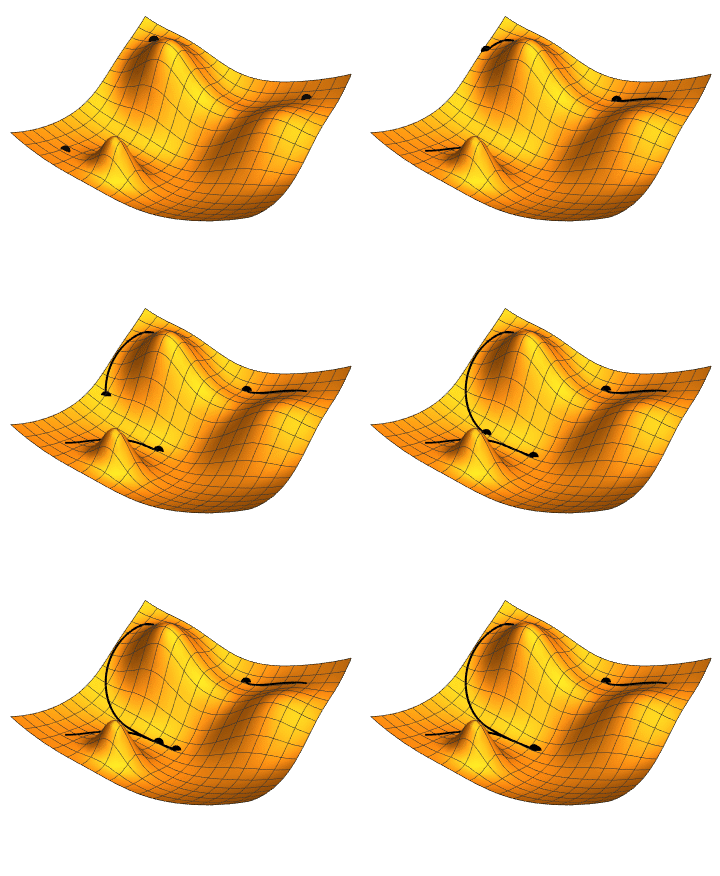
Variational optimization methods seek to minimize $L$ by using its gradient (sensitivity) with respect to the model parameters. This gradient indicates how to update the parameters to reduce the distance between the observations and the simulation outputs.

This can be done iteratively until finding the parameters that minimize the loss, as illustrated below.

This works very well! In theory.

In practice, the landscape is rugged, as in the picture below

By following the gradient in such a landscape, variational optimization methods tend to get stuck in wrong regions of the parameter space, and provide false estimate.

PiecewiseInference.jl

PiecewiseInference.jl is a julia package that I have authored, which implements a method to smoothen the loss landscape, and that permits to automatically obtain the model parameter sensitivity. It is detailed in the following preprint

Boussange, V., Vilimelis-Aceituno, P., Pellissier, L., Mini-batching ecological data to improve ecosystem models with machine learning. bioRxiv (2022), 46 pages.

⚠️ We will shortly rename this preprint in a revised version, as the term “mini batching” is confusing. We now prefer the term “partitioning”

The method works by training the model on small chunks of data

Let’s use it to tune the paramters of our mechanitic model. We’ll group data points in groups of 11, indicated by the argument group_size = 11

using PiecewiseInference
include("utils.jl"); # some utility functions defining `inference_problem_args` and `piecewise_MLE_args`

loss_likelihood(data, pred, rg) = sum((log.(data) .- log.(pred)).^2)

infprob = InferenceProblem(model_mechanistic, 
                            p_mech; 
                            loss_likelihood, 
                            inference_problem_args...);

@time res_mech = piecewise_MLE(infprob;
                        group_size = 11,
                        data = data,
                        tsteps = tsteps,
                        optimizers = [Adam(1e-2)],
                        epochs = [500],
                        piecewise_MLE_args...)
piecewise_MLE with 101 points and 10 groups.
Current loss after 50 iterations: 14.972400665283203
Current loss after 100 iterations: 12.230918884277344
Current loss after 150 iterations: 11.497014045715332
Current loss after 200 iterations: 11.264657020568848
Current loss after 250 iterations: 11.19422721862793
Current loss after 300 iterations: 11.16870403289795
Current loss after 350 iterations: 11.156006813049316
Current loss after 400 iterations: 11.14731216430664
Current loss after 450 iterations: 11.141851425170898
Current loss after 500 iterations: 11.138410568237305
166.285066 seconds (1.17 G allocations: 177.010 GiB, 10.44% gc time, 27.02%
 compilation time: 0% of which was recompilation)
`InferenceResult` with model SimpleEcosystemModel

Now let’s plot what does this trained model predicts

simul_mech_forecast = simulate(model_mechanistic, 
                                p = res_mech.p_trained, 
                                u0 = data[:,1],
                                saveat = vcat(tsteps, tsteps_forecast), 
                                tspan = (0, tsteps_forecast[end]));

fig, ax = subplots(1, figsize=(7,4))
for i in 1:N
    ax.scatter(tsteps, 
                data[i,:], 
                label = labels_sp[i], 
                color = species_colors[i],
                s = 6.)
    ax.plot(tsteps[1:end], 
            simul_mech_forecast[i,1:length(tsteps)], 
            c = species_colors[i])
    ax.plot(tsteps_forecast, 
            simul_mech_forecast[i,length(tsteps)+1:end], 
            linestyle="--", 
            c = species_colors[i])
end
ax.set_ylabel("Species abundance")
ax.set_xlabel("Time (days)")
fig.set_facecolor("None")
ax.set_facecolor("None")
fig.legend()
display(fig)

Looks much better! The model now captures doubling period oscillations.

In summary, mechanistic models

  • 👍 Very good for extrapolating to novel scenarios
  • 👎 Hard to parametrise
  • 👎 Inacurate

Model selection

To improve the accuracy, one can try to formulate different models corresponding to alternative hypotheses about the processes driving the ecosystem dynamics. For instance, we could compare the performance of this model to an alternative model, which would capture some sort of dependence between the water availability and the resource growth rate.

If we find that the refined model performs better than the model with constant growth rate, we have learnt that water availability is an important driver that affects the ecosystem dynamics.

Hybrid models

Assume that we have no idea on what the dependence of the resource growth rate on water availability may look like.

To proceed, we can define a very generic parametric function that can capture any sort of dependence, and then try to learn the parameters of this function from the data.

Neural networks are parametric functions that are highly suited for this sort of task. So we’ll build a hyrbid model, which contains the mechanistic components of the previous model, but where the resource growth rate is parametrized by a neural network.

🤖 + 🔬= 🤯

Below, we define the neural network, and the resource growth rate based on this neural net.

using Lux
rng = Random.default_rng()
# Multilayer FeedForward
hlsize = 5
neural_net = Lux.Chain(Lux.Dense(1,hlsize,rbf), 
                        Lux.Dense(hlsize,hlsize, rbf), 
                        Lux.Dense(hlsize,hlsize, rbf), 
                        Lux.Dense(hlsize, 1))
# Get the initial parameters and state variables of the model
p_nn, st = Lux.setup(rng, neural_net)
p_nn = p_nn |> ComponentArray

growth_rate_resource_nn(p_nn, water) = neural_net([water], p_nn, st)[1]

function hybrid_growth_rate(p, t)
    return [growth_rate_resource_nn(p.p_nn, water_availability(t)); p.r]
end
hybrid_growth_rate (generic function with 1 method)

Now we define our new hybrid model that implements this hybrid_growth_rate function

p_hybr = ComponentArray(H₂₁=p_mech.H₂₁,
                        H₃₂=p_mech.H₃₂,
                        q₂₁=p_mech.q₂₁,
                        q₃₂=p_mech.q₃₂,
                        r = p_mech.r[2:3],
                        K₁₁=p_mech.K₁₁,
                        A₁₁=p_mech.A₁₁,
                        p_nn = p_nn)

mp = ModelParams(;p=p_hybr,
                u0=u0_mech,
                solve_params...)

model_hybrid = SimpleEcosystemModel(; mp, 
                                    intinsic_growth_rate = hybrid_growth_rate,
                                    carrying_capacity,
                                    competition,
                                    resource_conversion_efficiency,
                                    feeding)
`Model` SimpleEcosystemModel

And we train it

infprob = InferenceProblem(model_hybrid, 
                            p_hybr; 
                            loss_likelihood, 
                            inference_problem_args...);

res_hybr = piecewise_MLE(infprob;
                    group_size = 11,
                    data = data,
                    tsteps = tsteps,
                    optimizers = [Adam(2e-2)],
                    epochs = [500],
                    piecewise_MLE_args...)
piecewise_MLE with 101 points and 10 groups.
Current loss after 50 iterations: 5.201906204223633
Current loss after 100 iterations: 3.6290767192840576
Current loss after 150 iterations: 3.519521713256836
Current loss after 200 iterations: 3.4955437183380127
Current loss after 250 iterations: 3.4787349700927734
Current loss after 300 iterations: 3.5343759059906006
Current loss after 350 iterations: 3.4698166847229004
Current loss after 400 iterations: 3.4563584327697754
Current loss after 450 iterations: 3.5980613231658936
Current loss after 500 iterations: 3.4506189823150635
`InferenceResult` with model SimpleEcosystemModel

The loss has signficiantly reduced. This means that this model better explains the dynamics, and as such, we have discovered that water avilability is indeed an important driver of ecosystem dynamics! Let’s plot the simulation output of this hyrbid model

simul_hybr_forecast = simulate(model_hybrid, 
                                p = res_hybr.p_trained, 
#                                 u0 = res_hybr.u0s_trained[1],
                                u0 = data[:,1],
                                saveat = vcat(tsteps, tsteps_forecast), 
                                tspan = (0, tsteps_forecast[end]));
fig, ax = subplots(1, figsize=(7,4))
for i in 1:N
    ax.scatter(tsteps, 
                data[i,:], 
                label = labels_sp[i], 
                color = species_colors[i],
                s = 6.)
    ax.plot(tsteps[1:end], 
        simul_hybr_forecast[i,1:length(tsteps)], 
            c = species_colors[i])
    ax.plot(tsteps_forecast, 
            simul_hybr_forecast[i,length(tsteps)+1:end], 
            linestyle="--", 
            c = species_colors[i])
end
ax.set_ylabel("Species abundance")
ax.set_xlabel("Time (days)")
fig.set_facecolor("None")
ax.set_facecolor("None")
fig.legend()
display(fig)

The cool thing is that although it contains a fully parametric component (the neural network), this hybrid can still extrapolate, because it is constrained by mechanistic processes.

plot_time_series(simulate(model_hybrid, 
                p = res_hybr.p_trained, 
                u0 = Float32[0., 0.060, 0.945], 
                saveat=0:dt:100.));

And what’s even cooler is that by interpreting the neural network, we can actually learn a new process: the shape of the dependence between the resource growth rate and the water availability!

water_avail = reshape(sort!(water_availability.(tsteps)),1,:)

p_nn_trained = res_hybr.p_trained.p_nn
gr = neural_net(water_avail, p_nn_trained, st)[1]


fig, ax = subplots(1)
ax.plot(water_avail[:], 
        gr[:], 
        label="Neural network",
        linestyle="--")

gr_true = model.mp.p[1] .* exp.(-0.5 .* water_avail.^2)
ax.plot(water_avail[:], gr_true[:], label="Ground truth")
ax.set_ylim(0,2)
ax.set_xlim(-2,2)
ax.legend()
xlabel("Water availability (normalized)")
ylabel("Resource basal growth rate")
display(fig)

Wrap-up

Hybrid approaches are the future! But they

  • Require
  • Requires differentiable programming and interoperability between scientific libraries
    • What
      is best at

    • But JAX is also very cool 🫠