Author Archives: Dean Markwick's Blog -- Julia

Accidentally Quadratic with DataFrames in Julia

By: Dean Markwick's Blog -- Julia

Re-posted from: https://dm13450.github.io/2021/04/21/Accidentally-Quadratic.html

using DataFrames, DataFramesMeta
using BenchmarkTools
using Plots

A post recently done the rounds where it looks like GTA had a bad
implementation of an algorithm that scaled in a quadratic fashion (How I cut GTA Online loading times by 70%),
which echoed a Bruce Dawson quote article about how it is common for
quadratically efficient processes to end up in production.
Quadratic
algorithms are fast enough when testing but once in production all of
a sudden the performance issues catch up with you and your sat with a
very inefficient process.

Well that happened to me.

Every month I recalibrate a model using the latest data pulled from a
database. I take this raw data and generate some features, fit a model
and save down the results. One of those operations is to match all the
id’s with the old data and new data to work out which trades need new features needed to be generated.

Basically, imagine I have a dataframe, and I want to find all the rows
that match some values. In this mock example, column B contains the
IDs and I’ve some new IDs that I want to filter the dataframe for.

I’ll create a large mock dataframe as an example.

N = 1000000
df = DataFrame(A = rand(N), B = 1:N);

My slow implementation use the DataFramesMeta package and used the broadcasted in function to check whether each value was in the new ids. This worked without a hitch last month, but then all of a sudden seemed to be incredibly slow. This was strange as I hadn’t changed anything, did the usual reboot of the machine and start afresh but it was still painfully slow.

function slow(df, ids)
  @where(df, in(ids).(:B))
end

After a quick profiling, I found that it was the above function that
was the bottleneck. So I refactored it to remove the DataFramesMeta dependancy and just used the base functions.

function quick(df, ids)
  df[findall(in(ids), df.B), :]
end

Thankfully this solved the issue, was much quicker and allowed my
process to complete without a hitch. This got me thinking, how slow was my originally implementation and how much different is the new version. So onto the benchmarking.

Using the BenchmarkTools.jl package I can run multiple iterations of each function across larger and larger IDs samples.

nSamps = [1, 10, 100, 1000, 10000, 100000, 1000000]
resQuick = zeros(length(nSamps))
resSlow = zeros(length(nSamps))

for (i, n) in enumerate(nSamps)
  ids = collect(1:n) 
    
  qb = @benchmark quick($df, $ids)
  sb = @benchmark slow($df, $ids)
    
  resQuick[i] = median(qb).time
  resSlow[i] = median(sb).time
end

I’ve made sure that I compiled the original function before starting
this benchmarking too.

plot(log.(nSamps), log.(resQuick), label="Quick", legend=:topleft, xlabel="log(Number of IDs selected)", ylab="log(Time)")
plot!(log.(nSamps), log.(resSlow), label="Slow")
svg

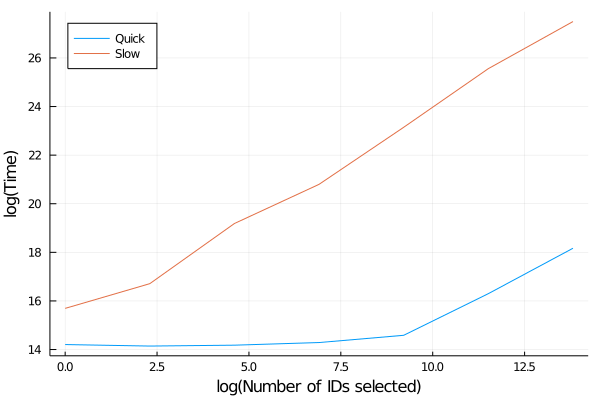
The difference in performance in remarkable. The quick function
is pretty much flat and just a slight increase towards the large sizes
in this log-log plot, whereas the slow version is always increasing. When we model the slow implementation performance as a power law we find that it is not quite quadratic, but more importantly, we can see that the faster method is pretty much constant, so a much scalable solution.

using GLM
lm(@formula(LogTime ~ LogSamps),
     DataFrame(LogSamps = log.(nSamps), LogTime=log.(resSlow)))
StatsModels.TableRegressionModel{LinearModel{GLM.LmResp{Vector{Float64}}, GLM.DensePredChol{Float64, LinearAlgebra.CholeskyPivoted{Float64, Matrix{Float64}}}}, Matrix{Float64}}

LogTime ~ 1 + LogSamps

Coefficients:
─────────────────────────────────────────────────────────────────────────
                 Coef.  Std. Error      t  Pr(>|t|)  Lower 95%  Upper 95%
─────────────────────────────────────────────────────────────────────────
(Intercept)  15.1134     0.275726   54.81    <1e-07  14.4046    15.8221
LogSamps      0.885168   0.0332117  26.65    <1e-05   0.799794   0.970541
─────────────────────────────────────────────────────────────────────────

When I first come across this issue I was ready to book out my week to rewriting the data functions to iron out any of the slow downs, so I was pretty happy that rewriting that one function made everything manageable.
Crypto Data using AlphaVantatge.jl

By: Dean Markwick's Blog -- Julia

Re-posted from: https://dm13450.github.io/2021/03/27/CryptoAlphaVantage.html

Julia 1.6 is hot off the press, so I’ve installed it and fired off this quick blog post to give 1.6 a test drive. So far, so good and there is a real decrease now in the latencies in both loading up packages and getting things going.

AlphaVantage have data on cryptocurrencies and not just stocks and fx. Each of which are implemented in AlphaVantage.jl. This is a simple blogpost that takes you through each function and how it might be useful to analyse cryptocurrencies.

Firstly, what coins are available? Over 500 (542 to be precise). Now as a crypto tourist, I’m only really familiar with the most popular ones that are causing the headlines. So I’ve taken the top 10 from coinmarketcap and will use those to demonstrate what AlphaVantage can do.

using AlphaVantage
using Plots
using DataFrames, DataFramesMeta
using CSV, Dates, Statistics

ccys = ["BTC", "ETH", "ADA", "DOT", "BNB", "USDT", "XRP", "UNI", "THETA", "LTC"]

FCAS Health Index from Flipside Crypto

AlphaVantage have partnered with Flipside Crypto to provide their ratings of different coins. This is designed to give some further info on different coins rather than just looking at what recently increased massively.

ratings = crypto_rating.(ccys);

Simple broadcasted call to get the ratings for each of the 10 currencies above. We format the response into a dataframe and get a nice table out. Not all the coins have a rating, so we have to filter out any empty ratings.

inds = findall(.!isempty.(ratings))
ratingsFrame = vcat(map(x->DataFrame(x["Crypto Rating (FCAS)"]), ratings[inds])...)
rename!(ratingsFrame, Symbol.(["Symbol", "Name", "Rating", "Score", "DevScore", "Maturity", "Utility", "LastRefresh", "TZ"]))
for col in (:Score, :DevScore, :Maturity, :Utility)
    ratingsFrame[!, col] .= parse.(Int64, ratingsFrame[!, col])
end
ratingsFrame

7 rows × 9 columns (omitted printing of 1 columns)

Symbol Name Rating Score DevScore Maturity Utility LastRefresh
String String String Int64 Int64 Int64 Int64 String
1 BTC Bitcoin Superb 910 868 897 965 2021-03-26 00:00:00
2 ETH Ethereum Superb 973 966 896 997 2021-03-26 00:00:00
3 ADA Cardano Superb 964 969 931 966 2021-03-26 00:00:00
4 BNB Binance Coin Attractive 834 745 901 932 2021-03-26 00:00:00
5 XRP XRP Attractive 842 881 829 794 2021-03-26 00:00:00
6 THETA THETA Caution 588 726 915 353 2021-03-26 00:00:00
7 LTC Litecoin Attractive 775 652 899 905 2021-03-26 00:00:00

Three superb, three attractive and one caution. THETA gets a lower utility score which is dragging down its overal rating. By the looks of it, THETA is some sort of streaming/YouTube-esque project, get paid their token by giving your excess computing power to video streams. There website is here and I’ll let you judge whether they deserve that rating.

To summarise briefly each of the ratings is on a 0 to 1000 scale in three different areas:

  • Developer Score (DevScore)

Things like code changes, improvements all taken from the repositories of the coins.

  • Market Maturity (Maturity)

This looks at the market conditions around the coin, so things like liquidity and volatility.

  • User Activity (Utility)

On chain activities, network activity and transactions, so is the coin being used for something actually useful. Hence why you can see why ETH is ranked the highest here.

More details are on their website here.

Timeseries Data

AlphaVantage also offer the usual time series data at daily, weekly and monthly frequencies. Hopefully you’ve read my other posts (basic market data and fundamental data), so this is nothing new!

Now for each 10 tokens we can grab their monthly data and calculate some stats and plot some graphs.

monthlyData = digital_currency_monthly.(ccys[inds], datatype = "csv");

Again formatting the returned data into a nice dataframe gives us a monthly view of the price action for each of the currencies. I format the date column, calculate the monthly log return and cumulative log return.

function format_data(x, ccy)
    df = DataFrame(x[1])
    rename!(df, Symbol.(vec(x[2])), makeunique=true)
    df[!, :timestamp] = Date.(df[!, :timestamp])
    sort!(df, :timestamp)
    df[!, :Return] = [NaN; diff(log.(df[!, Symbol("close (USD)")]))]
    df[!, :CumReturn] = [0; cumsum(diff(log.(df[!, Symbol("close (USD)")])))]
    df[!, :Symbol] .= ccy
    df
end

prices = vcat(map(x -> format_data(x[1], x[2]), zip(monthlyData, ccys[inds]))...)
first(prices, 5)

5 rows × 14 columns (omitted printing of 7 columns)

timestamp open (USD) high (USD) low (USD) close (USD) open (USD)_1 high (USD)_1
Date Any Any Any Any Any Any
1 2018-08-31 7735.67 7750.0 5880.0 7011.21 7735.67 7750.0
2 2018-09-30 7011.21 7410.0 6111.0 6626.57 7011.21 7410.0
3 2018-10-31 6626.57 7680.0 6205.0 6371.93 6626.57 7680.0
4 2018-11-30 6369.52 6615.15 3652.66 4041.32 6369.52 6615.15
5 2018-12-31 4041.27 4312.99 3156.26 3702.9 4041.27 4312.99
returnPlot = plot(prices[!, :timestamp], prices[!, :CumReturn], group=prices[!, :Symbol],
                  title="Cummulative Return",
                  legend=:topleft)
mcPlot = plot(prices[!, :timestamp], 
              prices[!, Symbol("market cap (USD)")] .* prices[!, Symbol("close (USD)")], 
              group=prices[!, :Symbol],
              title="Market Cap",
              legend=:none)

plot(returnPlot, mcPlot)

svg

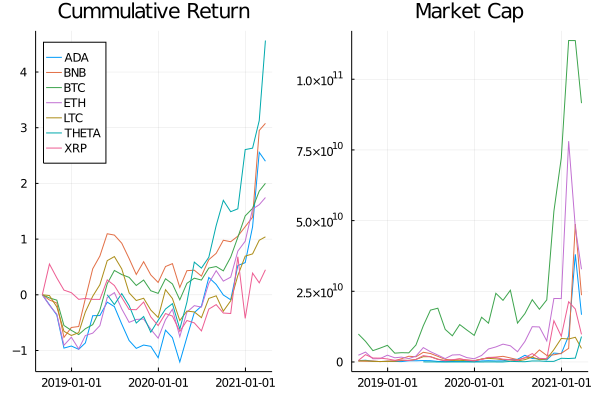
There we go, solid cumulative monthly returns (to the moon!) but bit of a decline in market cap recently after a week of negative returns. If you want higher frequencies there is always

  • digital_currency_daily
  • digital_currency_weekly

which will return the same type of data, just indexed differently.

Is the Rating Correlated with Monthly Trading Volume?

We’ve got two data sets, now we want to see if we can explain some the crypto scores with how much is traded each month. For this we simply take the monthly data, average the monthly volume traded and join it with the ratings dataframe.

gdata = groupby(prices, :Symbol)
avgprices = @combine(gdata, MeanVolume = mean(:volume .* cols(Symbol("close (USD)"))))
avgprices = leftjoin(avgprices, ratingsFrame, on=:Symbol)

7 rows × 10 columns (omitted printing of 2 columns)

Symbol MeanVolume Name Rating Score DevScore Maturity Utility
String Float64 String? String? Int64? Int64? Int64? Int64?
1 BTC 2.473e10 Bitcoin Superb 910 868 897 965
2 ETH 9.6248e9 Ethereum Superb 973 966 896 997
3 ADA 2.6184e9 Cardano Superb 964 969 931 966
4 BNB 3.7598e9 Binance Coin Attractive 834 745 901 932
5 XRP 3.28003e9 XRP Attractive 842 881 829 794
6 THETA 6.36549e8 THETA Caution 588 726 915 353
7 LTC 1.71448e9 Litecoin Attractive 775 652 899 905

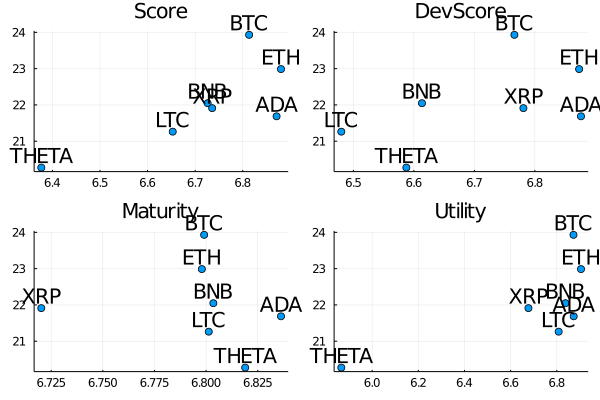
Visually, lets just plot the different scores on the x-axis and the monthly average volume on the y-axis. Taking logs of both variables stops BTC dominating the plots.

scorePlots = [plot(log.(avgprices[!, x]), 
                   log.(avgprices.MeanVolume), 
                   seriestype=:scatter, 
                   series_annotations = text.(avgprices.Symbol, :bottom),
                   legend=:none, 
                   title=String(x)) 
    for x in (:Score, :DevScore, :Maturity, :Utility)]
plot(scorePlots...)

svg

Solid linear relationship in the score and dev score metrics, not so much for the maturity and utility scores. Of course, as this is a log-log plot a linear relationship indicates power law behaviour.

Side note though, the graphs are a bit rough around the edges, labels are overlapping and even crossing though the axis. Julia needs a ggrepel equivalent.

Summary

Much like the other functions in AlphaVantage.jl everything comes through quite nicely and once you have the data its up to you to find something interesting!

Proper Bayesian Estimation of a Point Process in Julia

By: Dean Markwick's Blog -- Julia

Re-posted from: https://dm13450.github.io/2020/11/03/BayesPointProcess.html

I know how to use Stan and I know how to use Turing. But how do
those packages perform the posterior sampling for the underlying
models. Can I write a posterior distribution down and get
AdvancedHMC.jl to sample it? This is exactly what I want to do with
a point process where the posterior distribution of the model is a
touch more complicated than your typical regression problems.

This post will take you through my thought process and how you got from an idea, to a simulation of that idea, frequentist estimation of the simulated data and then a full Bayesian sampling of the problem.

But first, these are the Julia libraries that we will be using.

using Plots
using PlotThemes
using StatsPlots
using Distributions

Inhomogeneous Point Processes

A point process basically describes the time when something happens. That “thing” we can call an event and they happen between \(0\) and some maximum time \(T\). We describe the probability of an event happening at time \(t\) with an intensity \(\lambda\). Specifically we are going to use 4 different parameters for a polynomial.

\[\lambda (t) = \exp \left( \beta _0 + \beta _1 t + \beta _2 t^2 + \beta _3 ^2 t^3 \right)\]

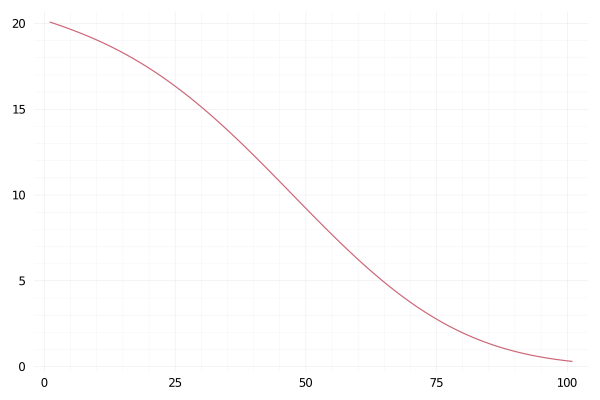
We take the exponent to ensure that the function is positive throughout the time period. What does this look like? We can simple plot the function from 0 to 100 with some random values for the \(\beta _i\)s.

λ(t::Number, params::Array{<:Number}) = exp(params[1] + params[2]*(t/100) + params[3]*(t/100)^2 + params[4]*(t/100)^3)
λ(t::Array{<:Number}, params::Array{<:Number}) = map(x-> λ(x, params), t)

testParams = [3, -0.5, -0.8, -2.9]
maxT = 100

plot(λ(collect(0:maxT), testParams), label=:none)

This looks like something that definitely changes over time. When
\(\lambda(t)\) is high we expect more events and likewise when it is
low there will be fewer events.

Simulating by Thinning

Let us simulate a point process using this intensity function. To do
so we use a procedure called thinning. This can be explained as a
three step process:

  1. Firstly simulate a constant Poisson process with intensity \(\lambda ^\star\) which is greater than \(\lambda (t)\) for all \(t\). This gives the un-thinned events, \(t^*_i\).
  2. For each un-thinned event calculate the probability it will become one of the final events as \(\frac{\lambda (t^*_i)}{\lambda ^\star}\).
  3. Sample from these probabilities to get the final events.

Simple enough to code up in a few lines of Julia.

lambdaMax = maximum(λ(collect(0:0.1:100), testParams)) * 1.1
rawEvents = rand(Poisson(lambdaMax * maxT), 1)[1]
unthinnedEvents = sort(rand(Uniform(0, maxT), rawEvents))
acceptProb = λ(unthinnedEvents, testParams) / lambdaMax
events = unthinnedEvents[rand(length(unthinnedEvents)) .< acceptProb];
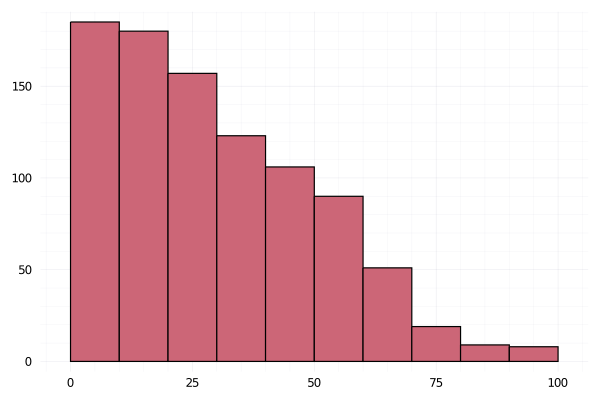
histogram(events,label=:none)

svg

A steady decreasing amount of events following the intensity function from above.

Maximum Likelihood Estimation

The log likelihood of a point process can be written as:

\[\mathcal{L} = \Sigma _{i = 1} ^N \log \lambda (t_i) – \int _0 ^T \lambda (t) \mathrm{d} t\]

Again, easy to write the code for this. The only technical difference is I am using the QuadGK.jl package to numerically integrate the function rather than doing the maths myself. This keeps it simple and also flexible if we decided to change the intensity function later.

function likelihood(params, rate, events, maxT)
    sum(log.(rate(events, params))) - quadgk(t-> rate(t, params), 0, maxT)[1]
end

For maximum likelihood estimation we simply pass this function through to an optimiser and find the maximum point. As optimize actually finds minimum points we have to invert the function.

using Optim
using QuadGK
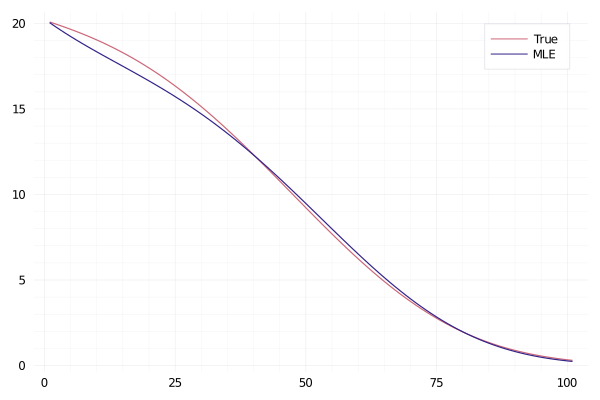
opt = optimize(x-> -1*likelihood(x, λ, events, maxT), rand(4))
plot(λ(collect(0:maxT), testParams), label="True")
plot!(λ(collect(0:maxT), Optim.minimizer(opt)), label = "MLE")

svg

Not a bad result! Our estimated intensity function is pretty close to
the actual function. So now we know that we can both simulate from a inhomogeneous point
process and that our likelihood can infer the correct parameters.

Bayesian Inference

Now for the good stuff. All of the above is needed for the Bayesian inference procedure. If you can’t get the maximum likelihood working for a relatively simple problem like above, adding in the complications of Bayesian inference will just get you knotted up without any results. So with the good results from above let us proceed to the Bayes methods. With the AdvancedHMC.jl package I can use all the fancy MCMC algos and upgrade from the basic Metropolis Hastings sampling.

I’ve shamelessly copied the README from AdvancedHMC.jl and changed the bits needed for this problem.

using AdvancedHMC, ForwardDiff

D = 4; initial_params = rand(D)

n_samples, n_adapts = 5000, 2000

target(x) = likelihood(x, λ, events, maxT) + sum(logpdf.(Normal(0, 5), x))

metric = DiagEuclideanMetric(D)
hamiltonian = Hamiltonian(metric, target, ForwardDiff)

initial_ϵ = find_good_stepsize(hamiltonian, initial_params)
integrator = Leapfrog(initial_ϵ)
proposal = NUTS{MultinomialTS, GeneralisedNoUTurn}(integrator)
adaptor = StanHMCAdaptor(MassMatrixAdaptor(metric), StepSizeAdaptor(0.8, integrator))

samples1, stats1 = sample(hamiltonian, proposal, initial_params, 
                        n_samples, adaptor, n_adapts; progress=true);
samples2, stats2 = sample(hamiltonian, proposal, initial_params, 
                        n_samples, adaptor, n_adapts; progress=true);

Samples done, now to manipulate the results to get the parameter
estimation.

a11 = map(x -> x[1], samples1)
a12 = map(x -> x[1], samples2)
a21 = map(x -> x[2], samples1)
a22 = map(x -> x[2], samples2)
a31 = map(x -> x[3], samples1)
a32 = map(x -> x[3], samples2)
a41 = map(x -> x[4], samples1)
a42 = map(x -> x[4], samples2)

bayesEst = map( x -> mean(x[1000:end]), [a11, a21, a31, a41])
bayesLower = map( x -> quantile(x[1000:end], 0.25), [a11, a21, a31, a41])
bayesUpper = map( x -> quantile(x[1000:end], 0.75), [a11, a21, a31, a41])
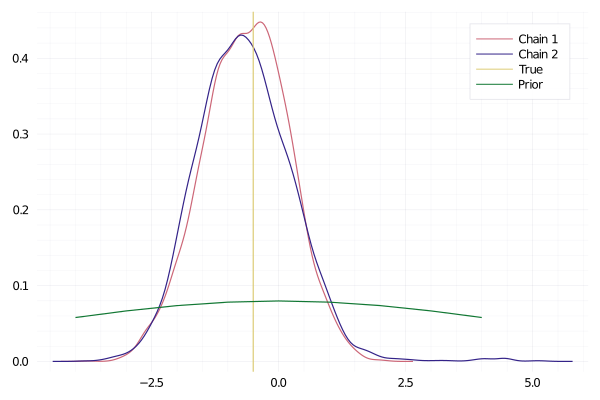
density(a21, label="Chain 1")
density!(a22, label="Chain 2")
vline!([testParams[2]], label="True")
plot!(-4:4, pdf.(Normal(0, 5), -4:4), label="Prior")

svg

The chains have sampled correctly and are centered around the correct
value. Plus it’s suitably different from the prior, which shows it has
updated with the information from the events.

plot(a11, label="Chain 1")
plot!(a12, label="Chain 2")

svg

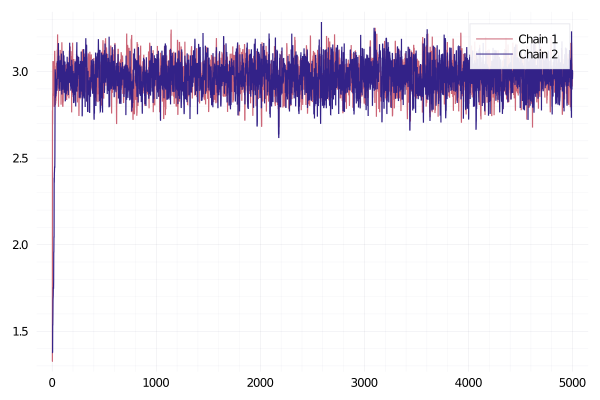
Looking at the convergence of the chains is also positive. So for this
simple model, everything looks like it has worked correctly.

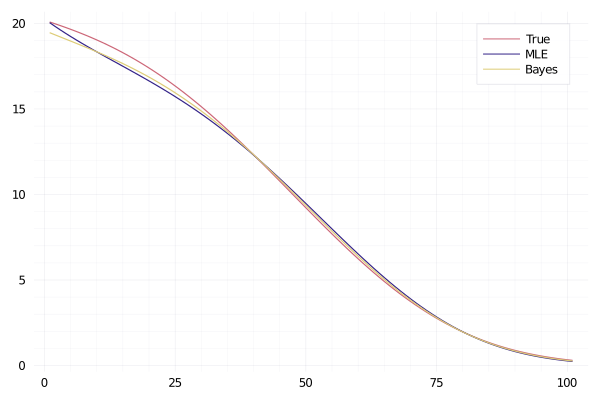
plot(λ(collect(0:maxT), testParams), label="True")
plot!(λ(collect(0:maxT), Optim.minimizer(opt)), label = "MLE")
plot!(λ(collect(0:maxT), bayesEst), label = "Bayes")

svg

Again, the bayesian estimate of the function isn’t too far from the true intensity. Success!

Conclusion

So what have I learnt after writing all this:

  • AdvancedHMC.jl is easy to use and despite all the scary terms and settings you can get away with the defaults.

What I have hopefully taught you after reading this:

  • Point process simulation through thinning.
  • What the likelihood of a point process looks like.
  • Maximum likelihood using Optim.jl
  • How to use AdvancedHMC.jl for that point process likelihood to get the posterior distribution.