Author Archives: Dean Markwick's Blog -- Julia

QuestDB Part 2 – High Frequency Finance (again!)

By: Dean Markwick's Blog -- Julia

Re-posted from: https://dm13450.github.io/2021/08/12/questdb-part2.html

Last time I showed you how to set up a producer/consumer model to
build a database of BTCUSD trades using the CoinbasePro WebSocket
feed. Now I’ll show you how you can connect to the same database to
pull out the data, use some specific timeseries database queries and
hopefully show where this type of database is useful by improving some
of my old calculations. You should read one of my older blog posts on
high frequency finance (here) as I’m going to repeat some of the calculations using more data this time.


Enjoy these types of post? Then you should sign up to my newsletter. It’s a short monthly recap of anything and everything I’ve found interesting recently plus
any posts I’ve written. So sign up and stay informed!


I ingested just over 24 hours worth of data over the 24th and 25th of July. Completely missed the massive rally though, which is just my luck, that would have been interesting to look at! Oh well.

Julia can connect to the database of the LibPQ.jl package and execute queries using all their functions. This is very handy as we don’t have to worry about database drivers or connection methods, we can just connect and go.

using LibPQ
using DataFrames, DataFramesMeta
using Plots
using Statistics, StatsBase
using CategoricalArrays

Default connection details to the database are used to connect to the database.

conn = LibPQ.Connection("""
             dbname=qdb
             host=127.0.0.1
             password=quest
             port=8812
             user=admin""")
PostgreSQL connection (CONNECTION_OK) with parameters:
  user = admin
  password = ********************
  dbname = qdb
  host = 127.0.0.1
  port = 8812
  client_encoding = UTF8
  options = -c DateStyle=ISO,YMD -c IntervalStyle=iso_8601 -c TimeZone=UTC
  application_name = LibPQ.jl
  sslmode = prefer
  sslcompression = 0
  gssencmode = disable
  krbsrvname = postgres
  target_session_attrs = any

Very easy, Julia just thinks that it is a Postgres database. We can
quickly move onto working with the data.

I start with simply getting all the trades out of the database.

@time trades = execute(conn, "SELECT * FROM coinbase_trades") |> DataFrame
dropmissing!(trades);
nrow(trades)
  4.828067 seconds (9.25 M allocations: 335.378 MiB, 1.64% gc time)

210217

It took about 5 seconds to pull 210 thousand rows into the notebook.

plot(trades.timestamp, trades.price, label=:none, fmt=:png)

png

Like I said in my last post, I missed the sudden rally on Sunday 25th
which was a bit unlucky. Side note, Plots.jl does struggle with
formatting the x axis with a timeseries plot.

Now to move onto updating my previous graphs with this new dataset.

Order Sign Correlation

The correlation between buys and sells follows a power law. Last time,
I only had 1000 trades to work after pulling them using the REST API. Now I’ve got 200x more, which should improve the uncertainty around the previous values.

ac = autocor(trades.side)
acplot = plot(1:length(ac), ac, seriestype=:scatter, label = :none, xlab="Lag", ylab = "Correlation")
aclogplot = plot(log.(1:length(ac)), log.(ac), seriestype=:scatter, label=:none, xlab= "log(Lag)", ylab="log(Correlation)")
plot(acplot, aclogplot, fmt=:png)

png

In the log-log plot we can see a nice straight line which we fit a linear model on.

using GLM

sideModel = lm(@formula(log(AC) ~ log(Lag)), DataFrame(AC=ac, Lag=1:length(ac)))
StatsModels.TableRegressionModel{LinearModel{GLM.LmResp{Vector{Float64}}, GLM.DensePredChol{Float64, LinearAlgebra.CholeskyPivoted{Float64, Matrix{Float64}}}}, Matrix{Float64}}

:(log(AC)) ~ 1 + :(log(Lag))

Coefficients:
──────────────────────────────────────────────────────────────────────────
                 Coef.  Std. Error       t  Pr(>|t|)  Lower 95%  Upper 95%
──────────────────────────────────────────────────────────────────────────
(Intercept)  -0.439012   0.049596    -8.85    <1e-11  -0.538534  -0.339491
log(Lag)     -0.70571    0.0156489  -45.10    <1e-42  -0.737112  -0.674308
──────────────────────────────────────────────────────────────────────────

This time we’ve got a \(\gamma\) value of 0.7 with more certainty.

plot(log.(1:length(ac)), log.(ac), seriestype=:scatter, label=:none)
plot!(log.(1:length(ac)), coef(sideModel)[1] .+ coef(sideModel)[2] .* log.(1:length(ac)), 
      label="Model", xlab= "log(Lag)", ylab="log(Correlation)", fmt=:png)

png

Lines up nicely with the data and better than the previous attempt
with just 1000 trades. \(\gamma\) is less than one which means it is
a ‘long memory’ process, so trades in the past effect trades in the
future for a long time. This is usually explained as the effect of
people breaking up large trades into slices and executing them bit by bit.

Size Distribution

Again, the size of each trade follows a power law distribution too. We use a slightly different method to estimate the exponent and last time with just 1000 trades we struggled to get a stable value. Now, with so much more data we can have another crack.

uSizes = minimum(trades.size):0.05:maximum(trades.size)

empF = ecdf(trades.size)

tradesSizePlot = plot((uSizes), (1 .- empF(uSizes)), seriestype=:scatter, label="P(V > x)", xlabel="Trade Size", ylabel="Probability")
tradesSizeLogPlot = plot(log.(uSizes), log.(1 .- empF(uSizes)), seriestype=:scatter, label="P(V > x)", xlabel = "log(Trade Size)", ylabel="log(Probability)")

plot(tradesSizePlot, tradesSizeLogPlot, fmt=:png)

png

Using the same Hill estimator as last time

function hill_estimator(sizes_sort, k)
    #sizes_sort = sort(sizes)
    N = length(sizes_sort)
    res = log.(sizes_sort[(N-k+1):N] / sizes_sort[N-k])
    k*(1/sum(res))
end
sizes = trades.size
sizes_sort = sort(sizes)
bds = 2:100:(length(sizes)-1000-1)


alphak = [hill_estimator(sizes_sort, k) for k in bds]
plot(bds, alphak, xlabel="k", ylabel="Alpha", label=:none, fmt=:png)

png

Still hard to make a judgement as to whether it is converging to a
value or not. It is always appears to be decreasing no mate the sample
size. Maybe I still need more data or maybe need a better
understanding of the Hill estimator!

Market Impact

I’ve not been using QuestDB to its full potential and repeating all my
previous graphs hasn’t fully exploited the available features. One of those features is the
ability to group by the timestamp across a bucket size (1 second, 5
minutes etc.) and aggregate the data. We will use that to
try and come up with a better model of market impact than I had in my
previous post.

We aggregate the trades into 1 minute buckets and calculate the total volume traded, the total signed volume (sell trades count as negative), the last price and also the number of trades in each bucket.

@time marketimpact = execute(conn, 
    "SELECT timestamp, sum(size) as TotalVolume, 
            sum(size*side) as SignedVolume,
            last(price) as Close,
            count(*) as NTrades
     FROM coinbase_trades 
    SAMPLE by 1m") |> DataFrame
dropmissing!(marketimpact)
marketimpact[1:3, :]
  0.223987 seconds (167.29 k allocations: 8.708 MiB, 56.20% compilation time)

3 rows × 5 columns

timestamp TotalVolume SignedVolume Close NTrades
DateTim… Float64 Float64 Float64 Int64
1 2021-07-24T08:50:34.365 1.75836 -0.331599 33649.0 52
2 2021-07-24T08:51:34.365 4.18169 -3.01704 33625.2 67
3 2021-07-24T08:52:34.365 0.572115 -0.325788 33620.1 46

This took less than a second and is a really easy line of code to write.

Now for the market impact calculation, we calculated the return bucket
to bucket and normalise the signed volume by the total volume traded
to give a value of between -1 and 1. This is taken from
https://arxiv.org/pdf/1206.0682.pdf and equation 26.

marketimpact[!, :returns] .= 1e4.*[NaN; diff(log.(marketimpact.Close))]
marketimpact[!, :NormVolume] .= marketimpact[!, :SignedVolume] ./ marketimpact[!, :TotalVolume]

miModel = lm(@formula(returns ~ NormVolume + 0), marketimpact[2:end, :])
StatsModels.TableRegressionModel{LinearModel{GLM.LmResp{Vector{Float64}}, GLM.DensePredChol{Float64, LinearAlgebra.CholeskyPivoted{Float64, Matrix{Float64}}}}, Matrix{Float64}}

returns ~ 0 + NormVolume

Coefficients:
──────────────────────────────────────────────────────────────────────
              Coef.  Std. Error      t  Pr(>|t|)  Lower 95%  Upper 95%
──────────────────────────────────────────────────────────────────────
NormVolume  4.55478    0.290869  15.66    <1e-51     3.9843    5.12526
──────────────────────────────────────────────────────────────────────

Here we can see that there is a positive coefficient, \(\theta\) in
the paper, as expected, and we can interpret this at how much the price moves after buying or selling. Specifically, in these minute buckets, those that contained only buy trades moved the market up by 4.5bps and the same for sells in the opposite direction.

plot(marketimpact.NormVolume, marketimpact.returns, seriestype=:scatter, label=:none, 
     xlab="Normalised Volume", ylab="Market Impact (log(bps))")
plot!(-1:0.1:1, coef(miModel)[1] .* collect(-1:0.1:1), label="Model", linewidth=3, legend=:topleft, fmt=:png)

png

You can see how the model lines of with the data and there is a very
slight trend that is picked. So overal, a better, if still very simple
model of market impact.

Trades with Top of Book

Now I’ve saved down the best bid and offer using the same process as Part 1 of this series. Over the same time period, the best bid and offer data has 17 million rows. So quite a bit more.

I use this best bid-offer data to do an ASOF join. This takes two tables with timestamps and joins them such that the timestamps align or the previous observation is used. In our case, we can take the trades, join it with the best bid and best offer table to get where the mid price was at the time of the trade.

@time trades2 = execute(conn, 
    "SELECT *
     FROM coinbase_trades 
    ASOF JOIN coinbase_bbo") |> DataFrame
dropmissing!(trades2);
  9.745210 seconds (18.49 M allocations: 671.544 MiB, 1.84% gc time)

This took 11 seconds, but was all done in the database, so no issue
with regards to blowing out the memory after pulling it into your
Julia session. Doing a normal join in Julia would only match
timestamps exactly, whereas we want the last observed bid/offer price
at least making the ASOF function very useful.

We now go through and calculate a mid price, how far the traded price was from the mid price and also add an indicator for what quantile the trade size landed in. We then group by this quantile indicator and calculate the average trade size and average distance from the mid price.

trades2[!, :Mid] .= (trades2.bid .+ trades2.ask)./2;
trades2[!, :Cost] .= 1e4 .* trades2.side .* ((trades2.price .- trades2.Mid) ./ (trades2.Mid))
trades2[!, :SizeBucket] .= cut(trades2[!, :size], [quantile(trades2[!, :size], 0:0.1:1); Inf])
gdata = groupby(@where(trades2, :Cost .> 0), :SizeBucket)
costData = @combine(gdata, MeanSize = mean(:size), MeanCost = mean(:Cost))

logCostPlot = plot(log.(costData.MeanSize), 
                   log.(costData.MeanCost), seriestype=:scatter, 
                   label=:none, 
                   xlab="log(Size)", 
                   ylab="log(Cost)", fmt=:png)

png

Unsurprisingly, we can see that larger trades are further away from
the mid price when they execute. This is because they are eating
through the posted liquidity.

This is very similar to my https://cryptoliquiditymetrics.com/ sweep
the book graph which is estimating the cost of eating liquidity. This graph above is showing
the actual cost of eating liquidity for real trades that have happened
on Coinbase.

We can fit a model to this plot and it is commonly referred to as the square root law of market impact. We ignore the smaller trade sizes, as they aren’t following the nice linear log-log plot.

costModel = lm(@formula(log(MeanCost) ~ log(MeanSize)),
                     @where(costData, :MeanSize .> exp(-7)))
StatsModels.TableRegressionModel{LinearModel{GLM.LmResp{Vector{Float64}}, GLM.DensePredChol{Float64, LinearAlgebra.CholeskyPivoted{Float64, Matrix{Float64}}}}, Matrix{Float64}}

:(log(MeanCost)) ~ 1 + :(log(MeanSize))

Coefficients:
───────────────────────────────────────────────────────────────────────────
                   Coef.  Std. Error      t  Pr(>|t|)  Lower 95%  Upper 95%
───────────────────────────────────────────────────────────────────────────
(Intercept)    -0.534863   0.0683721  -7.82    0.0001  -0.696537  -0.373189
log(MeanSize)   0.259424   0.0154468  16.79    <1e-06   0.222898   0.29595
───────────────────────────────────────────────────────────────────────────

The \(\gamma\) value of 0.25 is pretty low compared to other assets,
which we would expect to be around 0.5. But we haven’t included the usual volatility calculation which is in front of the volume component.

plot(log.(costData.MeanSize), 
     log.(costData.MeanCost), seriestype=:scatter, 
     label=:none, 
     xlab="log(Size)", 
     ylab="log(Cost)")
plot!(-8:0.1:3, coef(costModel)[1] .+ coef(costModel)[2] .* (-8:0.1:3), 
      label="Model", legend=:topleft, fmt=:png)

png

Apart from the small trades, the model lines up well with the
increasing trade size.

Using this model you can start to estimate how much a strategy
might cost to implement. At the end of the day, the outcome of your
strategy is unknown, but your trading costs are known. If it costs you
1bp to enter and exit a trade (round trip) but you only think the
price will change by 0.5bps, then your at a loss even if you were 100%
right on the price direction!

Summary

QuestDB makes working with this data incredibly easy. Both aggregating
the data using SAMPLE BY and joining two datasets using AS
OF
. Connecting to the database is a doddle using LibPQ.jl, so you
can get up and running without any issues. Very rare that these things
happen straight out the box.

Then by using this data I’ve ramped up the sample sizes and all my
plots and models start to look better. Again, all free data and with hopefully, very minimal
technical difficulty. As someone that usually finds themselves
drowning in csvs QuestDB has shown how much more efficient things can
be when you use a database.
Using QuestDB to Build a Crypto Trade Database in Julia

By: Dean Markwick's Blog -- Julia

Re-posted from: https://dm13450.github.io/2021/08/05/questdb-part-1.html

QuestDB is a timeseries database that is well suited for financial
data. It is built with timestamps in mind both when storing the data
and also when getting the data out. This makes it the ideal candidate
as a storage system for crypto trades.

You might have heard of KDB (or q the language used to work in KDB)
which is a popular comercial timeseries database. You’ll see it being
used all over the finance industry. Unfortunately KDB
costs money if you go beyond their personal license terms whereas
QuestDB is a free and also open source.

So this is a blog post on how to get started with QuestDB. We will be
connecting to Coinbase WebSockets in Julia to download trades that
will be stored in a QuestDB table.


Enjoy these types of post? Then you should sign up to my newsletter. It’s a short monthly recap of anything and everything I’ve found interesting recently plus
any posts I’ve written. So sign up and stay informed!


I’ve written about getting data using Coinbase’s REST APIs
here and
this WebSocket method is an alternative way to get the same
data. Using a WebSocket though has other benefits. With the REST API it is impolite to constantly query the endpoint to pull data in realtime. Plus you don’t know when something has changed, you pull the data, compare it to what you know and then see if there has been an update. With a WebSocket, it just tells you when something has changed, like when a new trade has occurred. This makes it great for building up a database, you can just connect to the firehose and save down all the trades that are coming through. Open the flood gates rather than always asking if something had changed.

Before we get started though you need to download and install QuestDB. As I’m on a Mac I downloaded it using Homebrew and started the process like questdb start.
You can get more information on downloading QuestDB here for your system.

The rest of the blog cost will walk you through the following steps.

  • The Producer/Consumer pattern
  • Using WebSockets in Julia
  • Putting data into QuestDB

In part two, which I will post sometime next week, I will show you how
we get data out of the database and use some of the specialised
features for timeseries data.

The Producer/Consumer Pattern

I am setting the processes up using a programming pattern called
‘product/consumer’. This means building one process that produces data and a separate process that can consume data. Having the two functions separate allows for a better scalability if you wanted to add in more exchanges or workers. It also means that there is a degree of independence between the two processes and reducing the coupling should make for an easier development experience.

To set this up in Julia we need to create a RemoteChannel which is how the producer and consumer processes will comunicate. It will be fileld up with the type Trade that we will also create.

struct Trade
    id::String
    time::String
    price::Float64
    size::Float64
    side::Int64
    exchange::String
end

Trade() = Trade("", "", NaN, NaN, 0, "")

Base.isempty(x::Trade) = x.id == ""

After creating the struct we also add in the null creator function and also a method for checking whether a trade but overal it is a simple type that just contains the relevant information for each trade found.

The RemoteChannel comes from the Distributed package.

using Distributed

const trades = RemoteChannel(()->Channel{Trade}(500));

It can store 500 trades and we will fill it up by connecting to the CoinbasePro WebSocket feed. Any of the producer processes would be able to add to this trades channel if needed.

WebSockets in Julia

A WebSocket needs a url and a call back function to run on the WebSocket. In our case we want to connect to the WebSocket, subscribe to the market data and parse the incoming messages.

Parsing the message is simple. As it is a JSON object it gets converted to a Julia dictionary, so we can just pull the appropriate fields and parse them to number if needed.

This can be accomplished as so:

using JSON
using Dates
using WebSockets

coinbase_url = "wss://ws-feed.pro.coinbase.com"
coinbase_subscribe_string = JSON.json(Dict(:type=>"subscribe", 
                         :product_ids=>["BTC-USD"], 
                         :channels=>["ticker", "heartbeat"]))

function parse_coinbase_data(x)
    if (get(x, "type", "") == "heartbeat") || (haskey(x, "channels"))
        println("Worker $(myid()): Coinbase Heartbeat")
        return Trade()
    end
    
    ts = get(x, "time", "")
    
    side = get(x, "side", "")
    tradedprice = parse(Float64, get(x, "price", "NaN"))
    size = parse(Float64, get(x, "last_size", "NaN"))
    id = get(x, "trade_id", "")
    
    Trade(string(id), ts, tradedprice, size, lowercase(side) == "buy" ? 1 : -1, "Coinbase")
end

function save_coinbase_trades(coinbase_url, coinbase_subscribe_string)

    WebSockets.open(coinbase_url) do ws
        write(ws, coinbase_subscribe_string)
        data, success = readguarded(ws)
        println("Entering Loop")
        while true
            data, success = readguarded(ws)
            jdata = JSON.parse(String(data))
            clean_data = parse_coinbase_data(jdata)
            if !isempty(clean_data)
              put!(trades, clean_data)
            end
        end
    end
    
end

We subscribe to the ticker channel, which gives us trades as they occur and we also use the heartbeat channel to keep the WebSocket alive.

Once the message has been parsed and we have created a Trade object, we can then add it to the queue for the database writer to pick up and save down.

This is finishes the producer part. We can now move onto the consumer process.

Getting Julia to Talk to QuestDB

We’ve connected to the WebSocket and our RemoteChannel is filling up. How do we get this into a database?. QuestDB exposes a socket (a normal socket not a WebSocket!) that Julia can connect to. So we simply connect to that exposed port and can send data to QuestDB.

QuestDB uses the
InfluxDB line protocol
to ingest data. This is as easy as sending a string down the
connection and QuestDB does the parsing to place it into the database
table. This string needs to take on a specific format:

table, string_column=value, numeric_column_1=value, numeric_column_2=value timestamp

We build this using an IOBuffer to incrementally add to the payload string.

The timestamp is the number of nanoseconds since the UNIX epoch. The timestamp of the trade from Coinbase does have this precision, but unfortunately Julia DateTime’s do not support nanoseconds but the Time type does. So we have to be a bit creative.

The timestamp looks like 2021-01-01T12:00:00.123456. I split on the . to get the datetime up to seconds and the nanoseconds. The datetime gets easily parsed into epoch time which we get into nanoseconds since the epoch by multiplying by 1e9. For the nanoseconds, we right pad it with any 0 to makes sure it is 9 digits long and can then convert to nanoseconds. Then it is as simple as adding the two values together and using @sprintf to get the full integer number without scientific notation.

using Printf

function parse_timestamp(ts::String)
    
    p1, p2 = split(ts, ".")
    
    ut = datetime2unix(DateTime(p1)) * 1e9
    ns = Nanosecond(rpad(chop(String(p2), tail=1), 9, "0"))
    
    @sprintf "%.0f" ut + ns.value 
end

function build_payload(x::Trade)
    buff = IOBuffer()
    write(buff, "coinbase_trades2,")
    write(buff, "exchange=$(getfield(x, :exchange)), ")
    for field in [:id, :price, :size]
        val = getfield(x, field)
        write(buff, "$(field)=$(val),")
    end
    write(buff, "side=$(getfield(x, :side)) ")
    
    tspretty = parse_timestamp(getfield(x, :time))
    
    write(buff, tspretty)
    write(buff, "\n")
    String(take!(buff))
end

The build_payload function takes in a trade and outputs a string to
write to QuestDB. We connect to port 9009 and continuously take trades
from the trades RemoteChannel and write it to the database.

using Sockets
function save_trades_quest(trades)
    cs = connect("localhost", 9009)
    while true
        payload = build_payload(take!(trades))
        write(cs, (payload))
    end
    close(cs)
end

All pretty simple. The annoying thing is that it won’t give any
indication as to whether it was successful in writing the file or
not. You can check by looking at the QuestDB web interface and seeing
if your value appears after querying the database or you can check the
QuestDB logs to see if any errors have been found. You’ll find the logs at /usr/local/var/questdb on a Mac.

Now we’ve got everything sorted we just need to get both processes
running. We will kick off the WebSocket process asynchronously so that is runs in the background and likewise, the save_trades_quest function so that it doesn’t lock your computer up if you are running the code along side it. With scaling in mind, you could run both of these processes on different threads or cores if needed. But in this case, both processes are light enough to be ran asynchronously on the main thread.

@async save_coinbase_trades(coinbase_url, coinbase_subscribe_string)
@async save_trades_quest(trades)

This is now saving down into the database every time a new trade is seen. If you go to localhost:9000 you query the data and see how it is evolving. QuestDB uses SQL like equivalent and so you can write things like

select * from coinbase_trades

and it will show you all the trades saved down so far. Or

select min(timestamp), max(timestamp) from coinbase_trades

to see the earliest and lastest timestamp in traditional SQL. Or using the timeseries database features:

select * from coinbase_trades
latest by exchange

which will pull out the last timestamp.

Summary

That’s the end of part 1. You should hopefully QuestDB installed and slowly filling up with trades from Coinbase now. In the next part, I’ll show you how to connect to the database and pull the data to do some analysis.

If you want something extra to do, why not try extending the program to pull in other cryptocurrencies, you’ll want to edit the subscribe string and how each message is parsed.
You can also connect to QuestDB using Grafana and build out some dashboards to monitor the trades without needing any other code.

Questions? Feedback? Comments? Let me know below!

Version Info

  • QuestDB 6.0.4
  • Julia 1.6

Getting Started with High Frequency Finance using Crypto Data and Julia

By: Dean Markwick's Blog -- Julia

Re-posted from: https://dm13450.github.io/2021/06/25/HighFreqCrypto.html

Crypto is making finance democratic. My PhD was originally going to be on the limit order book and modeling events that can change its state. However, I just couldn’t get the data. Now, anyone can access different exchanges limit orders books with simple API calls. My Julia package CoinbasePro.jl does exactly that and you can get full market data without even having to sign up.

Sure, crypto markets will be less liquid and more erratic than your traditional datasets, but you get what you pay for. So if you are a student looking to get stuck into high frequency or quant finance, this type of data is exactly what you are looking for.


Enjoy these types of post? Then you should sign up to my newsletter. It’s a short monthly recap of anything and everything I’ve found interesting recently plus
any posts I’ve written. So sign up and stay informed!


This blog post will introduce you to different concepts:

To access all this free data I’ve written an interface to the CoinbasePro API in Julia. It’s in the general repo and you can install it the normal way or take a look at the code here:

using Plots, Statistics, StatsBase, DataFrames, DataFramesMeta
using CoinbasePro

The Limit Order Book

The limit order book (LOB) is the collection of orders at which people are willing to buy and sell something. Rather than sending a market order to trade at whatever price, you can send an order into the book and it will execute if the price ever reaches your order.

When it comes to order book data, it gets categorised into three different types.

  • Level 1: The best price to buy or sell at. AKA the “top level” of the book.
  • Level 2: Aggregated levels, 50 levels at which people are willing to buy and sell.
  • Level 3: The full order book

With the book function you chose what level and currency pair to pull from Coinbase.

l1 = CoinbasePro.book("btc-usd", 1)
first(l1, 5)

1 rows × 8 columns (omitted printing of 1 columns)

num-orders_ask price_ask size_ask num-orders_bid price_bid size_bid sequence
Int64 Float64 Float64 Int64 Float64 Float64 Int64
1 3 36308.2 0.0350698 1 36308.2 0.214675 26223337988

Just one row, the top level, if you were to place a market order of a size less than the size above, this is the price you would be filled at. If your trade size was larger than the listed price, you would also consume the next levels until your full size was complete.

bookData = CoinbasePro.book("btc-usd", 2)
first(bookData, 5)

5 rows × 8 columns (omitted printing of 1 columns)

num-orders_ask price_ask size_ask num-orders_bid price_bid size_bid sequence
Int64 Float64 Float64 Int64 Float64 Float64 Int64
1 3 36313.6 0.350958 2 36313.6 0.0761817 26223343057
2 1 36313.6 0.0221 2 36313.0 2.07568 26223343057
3 1 36313.9 0.0441907 1 36313.0 0.0195784 26223343057
4 2 36315.0 0.400577 1 36312.4 0.137662 26223343057
5 1 36324.1 0.0542957 1 36312.4 2.42316 26223343057

Here is the top 50 levels at which people will buy and sell at at the given time we called the function. Can now get a better idea of where people will buy and sell. As it is aggregated, there might be multiple orders at one price rather than just a single large order.

l3 = CoinbasePro.book("btc-usd", 3)
first(l3, 5)

5 rows × 8 columns (omitted printing of 3 columns)

order_id_ask price_ask size_ask level order_id_bid
String? Float64 Float64 Int64 String?
1 5637f35f-287d-4b94-a13b-24af22f086a4 36313.6 0.319169 1 874060ad-3b51-466e-bf1e-ff5b7795200a
2 d36ea8e4-3709-4444-92a0-5f857960158b 36313.6 0.009689 2 9059258a-3977-4d3c-a950-dac07cb86369
3 d861a1a1-57bb-4338-a8a2-8c55af794f79 36313.6 0.0221 3 ff8a3260-b2cb-41be-930b-7201ffed202c
4 9a1f5a7d-a4b9-4127-a1c3-37dbf9498d36 36313.6 0.0221 4 e079d476-cbea-4f26-a9f2-0bbfd9d0e0e1
5 c9047dd6-058b-4c27-aeb2-3820821c315c 36313.9 0.0441907 5 001f6e6e-20a1-47f8-89bc-35a5c9aa511c

Finally the full order book, this gives every order currently available. So with each increasing level we get more and more detail about what the state of the market is. In the 3rd level there are over 50,000 different orders available.

nrow(l3)
55865

High frequency trading is all about knowing where and when to place orders and at what size. If you think you can predict where the price will be in the next second (or even shorter timescales) you can buy now, place a limit order where you think the price will go and hope it moves in that direction. Likewise, if you suddenly start observing lots of cancellations at particular levels, that might also give some information at what is happening to the market.

The good thing about the Coinbase API is you can now start to get a feel for how to manage this type of data free and easily.

Sweeping the Book

How can we use the information from the order book? What is the average price if we traded at every level? If we need to trade a large amount, we would go through each layer of the order book, trading at that price and eating up liquidity. But that comes at a price, our overall average price will be worse than the best price when we started. How much worse depends on the overal amount of liquidity available at a given time. So being on top of how much it would cost to trade a large amount at a given time is key for risk management.

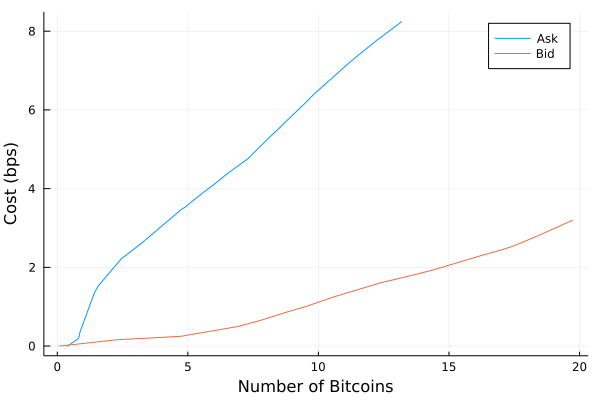
To calculate this using the order book data we simply add up the amount at each level and the cumulative average price at each level. We do this calculation on both the bid and ask side to see how they differ.

askSize = cumsum(bookData[!, "size_ask"])
askCost = map(n -> sum(bookData[!, "size_ask"][1:n] .* bookData[!, "price_ask"][1:n]) / askSize[n], 1:nrow(bookData))

bidSize = cumsum(bookData[!, "size_bid"])
bidCost = map(n -> sum(bookData[!, "size_bid"][1:n] .* bookData[!, "price_bid"][1:n]) / bidSize[n], 1:nrow(bookData));

We can now plot the total amount on the x axis and the total cost on the y axis.

plot(askSize, 1e4 .* ((askCost ./ bookData[!, "price_ask"][1]) .- 1), label="Ask", xlabel="Number of Bitcoins", ylabel="Cost (bps)")
plot!(bidSize, abs.(1e4 .* ((bidCost ./ bookData[!, "price_bid"][1]) .- 1)), label="Bid")

svg

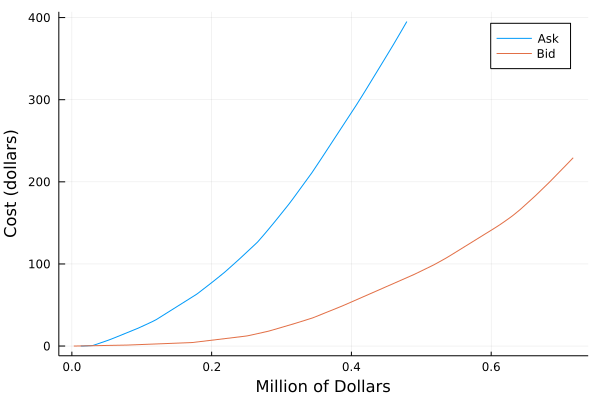
Only issue here, is the x axis is in Bitcoin’s and not the easiest to interpret. The y axis is in basis points (bps) which is a percentage of the total traded amount. 1bps = 0.01%. So we want to convert both axis into dollars so you can understand it all a bit easier. For this we will need the midprice of BTC-USD, which we get using the ticker function from the CoinbasePro API.

tickerStats = CoinbasePro.ticker("BTC-USD")

1 rows × 7 columns

ask bid price size time trade_id volume
Float64 Float64 Float64 Float64 String Int64 Float64
1 36339.7 36338.5 36339.6 0.00543844 2021-06-10T21:09:18.260533Z 185030293 20600.9
mid = (tickerStats.ask + tickerStats.bid)/2
1-element Vector{Float64}:
 36339.11

This gives a quick summary of the currency which we can then convert our previous calculation into dollars.

askBps = 1e4 .* ((askCost ./ bookData[!, "price_ask"][1]) .- 1)
bidBps = abs.(1e4 .* ((bidCost ./ bookData[!, "price_bid"][1]) .- 1))

plot(askSize .* mid /1e6, (askBps /1e4) .* askSize .* mid, label="Ask", xlabel="Million of Dollars")
plot!(bidSize .* mid /1e6, (bidBps/1e4) .* bidSize .* mid, label="Bid", ylabel = "Cost (dollars)")

svg

Now we can interpret this chart a little easier.
If we were to buy 500k USD worth of bitcoin we need to look at the ask curve. We can see that this roughly intercepts the y-axis as around 50$, which means we will pay $50 dollars to get our 500k order executed at current liquidity levels.

Now this isn’t a “direct” cost, like commission or a fee for trading, it is an execution cost.

  • You decide to buy 500k worth of BTC.
  • You send the market order to the exchange and it executes eating through all the levels.
  • When the Bitcoin is in your wallet, you’ve actually only got 499,950 worth.
  • This missing $50 can be attributed to execution costs.

You pay these execution costs because you are eating through liquidity.

Now minimising these costs is an entire industry and ultimately what a trader gets paid to do.

Last 1000 Trades

Coinbase also let you obtain the last 1000 trades, which can provide all sorts of insights. Echoing the introduction, you would never get this kind of information for free for any other asset classes.

trades, pages = CoinbasePro.trades("BTC-USD")
first(trades, 5)

5 rows × 5 columns

price side size time trade_id
Float64 String Float64 DateTim… Int64
1 36338.5 sell 0.0269793 2021-06-10T21:09:22.105 185030310
2 36338.5 buy 0.0191325 2021-06-10T21:09:21.888 185030309
3 36338.5 buy 0.045 2021-06-10T21:09:21.888 185030308
4 36338.5 buy 0.000999 2021-06-10T21:09:21.888 185030307
5 36338.5 buy 0.000701 2021-06-10T21:09:21.521 185030306
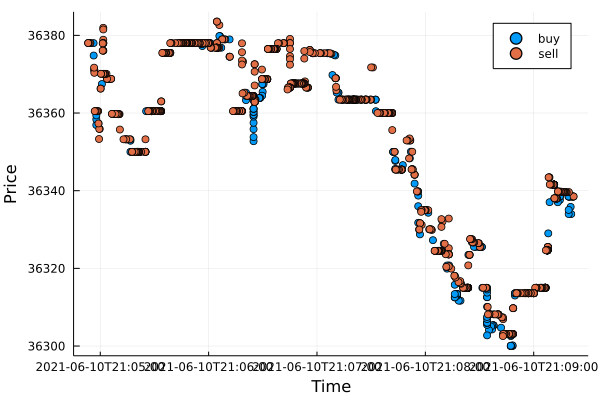
plot(trades.time, trades.price, group=trades.side, seriestype=:scatter, xlabel="Time", ylabel="Price")

svg

Here you can see buys and sells happening in flurries over a very short period of time.

trades_g = groupby(trades, :side)
@combine(trades_g, AvgPrice = mean(:price), 
                   N = length(:price), 
                   TotalNotional = sum(:size),
                   AvgWPrice = mean(:price, Weights(:size)))

2 rows × 5 columns

side AvgPrice N TotalNotional AvgWPrice
String Float64 Int64 Float64 Float64
1 sell 36351.6 643 14.6543 36358.4
2 buy 36344.6 357 19.2213 36328.8

More sellers than buyers, hence the price over the last 1000 trades has moved down. Supply and demand!

Price Impact

Using the trades we can build up a (very) simple model of price impact. Price impact is how much you move the market by trading. With each trade we look at the absolute price difference of the next traded price. But first we have to aggregate trades that happen as the same time and in the same direction.

sort!(trades, :time)

gtrades = groupby(trades, [:time, :side])
tradeS = @combine(gtrades, AvgPrice = mean(:price, Weights(:size)), 
                           TotalSize = sum(:size),
                           N = length(:price))


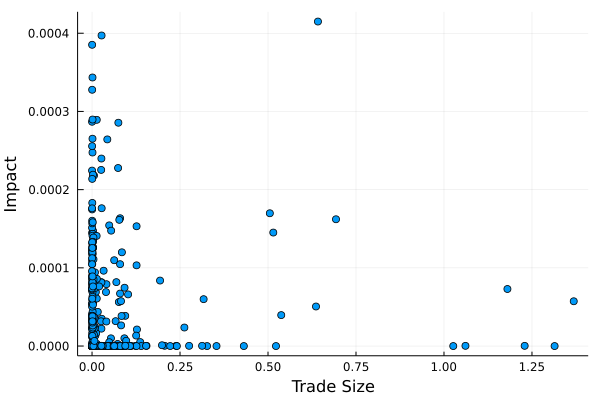
plot(log.(tradeS[2:end, :TotalSize] .+ 1), abs.(diff(log.(tradeS.AvgPrice))), seriestype=:scatter, label=:none, xlabel="Trade Size", ylabel="Impact")

svg

Here we can see that it is very noisy and difficult to pull out any real trend. 1000 trades isn’t really enough to build this type of model, and also my approach of taking the price of the next trade could be improved too. But I’ll leave that as an exercise to the reader.

tradeS.Impact = [NaN; diff(log.(tradeS.AvgPrice))]
tradeS.Sign = [x == "sell" ? -1 : 1 for x in tradeS.side]
tradeS.SignedImpact = tradeS.Impact .* tradeS.Sign
first(tradeS, 5)

5 rows × 8 columns (omitted printing of 1 columns)

time side AvgPrice TotalSize N Impact Sign
DateTim… String Float64 Float64 Int64 Float64 Int64
1 2021-06-10T21:04:53.286 sell 36378.0 0.0394498 2 NaN -1
2 2021-06-10T21:04:53.658 sell 36378.0 0.00054482 1 0.0 -1
3 2021-06-10T21:04:54.461 sell 36378.0 0.00404794 1 0.0 -1
4 2021-06-10T21:04:54.505 sell 36378.0 0.00103966 1 0.0 -1
5 2021-06-10T21:04:56.307 buy 36378.0 3.177e-5 1 -2.74891e-7 1
using CategoricalArrays

tradeS = tradeS[2:end, :]

tradeS.SizeBucket = cut(tradeS.TotalSize, quantile(tradeS.TotalSize, 0:0.1:1), extend=true)
tradeSG = groupby(tradeS, [:SizeBucket, :side])
quantileSummary = @combine(tradeSG, AvgSize = mean(:TotalSize), MeanImpact = mean(:Impact), MeanAbsImpact = mean(abs.(:Impact)))

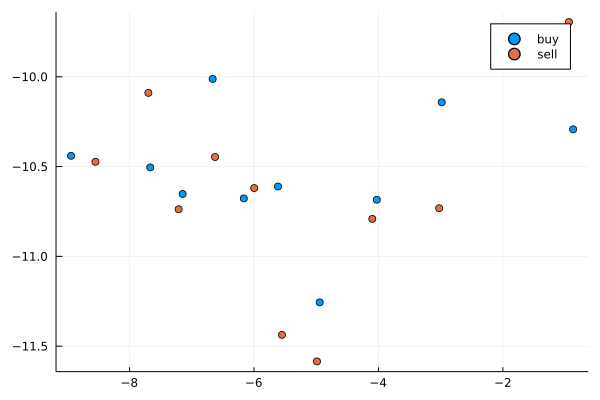
plot(log.(quantileSummary.AvgSize), log.(quantileSummary.MeanAbsImpact), group=quantileSummary.side, seriestype=:scatter)

svg

By looking at the quantiles of the trade size and looking at buys and sells separately this perhaps a bit more of a relationship, but again, nothing conclusive. I suggest that you collect more data and read some of papers on market impact. A good place to start would be these two:

  • https://arxiv.org/pdf/0903.2428.pdf
  • https://arxiv.org/pdf/0809.0822.pdf

Trade Sign Correlation

The distribution of trade signs also gives insight into the nature of markets. The notion of ‘long memory’ in markets can be attributed to the slicing up of a large order. As we have shown in the above section, each trade eats up liquidity and you pay a price for that, if you can break up an order into smaller chunks such that the sum of the costs of each small order is less than that if you would have made a big order, well thats more money in your pocket.

There are also lots of other reasons for splitting up a large order, suddenly flooding the market with a big trade size will cause an adverse reaction in the price and in essence ‘reveal’ how you are positioned. So being able to split an order is a necessity.

A great paper that looks at both order sign dynamics and also trade size distribution (which we will come onto later) can be found here: https://arxiv.org/pdf/cond-mat/0412708.pdf . I’ve largely take what they do and applied it to the crypto data from Coinbase.

First we aggregate those trades that occurred on the same timestamp and in the same direction.

aggTrades = @combine(gtrades, N=length(:size), TotalSize = sum(:size))
first(aggTrades, 5)

5 rows × 4 columns

time side N TotalSize
DateTim… String Int64 Float64
1 2021-06-10T21:04:53.286 sell 2 0.0394498
2 2021-06-10T21:04:53.658 sell 1 0.00054482
3 2021-06-10T21:04:54.461 sell 1 0.00404794
4 2021-06-10T21:04:54.505 sell 1 0.00103966
5 2021-06-10T21:04:56.307 buy 1 3.177e-5

For each of the aggregated timestamp trades we assign buys as 1 and sells as -1. Then by looking at the autocorrelation between the trades we can come up with an explanation of how likely a buy is followed by another buy.

sides = aggTrades.side
sidesI = zeros(length(sides))
sidesI[sides .== "buy"] .= 1
sidesI[sides .== "sell"] .= -1

ac = autocor(sidesI);

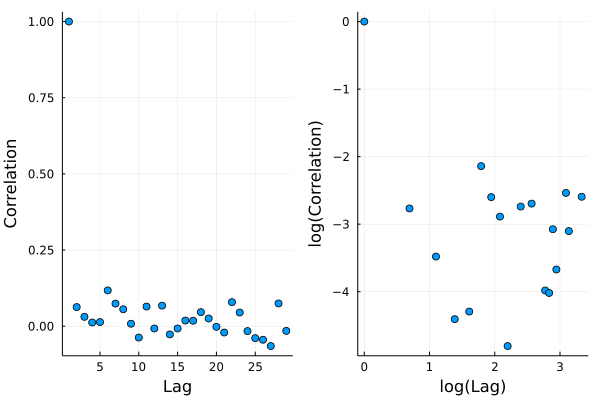
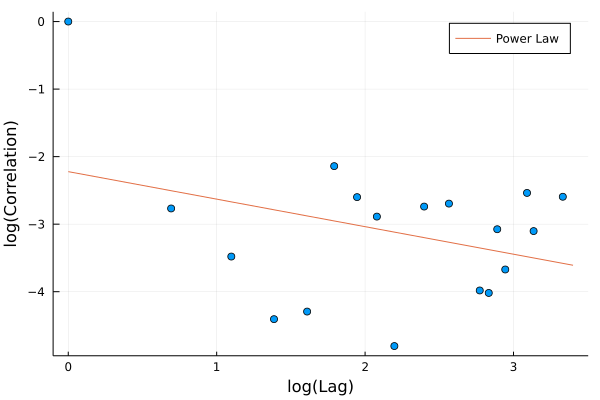
As we are looking at a possible power law relationship, we take the log of both the autocorrelation and the lag to see if there is a straight line. Which there appears to be.

lags = eachindex(ac)
posInds = findall(ac .> 0)

acPlot = plot(lags, ac, seriestype=:scatter, label=:none, xlabel="Lag", ylabel="Correlation")
acLogPlot = plot(log.(lags[posInds]), log.(ac[posInds]), seriestype=:scatter, label=:none, xlabel = "log(Lag)", ylabel="log(Correlation)")
plot(acPlot, acLogPlot)

svg

We can simply model the relationship like they do in the paper:
\(\tau ^ \gamma\)

where \(\tau\) is the lag. We also remove some of the outliers to stop them influencing the result.

using GLM
modelFrame = DataFrame(LogAC = log.(ac[posInds]), LogLag = log.(lags[posInds]))

m = lm(@formula(LogAC ~ LogLag), modelFrame)
StatsModels.TableRegressionModel{LinearModel{GLM.LmResp{Vector{Float64}}, GLM.DensePredChol{Float64, LinearAlgebra.CholeskyPivoted{Float64, Matrix{Float64}}}}, Matrix{Float64}}

LogAC ~ 1 + LogLag

Coefficients:
─────────────────────────────────────────────────────────────────────────
                 Coef.  Std. Error      t  Pr(>|t|)  Lower 95%  Upper 95%
─────────────────────────────────────────────────────────────────────────
(Intercept)  -2.22219     0.642869  -3.46    0.0032  -3.58501   -0.85937
LogLag       -0.407497    0.275649  -1.48    0.1587  -0.991846   0.176853
─────────────────────────────────────────────────────────────────────────
plot!(acLogPlot, log.(0:30), coef(m)[1] .+ coef(m)[2] .* log.(0:30), label="Power Law", xlabel = "log(Lag)", ylabel="log(Correlation)")

svg

We can see the log model fits well and we arrive at a \(\gamma\) value of around -0.4 which seems sensible and comparable to their value of -0.57 for some stocks. The paper uses a lot more data than just the 1000 trades we have access to aswell, but again, you can collect more data and see how the relationship evolves or changes across different pairs.

Trade Size Distribution

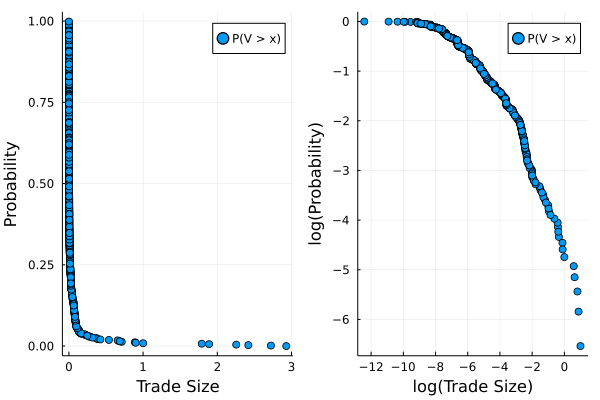
There is also a significant amount of work that is concerned with the distribution of each trade size observed. We calculate the empirical distribution and plot that on both a linear and log scale. Again, this is covered in the above paper.

sizes = aggTrades.TotalSize
uSizes = unique(aggTrades.TotalSize)

empF = ecdf(sizes)

tradesSizePlot = plot((uSizes), (1 .- empF(uSizes)), seriestype=:scatter, label="P(V > x)", xlabel="Trade Size", ylabel="Probability")
tradesSizeLogPlot = plot(log.(uSizes), log.(1 .- empF(uSizes)), seriestype=:scatter, label="P(V > x)", xlabel = "log(Trade Size)", ylabel="log(Probability)")

plot(tradesSizePlot, tradesSizeLogPlot)

svg

The log-log plot indicates that there is some power law behaviour in the tail of the distribution. Estimating this power lower can be achieved in a number of ways, but like the above paper, I’ll use the Hill estimator to calculate the tail parameter. This is a different method as to how we estimated the above power law and comes from the theory of extreme values. I’ve copied the form of the estimator from the R package ptsuite and you can find the equation here.

In short, it is a method for estimating the tail of a distribution when there are heavy tails. I think I’m going to write a separate blog post on this type of estimation, as it is interesting in its own right. But for now, take this equation as how we will come up with an \(\alpha\) value.

function hill_estimator(sizes, k)
    sizes_sort = sort(sizes)
    N = length(sizes_sort)
    res = log.(sizes_sort[(N-k+1):N] / sizes_sort[N-k])
    k*(1/sum(res))
end
hill_estimator (generic function with 1 method)

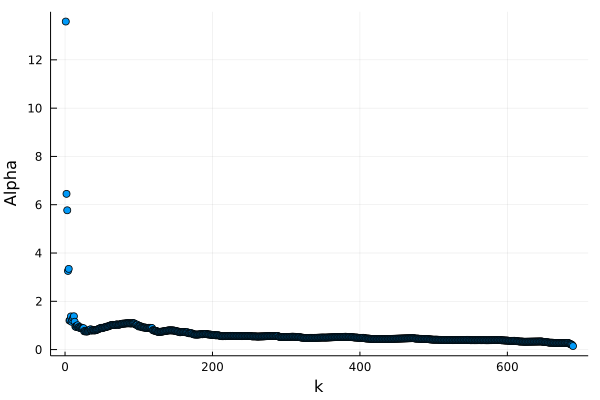
For this estimator we need to chose a threshold \(k\) and take all the values above that to calculate the parameter.

alphak = [hill_estimator(sizes, k) for k in 1:(length(sizes)-1)]
plot(1:(length(sizes)-1), alphak, seriestype= :scatter, xlabel="k", ylabel="Alpha", label=:none)

svg

last(alphak, 5)
5-element Vector{Float64}:
 0.229504703150391
 0.22575089901110806
 0.2080699145436874
 0.1867189489090256
 0.1457502984372589

We could say that the value is converging to a value of around 0.2, but I don’t think we can trust that too much. It looks like a lack of data to really come up with a good estimate, 1000 trades at the end of the day isn’t enough. Again, in the paper, they calculate a value of a value -1.59, so quite a bit of difference to the crypto data. Buy again, this is a much smaller dataset compared to the papers stock data.

A Side Project

Now after writing all this and going through the calculations I decided to learn some javascript and replicate some of the graphs here in a website. I’ve called it https://cryptoliquiditymetrics.com/ and it connects to the same Coinbase API to produce some insight into the current state of different cryptocurrencies at a given time. Check it out and hopefully it gives you a bit of market intelligence.

Conclusion

Hopefully you’ve now got a good idea about the basic approaches to high frequency finance and different models that are used to describe the price dynamics. I am only scratching the surface though and there is so much more out there that can be easily applied using the data from the CoinbasePro.jl module.

As I kept saying, getting 1000 trades at a time is a bit limiting, so I will be on the hunt for a larger data set of crypto trade data.

If there is anything you want me to specifically look at, let me know in the comments below!