Author Archives: Dean Markwick's Blog -- Julia

Order Flow Imbalance – A High Frequency Trading Signal

By: Dean Markwick's Blog -- Julia

Re-posted from: https://dm13450.github.io/2022/02/02/Order-Flow-Imbalance.html

I’ll show you how to calculate the ‘order flow imbalance’ and build a
high-frequency trading signal with the results. We’ll see if it is a
profitable strategy and how it might be useful as a market indicator.

A couple of months ago I attended the Oxford Math Finance seminar
where there was a presentation on order book dynamics to predict
short-term price direction. Nicholas Westray presented
Deep Order Flow Imbalance: Extracting Alpha at Multiple Horizons from the Limit Order Book. By
using deep learning they predict future price movements using common
neural network architectures such as the basic multi-layer perceptron
(MLP), Long Term Short Memory network (LSTM) and convolutional neural
networks (CNN). Combining all three networks types lets you extract
the strengths of each network:

  • CNNs: Reduce frequency variations.
    • The variations between each input reduce to some common
      factors.
  • LSTMs: Learn temporal structures
    • How are the different inputs correlated with each other such as
      autocorrelation structure.
  • MPLs: Universal approximators.
    • An MLP can approximate any function.

A good reference for LSTM-CNN combinations is DeepLOB: Deep
Convolution Neural Networks for Limit Order Books

where they use this type of neural network to predict whether the
market is moving up or down.

The Deep Order Flow talk was an excellent overview of deep
learning concepts and described how there is a great overlap between
computer vision and the state of the order book. You can build an
“image” out of the different order book levels and pass this through
the neural networks. My main takeaway from the talk was the concept of
Order Flow Imbalance. This is a transformation that uses the order
book to build a feature to predict future returns.

I’ll show you how to calculate the order flow imbalance and see how
well it predicts future returns.

The Setup

I have a QuestDB database with the best bid and offer price and size
at those levels for BTCUSD from Coinbase over roughly 24 hours. To
read how I collected this data check out my previous post on
streaming data into QuestDB.

Julia easily connects to QuestDB using the LibPQ.jl package. I also
load in the basic data manipulation packages and some statistics
modules to calculate the necessary values.

using LibPQ
using DataFrames, DataFramesMeta
using Plots
using Statistics, StatsBase
using CategoricalArrays
using Dates
using RollingFunctions

conn = LibPQ.Connection("""
             dbname=qdb
             host=127.0.0.1
             password=quest
             port=8812
             user=admin""")

Order flow imbalance is about the changing state of the order book. I
need to pull out the full best bid best offer table. Each row in this
table represents when the best price or size at the best price changed.

bbo = execute(conn, 
    "SELECT *
     FROM coinbase_bbo") |> DataFrame
dropmissing!(bbo);

I add the mid-price in too, as we will need it later.

bbo = @transform(bbo, mid = (:ask .+ :bid) / 2);

It is a big dataframe, but thankfully I’ve got enough RAM.

Calculating Order Flow Imbalance

Order flow imbalance represents the changes in supply and demand. With
each row one of the price or size at the best bid or ask changes which
corresponds to change in the supply or demand, even at a high
frequency level, of Bitcoin.

  • Best bid or size at the best bid increase -> increase in demand.
  • Best bid or size at the best bid decreases -> decrease in demand.
  • Best ask decreases or size at the best ask increases -> increase
    in supply.
  • Best ask increases or size at the best ask decreases ->
    decrease in supply.

Mathematically we summarise these four effects at from time \(n-1\) to
\(n\) as:

\[e_n = I_{\{ P_n^B \geq P^B_{n-1} \}} q_n^B – I_\{ P_n^B \leq
P_{n-1}^B \} q_{n-1}^B – I_\{ P_n^A \leq P_{n-1}^A \}
q_n^A + I_\{ P_n^A \geq P_{n-1}^A \} q_{n-1}^A,\]

where \(P\) is the best price at the bid (\(P^B\)) or ask (\(P^A\)) and
\(q\) is the size at those prices.

Which might be a bit easier to read as Julia code:

e = Array{Float64}(undef, nrow(bbo))
fill!(e, 0)

for n in 2:nrow(bbo)
    
    e[n] = (bbo.bid[n] >= bbo.bid[n-1]) * bbo.bidsize[n] - 
    (bbo.bid[n] <= bbo.bid[n-1]) * bbo.bidsize[n-1] -
    (bbo.ask[n] <= bbo.ask[n-1]) * bbo.asksize[n] + 
    (bbo.ask[n] >= bbo.ask[n-1]) * bbo.asksize[n-1]
    
end

bbo[!, :e] = e;

To produce an Order Flow Imbalance (OFI) value, you need to aggregate
\(e\) over some time-bucket. As this is a high-frequency problem I’m
choosing 1 second. We also add in the open and close price of the
buckets and the return across this bucket.

bbo = @transform(bbo, timestampfloor = floor.(:timestamp, Second(1)))
bbo_g = groupby(bbo, :timestampfloor)
modeldata = @combine(bbo_g, ofi = sum(:e), OpenPrice = first(:mid), ClosePrice = last(:mid), NTicks = length(:e))
modeldata = @transform(modeldata, OpenCloseReturn = 1e4*(log.(:ClosePrice) .- log.(:OpenPrice)))
modeldata = modeldata[2:(end-1), :]
first(modeldata, 5)

5 rows × 6 columns

timestampfloor ofi OpenPrice ClosePrice NTicks OpenCloseReturn
DateTime Float64 Float64 Float64 Int64 Float64
1 2021-07-24T08:50:36 0.0753159 33655.1 33655.1 77 0.0
2 2021-07-24T08:50:37 4.44089e-16 33655.1 33655.1 47 0.0
3 2021-07-24T08:50:38 0.0 33655.1 33655.1 20 0.0
4 2021-07-24T08:50:39 3.05727 33655.1 33655.1 164 0.0
5 2021-07-24T08:50:40 2.40417 33655.1 33657.4 278 0.674467

Now we do the usual train/test split by selecting the first 70% of the
data.

trainInds = collect(1:Int(floor(nrow(modeldata)*0.7)))
trainData = modeldata[trainInds, :]
testData = modeldata[Not(trainInds), :];

We are going to fit a basic linear regression using the OFI value as
the single predictor.

using GLM

ofiModel = lm(@formula(OpenCloseReturn ~ ofi), trainData)
StatsModels.TableRegressionModel{LinearModel{GLM.LmResp{Vector{Float64}}, GLM.DensePredChol{Float64, LinearAlgebra.CholeskyPivoted{Float64, Matrix{Float64}}}}, Matrix{Float64}}

OpenCloseReturn ~ 1 + ofi

Coefficients:
─────────────────────────────────────────────────────────────────────────────
                  Coef.   Std. Error       t  Pr(>|t|)  Lower 95%   Upper 95%
─────────────────────────────────────────────────────────────────────────────
(Intercept)  -0.0181293  0.00231571    -7.83    <1e-14  -0.022668  -0.0135905
ofi           0.15439    0.000695685  221.92    <1e-99   0.153026   0.155753
─────────────────────────────────────────────────────────────────────────────

We see a positive coefficient of 0.15 which is very significant.

r2(ofiModel)
0.3972317963590547

A very high in-sample \(R^2\).

predsTrain = predict(ofiModel, trainData)
predsTest = predict(ofiModel, testData)

(mean(abs.(trainData.OpenCloseReturn .- predsTrain)),
    mean(abs.(testData.OpenCloseReturn .- predsTest)))
(0.3490577385082666, 0.35318460250890665)

Comparable mean absolute error (MAE) across both train and test sets.

sst = sum((testData.OpenCloseReturn .- mean(testData.OpenCloseReturn)) .^2)
ssr = sum((predsTest .- mean(testData.OpenCloseReturn)) .^2)
ssr/sst
0.4104873667550974

An even better \(R^2\) in the test data

extrema.([predsTest, testData.OpenCloseReturn])
2-element Vector{Tuple{Float64, Float64}}:
 (-5.400295917229609, 5.285718311926791)
 (-11.602503514716034, 11.46049286770534)

But doesn’t quite predict the largest or smallest values.

So overall:

  • Comparable R2 and MAE values across the training and test sets.
  • Positive coefficient indicates that values with high positive order flow imbalance will have a large positive return.

But, this all suffers from the cardinal sin of backtesting, we are using information from the future (the sum of the \(e\) values to form the OFI) to predict the past. By the time we know the OFI value, the close value has already happened! We need to be smarter if we want to make trading decisions based on this variable.

So whilst it doesn’t give us an actionable signal, we know that it can explain price moves, we know just have to reformulate our model and make sure there is no information leakage.

Building a Predictive Trading Signal

I now want to see if OFI can be used to predict future price
returns. First up, what do the OFI values look like and what
about if we take a rolling average?

Using the excellent RollingFunctions.jl package we can calculate
the five-minute rolling average and compare it to the raw values.

xticks = collect(minimum(trainData.timestampfloor):Hour(4):maximum(trainData.timestampfloor))
xtickslabels = Dates.format.(xticks, dateformat"HH:MM")

ofiPlot = plot(trainData.timestampfloor, trainData.ofi, label = :none, title="OFI", xticks = (xticks, xtickslabels), fmt=:png)
ofi5minPlot = plot(trainData.timestampfloor, runmean(trainData.ofi, 60*5), title="OFI: 5 Minute Average", label=:none, xticks = (xticks, xtickslabels))
plot(ofiPlot, ofi5minPlot, fmt=:png)

OFI and 5 Minute OFI

It’s very spiky, but taking the rolling average smooths it out. To
scale the OFI values to a known range, I’ll perform the Z-score
transform using the rolling five-minute window of both the mean and
variance. We will also use the close to close returns rather than the
open-close returns of the previous model and make sure it is lagged
correctly to prevent information leakage.

modeldata = @transform(modeldata, ofi_5min_avg = runmean(:ofi, 60*5),
                                  ofi_5min_var = runvar(:ofi, 60*5),
                                  CloseCloseReturn = 1e4*[diff(log.(:ClosePrice)); NaN])

modeldata = @transform(modeldata, ofi_norm = (:ofi .- :ofi_5min_avg) ./ sqrt.(:ofi_5min_var))

modeldata[!, :CloseCloseReturnLag] = [NaN; modeldata.CloseCloseReturn[1:(end-1)]]

modeldata[1:7, [:ofi, :ofi_5min_avg, :ofi_5min_var, :ofi_norm, :OpenPrice, :ClosePrice, :CloseCloseReturn]]

7 rows × 7 columns

ofi ofi_5min_avg ofi_5min_var ofi_norm OpenPrice ClosePrice CloseCloseReturn
Float64 Float64 Float64 Float64 Float64 Float64 Float64
1 0.0753159 0.0753159 0.0 NaN 33655.1 33655.1 0.0
2 4.44089e-16 0.037658 0.00283625 -0.707107 33655.1 33655.1 0.0
3 0.0 0.0251053 0.00189083 -0.57735 33655.1 33655.1 0.0
4 3.05727 0.783146 2.29977 1.49959 33655.1 33655.1 0.674467
5 2.40417 1.10735 2.25037 0.864473 33655.1 33657.4 1.97263
6 2.4536 1.33172 2.10236 0.773732 33657.4 33664.0 0.252492
7 -2.33314 0.808173 3.67071 -1.63959 33664.0 33664.9 -0.531726
xticks = collect(minimum(modeldata.timestampfloor):Hour(4):maximum(modeldata.timestampfloor))
xtickslabels = Dates.format.(xticks, dateformat"HH:MM")

plot(modeldata.timestampfloor, modeldata.ofi_norm, label = "OFI Normalised", xticks = (xticks, xtickslabels), fmt=:png)
plot!(modeldata.timestampfloor, modeldata.ofi_5min_avg, label="OFI 5 minute Average")

A plot of the normalised order flow imbalance with the rolling 5 minute average overlaid.

The OFI values have been compressed from \((-50, 50)\) to \((-10,
10)\). From the average values we can see periods of positive and
negative regimes.

When building the model we split the data into a training and
testing sample, throwing away the early values where the was not
enough values for the rolling statistics to calculate.

We use a basic linear regression with just the normalised OFI value.

trainData = modeldata[(60*5):70000, :]
testData = modeldata[70001:(end-1), :]

ofiModel_predict = lm(@formula(CloseCloseReturn ~ ofi_norm), trainData)
StatsModels.TableRegressionModel{LinearModel{GLM.LmResp{Vector{Float64}}, GLM.DensePredChol{Float64, LinearAlgebra.CholeskyPivoted{Float64, Matrix{Float64}}}}, Matrix{Float64}}

CloseCloseReturn ~ 1 + ofi_norm

Coefficients:
────────────────────────────────────────────────────────────────────────────
                 Coef.  Std. Error      t  Pr(>|t|)    Lower 95%   Upper 95%
────────────────────────────────────────────────────────────────────────────
(Intercept)  0.0020086  0.00297527   0.68    0.4996  -0.00382293  0.00784014
ofi_norm     0.144358   0.00292666  49.33    <1e-99   0.138622    0.150094
────────────────────────────────────────────────────────────────────────────

A similar value in the coefficient compared to our previous model and
it remains statistically significant.

r2(ofiModel_predict)
0.033729601695801414

Unsurprisingly, a massive reduction on in-sample \(R^2\). A value of 3%
is not that bad, in the Deep Order Flow paper they achieve values of
around 1% but over a much larger dataset and across multiple
stocks. My 24 hours of Bitcoin data is much easier to predict.

returnPredictions = predict(ofiModel_predict, testData)

testData[!, :CloseClosePred] = returnPredictions

sst = sum((testData.CloseCloseReturn .- mean(testData.CloseCloseReturn)) .^2)
ssr = sum((testData.CloseClosePred .- mean(testData.CloseCloseReturn)) .^2)
ssr/sst
0.030495583445248473

The out-of-sample \(R^2\) is also around 3%, so not that bad really in
terms of overfitting. It looks like we’ve got a potential model on our
hands.

Does This Signal Make Money?

We can now go through a very basic backtest to see if this signal is
profitable to trade. This will all be done in pure Julia, without any
other packages.

Firstly, what happens if we go long every time the model predicts a
positive return and likewise go short if the model predicts a negative
return. This means simply taking the sign of the model prediction and
multiplying it by the observed returns will give us the returns of the
strategy.

In short, this means if our model were to predict a positive return
for the next second, we would immediately buy at the close and be filled
at the closing price. We would then close out our position after the
second elapsed, again, getting filled at the next close to produce a
return.

xticks = collect(minimum(testData.timestampfloor):Hour(4):maximum(testData.timestampfloor))
xtickslabels = Dates.format.(xticks, dateformat"HH:MM")

plot(testData.timestampfloor, cumsum(sign.(testData.CloseClosePred) .* testData.CloseCloseReturn), 
    label=:none, title = "Cummulative Return", fmt=:png, xticks = (xticks, xtickslabels))

Cumulative return

Up and to the right as we would hope. So following this strategy would
make you money. Theoretically. But is it a good strategy? To measure
this we can calculate the Sharpe ratio, which is measuring the overall
profile of the returns compared to the volatility of the returns.

moneyReturns = sign.(testData.CloseClosePred) .* testData.CloseCloseReturn
mean(moneyReturns) ./ std(moneyReturns)
0.11599938576235787

A Sharpe ratio of 0.12 if we are generous and round up. Anyone with
some experience in these strategies is probably having a good chuckle
right now, this value is terrible. At the very minimum, you would
like a value of 1, i.e. that your average return is greater than the
variance in returns, otherwise you are just looking at noise.

How many times did we correctly guess the direction of the market
though? This is the hit ratio of the strategy.

mean(abs.((sign.(testData.CloseClosePred) .* sign.(testData.CloseCloseReturn))))
0.530163738236414

So 53% of the time I was correct. 3% better than a coin toss, which is
good and shows there is a little bit of information in the OFI values
when predicting.

Does a Threshold Help?

Should we be more selective when we trade? What if we set a threshold and
only trade when our prediction is greater than that value. Plus the
same in the other direction. We can iterate through lots of potential
thresholds and see where the Sharpe ratios end up.

p = plot(ylabel = "Cummulative Returns", legend=:topleft, fmt=:png)
sharpes = []
hitratio = []

for thresh in 0.01:0.01:0.99
  trades = sign.(testData.CloseClosePred) .* (abs.(testData.CloseClosePred) .> thresh)

  newMoneyReturns = trades .* testData.CloseCloseReturn

  sharpe = round(mean(newMoneyReturns) ./ std(newMoneyReturns), digits=2)
  hr = mean(abs.((sign.(trades) .* sign.(testData.CloseCloseReturn))))

  if mod(thresh, 0.2) == 0
    plot!(p, testData.timestampfloor, cumsum(newMoneyReturns), label="$(thresh)", xticks = (xticks, xtickslabels))
  end
  push!(sharpes, sharpe)
  push!(hitratio, hr)
end
p

Equity curves for different thresholds

The equity curves look worse with each higher threshold.

plot(0.01:0.01:0.99, sharpes, label=:none, title = "Sharpe vs Threshold", xlabel = "Threshold", ylabel = "Sharpe Ratio", fmt=:png)

Sharpe Ratio vs Threshold

A brief increase in Sharpe ratio if we set a small threshold, but
overall, steadily decreasing Sharpe ratios once we start trading
less. For such a simple and linear model this isn’t surprising, but
once you start chucking more variables and different modeling
approaches into the mix it can shed some light on what happens around
the different values.

Why you shouldn’t trade this model

So at the first glance, the OFI signal looks like a profitable
strategy. Now I will highlight why it isn’t in practice.

  • Trading costs will eat you alive

I’ve not taken into account any slippage, probability of fill, or
anything that a real-world trading model would need to be
practical. As our analysis around the Sharpe ratio has shown, it wants
to trade as much as possible, which means transaction costs will just
destroy the return profile. With every trade, you will pay the full
bid-ask spread in a round trip to open and then close the trade.

  • The Sharpe ratio is terrible

With a Sharpe ratio < 1 shows that there is not much actual
information in the trading pattern, it is getting lucky vs the actual
volatility in the market. Now, Sharpe ratios can get funky when we are
looking at such high-frequency data, hence why this bullet point is second to the trading costs.

  • It has been trained on a tiny amount of data.

Needless to say, given that we are looking at seconds this dataset
could be much bigger and would give us greater confidence in the
actual results once expanded to a wider time frame of multiple days.

  • I’ve probably missed something that blows this out of the water

Like everything I do, there is a strong possibility I’ve gone wrong
somewhere, forgotten a minus, ordered a time-series wrong, and various other errors.

How this model might be useful

  • An overlay for a market-making algorithm

Making markets is about posting quotes where they will get filled and
collecting the bid-ask spread. Therefore, because our model appears to
be able to predict the direction fairly ok, you could use it to place
a quote where the market will be in one second, rather than where it
is now. This helps put your quote at the top of the queue if the
market does move in that direction. Secondly, if you are traded with
and need to hedge the position, you have an idea of how long to wait
to hedge. If the market is moving in your favour, then you can wait an
extra second to hedge and benefit from the move. Likewise, if this
model is predicting a move against your inventory position, then you
know to start aggressively quoting to minimise that move against.

  • An execution algorithm

If you are potentially trading a large amount of bitcoin, then you
want to split your order up into lots of little orders. Using this
model you then know how aggressive or passive you should trade based on
where the market is predicted to move second by second. If the order
flow imbalance is trending positive, the market is going to go up, so
you want to increase your buying as not to miss out on the move and
again, if the market is predicted to move down, you’ll want to slow
down your buying so that you fully benefit from the lull.

Conclusion

Overall hopefully you now know more about order flow imbalance and how
it can somewhat explain returns. It also has some predictive power and
we use that to try and build a trading strategy around the signal.

We find that the Sharpe ratio of said strategy is poor and that
overall, using it as a trading signal on its own will not have you
retiring to the Bahamas.

This post has been another look at high-frequency finance and the
trials and tribulations around this type of data.

Fitting Mixed Effects Models – Python, Julia or R?

By: Dean Markwick's Blog -- Julia

Re-posted from: https://dm13450.github.io/2022/01/06/Mixed-Models-Benchmarking.html

I’m benchmarking how long it takes to fit a mixed
effects model using lme4 in R, statsmodels in Python, plus
showing how MixedModels.jl in Julia is also a viable option.


Enjoy these types of posts? Then you should sign up for my newsletter. It’s a short monthly recap of anything and everything I’ve found interesting recently plus
any posts I’ve written. So sign up and stay informed!


Data science is always up for debating whether R or Python is the better
language when it comes to analysing some data. Julia has been
making its case as a viable alternative as well. In most cases you can
perform a task in all three with a little bit of syntax
adjustment, so no need for any real commitment. Yet, I’ve
recently been having performance issues in R with a mixed model.

I have a dataset with 1604 groups for a random effect that has been
grinding to a halt when fitting in R using lme4. The team at lme4
have a vignette titled
performance tips
which at the bottom suggests using Julia to speed things up. So I’ve
taken it upon myself to benchmark the basic model-fitting performances
to see if there is a measurable difference. You can use this post as
an example of fitting a mixed effects model in Python, R and Julia.

The Setup

In our first experiment, I am using the palmerspenguins dataset to
fit a basic linear model. I’ve followed the most basic method in all
three languages, using what the first thing in Google
displays.

The dataset has 333 observations with 3 groups for the random effects
parameter.

I’ll make sure all the parameters are close across the three
languages before benchmarking the performance, again, using what
Google says is the best approach to time some code.

I’m running everything on a Late 2013 Macbook. 2.6GHz i5 with 16GB of
RAM. I’m more than happy to repeat this on an M1 Macbook if someone is
willing to sponsor the purchase!

Now onto the code.

Mixed Effects Models in R with lme4

We will start with R as that is where the dataset comes from. Loading
up the palmerspenguins package and filtering out the NaN in the
relevant columns provide a consistent dataset for the other
languages.

  • R – 4.1.0
  • lme4 – 1.1-27.1
require(palmerpenguins)
require(lme4)
require(microbenchmark)

testData <- palmerpenguins::penguins %>%
                    drop_na(sex, species, island, bill_length_mm)
lmer(bill_length_mm ~ (1 | species) + sex + 1,  testData)
  • Intercept – 43.211
  • sex:male – 3.694
  • species variance – 29.55

This testData gets saved as a csv for the rest of the languages
to read and use in the benchmarking.

To benchmark the function I use the
microbenchmark
package. It is an excellent and lightweight way of quickly working out
how long a function takes to run.

microbenchmark(lmer(bill_length_mm ~ (1 | species) + sex + 1,  testData), times = 1000)

This outputs the relevant quantities of the benchmarking times.

Mixed Effects Models Python with statsmodels

  • Python 3.9.4
  • statmodels 0.13.1
import pandas as pd
import statsmodels.api as sm
import statsmodels.formula.api as smf
import timeit as tt

modelData = pd.read_csv("~/Downloads/penguins.csv")

md = smf.mixedlm("bill_length_mm  ~ sex + 1", modelData, groups=modelData["species"])
mdf = md.fit(method=["lbfgs"])

Which gives us parameter values:

  • Intercept – 43.211
  • sex:male – 3.694
  • Species variance: 29.496

When we benchmark the code, we define a specific function and
repeatedly run it 10000 times. This is all contained in the timeit
module, part of the Python standard library.

def run():
    md = smf.mixedlm("bill_length_mm  ~ sex + 1", modelData, groups=modelData["species"])
    mdf = md.fit(method=["lbfgs"])

times = tt.repeat('run()', repeat = 10000, setup = "from __main__ import run", number = 1)

We’ll be taking the mean, median and, range of the times array.

Mixed Effects Models in Julia with MixedModels.jl

  • Julia 1.6.0
  • MixedModels 4.5.0

Julia follows the R syntax very closely, so this needs little
explanation.

using DataFrames, DataFramesMeta, CSV, MixedModels
using BenchmarkTools

modelData = CSV.read("/Users/deanmarkwick/Downloads/penguins.csv",
                                     DataFrame)

m1 = fit(MixedModel, @formula(bill_length_mm ~ 1 + (1|species) + sex), modelData)
  • Intercept – 43.2
  • sex:male coefficient – 3.694
  • group variance of – 19.68751

We use the
BenchmarkTools.jl
package to run the function 10,000 times.

@benchmark fit(MixedModel, @formula(bill_length_mm ~ 1 + (1|species) + sex), $modelData)

As a side note, if you run this benchmarking code in a Jupyter
notebook, you get this beautiful output from the BenchmarkTools
package. Gives you a lovely overview of all the different metrics and
the distribution on the running times.

Julia benchmarking screenshot

Timing Results

All the parameters are close enough, how about the running times?

In milliseconds:

Language Mean Median Min Max
Julia 0.482 0.374 0.320 34
Python 340 260 19 1400
R 29.5 24.5 20.45 467

Julia blows both Python and R out of the water. About 60 times
faster.

I don’t think Python is that slow in practice, I think it is more of
an artefact of the benchmarking code that doesn’t behave in the
same way as Julia and R.

What About Bigger Data and More Groups?

What if we increased the scale of the problem and also the number of
groups in the random effects parameters?

I’ll now fit a Poisson mixed model to some football data. I’ll
be modeling the goals scored by each team as a Poisson variable, with
a fixed effect of whether the team played at home or not and random
effects for the team and another random effect of the opponent.

This new data set is from
football-data.co.uk and has 98,242
rows with 151 groups in the random effects. Much bigger than the
Palmer Penguins dataset.

Now, poking around the statsmodels documentation, there doesn’t
appear to be a way to fit this model in a frequentist
way. The closest is the PoissonBayesMixedGLM, which isn’t comparable
to the R/Julia methods. So in this case we will be dropping Python
from the analysis. If I’m wrong, please let me know in the comments
below and I’ll add it to the benchmarking.

With generalised linear models in both R and Julia, there are
additional parameters to help speed up the fitting but at the expense of
the parameter accuracy. I’ll be testing these parameters to judge how
much of a tradeoff there is between speed and accuracy.

R

The basic mixed-effects generalised linear model doesn’t change much from the
above in R.

glmer(Goals ~ Home + (1 | Team) + (1 | Opponent), data=modelData, family="poisson")

The documentation states that you can pass nAGQ=0 to speed up the
fitting process but might lose some accuracy. So our fast version of
this model is simply:

glmer(Goals ~ Home + (1 | Team) + (1 | Opponent), data=modelData, family="poisson", nAGQ = 0)

Julia

Likewise for Julia hardly any difference in fitting this type of Poisson model.

fit(MixedModel, @formula(Goals ~ Home + (1 | Team) + (1 | Opponent)), footballData, Poisson())

And even mode simply, there is a fast parameter to use which speeds
up the fitting.

fit(MixedModel, @formula(Goals ~ Home + (1 | Team) + (1 | Opponent)), footballData, Poisson(), fast = true)

Big Data Results

Let’s check the fitted coefficients.

Method Intercept Home \(\sigma _\text{Team}\) \(\sigma_\text{Opponent}\)
R slow 0.1345 0.2426 0.2110 0.2304
R fast 0.1369 0.2426 0.2110 0.2304
Julia slow 0.13455 0.242624 0.211030 0.230415
Julia fast 0.136924 0.242625 0.211030 0.230422

The parameters are all very similar, showing that for this parameter
specification the different speed flags do not change the coefficient
results, which is good. But for any specific model, you should verify
on a subsample at least to make sure the flags don’t change anything.

Now, what about speed.

Language Additional Parameter Mean Median Min Max
Julia 11.151 10.966 9.963 16.150
Julia fast=true 5.94 5.924 4.98 8.15
R 35.4 33.12 24.33 66.48
R nAGQ=0 8.06 7.99 7.37 9.56

So setting fast=true gives a 2x speed boost in Julia which is
nice. Likewise, setting nAGQ=0 in R improves the speed by almost 3x over
the default. Julia set to fast = true is the quickest, but I’m
surprised that R can get close with its speed-up parameter.

Conclusion

If you are fitting a large mixed-effects model with lots of groups
hopefully, this convinces you that Julia is the way forward. The syntax
for fitting the model is equivalent, so you can do all your
preparation in R before importing the data into Julia to do the model
fitting.

Ecomonic Indicators from AlphaVantage

By: Dean Markwick's Blog -- Julia

Re-posted from: https://dm13450.github.io/2021/11/08/AlphaVantage-Economic-Indicators.html

AlphaVantage has added endpoints to
the FRED data repository and I’ve extended the Julia package
AlphaVantage.jl to use them. This gives you an easy way to include some economic data into your models. This blog post will detail the new functions and I’ll be dusting off my AS-Level in economics to try and explain what they all mean.

What AlphaVantage has done here is nothing new, and you can get the
FRED data directly from source https://fred.stlouisfed.org both
through an API and also just downloading csvs. But having another a way to get this economic data into a Julia environment is always a bonus.


Enjoy these types of posts? Then you should sign up for my newsletter. It’s a short monthly recap of anything and everything I’ve found interesting recently plus
any posts I’ve written. So sign up and stay informed!


Make sure you’ve upgraded your AlphaVantage.jl to version to 0.4.1. I’m
running Julia 1.6.

using AlphaVantage
using Plots, DataFrames, DataFramesMeta, Dates

GDP

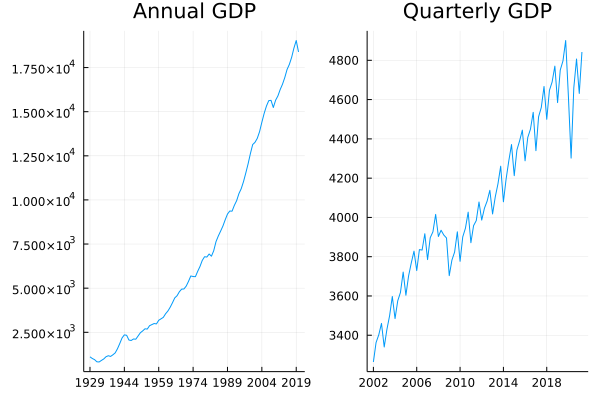
Gross Domestic Product (GDP) is the overall output of a country. It comprises of both goods and services, so both things that are made (goods) and things that are provided (services). You can think of it as countries overall revenue and summarise how well a country is doing. Good if it is increasing, bad if it is decreasing.

AlphaVantage gives the ability to pull both quarterly and annual values.

realgdp = AlphaVantage.real_gdp("annual") |> DataFrame
realgdp[!, :timestamp] = Date.(realgdp[!, :timestamp])

quartgdp = AlphaVantage.real_gdp("quarterly") |> DataFrame
quartgdp[!, :timestamp] = Date.(quartgdp[!, :timestamp]);
a_tks = minimum(realgdp.timestamp):Year(15):maximum(realgdp.timestamp)
a_tkslbl = Dates.format.(a_tks, "yyyy")

q_tks = minimum(quartgdp.timestamp):Year(4):maximum(quartgdp.timestamp)
q_tkslbl = Dates.format.(q_tks, "yyyy")

aGDP = plot(realgdp[!, :timestamp], realgdp[!, :value], label=:none, title="Annual GDP", xticks = (a_tks, a_tkslbl))
qGDP = plot(quartgdp[!, :timestamp], quartgdp[!, :value], label = :none, title = "Quarterly GDP", xticks = (q_tks, q_tkslbl))

plot(aGDP, qGDP)

svg

There are very few periods where GDP has decreased, although it has
recently been because of COVID. The effects of COVID will crop up
quite a bit in this post.

Real GDP per Capita

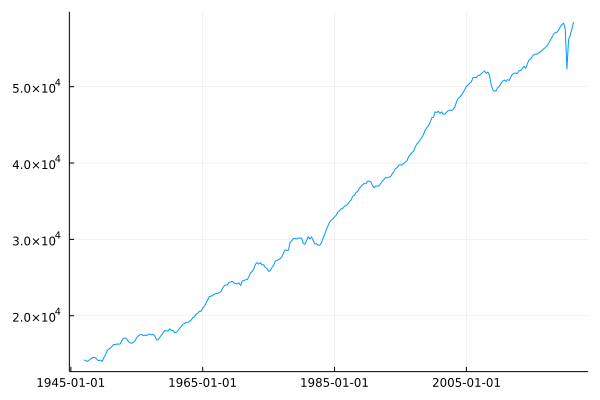
The problem with GDP is that it doesn’t take into account how big the country is. If you have more people in your economy then you can probably generate more money. Likewise, to compare your current GDP with historical values it is probably wise to divide by the population size, which gives a general indication of overal quality of life.

gdpPerCapita = AlphaVantage.real_gdp_per_capita() |> DataFrame
gdpPerCapita[!, :timestamp] = Date.(gdpPerCapita[!, :timestamp])

plot(gdpPerCapita.timestamp, gdpPerCapita.value, label=:none)

svg

Again, another drop because of COVID but getting close to reverting on trend

Treasury Yield

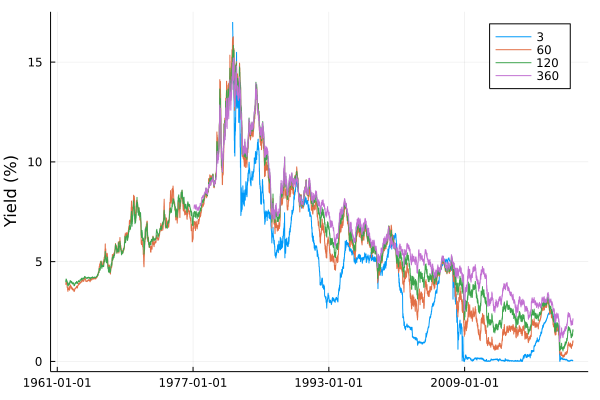
The treasury yield represents what percentage return you get for lending money to the US government. As the US government is continuously issuing new debt you could choose lots of different lengths of times to lend the money, the longer you lend money for, the higher your rate of return because you are taking on more risk. FRED provides four different tenors (lengths of time) and what the average yield on your money would be if you bought on that day.

yields = AlphaVantage.treasury_yield.("daily", ["3month", "5year", "10year", "30year"]);

We take advantage of broadcasting to pull the data of each tenor before joining all the data into one big dataframe.

yields = DataFrame.(yields)

tenor = [3, 5*12, 10*12, 30*12]

allyields = mapreduce(i -> begin 
        yields[i][!, :Tenor] .= tenor[i]
        yields[i][!, :timestamp] = Date.(yields[i][!, :timestamp])
        return yields[i]
        end, vcat, 1:4)

allyields = @subset(allyields, :value .!= ".")
allyields[!, :value] = convert.(Float64, allyields[!, :value]);
plot(allyields[!, :timestamp], allyields[!, :value], group = allyields[!, :Tenor], ylabel = "Yield (%)")

svg

Rates have continuously fallen since the peaks in the 1980s. You can also

What happens though when the short-term yields are higher than the
long-term rates? This is when the yield curve ‘inverts’ and the market
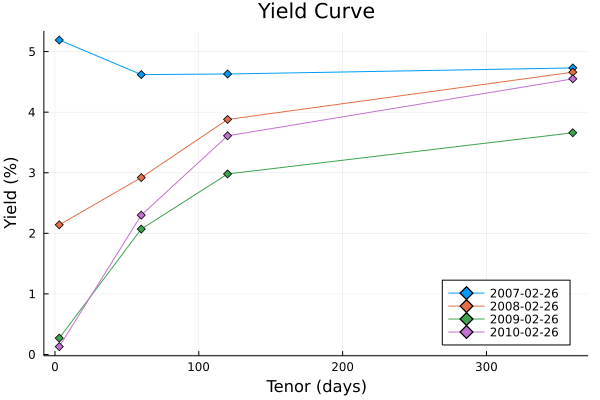
believes the short-term risk is higher than the long-term risk. It is very rare, as we can see above, the blue line has only crossed the highest a few times. When was the last time? It was over the great financial crisis. On the 26th of Feb 2007, this happened with the 3-month rate crossing 5% whilst the 30 year was still less than 5%. The very next day there was a market crash and the stock market has one of the largest falls in history.

creditcrunch = @subset(allyields, in.(:timestamp, [[Date("2007-02-26"), 
                                                    Date("2008-02-26"), 
                                                    Date("2009-02-26"),
                                                    Date("2010-02-26")]]))

plot(creditcrunch.Tenor, 
    creditcrunch.value, 
    group = creditcrunch.timestamp, marker = :d,
    legendposition = :bottomright,
     title = "Yield Curve", xlabel="Tenor (days)", legend=:bottomright, ylabel = "Yield (%)")

svg

This is the yield curve throughout the years on that same day. We can see that usually, it is increasing, but on the day before the market crash it flipped and there was little difference in the other rates. So next time you hear about the yield curve inverting, you can join everyone else in getting nervous.

Federal Fund Rate

This is what is decided by the FOMC on Thursday afternoons.

The rate at which lending institutions lend overnight and is
uncollateralised, which means that don’t have to put down any type of
collateral for the loan. Gives an indication of the overall interest
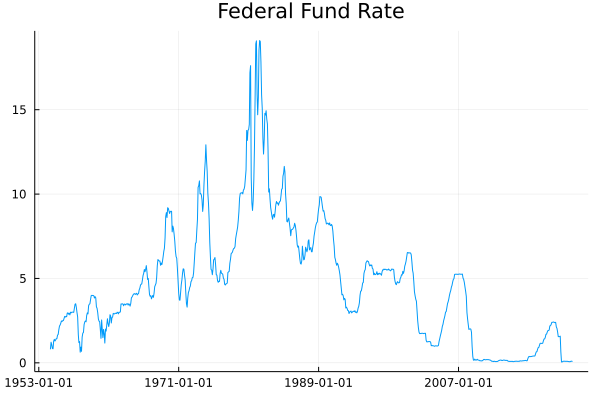
rate in the American economy. Our (the UK) equivalent is the Bank of England rate, or in Europe the ECB right. This is essentially what you could put as \(r\), the risk-free rate in the Black Scholes model.

fedFundRate = AlphaVantage.federal_fund_rate("monthly") |> DataFrame

fedFundRate[!, :timestamp] = Date.(fedFundRate[!, :timestamp])
fedFundRate[!, :value] = convert.(Float64, fedFundRate[!, :value])

plot(fedFundRate.timestamp, fedFundRate.value, label=:none, title="Federal Fund Rate")

svg

Again, much like the treasury rates, it has fallen steadily since the 1980s. You might be wondering what the difference is between this rate and the above treasury interest rates. This Federal Fund Rate is set by the FOMC and represents bank to bank lending, whereas anyone can buy a treasury and receive that return. Essentially, the Federal Fund Rate is the overall driver of the treasuries.

So, why would the FOMC change the Federal Fund Rate? One of the reasons would be down to inflation and how prices are changing for the average person.

Consumer Price Index (CPI)

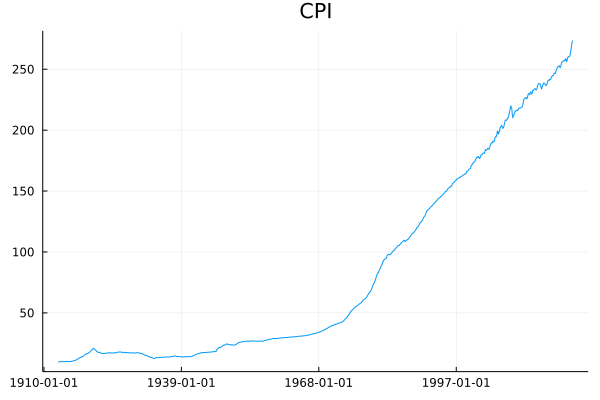
This is the consumer price index and represents the price of goods in a basket and how it has changed over time. This provides some measure of inflation and tells us how prices have changed.

AlphaVantage provides this both on a monthly and a semiannual basis.

cpi = AlphaVantage.cpi("monthly") |> DataFrame

cpi[!, :timestamp] = Date.(cpi[!, :timestamp])
cpi[!, :value] = convert.(Float64, cpi[!, :value])

plot(cpi.timestamp, cpi.value, title = "CPI", label = :none)

svg

Prices have been consistently increasing which indicates inflation, but quoting the CPI value isn’t all that intuitive. Instead, what we need is the change in prices to truly reflect how prices have increased, or decreased.

Inflation and Inflation Expectation

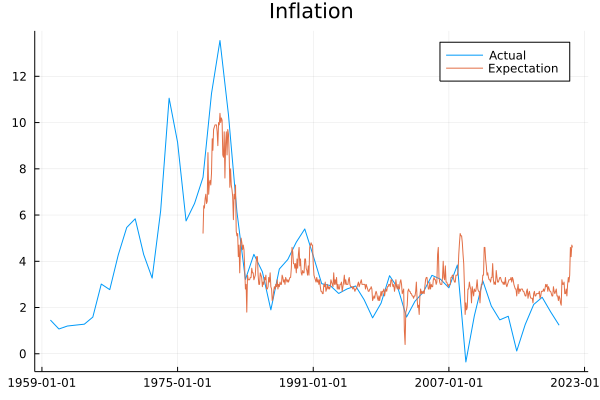
Inflation is the compliment to the above CPI measure and provides a percentage to understand how prices have changed over some time.

Inflation is also funny as people will change their behaviour based on
what they think inflation is, rather than what it actually might
be. This is where the inflation expectation comes in handy. If there
is an expectation of high future inflation people might save more to
prepare for higher prices, or they might spend more now to get in front of higher prices. Likewise, if a bank is trying to price a mortgage, higher inflation in the future would reduce the value of the future repayments, so they would adjust the interest rate accordingly.

AlphaVantage provides both from the FRED Datasource inflation (yearly) and inflation_expectation (monthly).

inflation = AlphaVantage.inflation() |> DataFrame
expInflation = AlphaVantage.inflation_expectation() |> DataFrame

inflation[!, :Label] .= "Actual"
expInflation[!, :Label] .= "Expectation"
inflation = vcat(inflation, expInflation)

inflation[!, :timestamp] = Date.(inflation[!, :timestamp])
inflation[!, :value] = convert.(Float64, inflation[!, :value])

plot(inflation.timestamp, inflation.value, group=inflation.Label, title="Inflation")

svg

Since the GFC inflation expectation has been consistently higher than the actual value of inflation. Expectations have also seen a large increase recently. Inflation is becoming an increasing concern in this current economy.

Consumer Sentiment

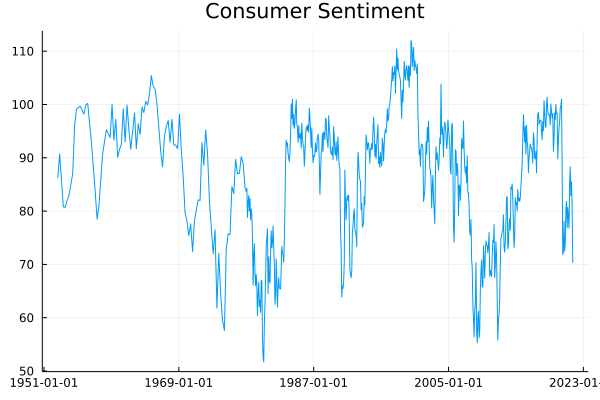
Consumer sentiment comes from a survey of around 500 people in
America. They are asked how they feel about the economy and their general outlook on what is happening. This is then condensed down into a number which we can view as an indicator of how people feel. Again, like the inflation expectation, it can sometimes be more important to focus on people’s thoughts vs everyone’s actions. Take the petrol crisis here in the UK, I imagine everyone believes they are not the ones panic buying, however, if no-one was panic buying, there would still be petrol! Likewise, if everyone is talking negatively about the economy but not changing behaviour, then it could still have a negative overall effect.

sentiment = AlphaVantage.consumer_sentiment() |> DataFrame

sentiment = @subset(sentiment, :value .!= ".")
sentiment.timestamp = Date.(sentiment.timestamp)

plot(sentiment.timestamp, sentiment.value, label=:none, title="Consumer Sentiment")

svg

Consumer sentiment has been consistent throughout the years, with overall sentiment peaking in the 2000s and at its worse in the 1980s. Understandably, COVID had a major effect causing a fall that had been recovering but has since reversed I imagine based on inflation fears.

Retail Sales and Durable Goods

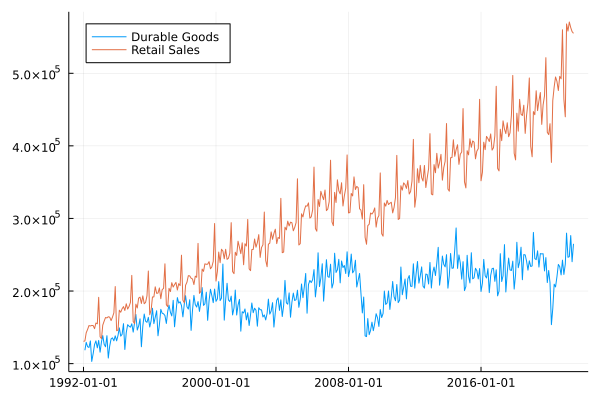
Retail sales and durable goods are all about what is being bought in the economy. Retail sales consist of things like eating at restaurants, buying clothes, and similar goods. Think of it as doing your weekly shop and how that can vary week on week. Sometimes you might be stocking up on cleaning products, other times you might be buying more food. All of those will be counted in the retail sales survey.

Whereas durable goods are your big-ticket purchases, things that you use more than once and have sort of further use. Cars, ovens, and refrigerators are good examples. Something you’ll save up for and buy at a special store rather than at Tesco.

So these two measures can give a good idea of how people are acting in the economy, are the weekly shops decreasing at the same time as the durable sales because people are spending less across the board? Or is there a sudden increase in durable goods as retail sales remain constant because people suddenly have access to more money to buy a car etc. All sorts of ways you can interpret the numbers.

retails = AlphaVantage.retail_sales() |> DataFrame
goods = AlphaVantage.durables() |> DataFrame;
retails[!, :Label] .= "Retail Sales"
goods[!, :Label] .= "Durable Goods"
retails = vcat(retails, goods)
retails.timestamp = Date.(retails.timestamp)

plot(retails.timestamp, retails.value, group=retails.Label, legend=:topleft)

svg

We can see that they are very seasonal, with large variations
throughout the year. Durable goods took a hit over the COVID crisis,
whereas retail sales have continued to increase and regained their highs even after a COVID decrease.

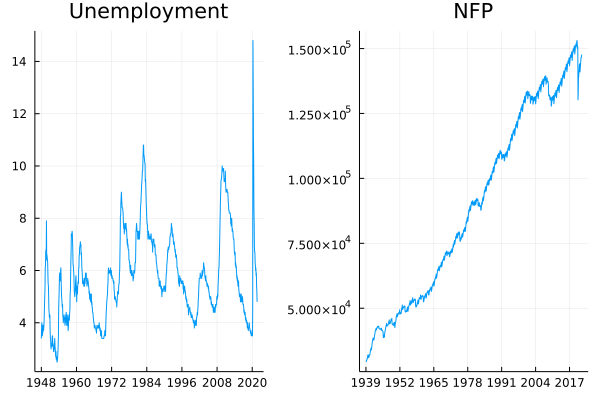
Unemployment and Non-Farm Payrolls

Finally, we have the unemployment figures. This includes the explicit unemployment rate, expressed as a percentage and also the Non-Farm Payrolls (NFP) number. This is the opposite of an unemployment rate and indicates the current number of people employed. Both of these numbers are monthly figures.

unemployment = AlphaVantage.unemployment() |> DataFrame
nfp = AlphaVantage.nonfarm_payroll() |> DataFrame

unemployment[!, :label] .= "Unemployment"
nfp[!, :label] .= "NFP"

nfp.timestamp = Date.(nfp.timestamp)
unemployment.timestamp = Date.(unemployment.timestamp)

utks = minimum(unemployment.timestamp):Year(12):maximum(unemployment.timestamp)
utkslabel = Dates.format.(utks, "yyyy")

ntks = minimum(nfp.timestamp):Year(13):maximum(nfp.timestamp)
ntkslabel = Dates.format.(ntks, "yyyy")

unemPlot = plot(unemployment.timestamp, unemployment.value, title = "Unemployment", label=:none, xticks = (utks, utkslabel))
nfpPlot = plot(nfp.timestamp, nfp.value, title = "NFP", label=:none, xticks = (ntks , ntkslabel))

plot(unemPlot, nfpPlot)

svg

Unemployment went very high briefly after COVID before coming back down, so seems to have adverted that crisis. NFP numbers are also progressing upwards since the COVID disruption.

Conclusion

Well done on making it this far. Quite a few words and also graphs that all appear to look very similar. Hopefully, you’ve learned something new, or you are about to correct me on something by leaving a comment below!