Author Archives: Dean Markwick's Blog -- Julia

Optimising FPL with Julia and JuMP

By: Dean Markwick's Blog -- Julia

Re-posted from: https://dm13450.github.io/2022/08/05/FPL-Optimising.html

One of my talks for JuliaCon 2022 explored the use of JuMP to optimise a Fantasy Premier League (FPL) team. You can watch my presentation here: Optimising Fantasy Football with JuMP and this blog post is an accompaniment and extension to that talk. I’ve used FPL Review free expected points model and their tools to generate the team images, go check them out.


Enjoy these types of posts? Then you should sign up for my newsletter. It’s a short monthly recap of anything and everything I’ve found interesting recently plus
any posts I’ve written. So sign up and stay informed!


Now last season was my first time playing this game. I started with an analytical approach but didn’t write the team optimising routines until later in the season, by which time it was too late to make too much of a difference. I finished at 353k, so not too bad for a first attempt, but quite a way off from that 100k “good player” milestone. I won’t be starting a YouTube channel for FPL anytime soon.

Still, a new season awaits, and with more knowledge, a hand-crafted optimiser, and some expected points, let’s see if I can do any better.

A Quick Overview of FPL

FPL is a fantasy football game where you need to choose a team of 15 players that consists of:

  • 2 goalkeepers
  • 5 defenders
  • 5 midfielders
  • 3 forwards

Then from these 15 players, you chose a team of 11 each week that must conform to:

  • 1 goalkeeper
  • Between 3 and 5 defenders
  • Between 2 and 5 midfielders
  • Between 1 and 3 forwards

You have a budget of £100 million and you can have at most 3 players from a given team. So no more than 3 Liverpool players etc.

You then score points based on how many goals a player scores, how many assists, and other ways. Each week you can transfer one player out of your squad of 15 for a new player.

That’s the long and short of it, you want to score the most points each week and be forwarding looking to ensure you are set for getting the most points.

A Quick Overview of JuMP

JuMP is an optimisation library for Julia. You write out your problem in the JuMP language, supply an optimiser and let it work its magic. For a detailed explanation of how you can solve the FPL problem in JuMP I recommend you watch my JuliaCon talk here:

But in short, we want to maximise the number of points based on the above constraints while sticking to the overall budget. The code is easy to interpret and there is just the odd bit of code massage to make it do what we want.

All my optimising functions are in the below file which is will be hosted on Github shortly so you can keep up to date with my tweaks.

include("team_optim_functions.jl")

FPL Review Expected Points

To start, we need some indication of each player’s ability. This is an expected points model and will take into account the player’s position, form, and overall ability to score FPL points. Rather than build my expected models I’m going to be using FPL Reviews numbers. They are a very popular site for this type of data and the amount of time I would have to invest to come up with a better model would be not worth the effort. Plus, I feel that the amount of variance in FPL points means that it’s a tough job anyway, it’s better to crowdsource the effort and use other results.

That being said, once you’ve set your team, there might be some edge in interpreting the statistics. But that’s a problem for another day.

FPL Review is nice enough to make their free model as a downloadable CSV so you can head there, download the file and pull it into Julia.

df = CSV.read("fplreview_1658563959", DataFrame)

To verify the numbers they have produced we can look and the total number of points each team is expected to score over the 5 game weeks they provide.

sort(@combine(groupby(df, :Team), 
       :TotalPoints_1 = sum(cols(Symbol("1_Pts"))),
       :TotalPoints_2 = sum(cols(Symbol("2_Pts"))),
       :TotalPoints_3 = sum(cols(Symbol("3_Pts"))),
       :TotalPoints_4 = sum(cols(Symbol("4_Pts"))),
       :TotalPoints_5 = sum(cols(Symbol("5_Pts"))) 
        ), :TotalPoints_5, rev=true)

20 rows × 3 columns

Team TotalPoints_1_2 TotalPointsAll
String15 Float64 Float64
1 Man City 117.63 296.58
2 Liverpool 115.52 284.36
3 Chelsea 94.37 243.1
4 Arsenal 90.38 241.0
5 Spurs 90.85 237.81
6 Man Utd 92.77 215.76
7 Brighton 79.35 205.93
8 Wolves 87.02 203.23
9 Aston Villa 88.65 202.32
10 Brentford 74.75 199.51
11 Leicester 77.99 197.34
12 West Ham 76.19 197.33
13 Leeds 80.61 194.82
14 Newcastle 89.81 190.98
15 Everton 68.46 189.73
16 Crystal Palace 64.95 180.66
17 Southampton 72.23 176.97
18 Fulham 63.02 172.57
19 Bournemouth 62.31 161.9
20 Nott'm Forest 69.65 161.05

So looks pretty sensible, Man City and Liverpool up the top, the newly promoted teams at the bottom. So looks like the FPL Review knows what they are doing.

With that done, let’s move on to optimising. I have to take the dataframe and prepare the inputs for my optimising functions.

expPoints1 = df[!, "1_Pts"]
expPoints2 = df[!, "2_Pts"]
expPoints3 = df[!, "3_Pts"]
expPoints4 = df[!, "4_Pts"]
expPoints5 = df[!, "5_Pts"]

cost = df.BV*10
position = df.Pos
team = df.Team

#currentSquad = rawData.Squad

posInt = recode(position, "M" => 3, "G" => 1, "F" => 4, "D" => 2)
df[!, "PosInt"] = posInt
df[!, "TotalExpPoints"] = expPoints1 + expPoints2 + expPoints3 + expPoints4 + expPoints5
teamDict = Dict(zip(sort(unique(team)), 1:20))
teamInt = get.([teamDict], team, NaN);

I have to multiply the buy values (BV) by 10 to get the values in the same units as my optimising code.

The Set and Forget Team

In this scenario, we add up all the expected points for the five game weeks and run the optimiser to select the highest scoring team over the 5 weeks. No transfers and we set the bench-weighting to 0.5.

# Best set and forget
modelF, resF = squad_selector(expPoints1 + expPoints2 + expPoints3 + expPoints4 + expPoints5, 
    cost, posInt, teamInt, 0.5, false)

Set and forget

It’s a pretty strong-looking team. Big at the back with all the premium defenders which is a slight danger as one conceded goal by either Liverpool or Man City could spell disaster for your rank. Plus no Salah is a bold move.

To add some human input, we can look at the other £5 million defenders to assess who to swap Walker with.

first(sort(@subset(df[!, [:Name, :Team, :Pos, :BV, :TotalExpPoints]], :BV .<= 5.0, :Pos .== "D", :Team .!= "Arsenal"), 
     :TotalExpPoints, rev=true), 5)
Name Team Pos BV TotalExpPoints
String31 String15 String1 Float64 Float64
1 Walker Man City D 5.0 16.53
2 Digne Aston Villa D 5.0 15.25
3 Doherty Spurs D 5.0 15.18
4 Romero Spurs D 5.0 15.03
5 Dunk Brighton D 4.5 14.74

So Doherty or Digne seems like a decent shout. This just goes to show though that you can’t blindly follow the optimiser and you can add some alpha by tweaking as you see fit.

Update After Two Game Weeks

What about if we now allow transfers? We will optimise for the first two game weeks and then see how many transfers are needed afterward to maximise the number of points.

model, res1 = squad_selector(expPoints1 + expPoints2, cost, posInt, teamInt, 0.5)
currentSquad = zeros(nrow(df))
currentSquad[res1[1]["Squad"] .> 0.5] .= 1

res = Array{Dict{String, Any}}(undef, length(0:5))

expPoints = zeros(length(0:5))

for (i, t) in enumerate(0:5)
    model, res3 = transfer_test(expPoints3 + expPoints4 + expPoints5, cost, posInt, teamInt, 0.5, currentSquad, t, true)
    res[i] = res3[1]
    expPoints[i] = res3[1]["ExpPoints"]
end

Checking the expected points of the teams and adjusting for any transfers after the first two free ones gives us:

expPoints .- [0,0,0,1,2,3]*4
6-element Vector{Float64}:
 162.385
 164.295
 167.987
 165.767
 164.084
 161.726

So making two transfers improve our score by 5 points, so seems worth it. If we go beyond two transfers, then we will pay a 4 point penalty, so it seems worth

Update after 2 GWs

So Botman and Watkins are switched out for Gabriel and Toney. Again, not a bad-looking team, and making these transfers improves the expected points by 5.

Shortcomings

The FPL community can be split into two camps, those that think data help and those that think watching the games and the players help. So what are the major issues with these teams?

Firstly, Spurs have a glaring omission from any of the results. Given their strong finish to the season and high expectations coming into the season this is potentially a problem.

Things can change very quickly. After the first week, we will have some information on how different players are looking and by that time these teams could be very wrong with little flexibility to change them to adjust to the new information. I am reminded of last year where Luke Shaw was a hot pick in lots of initial teams and look how that turned out.

How off-meta these teams are. It’s hard to judge what the current template team is going to be at these early stages in the pre-season, but if you aren’t accounting for who other people will be owning you can find yourself being left behind all for the sake of being contrarian. For example, this team has put lots of money into goalkeepers when you could potentially spend that elsewhere.

Some of the players in the teams listed might not get that many minutes. Especially for the cheaper players, I could be selecting fringe players rather than the reliable starters for the lower teams. Again, similar to the last point, there is are ‘enablers’ that the wider community believes to be the most reliable at the lower price points.

And finally variance. FPL is a game of variance. Haaland is projected to score 7 points in his first match, which is the equivalent to playing the full 90 minutes and a goal/assist. He could quite easily only score 1 point after not starting and coming on for the last 10 minutes and you are then panicking about the future game weeks. Relying on these optimised teams can sometimes mean you forget about the variance and how easy it is for a player to not get close to the number of points they are predicted.

Conclusion and What Next

Overall using the optimiser helps reduce the manual process of working out if there is a better player at each price point. Instead, you can use it to inspire some teams and build on them from there adjusting accordingly. There are still some tweaks that I can build into the optimiser, making sure it doesn’t overload the defence with players from the same team and see if I can simulate week-by-week what the optimal transfer if there is one, should be.

I also want to try and make this a bit more interactive so I’m less reliant on the notebooks and have something more production-ready that other people can play with.

Also given we get a free wildcard over Christmas I can do a mid-season review and essentially start again! So check back here in a few months time.

Modelling Microstructure Noise Using Hawkes Processes

By: Dean Markwick's Blog -- Julia

Re-posted from: https://dm13450.github.io/2022/05/11/modelling-microstructure-noise-using-hawkes-processes.html

Microstructure noise is where the
price we observe isn’t the ‘true’ price of the underlying asset. The
observed price doesn’t diffuse as we assume in your typical
derivative pricing models, but instead, we see
some quirks in the underlying data. For example, there is an explosion of
realised variance as we use finer and finer time subsampling periods.

Last month I wrote about
calculating realised volatility
and now I’ll be taking it a step further. I’ll show you how this
microstructure noise manifests itself in futures trade data and how I
use a Hawkes process to come up with a price formation model that fits
the actual data.

The original work was all done in
Modeling microstructure noise with mutually exciting point processes. I’ll
be explaining the maths behind it, showing you how to fit the models
in Julia and hopefully educating you on this high-frequency finance
topic.


Enjoy these types of posts? Then you should sign up for my newsletter. It’s a short monthly recap of anything and everything I’ve found interesting recently plus
any posts I’ve written. So sign up and stay informed!


A Bit of Background

My Ph.D. was all about using Hawkes processes to model when things
happen and how these things are self-exciting. You may have read my
work on Hawkes process before, either through my Julia package
HawkesProcess.jl,
or examples of me
using Hawkes processes to model terror attack data or just
how to calculate the deviance information criteria of a Hawkes process. The
real hardcore might have read my Ph.D. thesis.

But how can we use a Hawkes process to model the price of some
financial asset? There is a vast amount of research and work about how Hawkes
processes can be used in price formation processes for financial
instruments and high-frequency types of problems and this post will
act as a primer to anyone interested in using Hawkes processes for
such problems.

The High-Frequency Problem

At short timescales, a price moves randomly rather than with any
trend. Amazon stock might trade thousands of times in a minute but
that’s supply and demand changing rather than people thinking
Amazon’s future is going to change from one minute to the next. So we need
a different way of thinking about how prices move at short timescales
compared to longer timescales.

We can build nice mathematical models guessing how a price might move;
it might move like a random walk or maybe a random walk with jumps in
the price now and then. But, no matter what model we use, it must
match up with what is observed in the real world. One of
these observations is a phenomenon called ‘microstructure noise’ and we
only see it in high-frequency data.

Microstructure noise is a catch-all term for different things happening
in the market. This includes, bid-ask bounce, people buy and sell at
two different prices, so looks like the price is moving, but in
reality, just oscillating around the mid-price. The discreteness of
prices at these time scales also plays a part. There is a minimum
increment level that prices change buy and this can have real effects
on how prices move. Exchanges need to pay attention to their tick
sizes, as it can help or hinder liquidity if they are set
incorrectly. This then has a real effect that we can observe when we
calculate a realised volatility.

Realised volatility is measuring how much the price moved in a
period. These high-frequency effects are going to give the impression
of more movement than what the ‘true’ volatility is. So we end up
seeing our measurement of volatility explode as the time scale we use
gets smaller and smaller. Calculating the volatility using 1-second
intervals gives a larger value than if we used 1 minute
intervals. This means that our volatility estimation depends on the
time scale used, so what is the ‘real’ volatility?

We aren’t interested in working out what the real volatility
is. Instead, we want to build a model for a price that displays this
volatility scaling effect.

The Hawkes Process Model for a Price

How do we use Hawkes processes to build a model that will have this microstructure noise?

Lets call the price at time \(t\), \(X(t)\) and guess that it moves by
summing up the positive jumps \(N_1(t)\) and negative jumps \(N_2(t)\)
that also happen at time \(t\).

\[X(t) = N_1(t) – N_2(t)\]

When do these jumps occur? How are these jumps distributed? This is
where we use the Hawkes process.

A Hawkes process is a self-exciting point process. When something
happens it increases the probability of another event happening. This
is the self-exciting behaviour we want. Every time there is a positive
jump, there is an increase in the probability of a negative jump
happening and, likewise, when there is a negative jump there is a greater
probability of a positive jump.

Hawkes demonstration
Each jump causes the probability of the other jump happening like in
this picture

When someone buys and pushes the price higher by removing that
liquidity, it’s more likely that someone will now sell at the new
higher price introducing some downward pressure. This is mean
reversion
where prices move higher and then outside forces
push it lower and vice versa.

With Hawkes processes there are three parameters:

  • The background rate or when the jumps randomly occur. This is common to both positive and negative jumps.
  • \(\kappa\) – the ‘force’ that pushes and increases the probability of the other jump happening.
  • The kernel \(g(t)\) dictates how long the force lasts. This is an exponential decay with parameter \(\beta\).

Hawkes parameters demonstration

We will fit a Hawkes process to a price series
to infer the 3 parameters that describe how the jumps behave. This
model will hopefully replicate the ‘microstructure noise’ effects we
see in practise.

Futures Trade Data

In the early days of my Ph.D., I answered an email that was advertising
for early grad students to do some prop trading. As part of the
interview, they gave me some data and asked me to write a simple
moving cross-over strategy. I failed miserably as I never
heard back from them. But I did get some nice data, which now that I’m
older and wiser, recognise as reported trades from a futures
exchange. This is the data we will be using today to calculate the
mode and luckily it’s similar to the data they use in the original
paper.

using CSV
using DataFrames, DataFramesMeta
using Plots
using Dates
using Statistics

All the usual packages when working with data in Julia.

rawData = CSV.read("fgbl__BNH14_clean.csv", DataFrame, header=false)
rename!(rawData, [:UnixTime, :Price, :Volume, :DateTime]);
first(rawData, 5)

5 rows × 4 columns

UnixTime Price Volume DateTime
Int64 Float64 Int64 String
1 1378908794086 136.9 1 09/11/201315:13:14.086
2 1378974046854 137.25 5 09/12/201309:20:46.854
3 1378990110771 137.55 1 09/12/201313:48:30.771
4 1378998136894 137.7 1 09/12/201316:02:16.894
5 1378999992561 137.55 1 09/12/201316:33:12.561

To clean the data we convert the Unix timestamp to an actual DateTime object and pull out the hour and the date of the trade.

cleanData = @transform(rawData, DateTimeClean = DateTime.(:DateTime, dateformat"mm/dd/yyyyHH:MM:SS.sss"), 
                                DateTimeUnix = unix2datetime.(:UnixTime ./ 1000) )
cleanData = @transform(cleanData, Date = Date.(:DateTimeUnix),
                                  Hour = hour.(:DateTimeUnix));
first(cleanData[:,[:UnixTime, :DateTimeClean, :DateTimeUnix]], 5)

5 rows × 3 columns

UnixTime DateTimeClean DateTimeUnix
Int64 DateTime DateTime
1 1378908794086 2013-09-11T15:13:14.086 2013-09-11T14:13:14.086
2 1378974046854 2013-09-12T09:20:46.854 2013-09-12T08:20:46.854
3 1378990110771 2013-09-12T13:48:30.771 2013-09-12T12:48:30.771
4 1378998136894 2013-09-12T16:02:16.894 2013-09-12T15:02:16.894
5 1378999992561 2013-09-12T16:33:12.561 2013-09-12T15:33:12.561

To get an idea of the data we are looking at I aggregate the total
number of trades and total volume of the trades over each day and plot
that as a time series.

dayData = groupby(cleanData, :Date)
dailyVolumes = @combine(dayData, TotalVolume = sum(:Volume),
                                  TotalTrades = length(:Volume),
                                  FirstTradeTime = minimum(:DateTimeUnix))

xticks = minimum(dailyVolumes.Date):Month(2):maximum(dailyVolumes.Date)
xticks_labels = Dates.format.(xticks, "yyyy-mm")

p1 = plot(dailyVolumes.Date, dailyVolumes.TotalVolume, seriestype=:scatter, label="Daily Volume", legend = :topleft, xticks = (xticks, xticks_labels))
p2 = plot(dailyVolumes.Date, dailyVolumes.TotalTrades, seriestype=:scatter, label= "Daily Number of Trades", legend = :topleft, xticks = (xticks, xticks_labels))
plot(p1, p2, fmt=:png)

Daily futures volume

It takes a while for the trading to take off in this future
contract. This is where it slowly becomes the front-month contract and
then is the most active.

Also, because trading doesn’t cross over the daylight saving dates, we don’t have to worry about timezones. Always a bonus!

What about if we look at what hour is the most active?

hourDataG = groupby(cleanData, [:Date, :Hour])
hourDataS = @combine(hourDataG, TotalHourVolume = sum(:Volume),
                                  TotalHourTrades = length(:Volume))
hourDataS = leftjoin(hourDataS, dailyVolumes, on=:Date)

hourDataS = @transform(hourDataS, FracVolume = :TotalHourVolume ./ :TotalVolume)

hourDataG = groupby(hourDataS, :Hour)
hourDataS = @combine(hourDataG, MeanFracVolume = mean(:FracVolume),
                                 MedianFracVolume = median(:FracVolume))
sort!(hourDataS, :Hour)
bar(hourDataS.Hour, hourDataS.MedianFracVolume * 100, title = "Fraction of Daily Volume", label=:none, fmt=:png)

Hourly volume fraction of a futures contract.

Early in the morning (just after the exchange opens) and late afternoon (when the Americans start trading) is where there is the most activity.

For our analysis, we are going to be focused on the hours 14, 15, 16
to make sure that we have the most active period and this is the same
as what the original paper did, took a subset of the day.

How to Calculate the Volatility Signature

Let \(X(t)\) be the price of the future at time \(t\). The signature is the quadratic variation over a window of \([0, T]\), which is more commonly known as the realised volatility:

\[C(\tau) = \frac{1}{T} \Sigma _{n=0} ^{T/\tau} \mid X((n+1) \tau) – X(n \tau) \mid ^2 .\]

\(\tau\) is our sampling frequency, say every minute, etc.

To calculate the volatility across the trades we have to pay particular attention to the fact that these trades are irregularly spaced, so we need to fill forward the price for every \(t\) value.

function get_price(t::Number, prices, times)
    ind = min(searchsortedfirst(times, t), length(times))
    sp = ind == 0 ? 0 : prices[ind]
end

function get_price(t::Array{<:Number}, prices, times)
    res = Array{Float64}(undef, length(t))
    for i in eachindex(t)
        res[i] = get_price(t[i], prices, times)
    end
    res
end

Our get_price function here will return the last price before time \(t\).

To calculate the signature value we chose a \(\tau\) value, generate
the indexes between 0 and \(T\) using a \(\tau\) step size. Pull the
price at those times and calculate the quadratic variation. Again, we
add a method to calculate the signature for different \(\tau\)’s.

function signature(tau::Number, x, t, maxT)
    inds = collect(0:tau:maxT)
    prices = get_price(inds, x, t)
    
    rets = prices[2:end] .- prices[1:(end-1)]
    (1/maxT) * sum(abs.(rets) .^ 2)
end

function signature(tau::Array{<:Number}, x, t, maxT)
   res = Array{Float64}(undef, length(tau))
    for i in eachindex(res)
        res[i] = signature(tau[i], x, t, maxT)
    end
    res
end

Now let’s apply this to the data. We are only interested when the
future was actively trading and in the hours between 14:00 and 16:00.
We convert the times into seconds since 15:59:59 and calculate the
signature for all the dates, before taking the final average.

We are taking the log price of the last trade to represent our actual
\(X(t)\). We just look at 2014 dates too as that is when the future is
active.

cleanData2014 = @subset(cleanData, :Date .>= Date("2014-01-01"))

uniqueDates = unique(cleanData2014.Date)

eventList = Array{Array{Float64}}(undef, length(uniqueDates))
priceList = Array{Array{Float64}}(undef, length(uniqueDates))

signatureList = Array{Array{Float64}}(undef, length(uniqueDates))
avgSignature = zeros(length(1:1:200))

for (i, dt) in enumerate(uniqueDates)
   
    subData = @subset(cleanData2014, :Date .== dt, :Hour .<= 16, :Hour .>= 14)
    eventList[i] = getfield.(subData.DateTimeClean .- (DateTime(dt) + Hour(14) - Second(1)), :value) ./ 1e3
    priceList[i] = subData.Price
    
    signatureList[i] = signature(collect(1:1:200), log.(priceList[i]), eventList[i] .+ rand(length(eventList[i])), 3*60*60 + 1)
    avgSignature .+= signatureList[i]
end

avgSignature = avgSignature ./ length(eventList);

To plot the signature we take the average across all the dates and
then normalised by the \(\tau = 60\) value.

plot(avgSignature / avgSignature[60], seriestype=:scatter, 
    label = "Average Signature", xlabel = "Tau", ylabel = "Realised Volatility (normalised)", fmt=:png)

Realised Volatility Signature

This is an interesting plot with big consequences in high-frequency finance.

This explosion in realised volatility at small timescales (\(\tau
\rightarrow 0\)) comes from microstructure noise. If prices evolved
as Brownian motion, the above plot would be flat for all timescales so
the above result contradicts lots of classical finance assumptions.

Practically, this is a pain if we are trying to measure the currently
volatility, it depends on the timescale we are looking at, there isn’t
one true volatility using the normal methods. Instead, we need to be
aware of these microstructure effects as we use a finer \(\tau\) over
which to calculate the volatility.

This is where the Hawkes model comes in. If we assume the price,
\(X(t)\) moves as stated in Equation (), can we produce a similar signature plot?

The Theoretical Signature Under a Hawkes Process

After doing some maths (you can read the paper for the full details), we arrive at the following equation for the theoretical signature.

If both \(N_1\) and \(N_2\) are realisations of Hawkes processes with
parameters \(\mu, \kappa\) and \(g(t) = \beta \exp (-\beta t)\) then their intensity can be written as

\[C(\tau) = \Lambda \left( k ^2 + (1 – k ^2) \frac{1 – e ^{-\gamma \tau}}{ \gamma \tau} \right),\]

where

\(\Lambda = \frac{2 \mu}{1 – \kappa}, k = \frac{1}{1 + \kappa}, \gamma = \beta (\kappa + 1)\).

These are from the paper and adjusted based on my parameterisation of the Hawkes process. This gives us our theo_signature function.

function theo_signature(tau, bg, kappa, kern)
    Lambda = 2*bg/(1-kappa)
    k = 1/(1 + kappa)
    gamma = kern*(kappa + 1)
    @. Lambda * (k^2 + (1-k^2) * (1 - exp(-gamma * tau)) / (gamma*tau))
end

Calibrating the Hawkes Process Model

We now move on to fitting the Hawkes process to the data. I’ll be using
a new method that takes a different approach to my package HawkesProcesses.jl.

We have a theoretical volatility signature from a Hawkes process
(theo_signature) and the above plot of what the actual signature
looks like it. Therefore, it is just a case of optimising over a loss
function to find the best fitting parameters. I’ll use root mean
square error as my loss function and simply use the Optim.jl package
to perform the minimisation.

signatureRMSE(x, sig) = sqrt(
    mean(
        (sig .- theo_signature(1:200, x[1], x[2], x[3])).^2
        )
)

using Optim
optRes = optimize(x->signatureRMSE(x, avgSignature/avgSignature[10]), rand(3))

paramEst = Optim.minimizer(optRes)
3-element Vector{Float64}:
 0.24402236592012655
 0.7417867072115396
 0.19569169443936185

These are the three parameters of the Hawkes process which appear
sensible.

plot(avgSignature, label="Observed", seriestype=:scatter)
plot!(avgSignature[10]*theo_signature(1:200, paramEst[1], paramEst[2], paramEst[3]), label="Theoretical", lw=3, xlabel = "Tau", ylabel = "Realised Variance", fmt=:png)

Theoretical vs Observed Signature

So a nice match-up between the theoretical signature and what we
observed. This gives some weight to the Hawkes model as a
representation of the price process.

Interpreting the Hawkes Parameters

Our \(\kappa\) value of 0.75 shows there is a large amount of
excitement with each price jump. a \(\beta\) value of 0.2 shows that this
mean reversion lasts for about 5 seconds. So if we see an uptick in
the price, we expect a downtick with a rough half-life of five
seconds. The opposite is also true, a downtick likely leads to an
uptick 5 seconds later.

Conclusion

Microstructure noise shows up when we start calculating volatility on
a high-frequency timescale. We have shown that it is a real effect
using some futures data and then built a Hawkes model to try and
reproduce this effect. We managed to get the right shape of the
volatility signature and found that was quite a bit of mean reversion
between the up and downticks that lasted around 5 seconds.

What’s next? In a future post, I will introduce another dimension and
show and there can also be correlation across assets under a similar
method to reproduce another high-frequency phenomenon. This will be
based on the same paper and show you how we can start looking at the
correlation between two assets and how that changes at high-frequency
time scales.

How to Calculate Realised Volatility

By: Dean Markwick's Blog -- Julia

Re-posted from: https://dm13450.github.io/2022/04/28/Volatility-methods.html

Volatility measures the scales of price changes and is an easy way to
describe how busy markets are. High volatility means there are periods
of large price changes and vice versa, low volatility means periods of
small changes. In this post, I’ll show you how to measure realised
volatility and demonstrate how it can be used. If you just want a live
view of crypto volatility, take a look at
cryptoliquiditymetrics where I have added in a new card with the volatility over the last 24 hours.


Enjoy these types of posts? Then you should sign up for my newsletter. It’s a short monthly recap of anything and everything I’ve found interesting recently plus
any posts I’ve written. So sign up and stay informed!


To start with we will be looking at daily data. Using my
CoinbasePro.jl package in a Julia we can get the last 300 days OHLC
prices.

I’m running Julia 1.7 and all the packages were updated using
Pkg.update() at the time of this post.

using CoinbasePro
using Dates
using Plots, StatsPlots
using DataFrames, DataFramesMeta
using RollingFunctions

From my CoinbasePro.jl
package, we can pull in the daily candles of Bitcoin. 86400 is the
frequency for daily data. Coinbase restrict you to just 300 data
points

dailydata = CoinbasePro.candles("BTC-USD", now()-Day(300), now(), 86400);
sort!(dailydata, :time)
dailydata = @transform(dailydata, :time = Date.(:time))
first(dailydata, 4)

4 rows × 7 columns

close high low open unix_time volume time
Float64 Float64 Float64 Float64 Int64 Float64 Date
1 50978.6 51459.0 48909.8 48909.8 1615075200 13965.2 2021-03-07
2 52415.2 52425.0 49328.6 50976.2 1615161600 18856.3 2021-03-08
3 54916.4 54936.0 51845.0 52413.2 1615248000 21177.1 2021-03-09
4 55890.7 57402.1 53025.0 54921.6 1615334400 28326.1 2021-03-10

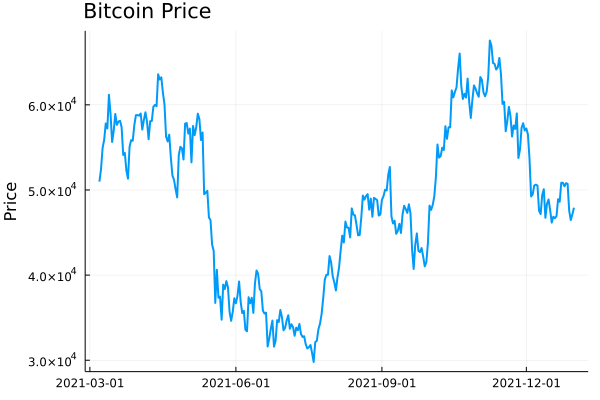
Plotting this gives you the typical price path. Now realised
volatility is a measure of how varied this price was
over time. Was it stable or were there wild swings?

plot(dailydata.time, dailydata.close, label = :none, 
     ylabel = "Price", title = "Bitcoin Price", titleloc = :left, linewidth = 2)

Bitcoin Daily Prices

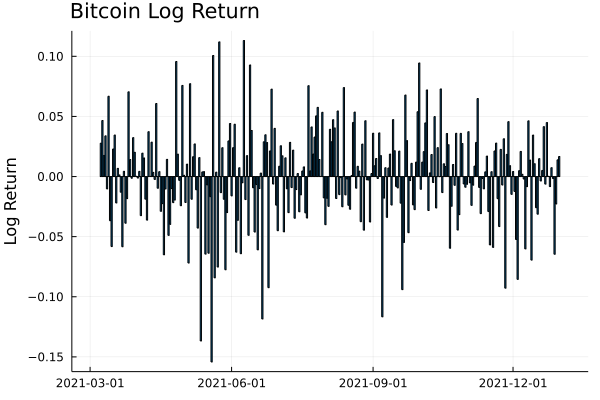
To calculate this variation, we need to add in the log-returns.

dailydata = @transform(dailydata, :returns = [NaN; diff(log.(:close))]);
bar(dailydata.time[2:end], dailydata.returns[2:end], 
    label=:none, 
    ylabel = "Log Return", title = "Bitcoin Log Return", titleloc = :left)

Bitcoin Daily Log Returns

We can start by looking at this from a distribution perspective. If we
assume the log-returns (\(r\)) are from a normal distribution, with
zero mean, the standard deviation of this distribution is the equivalent to the
volatility

\[r \sim N(0, \sigma ^2),\]

so \(\sigma\) is how we will refer to volatility. From this, you can
see how high volatility leads to wide variations in prices. Each
log-return sample has a wider range of values that it could be.

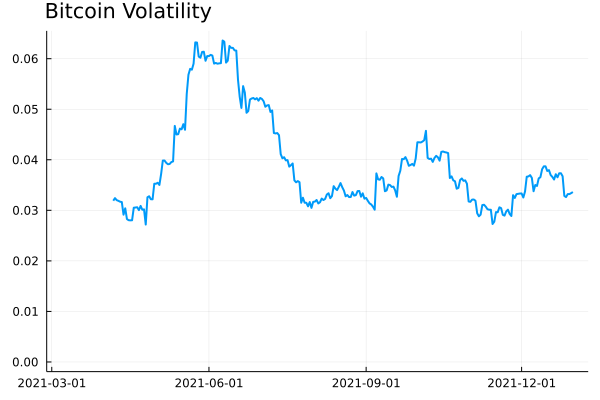
So by taking the running standard deviation of the log-returns we can
estimate the volatility and how it changes over time. Using the RollingFunctions.jl package this is a one-liner.

dailydata = @transform(dailydata, :volatility = runstd(:returns, 30))
plot(dailydata.time, dailydata.volatility, title = "Bitcoin Volatility", titleloc = :left, label=:none, linewidth = 2)

Bitcoin Daily Volatility

There was high volatility over June this year as the price of Bitcoin
crashed. It’s been fairly stable since then, hovering around 0.03
and 0.04. How does this compare though to the S&P 500 as a general
indicator of the stop market? We know Bitcoin is more volatile than
the stock market, but how much more?

I’ll load up the AlphaVantage.jl package to pull the daily prices of
the SPY ETF and repeat the calculation; adding the log-returns and
taking the rolling standard deviation.

using AlphaVantage, CSV

stockPrices = AlphaVantage.time_series_daily("SPY", datatype="csv", outputsize="full", parser = x -> CSV.File(IOBuffer(x.body))) |> DataFrame
sort!(stockPrices, :timestamp)
stockPrices = @subset(stockPrices, :timestamp .>= minimum(dailydata.time));

Again, add in the log-returns and calculate the rolling standard
deviation to estimate the volatility.

stockPrices = @transform(stockPrices, :returns = [NaN; diff(log.(:close))])
stockPrices = @transform(stockPrices, :volatility = runstd(:returns, 30));

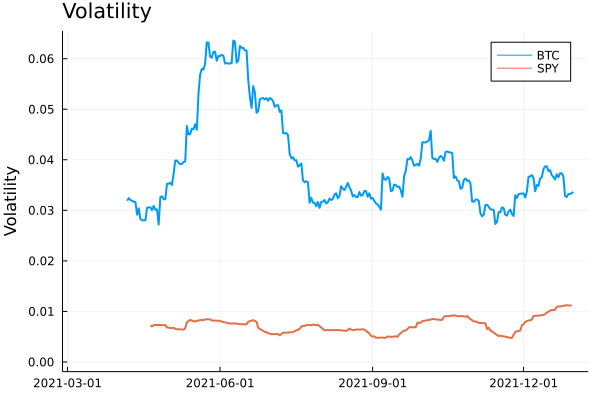
volPlot = plot(dailydata.time, dailydata.volatility, label="BTC", 
               ylabel = "Volatility", title = "Volatility", titleloc = :left, linewidth = 2)
volPlot = plot!(volPlot, stockPrices.timestamp, stockPrices.volatility, label = "SPY", linewidth = 2)

Bitcoin and SPY volatility

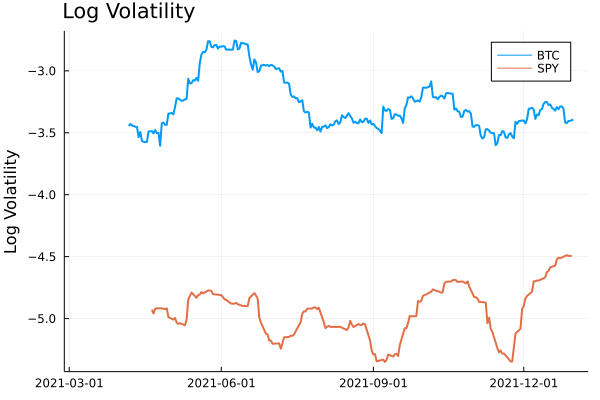
As expected, Bitcoin volatility is much higher. Let’s take the log of
the volatility to look zoom in on the detail.

volPlot = plot(dailydata.time, log.(dailydata.volatility), 
               label="BTC", ylabel = "Log Volatility", title = "Log Volatility", 
               titleloc = :left, linewidth = 2)
volPlot = plot!(volPlot, stockPrices.timestamp, log.(stockPrices.volatility), label = "SPY", linewidth = 2)

Bitcoin and SPY Log Volatility

Interestingly the SPY has had a resurgence in volatility as we move
towards the end of the year. One thing to point out though is the
slight difference in look back periods for the two products. Bitcoin
does not observe weekends or holidays, so 30 rows previously are
always 30 days, but for SPY this is the case as there are weekends and
trading holidays. In this illustrative example, it isn’t too much of an
issue, but if you were to take it further and perhaps look at the
correlation between the volatilities, this is something you would need
to account for.

A Higher Frequency Volatility

So far it has all been on daily observations, your classic dataset to
practise on. But I am always banging on about high-frequency finance,
so let’s look at more frequent data and understand how the volatility
looks at finer timescales.

This time we will pull the 5-minute candle bar data of both Bitcoin
and SPY and repeat the calculation.

  1. Calculate the log-returns of the close to close bars
  2. Calculate the rolling standard deviation by looking back 20 rows.
minuteData_spy = AlphaVantage.time_series_intraday_extended("SPY", "5min", "year1month1", parser = x -> CSV.File(IOBuffer(x.body))) |> DataFrame
minuteData_spy = @transform(minuteData_spy, :time = DateTime.(:time, dateformat"yyyy-mm-dd HH:MM:SS"))
minuteData_btc = CoinbasePro.candles("BTC-USD", maximum(minuteData_spy.time)-Day(1), maximum(minuteData_spy.time),300);

combData = leftjoin(minuteData_spy[!, [:time, :close]], minuteData_btc[!, [:time, :close]], on=[:time], makeunique=true)
rename!(combData, ["time", "spy", "btc"])
combData = combData[2:end, :]
dropmissing!(combData)
sort!(combData, :time)
first(combData, 3)

3 rows × 3 columns

time spy btc
DateTime Float64 Float64
1 2021-12-29T20:00:00 477.05 47163.9
2 2021-12-30T04:05:00 477.83 46676.3
3 2021-12-30T04:10:00 477.98 46768.8

For 5 minute data, we will use a look-back period of 20 rows, which gives us 100 minutes, so a little under 2 hours.

combData = @transform(combData, :spy_returns = [NaN; diff(log.(:spy))],
                                :btc_returns = [NaN; diff(log.(:btc))])
combData = @transform(combData, :spy_vol = runstd(:spy_returns, 20),
                                :btc_vol = runstd(:btc_returns, 20))
combData = combData[2:end, :];

Plotting it all again!

vol_tks = minimum(combData.time):Hour(6):maximum(combData.time)
vol_tkslbl = Dates.format.(vol_tks, "e HH:MM")

returnPlot = plot(combData.time[2:end], cumsum(combData.btc_returns[2:end]), 
                  label="BTC", title = "Cumulative Returns", xticks = (vol_tks, vol_tkslbl),
                  linewidth = 2, legend=:topleft)
returnPlot = plot!(returnPlot, combData.time[2:end], cumsum(combData.spy_returns[2:end]), label="SPY",
                   xticks = (vol_tks, vol_tkslbl),
                   linewidth = 2)


volPlot = plot(combData.time, combData.btc_vol * sqrt(24 * 20), 
    label="BTC", xticks = (vol_tks, vol_tkslbl), titleloc = :left, linewidth = 2)
volPlot = plot!(combData.time, combData.spy_vol * sqrt(24 * 20), label="SPY", title = "Volatility",
               xticks = (vol_tks, vol_tkslbl), titleloc = :left, linewidth = 2)

plot(returnPlot, volPlot)

5 minute returns and volatility

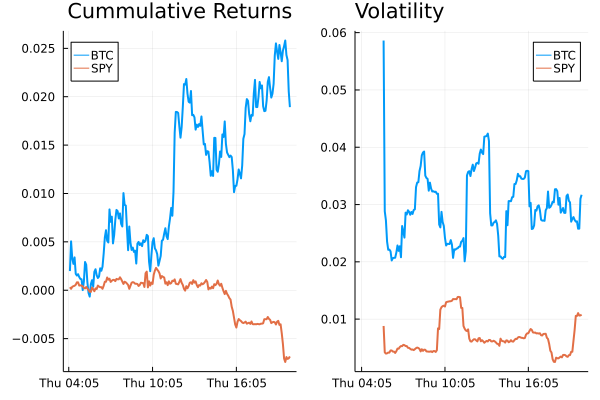
On the left-hand side, we have the cumulative return of the two
assets on the 30th of December, and on the right the corresponding
volatility. Bitcoin still has higher volatility whereas SPY has been
relatively stable with just some jumps.

Simplifying the Calculation

Rolling the standard deviation isn’t the efficient way of calculating the volatility and can also be simplified down to a more efficient calculation.

The standard deviation is defined as:

\[\sigma ^2 = \mathbb{E} (r^2) + \mathbb{E} (r) ^2\]

if we assume there is no trend in the returns so that the average is zero:

\[\mathbb{E} (r) = 0\]

then we get just the first term

\[\sigma ^2 = \frac{1}{N} \sum _{i=1} ^N r^2\]

which is simply proportional to the sum of squares. Hence why you will
hear that the realised variance is referred to as the sum of squares.

Once again, let’s pull the data and repeat the previous calculations
but this time adding another column that is the rolling summation of
the square of the returns.

minutedata = CoinbasePro.candles("BTC-USD", now()-Day(1) - Hour(1), now(), 5*60)
sort!(minutedata, :time)
minutedata = @transform(minutedata, :close_close_return = [NaN; diff(log.(:close))])
minutedata = minutedata[2:end, :]
first(minutedata, 4)

minutedata = @transform(minutedata,
                                    :new_vol_5 = running(sum, :close_close_return .^2, 20),
                                    :vol_5 = runstd(:close_close_return, 20))
minutedata = minutedata[2:end, :]
minutedata[1:5, [:time, :new_vol_5, :vol_5]]

5 rows × 3 columns

time new_vol_5 vol_5
DateTime Float64 Float64
1 2021-12-30T13:40:00 3.05319e-6 0.00171371
2 2021-12-30T13:45:00 5.11203e-6 0.00139403
3 2021-12-30T13:50:00 5.11472e-6 0.00118951
4 2021-12-30T13:55:00 6.40417e-6 0.00107273
5 2021-12-30T14:00:00 6.55196e-6 0.00104028
vol_tks = minimum(minutedata.time):Hour(8):maximum(minutedata.time)
vol_tkslbl = Dates.format.(vol_tks, "e HH:MM")

ss_vol = plot(minutedata.time, sqrt.(288 * minutedata.new_vol_5), titleloc = :left, 
              title = "Sum of Squares", label=:none, xticks = (vol_tks, vol_tkslbl), linewidth = 2)
std_vol = plot(minutedata.time, sqrt.(288 * minutedata.vol_5), titleloc = :left, 
               title = "Standard Deviation", label=:none, xticks = (vol_tks, vol_tkslbl), linewidth = 2)
plot(ss_vol, std_vol)

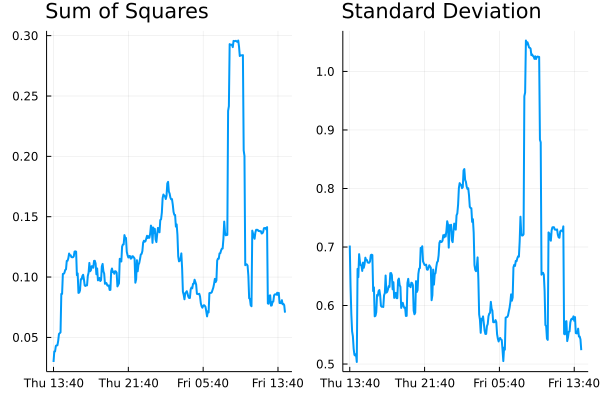
Standard deviation vs sum of squares for volatility

Both methods show represent the relative changes equally. There are
some notable edge effects in the standard deviation method, but
overall, our assumptions look fine. The y-scales are different though
as there are some constant factor differences between the two methods.

Comparing Crypto Volatilities

Let’s see how the volatility changes across some different
currencies. We define a function that calculates the close to close
return and iterate through some different currencies.

function calc_vol(ccy)
    minutedata = CoinbasePro.candles(ccy, now()-Day(1) - Hour(1), now(), 5*60)
    sort!(minutedata, :time)
    minutedata = @transform(minutedata, :close_close_return = [NaN; diff(log.(:close))])
    minutedata = minutedata[2:end, :]
    minutedata = @transform(minutedata, :var = 288*running(sum, :close_close_return .^2, 20))
    minutedata
    minutedata[21:end, :]
end

Let’s choose the classics BTC and ETH, the meme that is SHIB and
finally EURUSD (the crypto version).

p = plot(legend=:topleft, ylabel = "Realised Volatility")
for ccy in ["BTC-USD", "ETH-USD", "USDC-EUR", "SHIB-USD"]
    voldata = calc_vol(ccy)
    vol_tks = minimum(voldata.time):Hour(4):maximum(voldata.time)
    vol_tkslbl = Dates.format.(vol_tks, "e HH:MM")
    plot!(voldata.time, sqrt.(voldata.var), label = ccy, 
          xticks = (vol_tks, vol_tkslbl), linewidth = 2)
end
p

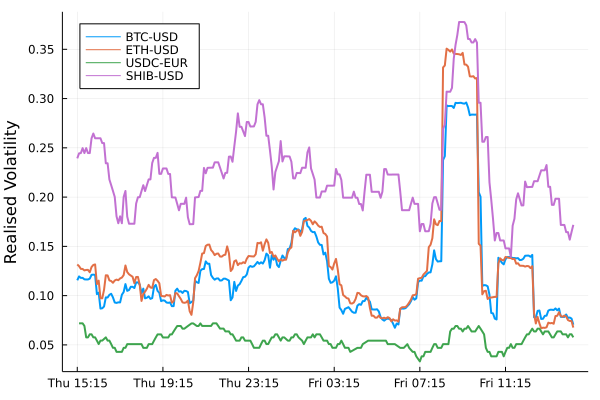
Volatility comparison between different currencies.

SHIB has higher overall volatility. ETH and BTC have very comparable
volatilities moving together. EURUSD has the lowest overall (as we
would expect), but interesting to see how it moved higher just as the
cryptos did at about 9 am.

An Update to CryptoLiquidityMetrics

So I’ve taken everything we’ve learnt here and implemented it into
cryptoliquiditymetrics.com. It is a new panel (bottom right) and
calculated all through Javascript.

Screenshot of cryptoliquiditymetrics.com

How does this help you?

Knowing the volatility helps you get an idea of how easy it is to trade
or what strategy to use. When volatility is high and the price is
moving about it might be better to be more aggressive and make sure your trade
happens. Whereas if it is a stable market without too much volatility
you could be more passive and just wait, trading slowly and picking
good prices.

Just another addition to my Javascript side project!