Author Archives: Christopher Rackauckas

Using Julia’s Type System For Hidden Performance Gains

By: Christopher Rackauckas

Re-posted from: http://www.stochasticlifestyle.com/using-julias-type-system-hidden-performance-chunkedarrays-growablearrays-ellipsisnotation/

What I want to share today is how you can use Julia’s type system to hide performance gains in your code. What I mean is this: in many cases you may find out that the optimal way to do some calculation is not a “clean” solution. What do you do? What I want to do is show how you can define special arrays which are wrappers such that these special “speedups” are performed in the background, while having not having to keep all of that muck in your main algorithms. This is easiest to show by example.

The examples I will be building towards are useful for solving ODEs and SDEs. Indeed, these tricks have all been implemented as part of DifferentialEquations.jl and so these examples come from a real use case! They really highlight a main feature of Julia: since Julia code is fast (as long as you have type stability!), you don’t need to worry about writing code outside of Julia, and you can take advantage of higher-level features (with caution). In Python, normally one would only get speed benefits by going down to C, and so utilizing these complex objects would not get speed benefits over simply using numpy arrays in the most vectorized fashion. The same holds for R. In MATLAB… it would be really tough to implement most of this in MATLAB!

Taking Random Numbers in Chunks: ChunkedArrays

Let’s say we need to take random numbers in a loop like the following:

for i = 1:N
  dW = randn(size(u))
  #Do some things and add dW to u
end

While this is the “intuitive” code to write, it’s not necessarily the best. While there have been some improvements made since early Julia, in principle it’s just slower to make 1000 random numbers via randn() than to use randn(1000). This is because of internal speedups due to caching, SIMD, etc. and you can find mentions of this fact all over the web especially when people are talking about fast random number generators like from the VSL library.

So okay, what we really want to do is the following. Every “bufferSize” steps, create a new random number dW which is of size size(u)*bufferSize, and go through using the buffer until it is all used up, and then grab another buffer.

for i = 1:N
  if i%bufferSize == 0
    dW = randn(size(u),bufferSize)
  end
  #Do some things and add dW[..,i] to u
end

But wait? What if we don’t always use one random number? Sometimes the algorithm may need to use more than one! So you can make an integer k which tracks the current state in the buffer, and then at each point where it can be incremented, you add the conditional to grab a new buffer, etc. Also, what if you want to have the buffer generated in parallel? As you can see, code complexity explosion, just to go a little faster?

This is where ChunkedArrays come in. What I did is defined an array which essentially does the chunking/buffering in the background, so that way the code in the algorithm could be clean. A ChunkedArray is a wrapper over an array, and then used the next command to hide all of this complexity. Thus, to generate random numbers in chunks to get this speed improvement, you can use code like this:

rands = ChunkedArray(u)
for i = 1:N
  if i%bufferSize == 0
    dW = next(rands)
  end
  #Do some things and add dW[..,i] to u
end

Any time another random number is needed, you just call next. It internally stores an array and the state of the buffer, and the next function automatically check / replenishes the buffer, and can launch another process to do this in parallel if the user wants. Thus we get the optimal solution without sacrificing cleanliness. I chopped off about 10% of a runtime in Euler-Maruyama code in DifferentialEquations.jl by switching to ChunkedArrays, and haven’t thought about doing a benchmark since.

Safe Vectors of Arrays and Conversion: GrowableArrays

First let’s look at the performance difference between Vectors of Arrays and higher-dimensional contiguous arrays when using them in a loop. Julia’s arrays can take in a parametric type which makes the array hold arrays, this makes the array essentially an array of pointers. The issue here is that this adds an extra cost every time the array is dereferenced. However, for high-dimensional arrays, the : way of referencing has to generate a slice each time. Which way is more performant?

function test1()
  u = Array{Int}(4,4,3)
  u[:,:,1] = [1 2 3 4
          1 3 3 4
          1 5 6 3
          5 2 3 1]
 
  u[:,:,2] = [1 2 3 4
          1 3 3 4
          1 5 6 3
          5 2 3 1]
 
  u[:,:,3] = [1 2 3 4
          1 3 3 4
          1 5 6 3
          5 2 3 1]
 
  j = 1
  for i = 1:100000
    j += sum(u[:,:,1] + u[:,:,2] + 3u[:,:,3] + u[:,:,i%3+1] -  u[:,:,(i%j)%2+1])
  end
end


function test2()
  u = Vector{Matrix{Int}}(3)
  u[1] = [1 2 3 4
          1 3 3 4
          1 5 6 3
          5 2 3 1]
 
  u[2] = [1 2 3 4
          1 3 3 4
          1 5 6 3
          5 2 3 1]
 
  u[3] = [1 2 3 4
          1 3 3 4
          1 5 6 3
          5 2 3 1]
 
  j = 1
  for i = 1:100000
    j += sum(u[1] + u[2] + 3u[3] + u[i%3+1] - u[(i%j)%2+1])
  end
end
 
 
function test3()
  u = Array{Int}(4,4,4)
  u[1,:,:] = reshape([1 2 3 4
          1 3 3 4
          1 5 6 3
          5 2 3 1],(1,4,4))
 
  u[2,:,:] = reshape([1 2 3 4
          1 3 3 4
          1 5 6 3
          5 2 3 1],(1,4,4))
 
  u[3,:,:] = reshape([1 2 3 4
          1 3 3 4
          1 5 6 3
          5 2 3 1],(1,4,4))
 
  j = 1
  for i = 1:100000
    j += sum(u[1,:,:] + u[2,:,:] + 3u[3,:,:] + u[i%3+1,:,:] - u[(i%j)%2+1,:,:])
  end
end
 
#Pre-compile
test1()
test2()
test3()
 
t1 = @elapsed for i=1:10 test1() end
t2 = @elapsed for i=1:10 test2() end
t3 = @elapsed for i=1:10 test3() end
 
println("Test results: t1=$t1, t2=$t2, t3=$t3")
#Test results: t1=1.239379946, t2=0.576053075, t3=1.533462129

So using Vectors of Arrays is fast for dereferecing.

Now think about adding to an array. If you have a Vector of pointers and need to resize the array, it’s much easier to resize and copy over some pointers then it is to copy over all of the arrays. So, if you’re going to grow an array in a loop, the Vector of Arrays is the fastest implementation! Here’s a quick benchmark from GrowableArrays.jl:

using GrowableArrays, EllipsisNotation
using Base.Test
 
tic()
const NUM_RUNS = 100
const PROBLEM_SIZE = 1000
function test1()
  u =    [1 2 3 4
          1 3 3 4
          1 5 6 3
          5 2 3 1]
 
  uFull = u
  for i = 1:PROBLEM_SIZE
    uFull = hcat(uFull,u)
  end
  uFull
end
 
function test2()
  u =    [1 2 3 4
          1 3 3 4
          1 5 6 3
          5 2 3 1]
 
  uFull = u
 
  for i = 1:PROBLEM_SIZE
    uFull = vcat(uFull,u)
  end
  uFull
end
 
function test3()
  u =    [1 2 3 4
          1 3 3 4
          1 5 6 3
          5 2 3 1]
 
  uFull = Vector{Int}(0)
  sizehint!(uFull,PROBLEM_SIZE*16)
  append!(uFull,vec(u))
 
  for i = 1:PROBLEM_SIZE
    append!(uFull,vec(u))
  end
  reshape(uFull,4,4,PROBLEM_SIZE+1)
  uFull
end
 
function test4()
  u =    [1 2 3 4
          1 3 3 4
          1 5 6 3
          5 2 3 1]
 
  uFull = Vector{Array{Int}}(0)
  push!(uFull,copy(u))
 
  for i = 1:PROBLEM_SIZE
    push!(uFull,copy(u))
  end
  uFull
end
 
function test5()
  u =    [1 2 3 4
          1 3 3 4
          1 5 6 3
          5 2 3 1]
 
  uFull = Vector{Array{Int,2}}(0)
  push!(uFull,copy(u))
 
  for i = 1:PROBLEM_SIZE
    push!(uFull,copy(u))
  end
  uFull
end
 
function test6()
  u =    [1 2 3 4
          1 3 3 4
          1 5 6 3
          5 2 3 1]
 
  uFull = Vector{typeof(u)}(0)
  push!(uFull,u)
 
  for i = 1:PROBLEM_SIZE
    push!(uFull,copy(u))
  end
  uFull
end
 
function test7()
  u =    [1 2 3 4
          1 3 3 4
          1 5 6 3
          5 2 3 1]
 
  uFull = GrowableArray(u)
  for i = 1:PROBLEM_SIZE
    push!(uFull,u)
  end
  uFull
end
 
function test8()
  u =    [1 2 3 4
          1 3 3 4
          1 5 6 3
          5 2 3 1]
 
  uFull = GrowableArray(u)
  sizehint!(uFull,PROBLEM_SIZE)
  for i = 1:PROBLEM_SIZE
    push!(uFull,u)
  end
  uFull
end
 
println("Run Benchmarks")
println("Pre-Compile")
#Compile Test Functions
test1()
test2()
test3()
test4()
test5()
test6()
test7()
test8()
 
println("Running Benchmarks")
t1 = @elapsed for i=1:NUM_RUNS test1() end
t2 = @elapsed for i=1:NUM_RUNS test2() end
t3 = @elapsed for i=1:NUM_RUNS test3() end
t4 = @elapsed for i=1:NUM_RUNS test4() end
t5 = @elapsed for i=1:NUM_RUNS test5() end
t6 = @elapsed for i=1:NUM_RUNS test6() end
t7 = @elapsed for i=1:NUM_RUNS test7() end
t8 = @elapsed for i=1:NUM_RUNS test8() end
 
println("Benchmark results: $t1 $t2 $t3 $t4 $t5 $t6 $t7 $t8")
 
#Benchmark results: 1.923640854 2.131108443 0.012493308 0.00866045 0.005246504 0.00532613 0.00773568 0.00819909

As you can see in test7 and test8, I created a “GrowableArray” which is an array which acts like a Vector of Arrays. However, it has an added functionality that if you copy(G), then what you get is the contiguous array. Therefore in the loop you can grow the array the quickest way as a storage machine, but after the loop (say to plot the array), but at any time you can copy it to a contiguous array which is more suited for interop with C and other goodies.

It also hides a few painful things. Notice that in the code we pushed a copy of u (copy(u)). This is because when u is an array, it’s only the reference to the array, so if we simply push!(uFull,u), every element of uFull is actually the same item! This benchmark won’t catch this issue, but try changing u and you will see that every element of uFull changes if you don’t use copy. This can be a nasty bug, so instead we build copy() into the push!() command for the GrowableArray. This gives another issue. Since copying a GrowableArray changes it, you need to make sure push! doesn’t copy on arguments of GrowableArrays (to create GrowableArrays of GrowableArrays). However, this is easily managed via dispatch.

Helping Yourself and the Julia Community

Simple projects like these lead to re-usable solutions to improve performance while allowing for ease of use. I have just detailed some projects I have personally done (and have more to do!), but there are others that should be pointed out. I am fond of projects like VML.jl which speedup standard functions, and DoubleDouble.jl which implements efficient quad-precision numbers that you can then use in place of other number types.

I think Julia will succeed not by the “killer packages” that are built in Julia, but by a rich type ecosystem that will make everyone want to build their “killer package” in Julia.

The post Using Julia’s Type System For Hidden Performance Gains appeared first on Stochastic Lifestyle.

Finalizing Your Julia Package: Documentation, Testing, Coverage, and Publishing

By: Christopher Rackauckas

Re-posted from: http://www.stochasticlifestyle.com/finalizing-julia-package-documentation-testing-coverage-publishing/

In this tutorial we will go through the steps to finalizing a Julia package. At this point you have some functionality you wish to share with the world… what do you do? You want to have documentation, code testing each time you commit (on all the major OSs), a nice badge which shows how much of the code is tested, and put it into metadata so that people could install your package just by typing Pkg.add(“Pkgname”). How do you do all of this?

Note: At anytime feel free to checkout my package repository DifferentialEquations.jl which should be a working example.

Generate the Package and Get it on Github

First you will want to generate your package and get it on Github repository. Make sure you have a Github account, and then setup the environment variables in the git shell:

$ git config --global user.name "FULL NAME"
$ git config --global user.email "EMAIL"
$ git config --global github.user "USERNAME"

Now you can generate your package via

Pkg.generate("PkgName","license")

For the license, I tend to use MIT since it is quite permissive. This will tell you where your package was generated (usually in your Julia library folder). Take your function files and paste them into the /src folder in the package. In your /src folder, you will have a file PkgName.jl. This file defines your module. Generally you will want it to look something like this:

module PkgName
 
#Import your packages
using Pkg1, Pkg2, Pkg3
import Base: func1 #Any function you add dispatches to need to be imported directly
 
abstract AbType #Define abstract types before the types they abstract!
 
include("functionsForPackage.jl") #Include all the functionality
 
export coolfunc, coolfunc2 #Export the functions you want users to use
 
end

Now try on your computer using PkgName. Try your functions out. Once this is all working, this means you have your package working locally.

Write the Documentation

For documentation, it’s recommended to use Documenter.jl. The other packages, Docile.jl and Lexicon.jl, have been deprecated in favor of Documenter.jl. Getting your documentation to generate starts with writing docstrings. Docstrings are strings in your source code which are used for generating documentation. It is best to use docstrings because these will also show up in the REPL, i.e. if someone types ?coolfunc, your docstrings will show here.

To do this, you just add strings before your function definitions. For example,

 
"Defines a cool function. Returns some stuff"
function coolFunc()
  ...
end
 
"""
Defines an even cooler function. ``LaTeX``.
 
```math
SameAs$$LaTeX
```
 
### Returns
 * Markdown works in here
"""
function coolFunc2()
  ...
end

Once you have your docstrings together, you can use them to generate your documentation. Install Documenter.jl in your local repository by cloning the repository with Pkg.clone(“PkgLocation”). Make a new folder in the top directory of your package named /docs. In this directory, make a file make.jl and add the following lines to the file:

using Documenter, PkgName
 
makedocs(modules=[PkgName],
        doctest=true)
 
deploydocs(deps   = Deps.pip("mkdocs", "python-markdown-math"),
    repo = "github.com/GITHUBNAME/GITHUBREPO.git",
    julia  = "0.4.5",
    osname = "linux")

Don’t forget to change PkgName and repo to match your project. Now make a folder in this directory named /src (i.e. it’s /docs/src). Make a file named index.md. This will be the index of your documentation. You’ll want to make it something like this:

#Documentation Title
 
Some text describing the package.
 
## Subtitle
 
More text
 
## Tutorials
 
```
{contents}
Pages = [
    "tutorials/page1.md",
    "tutorials/page2.md",
    "tutorials/page3.md"
    ]
Depth = 2
```
 
## Another Section
```
{contents}
Pages = [
    "sec2/page1.md",
    "sec2/page2.md",
    "sec2/page3.md"
    ]
Depth = 2
```
 
## Index
 
```
{index}
```

At the top we explain the page. The next part adds 3 pages to a “Tutorial” section of the documentation, and then 3 pages to a “Another Section” section of the documentation. Now inside /docs/src make the directories tutorial and sec2, and add the appropriate pages page1.md, page2.md, page3.md. These are the Markdown files that the documentation will use to build the pages.

To build a page, you can do something like as follows:

# Title
 
Some text describing this section
 
## Subtitle
 
```
{docs}
PkgName.coolfunc
PkgName.coolfunc2
```

What this does is it builds the page with your added text/titles on the top, and then puts your docstrings in below. Thus most of the information should be in your docstrings, with quick introductions before each page. So if your docstrings are pretty complete, this will be quick.

Build the Documentation

Now we will build the documentation. cd into the /docs folder and run make.jl. If that’s successful, then you will have a folder /docs/build. This contains markdown files where the docstrings have been added. To turn this into a documentation, first install mkdocs. Now add the following file to your /docs folder as mkdocs.yml:

site_name:           PkgName
repo_url:            https://github.com/GITHUBUSER/PkgName
site_description:    Description
site_author:         You
theme:               readthedocs

markdown_extensions:
  - codehilite
  - extra
  - tables
  - fenced_code
  - mdx_math # For LaTeX

extra_css:
  - assets/Documenter.css

extra_javascript:
  - https://cdn.mathjax.org/mathjax/latest/MathJax.js?config=TeX-AMS_HTML
  - assets/mathjaxhelper.js

docs_dir: 'build'

pages:
- Introduction: index.md
- Tutorial:
  - Title 1: tutorials/page1.md
  - Title 2: tutorials/page2.md
  - Title 3: tutorials/page3.md
- Another Section:
  - Title 1: sec2/page1.md
  - Title 2: sec2/page2.md
  - Title 3: sec2/page3.md

Now to build the webpage, cd into /docs and run `mkdocs build`, and then `mkdocs serve`. Go to the local webserver that it tells you and check out your documentation.

Testing

Now that we are documented, let’s add testing. In the top of your package directory, make a folder /test. In there, make a file runtests.jl. You will want to make it say something like this:

#!/usr/bin/env julia
 
#Start Test Script
using PkgName
using Base.Test
 
# Run tests
 
tic()
println("Test 1")
@time @test include("test1.jl")
println("Test 2")
@time @test include("test2.jl")
toc()

This will run the files /test/test1.jl and /test/test2.jl and work if they both return a boolean. So make these test files use some of your package functionality and at the bottom make sure it returns a boolean saying whether the tests passed or failed. For example, you can have it make sure some number is close to what it should be, or you can just put `true` on the bottom on the file. Now use

Pkg.test("PkgName")

And make sure your tests pass. Now setup accounts at Travis CI (for Linux and OSX testing) and AppVoyer (for Windows testing). Modify .travis.yml to be like the following:

# Documentation: http://docs.travis-ci.com/user/languages/julia/
language: julia
os:
  - linux
  - osx
julia:
  - nightly
  - release
  - 0.4.5
matrix:
  allow_failures:
    - julia: nightly
notifications:
  email: false
script:
#  - if [[ -a .git/shallow ]]; then git fetch --unshallow; fi
  - julia -e 'Pkg.init(); Pkg.clone("https://github.com/GITHUBUSER/REPONAME")'
  - julia -e 'Pkg.test("PkgName",coverage=true)'
after_success:
  - julia -e 'Pkg.clone("https://github.com/MichaelHatherly/Documenter.jl")'
  - julia -e 'cd(Pkg.dir("PkgName")); include(joinpath("docs", "make.jl"))'
  - julia -e 'cd(Pkg.dir("PkgName")); Pkg.add("Coverage"); using Coverage; Codecov.submit(Codecov.process_folder())'
  - julia -e 'cd(Pkg.dir("PkgName")); Pkg.add("Coverage"); using Coverage; Coveralls.submit(process_folder())'

If you are using matplotlib/PyPlot you will want to add

ENV["PYTHON"]=""; Pkg.build("PyCall"); using PyPlot;

before Pkg.test(“PkgName”,coverage=true). Now edit your appvoyer.yml to be like the following:

environment:
  matrix:
  - JULIAVERSION: "julialang/bin/winnt/x86/0.4/julia-0.4-latest-win32.exe"
  - JULIAVERSION: "julialang/bin/winnt/x64/0.4/julia-0.4-latest-win64.exe"
matrix:
  allow_failures:
    - JULIAVERSION: "julianightlies/bin/winnt/x86/julia-latest-win32.exe"
    - JULIAVERSION: "julianightlies/bin/winnt/x64/julia-latest-win64.exe"
branches:
  only:
    - master
    - /release-.*/
 
notifications:
  - provider: Email
    on_build_success: false
    on_build_failure: false
    on_build_status_changed: false
 
install:
# Download most recent Julia Windows binary
  - ps: (new-object net.webclient).DownloadFile(
        $("http://s3.amazonaws.com/"+$env:JULIAVERSION),
        "C:projectsjulia-binary.exe")
  - set PATH=C:Miniconda3;C:Miniconda3Scripts;%PATH%
# Run installer silently, output to C:projectsjulia
  - C:projectsjulia-binary.exe /S /D=C:projectsjulia
 
build_script:
# Need to convert from shallow to complete for Pkg.clone to work
  - IF EXIST .gitshallow (git fetch --unshallow)
  - C:projectsjuliabinjulia -e "versioninfo();
      Pkg.clone(pwd(), "PkgName"); Pkg.build("PkgName")"
 
test_script:
  - C:projectsjuliabinjulia --check-bounds=yes -e "Pkg.test("PkgName")"

Add Coverage

I was sly and already added all of the coverage parts in there! This is done by the commands which add Coverge.jl, the keyword coverage=true in Pkg.test, and then specific functions for sending the coverage data to appropriate places. Setup an account on Codecov and Coveralls.

Fix Up Readme

Now update your readme to match your documentation, and add the badges for testing, coverage, and docs from the appropriate websites.

Update Your Repository

Now push everything into your Git repository. `cd` into your package directory and using the command line do:

git add --all
git commit -m "Commit message"
git push origin master

or something of the like. On Windows you can use their GUI. Check your repository and make sure everything is there. Wait for your tests to pass.

Publish Your Package

Now publish your package. This step is optional, but if you do this then people can add your package by just doing `Pkg.add(“PkgName”)`. To do this, simply run the following:

Pkg.update()
Pkg.register("PkgName")
Pkg.tag("PkgName")
Pkg.publish()

This will give you a url. Put this into your browser and write a message with your pull request and submit it. If all goes well, they will merge the changes and your package will be registered with METADATA.jl.

That’s it! Now every time you commit, your package will automatically be tested, coverage will be calculated, and documentation will be updated. Note that for people to get the changes you made to your code, they will need to run `Pkg.checkout(“PkgName”)` unless you tag and publish a new version.

The post Finalizing Your Julia Package: Documentation, Testing, Coverage, and Publishing appeared first on Stochastic Lifestyle.

Optimal Number of Workers for Parallel Julia

By: Christopher Rackauckas

Re-posted from: http://www.stochasticlifestyle.com/236-2/

How many workers do you choose when running a parallel job in Julia? The answer is easy right? The number of physical cores. We always default to that number. For my Core i7 4770K, that means it’s 4, not 8 since that would include the hyperthreads. On my FX8350, there are 8 cores, but only 4 floating-point units (FPUs) which do the math, so in mathematical projects, I should use 4, right? I want to demonstrate that it’s not that simple.

Where the Intuition Comes From

Most of the time when doing scientific computing you are doing parallel programming without even knowing it. This is because a lot of vectorized operations are “implicitly paralleled”, meaning that they are multi-threaded behind the scenes to make everything faster. In other languages like Python, MATLAB, and R, this is also the case. Fire up MATLAB and run

A = randn(10000,10000)
B = randn(10000,10000)
A.*B

and you will see that all of your cores are used. Threads are a recent introduction to Julia, and so in version 0.5 this will also be the case.

Another large place where implicit parallelization comes up is in linear algebra. When one uses a matrix multiplication, it is almost surely calling an underlying program which is an implementation of BLAS. BLAS (Basic Linear Algebra Subroutines) is aptly named just a set of functions for solving linear algebra problems. These are written in either C or Fortran and are heavily optimized. They are well-studied and many smart people have meticulously crafted “perfect code” which minimizes cache misses and all of that other low level stuff, all to make this very common operation run smoothly.

Because BLAS (and LINPACK, Linear Algebra Package, for other linear algebra routines) is so optimized, people say you should always make sure that it knows exactly how many “real” processors it has to work with. So in my case, with a Core i7 with 4 physical cores and 4 from hyperthreading, forget the hyperthreading and thus there are 4. With the FX8350, there are only 4 processors for doing math, so 4 threads. Check to make sure this is best.

What about for your code?

Most likely this does not apply to your code. You didn’t carefully manage all of your allocations and tell the compiler what needs to be cached etc. You just wrote some beautiful Julia code. So how many workers do you choose?

Let’s take my case. I have 4 real cores, do I choose 4? Or do I make 3 workers to allow for 1 to “command” the others freely? Or do I make 7/8 due to hyperthreading?

I decided to test this out on a non-trivial example. I am not going to share all of the code (I am submitting it as part of a manuscript soon), but the basic idea is that it is a high-order adaptive solver for stochastic differential equations. The code sets up the problem and then calls pmap to do a Monte Carlo simulation and solve the equation 1000 times in parallel. The code is mostly math, but there is a slight twist where some values are stored on stacks (very lightweight datastructure). To make sure I could trust the times, I ran the code 1000 times and took the average, min, and max times.

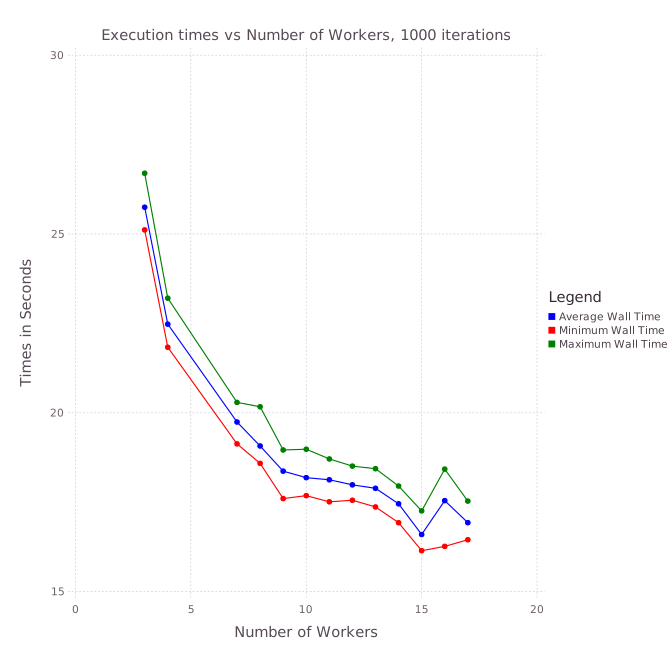
So in this case, what was best? The results speak for themselves.

Average wall times vs Number of Worker Processes, 1000 iterations
Number of Workers Average Wall Time Max Wall Time Min Wall Time
1 62.8732 64.3445 61.4971
3 25.749 26.6989 25.1143
4 22.4782 23.2046 21.8322
7 19.7411 20.2904 19.1305
8 19.0709 20.1682 18.5846
9 18.3677 18.9592 17.6
10 18.1857 18.9801 17.6823
11 18.1267 18.7089 17.5099
12 17.9848 18.5083 17.5529
13 17.8873 18.4358 17.3664
14 17.4543 17.9513 16.9258
15 16.5952 17.2566 16.1435
16 17.5426 18.4232 16.2633
17 16.927 17.5298 16.4492

Note there are two “1000”s here. I ran the Monte Carlo simulation (each solving the SDE 1000 times itself) 1000 times. I plotted the mean, max, and min times it took to solve the simulation. From the plot it’s very clear that the minimum exists somewhere around 15. 15!

What’s going on? My guess is that this is because of the time that’s not spent on the actual mathematics. Sometimes there are things performing logic, checking if statements, allocating new memory as the stacks grow bigger, etc. Although it is a math problem, there is more than just the math in this problem! Thus it seems the scheduler is able to effectively let the processes compete and more fully utilize the CPU by pushing the jobs around. This can only go so far: if you have too many workers, then you start to get cache misses and then the computational time starts to increase. Indeed, at 10 workers I could already see signs of problems in the resource manager.

Overload at 10 Workers as seen in Window's Resource Manager

Overload at 10 Workers as seen in Window’s Resource Manager

However, allowing one process to start re-allocating memory but causing a cache miss (or whatever it’s doing) seems to be a good tradeoff at low levels. Thus for this code the optimal number of workers is far above the number of physical cores.

Moral of the Story

The moral is, test your code. If your code is REALLY efficient, then sure, making sure you don’t mess with your perfect code is optimal. If your code isn’t optimal (i.e. it’s just some Julia code that is pretty good and you want to parallelize it), try some higher numbers of workers. You may be shocked what happens. In this case, the compute time dropped more than 30% by overloading the number of workers.

The post Optimal Number of Workers for Parallel Julia appeared first on Stochastic Lifestyle.