By: Dean Markwick's Blog -- Julia
Re-posted from: https://dm13450.github.io/2022/03/22/AlpacaMarkets.jl-More-Free-Data.html
My quest for free and accessible data continues. This time turning to
https://alpaca.markets/. They provide both stock and crypto trades
and quotes with the ability to easily backload a database.
Enjoy these types of posts? Then sign up for my newsletter.
I’m no stranger to writing API wrappers in Julia for various data
sources, I revitalised
AlphaVantage.jl
and also behind CoinbasePro.jl, each providing a slightly different
type of data. The same is now for Alpaca Markets data. AlphaVantage
only provides candle data for stocks, whereas Alpaca gives you both
quotes and trades. This gives a new angle to look at the markets with
much more granular data. Likewise, with CoinbasePro.jl, it is good for providing real-time data, but when you try and get historical data it is limited. Alpaca removes these limits and lets you backfill as much as needed. It might take some time but gives your laptop to do something while you sleep.
Their data is from IEX (of Flash Boys fame). They provide the both the
quote and trade data free from their website
https://exchange.iex.io/products/market-data-connectivity/, so this
AlpacaMarkets.jl acts
as an easy wrapper around this data through Alpaca. Plus if Alpaca ever
add more sources you will get this without too much trouble as well.
I’ve written exact wrappers to their exposed functions, but also added some functions that will help you get the data you need without worrying about formatting timestamps or managing pagination responses.
To get started with the API you’ll need to sign up to AlpacaMarkets and get some API keys.
Getting API Credentials for Alpaca Markets
You need to sign up to Alpaca markets to obtain your developer keys to connect to their services. Once you have both the key and the secret you need to authenticate AlpacaMarkets.jl.
You can do this manually, using:
using AlpacaMarkets
AlpacaMarkets.auth(KEY, SECRET)
Where KEY and SECRET are the two values personal to you.
Or you can make sure you are always authenticated by including the keys in your startup.jl file in .julia/config/.
ENV["ALPACA_KEY"] = KEY
ENV["ALPACA_SECRET"] = SECRET
Once this is done you should all be good to go!
Free Stock Data Market
Now we are set up, we can get going with pulling some data. A few packages are needed to make our lives easier. Most importantly, AlpacaMarkets.jl.
using AlpacaMarkets
using Dates, DataFrames, DataFramesMeta
using Statistics
using Plots
using TimesDates
Stock Quote Data
A quote is a price you could buy or sell a stock for. Across the US equity landscape, there are different exchanges where you could trade a stock, so at any given time there is one place that offers the best price to buy and sell a stock.
If we look at just 1 second’s worth of quotes we get quite a bit of data back.
aapl = AlpacaMarkets.get_stock_quotes("AAPL",
  DateTime("2022-01-27T15:00:00"),
  DateTime("2022-01-27T15:00:01"))
first(aapl, 3)
3 rows × 10 columns (omitted printing of 2 columns)
| ap | as | ax | bp | bs | bx | c | t | |
|---|---|---|---|---|---|---|---|---|
| Float64 | Int64 | String | Float64 | Int64 | String | Any | String | |
| 1 | 163.08 | 2 | Q | 163.06 | 1 | P | R | 2022-01-27T15:00:00.007177Z |
| 2 | 163.08 | 2 | Q | 163.05 | 4 | Q | R | 2022-01-27T15:00:00.007566848Z |
| 3 | 163.08 | 2 | K | 163.05 | 4 | Q | R | 2022-01-27T15:00:00.010519578Z |
In the ax and bx columns (ask exchange and bid exchange) we can see what venue was offering that price at a given time. More on that later.
If we want to look at this data we have to convert the timestamp into a Julia DateTime object. The values that come down the wire are a little funky, so I’ve written a help function in the AlpacaMarkets.jl module to help.
function convert_t_timestamp(x)
   ts =  first(x, 23)

    if endswith(ts, "Z")
        ts = chop(ts)
    end
    DateTime(ts)
end

function convert_t_time(x)
   ts = split(x, "T")[2]
   ts = first(ts, 12)
    if endswith(ts, "Z")
        ts = chop(ts)
    end
    Time(ts)
end
However, Julia’s default DateTime type only allows up millisecond precision. When we look at our data we have up to nanoseconds, so need to use the TimeDate.jl package to account for these extra digits.
aapl = @transform(aapl, :TimeStamp = convert_t_timestamp.(:t),
                        :TimeStamp_nano = TimeDate.(string.(chop.(:t))));
We now plot the bid and ask price.
ticks = minimum(aapl.TimeStamp):Millisecond(250):maximum(aapl.TimeStamp)
tick_labels = Dates.format.(ticks, "HH:MM:SS.sss")

plot(aapl.TimeStamp, aapl.ap, label = "Ask Price", seriestype=:steppre, xticks = (ticks, tick_labels))
plot!(aapl.TimeStamp, aapl.bp, label = "Bid Price", seriestype=:steppre)
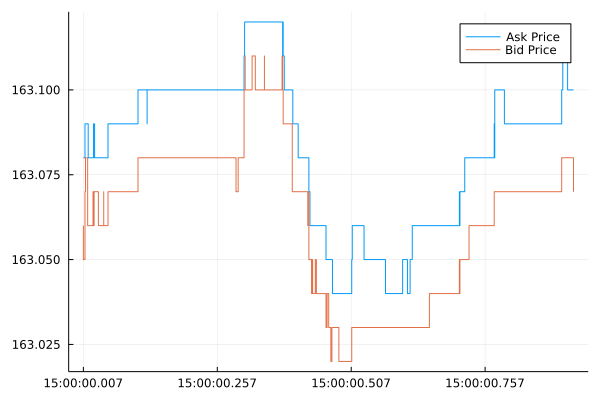
There we go, the movement of the best bid and ask price over one
second. Most data sources would condense this into a single open-high-low-close bar, whereas AlpacaMarkets.jl is giving us the raw data underneath that data. All for free!
This means you can now calculate things like:
- Quote intensity – how often there is a new price in a set period,
- Order flow imbalance – how the supply and demand changes in the order book,
- Tick by tick models – predicting what the next tick will be, easier than predicting what the next price will be.
I’ve written about
Order flow imbalance
before in the crypto markets. It is about looking at frequent changes
in the best ask/offer and the amount that corresponds to these prices. Each small change gives us an idea of the supply and demand and can reasonably predict future price movements.
Overall, getting the raw best bid/offers from Alpaca across all these stocks is a treasure trove of information, and using my package you can easily save a database worth of data for your project.
Stock Trade Data
Alpaca Markets also give us access to what trades, so stock
transactions, that happened over some time. This records how much stock was traded at a given time and for what price.
Again we will look at the same one-second period.
aaplTrades  = AlpacaMarkets.get_stock_trades("AAPL", DateTime("2022-01-27T15:00:00"), DateTime("2022-01-27T15:00:01"))
first(aaplTrades, 5)
5 rows × 8 columns
| c | i | p | s | t | x | z | symbol | |
|---|---|---|---|---|---|---|---|---|
| Any | Int64 | Float64 | Int64 | String | String | String | String | |
| 1 | @ | 39300 | 163.07 | 25 | 2022-01-27T15:00:00.010519578Z | Q | C | AAPL |
| 2 | I | 39300 | 163.07 | 25 | 2022-01-27T15:00:00.010519578Z | Q | C | AAPL |
| 3 | @ | 39301 | 163.08 | 100 | 2022-01-27T15:00:00.010519578Z | Q | C | AAPL |
| 4 | @ | 39302 | 163.08 | 100 | 2022-01-27T15:00:00.010519578Z | Q | C | AAPL |
| 5 | @ | 7109 | 163.08 | 100 | 2022-01-27T15:00:00.010711251Z | U | C | AAPL |
We can see a new column, c which has different symbols for each row. This is the condition code and describes the type of trade. For the first two trades we see:
@: Is a regular tradeI: is an odd lot trade
The x column dictates where the trade happened, so the venue that executed the trade. The z column tells us what tape the trade was recorded on. There are three possible tapes, A, B, and C.
Again, we convert the timestamp and plot it against the prices. We also want just the unique trade ids (i) to make sure each trade is represented once.
aaplTrades = unique(aaplTrades, :i)
aaplTrades = @transform(aaplTrades, :TimeStamp = convert_t_timestamp.(:t),
                                    :TimeStamp_nano = TimeDate.(string.(chop.(:t))));
plot(aapl.TimeStamp, aapl.ap, label = "Ask Price", seriestype=:steppre, xticks = (ticks, tick_labels))
plot!(aapl.TimeStamp, aapl.bp, label = "Bid Price", seriestype=:steppre)
plot!(aaplTrades.TimeStamp, aaplTrades.p, label="Trades", seriestype=:scatter)
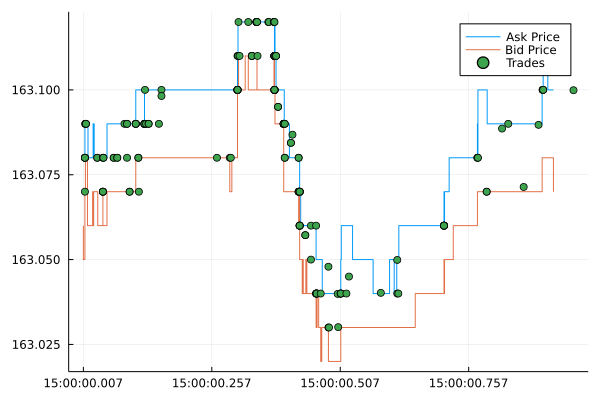
The trades line up nicely with the prices at the same time and we can see the series of trades that drove the price higher between 500 and 750 milliseconds past 15:00.
We’ve now got quite a complete picture of what happened in the second between 15:00:00 and 15:00:01.
- 344 price updates
- 384 trades
It’s now up to you to use that data how you see fit. Here I’ll demonstrate a few ideas.
Equity Venue Analysis
There are so many stock trading venues in the US, but what ones are good? If you’ve read Flash Boys, you might think they are all bad except for IEX. If you’ve read The Lean Startup you might think that the Long Term Stock Exchange is a good idea. But marketing and popularity aside, this is a key question for people that are fine-tuning their execution to ensure the best possible price.
But generally, we want to consider two things:
- How long did they have the best price?
- How much volume did they have at this best price?
So using our quote data we can try and calculate some statistics.
Let’s pull some Apple quotes over one hour now.
aaplVenue = AlpacaMarkets.get_stock_quotes("AAPL", DateTime("2022-01-27T15:00:00"), DateTime("2022-01-27T16:00:00"))
first(aaplVenue, 4)
4 rows × 10 columns (omitted printing of 2 columns)
| ap | as | ax | bp | bs | bx | c | t | |
|---|---|---|---|---|---|---|---|---|
| Float64 | Int64 | String | Float64 | Int64 | String | Any | String | |
| 1 | 163.08 | 2 | Q | 163.06 | 1 | P | R | 2022-01-27T15:00:00.007177Z |
| 2 | 163.08 | 2 | Q | 163.05 | 4 | Q | R | 2022-01-27T15:00:00.007566848Z |
| 3 | 163.08 | 2 | K | 163.05 | 4 | Q | R | 2022-01-27T15:00:00.010519578Z |
| 4 | 163.08 | 2 | K | 163.06 | 1 | Q | R | 2022-01-27T15:00:00.010547447Z |
Using the TimeDate package we can create an object with the correct resolution up to the nanosecond as reported by Alpaca Markets. We then calculate how long that price was the best bid or offer using diff.
function get_ns(x)
    getfield(x, :value)
end

aaplVenue = @transform(aaplVenue, :TimeStamp = convert_t_timestamp.(:t),
                                  :TimeStamp_nano = TimeDate.(string.(chop.(:t))));
aaplVenue = @transform(aaplVenue, :TimeDelta = [diff(:TimeStamp_nano); NaN])
aaplVenue = aaplVenue[1:(end-1), :]
aaplVenue = @transform(aaplVenue, :ns = get_ns.(:TimeDelta));
Now for each venue, plus bid and ask price, we group by the exchange and calculate the following:
- How many times it was the best bid and best offer
- The average number of shares available at this price
- How long was the quote the best bid or offer.
This gives us three different values to assess the ‘quality’ of each venue.
gdata_bids = groupby(aaplVenue, :bx)
gdata_asks = groupby(aaplVenue, :ax)
venue_bids = @combine(gdata_bids, :n_best_bid = length(:c),
                                  :avg_size_bid = mean(:as),
                                  :avg_time_best_bid = mean(:ns) * 1e-9)
venue_asks = @combine(gdata_asks, :n_best_ask = length(:c),
                                  :avg_size_ask = mean(:as),
                                  :avg_time_best_ask = mean(:ns) * 1e-9)
rename!(venue_asks, ["venue", "n_best_ask", "avg_size_ask", "avg_time_best_ask"])
rename!(venue_bids, ["venue", "n_best_bid", "avg_size_bid", "avg_time_best_bid"])

venue = leftjoin(venue_bids, venue_asks, on = "venue")
venue = leftjoin(venue, rename!(AlpacaMarkets.STOCK_EXCHANGES, ["Name", "venue"]), on = "venue")

first(venue[!,["Name", "n_best_ask", "avg_size_ask", "avg_time_best_ask"]], 4)
4 rows × 4 columns
| Name | n_best_ask | avg_size_ask | avg_time_best_ask | |
|---|---|---|---|---|
| String? | Int64? | Float64? | Float64? | |
| 1 | NYSE American (AMEX) | 1536 | 1.83464 | 0.0107363 |
| 2 | NASDAQ OMX BX | 161 | 1.95652 | 0.0152946 |
| 3 | National Stock Exchange | 48 | 3.33333 | 0.00691273 |
| 4 | MIAX | 29431 | 1.26829 | 0.00747923 |
Plus all the values for the bid side too.
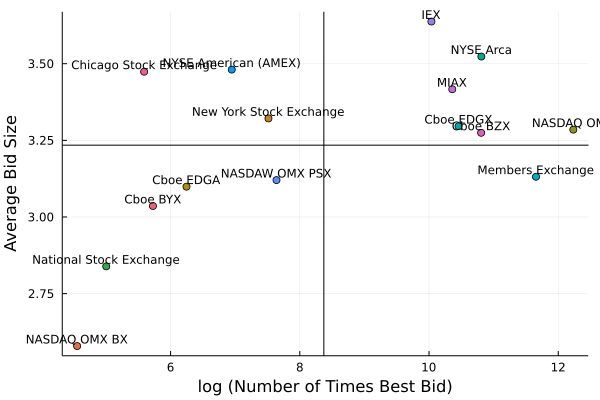
Now let’s visualise it with a quadrant plot.
plot(log.(venue.n_best_bid), venue.avg_size_bid, seriestype = :scatter,
    label = :none, group = venue.venue,
    series_annotations = text.(venue.Name, :bottom, pointsize=8),
    xlabel = "log (Number of Times Best Bid)",
    ylabel = "Average Bid Size")
hline!([mean(venue.avg_size_bid)], label=:none, color=:black)
vline!([mean(log.(venue.n_best_bid))], label=:none, color=:black)
plot(log.(venue.n_best_ask), venue.avg_time_best_ask, seriestype = :scatter,
    label = :none, group = venue.venue,
    series_annotations = text.(venue.Name, :bottom, pointsize=8),
    xlabel = "log (Number of Times Best Ask)",
    ylabel = "Average Time Best Ask (seconds)")
hline!([mean(venue.avg_time_best_ask)], label=:none, color=:black)
vline!([mean(log.(venue.n_best_ask))], label=:none, color=:black)
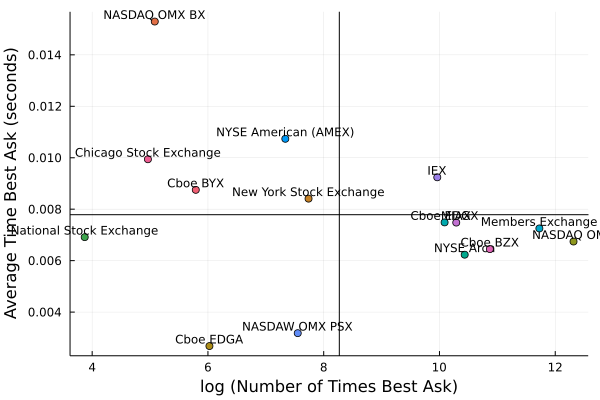
There are two clusters of exchanges and those to the right look like
the best. They are top of book the most and also quote the largest
size. To give an idea of size IEX quotes about 0.5 more shares than
the Members Exchange. For Apple with a share price of around $175,
you can trade $87.5 more notional with IEX (on average) than the
Members Exchange, so if you have a large order, it might mean going to
the market fewer times and therefore paying fewer transaction costs.
Ok so that’s something interesting with the quotes, what about the trades?
The Lee-Ready Algorithm
When Alpaca Markets sends us the trades there is no indication if the
trade was a buy or a sell. This can make analysis slightly harder as
we first have to try and guess the sign of the trade. If we look at
the plot of the trades again we can see that the trades happen
predicatably.
Most of the trades happen at the higher ask price, so they are
probably buying, and likewise, some trades fall on the bid price
line. These are probably sales.
Now guessing what sign the trades has plenty of academic research
behind it. One of the typical methods is the
Lee-Ready algorithm which
looks at where the trade is compared to the quoted mid-price at the time of the trade. If the trade is above the mid-price then it is likely that the trade was a buy and vice versa, if it was below it was likely a sell.
To evaluate this algorithm we have to join the trades with the closest prices. Normally this would just be an ASOF join, but we have to hack our way around this in Julia.
tradeTimes = aaplTrades.TimeStamp_nano
quoteTimes = aapl.TimeStamp_nano

quoteInds = searchsortedlast.([quoteTimes], tradeTimes)

aaplTrades[!, "ap"] = aapl.ap[quoteInds]
aaplTrades[!, "bp"] = aapl.bp[quoteInds]

aaplTrades = @transform(aaplTrades, :Mid = (:ap .+ :bp) ./ 2)

aaplTrades[1:4, ["t", "TimeStamp_nano", "p", "ap", "bp", "Mid"]]
4 rows × 6 columns (omitted printing of 2 columns)
| t | TimeStamp_nano | p | ap | |
|---|---|---|---|---|
| String | TimeDate | Float64 | Float64 | |
| 1 | 2022-01-27T15:00:00.010519578Z | 2022-01-27T15:00:00.010519578 | 163.07 | 163.08 |
| 2 | 2022-01-27T15:00:00.010519578Z | 2022-01-27T15:00:00.010519578 | 163.07 | 163.08 |
| 3 | 2022-01-27T15:00:00.010519578Z | 2022-01-27T15:00:00.010519578 | 163.08 | 163.08 |
| 4 | 2022-01-27T15:00:00.010519578Z | 2022-01-27T15:00:00.010519578 | 163.08 | 163.08 |
With the prices added we check the sign of the difference between the traded price and the mid-price to classify it as a buy or sell.
function classify_trade(x)
    if x == 0
        return "Unknown"
    elseif x == 1
        return "Buy"
    else
        return "Sell"
    end
end


aaplTrades = @transform(aaplTrades, :Sign = sign.(:p .- :Mid))
aaplTrades = @transform(aaplTrades, :Side = classify_trade.(:Sign))


plot(aapl.TimeStamp, aapl.ap, label = "Ask Price", seriestype=:steppre, xticks = (ticks, tick_labels))
plot!(aapl.TimeStamp, aapl.bp, label = "Bid Price", seriestype=:steppre)
plot!(aaplTrades.TimeStamp, aaplTrades.p, seriestype=:scatter, groups=aaplTrades.Side)
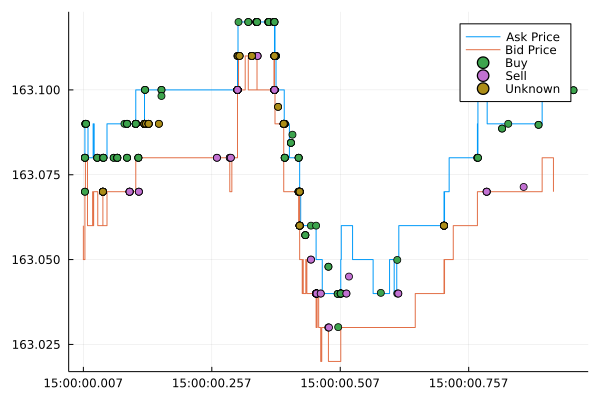
It’s not a 100% foolproof method, we can see that it hasn’t managed to
classify all the trades, some are unknown. It seems to struggle around
periods where the market starts moving and the mid is volatile. But there are other methods to keep digging deeper and classify all the trades.
Summary
Another angle of the free data world. Sign up to AlpacaMarkets today
and get your data to start exploring. Perhaps look at my older posts
where I’ve applied simple models to crypto data, you can change the
data to a stock and see how the results change.