Tag Archives: Python

My first post on Julia

By: Alvaro "Blag" Tejada Galindo

Re-posted from: http://blagrants.blogspot.com/2014/05/my-first-post-on-julia.html

So…what Julia? Just another nice programming language -;)

According to it’s creators…

Julia is a high-level, high-performance dynamic programming language for technical computing, with syntax that is familiar to users of other technical computing environments.

I just started learning it a couple of days ago…and I must say that I really like it…it has a Python like syntax so I felt comfortable from the very start…

Of course…it’s kind of a brand new language, so things are being added and fixed while we speak…but the community is growing and I’m glad to be amongst it’s “early” supporters -:)

What I did right after I read the documentation and watch a couple of videos was to simply port one my old Python applications to Julia…the app was “LCD Numbers” which ask for a number and return it printed like in LCD format…

This is the Python code…

LCD_Numbers.py
global line1, line2, line3

line1 = ""
line2 = ""
line3 = ""

zero = {1: ' _ ', 2: '| | ', 3: '|_| '}
one = {1: ' ', 2: '| ', 3: '| '}
two = {1: ' _ ', 2: ' _| ', 3: '|_ '}
three = {1: '_ ', 2: '_| ', 3: '_| '}
four = {1: ' ', 2: '|_| ', 3: ' | '}
five = {1: ' _ ', 2: '|_ ', 3: ' _| '}
six = {1: ' _ ', 2: '|_ ', 3: '|_| '}
seven = {1: '_ ', 2: ' | ', 3: ' | '}
eight = {1: ' _ ', 2: '|_| ', 3: '|_| '}
nine = {1: ' _ ', 2: '|_| ', 3: ' _| '}

num_lines = {0: zero, 1: one, 2: two, 3: three, 4: four,
5: five, 6: six, 7: seven, 8: eight, 9: nine}

def Lines(number):
global line1, line2, line3
line1 += number.get(1, 0)
line2 += number.get(2, 0)
line3 += number.get(3, 0)

number = str(input("\nEnter a number: "))
length = len(number)
for i in range(0, length):
Lines(num_lines.get(int(number[i:i+1]), 0))

print ("\n")
print line1
print line2
print line3
print ("\n") 

And this is in turn…the Julia version of it…

LCD_Numbers.jl
zero = [1=> " _  ", 2=> "| | ", 3=> "|_| "]
one = [1=> " ", 2=> "| ", 3=> "| "]
two = [1=> " _ ", 2=> " _| ", 3=> "|_ "]
three = [1=> "_ ", 2=> "_| ", 3=> "_| "]
four = [1=> " ", 2=> "|_| ", 3=> " | "]
five = [1=> " _ ", 2=> "|_ ", 3=> " _| "]
six = [1=> " _ ", 2=> "|_ ", 3=> "|_| "]
seven = [1=> "_ ", 2=> " | ", 3=> " | "]
eight = [1=> " _ ", 2=> "|_| ", 3=> "|_| "]
nine = [1=> " _ ", 2=> "|_| ", 3=> " _| "]

num_lines = [0=> zero, 1=> one, 2=> two, 3=> three, 4=> four,
5=> five, 6=> six, 7=> seven, 8=> eight, 9=> nine]

line = ""; line1 = ""; line2 = ""; line3 = ""

function Lines(number, line1, line2, line3)
line1 *= number[1]
line2 *= number[2]
line3 *= number[3]
line1, line2, line3
end

println("Enter a number: "); number = chomp(readline(STDIN))
len = length(number)
for i in [1:len]
line = Lines(num_lines[parseint(string(number[i]))],line1,line2,line3)
line1 = line[1]; line2 = line[2]; line3 = line[3]
end

println(line1)
println(line2)
println(line3 * "\n")

As you can see…the code looks somehow similar…but of course…I got rid of those ugly global variables…and used some of the neat Julia features, like multiple value return and variable definition on one line… If you want to see the output…here it is…

Of course…this is just a test…things are going to become interesting when I port some R code into Julia and run some speed comparisons -;)

Greetings,

Blag.
Development Culture.

Fun With Just-In-Time Compiling: Julia, Python, R and pqR

By: randyzwitch - Articles

Re-posted from: http://randyzwitch.com/python-pypy-julia-r-pqr-jit-just-in-time-compiler/

Recently I’ve been spending a lot of time trying to learn Julia by doing the problems at Project Euler. What’s great about these problems is that it gets me out of my normal design patterns, since I don’t generally think about prime numbers, factorials and other number theory problems during my normal workday. These problems have also given me the opportunity to really think about how computers work, since Julia allows the programmer to pass type declarations to the just-in-time compiler (JIT).

As I’ve been working on optimizing my Julia code, I decided to figure out how fast this problem can be solved using any of the languages/techniques I know. So I decided to benchmark one of the Project Euler problems using Julia, Python, Python with NumbaPyPy, R, R using the compiler package, pqR and pqR using the compiler package. Here’s what I found…

Problem

The problem I’m using for the benchmark is calculating the smallest number that is divisible by all of the numbers in a factorial. For example, for the numbers in 5!, 60 is the smallest number that is divisible by 2, 3, 4 and 5. Here’s the Julia code:

All code versions follow this same pattern: the outside loop will run from 1 up to n!, since by definition the last value in the loop will be divisible by all of the numbers in the factorial. The inner loops go through and do a modulo calculation, checking to see if there is a remainder after division. If there is a remainder, break out of the loop and move to the next number. Once the state occurs where there is no remainder on the modulo calculation and the inner loop value of j equals the last number in the factorial (i.e. it is divisible by all of the factorial numbers), we have found the minimum number.

Benchmarking – Overall

Here are the results of the eight permutations of languages/techniques (see this GitHub Gist for the actual code used, this link for results file, and this GitHub Gist for the ggplot2 code):

jit-comparison

Across the range of tests from 5! to 20!, Julia is the fastest to find the minimum number. Python with Numba is second and PyPy is third. pqR fares better than R in general, but using the compiler package can narrow the gap.

To make more useful comparisons, in the next section I’ll compare each language to its “compiled” function state.

Benchmarking – Individual

Python

JITpython

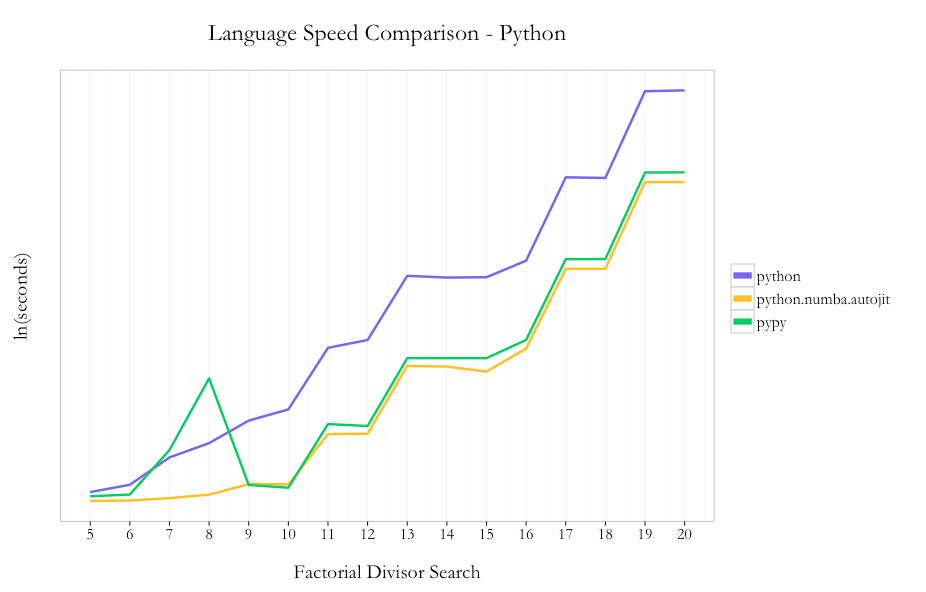
Amongst the native Python code options, I saw a 16x speedup by using PyPy instead of Python 2.7.6 (10.62s vs. 172.06s at 20!). Using Numba with Python instead of PyPy nets an incremental ~40% speedup using the @autojit decorator (7.63s vs. 10.63 at 20!).

So in the case of Python, using two lines of code with the Numba JIT compiler you can get substantial improvements in performance without needing to do any code re-writes. This is a great benefit given that you can stay in native Python, since PyPy doesn’t support all existing packages within the Python ecosystem.

R/pqR

JITr

It’s understood in the R community that loops are not a strong point of the language. In the case of this problem, I decided to use loops because 1) it keeps the code pattern similar across languages and 2) I hoped I’d see the max benefit from the compiler package by not trying any funky R optimizations up front.

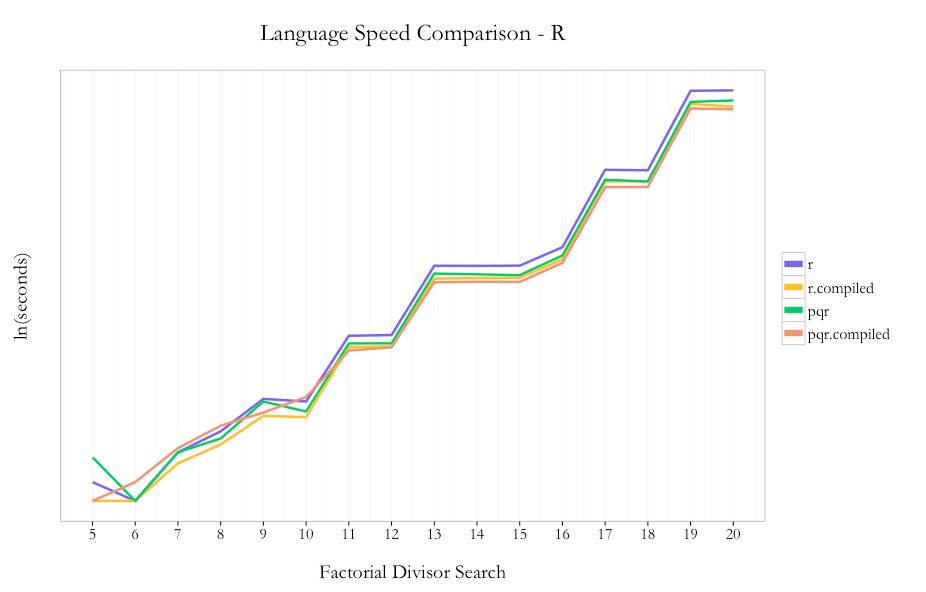
As expected, pqR is generally faster than R and using the compiler package is faster than not using the compiler. I saw ~30% improvement using pqR relative to R and ~20% incremental improvement using the compiler package with pqR. Using the compiler package within R showed ~35% improvement.

So unlike the case with Python, where you could just use Python with Numba and stay within the same language/environment, if you can use pqR and the compiler package, you can get a performance benefit from using both.

Summary

For a comparison like I’ve done above, it’s easy to get carried away and extrapolate the results from one simple test to all programming problems ever. “Julia is the best language for all cases ever!!!11111eleventy!” would be easy to proclaim, but all problems aren’t looping problems using simple division. Once you get into writing longer programs, other tasks such string manipulation and accessing APIs, using a technique from a package only available in one ecosystem but not another, etc., which tool is “best” for solving a problem becomes a much more difficult decision. The only way to know how much improvement you can see from different techniques & tools is to profile your program(s) and experiment.

The main thing that I took away from this exercise is that no matter which tool you are comfortable with to do analysis, there are potentially large performance improvements that can be made just by using a JIT without needing to dramatically re-write your code. For those of us who don’t know C (and/or are too lazy to re-write our code several times to wring out a little extra performance), that’s a great thing.

Tabular Data I/O in Julia

By: randyzwitch - Articles

Re-posted from: http://randyzwitch.com/julia-import-data/

Importing tabular data into Julia can be done in (at least) three ways: reading a delimited file into an array, reading a delimited file into a DataFrame and accessing databases using ODBC.

Reading a file into an array using readdlm

The most basic way to read data into Julia is through the use of the readdlm function, which will create an array:

readdlm(source, delim::Char, T::Type; options...)

If you are reading in a fairly normal delimited file, you can get away with just using the first two arguments, source and delim:It’s important to note that by only specifying the first two arguments, you leave it up to Julia to determine the type of array to return. In the code example above, an array of type ‘Any’ is returned, as the .csv file I read in was not of homogenous type such as Int64 or ASCIIString. If you know for certain which type of array you want, you specify the data type using the type argument:

It’s probably the case that unless you are looking to do linear algebra or other specific mathy type work, you’ll likely find that reading your data into a DataFrame will be more comfortable to work with (especially if you are coming from an R, Python/pandas or even spreadsheet tradition).

To write an array out to a file, you can use the writedlm function (defaults to comma-separated):

writedlm(filename, array, delim::Char)

Reading a file into a DataFrame using readtable

As I covered in my prior blog post about Julia, you can also read in delimited files into Julia using the DataFrames package, which returns a DataFrame instead of an array. Besides just being able to read in delimited files, the DataFrames package also supports reading in gzippped files on the fly:From what I understand, in the future you will be able to read files directly from Amazon S3 into a DataFrame (this is already supported in the AWS package), but for now, the DataFrames package works only on local files. Writing a DataFrame to file can be done with the writetable function: writetable(filename::String, df::DataFrame) By default, the writetable function will use the delimiter specified by the filename extension and default to printing the column names as a header.

Accessing Databases using ODBC

The third major way of importing tabular data into Julia is through the use of ODBC access to various databases such as MySQL and PostgreSQL.

Using a DSN

The Julia ODBC package provides functionality to connect to a database using a Data Source Name (DSN). Assuming you store all the credentials in your DSN (server name, username, password, etc.), connecting to a database is as easy as:

Of course, if you don’t want to store your password in your DSN (especially in the case where there are multiple users for a computer), you can pass the “usr” and “pwd” arguments to the ODBC.connect function:

ODBC.connect(dsn; usr="", pwd="")

Using a connection string

Alternatively, you can build your own connection strings within a Julia session using the advancedconnect function:Regardless of which way you connect, you can query data using the query function. If you want your output as a DataFrame, you can assign the result of the function to an object. If you want to save the results to a file, you specify the “file” argument:

Summary

Overall, importing data into Julia is no easier/more difficult than any other language. The biggest thing I’ve noticed thus far is that Julia is a bit less efficient than Python/pandas or R in terms of the amount of RAM needed to store data. In my experience, this is really only an issue once you are working with 1GB+ files (of course, depending on the resources available to you on your machine).