Tag Archives: julialang

Efficiency of data frame row iteration

By: Blog by Bogumił Kamiński

Re-posted from: https://bkamins.github.io/julialang/2022/07/08/iteration.html

Introduction

Last week I have received several questions about efficiency of iteration
over rows of data frames in DataFrames.jl. In this post I summarize the
most important recommendations on this topic.

The code I use was written under Julia 1.7.2, DataFrames.jl 1.3.4,
DataFramesMeta.jl 0.11.0.

A basic approach

Assume we have a data frame that has two numeric columns :a and :b and we
want to check if for all rows the value in column :a is less than the value in
column :b. We want to compare several approaches to this task and check their
performance. (I have chosen an easy task on purpose to concentrate on the issue
of iteration.)

Here is a basic approach to this problem (in all the examples I will run
the operation twice and show the @time output to capture the compilation
time and reflect interactive experience of the user):

julia> using DataFrames

julia> df = DataFrame(a=1:100_000_000, b=2:100_000_001)
100000000×2 DataFrame
       Row │ a          b
           │ Int64      Int64
───────────┼──────────────────────
         1 │         1          2
         2 │         2          3
     ⋮     │     ⋮          ⋮
  99999999 │  99999999  100000000
 100000000 │ 100000000  100000001
             99999996 rows omitted

julia> @time all(df.a .< df.b)
  0.204820 seconds (326.44 k allocations: 28.022 MiB, 53.94% compilation time)
true

julia> @time all(df.a .< df.b)
  0.093742 seconds (6 allocations: 11.925 MiB)
true

I have used broadcasting to present a reference performance of the operation.

Using data frame row iteration

The first take on our problem is to use the eachrow iterator:

julia> function f1(df)
           for row in eachrow(df)
               row.a < row.b || return false
           end
           return true
       end
f1 (generic function with 1 method)

julia> @time f1(df)
 19.280229 seconds (700.15 M allocations: 10.438 GiB, 6.00% gc time, 0.20% compilation time)
true

julia> @time f1(df)
 19.465430 seconds (700.00 M allocations: 10.431 GiB, 5.46% gc time)
true

As you can see using eachrow is slow. This approach is easy, but
should be used only for data frames that have few rows. The reason why it
is slow is that it is not type stable.

Using named tuples

Here is the approach that is type stable:

julia> function f2(nti)
           for row in nti
               row.a < row.b || return false
           end
           return true
       end
f2 (generic function with 1 method)

julia> @time f2(Tables.namedtupleiterator(df))
  0.104822 seconds (7.64 k allocations: 438.955 KiB, 7.41% compilation time)
true

julia> @time f2(Tables.namedtupleiterator(df))
  0.090318 seconds (9 allocations: 336 bytes)
true

This time the operation is fast. Note two things though:

  • using Tables.namedtupleiterator can be slow if data frame has many columns
    (it can have high compilation cost);
  • we need to pass Tables.namedtupleiterator(df) as an argument to f2 to
    make this function type stable.

Using vectors

The next approach that is typically used is to pass the vectors that
we want to compare to the function:

julia> function f3(a, b)
           for i in eachindex(a, b)
               @inbounds a[i] < b[i] || return false
           end
           return true
       end
f3 (generic function with 1 method)

julia> @time f3(df.a, df.b)
  0.113009 seconds (6.14 k allocations: 323.976 KiB, 6.03% compilation time)
true

julia> @time f3(df.a, df.b)
  0.082265 seconds
true

As you can see the operation is fast this time. I know I can safely use
@inbounds because the i index is taken from eachindex(a, b) that
guarantees that only valid indices are passed.

Using DataFramesMeta.jl

The last option we consider is using the @eachrow! macro from DataFramesMeta.jl:

julia> function f4(df)
           flag = true
           @eachrow! df begin
               if !(:a < :b)
                   flag = false
               end
           end
           return flag
       end
f4 (generic function with 1 method)

julia> @time f4(df)
  0.133970 seconds (80.46 k allocations: 4.634 MiB, 16.30% compilation time)
true

julia> @time f4(df)
  0.090125 seconds (27 allocations: 1.578 KiB)
true

The operation is also fast. Here it is worth to note two things:

  • we use @eachrow! not @eachrow as the latter would copy df which in our
    case is not needed;
  • we need to use the flag helper variable and we cannot use break to stop
    the iteration early (in the example I use this does not affect the result
    since :a is always less than :b so we iterate all rows anyway, but for
    other data it could matter).

Conclusions

The take-aways from these examples are as follows:

  • eachrow is easy to use, but it will be slow if you work with data frame
    that has many rows;
  • you can use Tables.namedtupleiterator wrapper instead of eachrow; it will
    be fast but it can have large compilation time for wide tables (note, however,
    that you can always pass only a narrow data frame to it if not all source
    columns are needed in your operation, for example
    Tables.namedtupleiterator(df[!, [:a, :b]]) in the code we used in this post);
  • you can directly pass columns you want to work with to a function – this
    approach will be fast and gives you most control (at the expense of having to
    write a more low-level code);
  • There is the @eachrow! macro (and @eachrow if you want to copy data) in
    DataFramesMeta.jl that will be also fast. When you use it remember that it
    is designed to always iterate all rows of a data frame.

Efficiency of data frame row iteration

By: Blog by Bogumił Kamiński

Re-posted from: https://bkamins.github.io/julialang/2022/07/08/iteration.html

Introduction

Last week I have received several questions about efficiency of iteration
over rows of data frames in DataFrames.jl. In this post I summarize the
most important recommendations on this topic.

The code I use was written under Julia 1.7.2, DataFrames.jl 1.3.4,
DataFramesMeta.jl 0.11.0.

A basic approach

Assume we have a data frame that has two numeric columns :a and :b and we
want to check if for all rows the value in column :a is less than the value in
column :b. We want to compare several approaches to this task and check their
performance. (I have chosen an easy task on purpose to concentrate on the issue
of iteration.)

Here is a basic approach to this problem (in all the examples I will run
the operation twice and show the @time output to capture the compilation
time and reflect interactive experience of the user):

julia> using DataFrames

julia> df = DataFrame(a=1:100_000_000, b=2:100_000_001)
100000000×2 DataFrame
       Row │ a          b
           │ Int64      Int64
───────────┼──────────────────────
         1 │         1          2
         2 │         2          3
     ⋮     │     ⋮          ⋮
  99999999 │  99999999  100000000
 100000000 │ 100000000  100000001
             99999996 rows omitted

julia> @time all(df.a .< df.b)
  0.204820 seconds (326.44 k allocations: 28.022 MiB, 53.94% compilation time)
true

julia> @time all(df.a .< df.b)
  0.093742 seconds (6 allocations: 11.925 MiB)
true

I have used broadcasting to present a reference performance of the operation.

Using data frame row iteration

The first take on our problem is to use the eachrow iterator:

julia> function f1(df)
           for row in eachrow(df)
               row.a < row.b || return false
           end
           return true
       end
f1 (generic function with 1 method)

julia> @time f1(df)
 19.280229 seconds (700.15 M allocations: 10.438 GiB, 6.00% gc time, 0.20% compilation time)
true

julia> @time f1(df)
 19.465430 seconds (700.00 M allocations: 10.431 GiB, 5.46% gc time)
true

As you can see using eachrow is slow. This approach is easy, but
should be used only for data frames that have few rows. The reason why it
is slow is that it is not type stable.

Using named tuples

Here is the approach that is type stable:

julia> function f2(nti)
           for row in nti
               row.a < row.b || return false
           end
           return true
       end
f2 (generic function with 1 method)

julia> @time f2(Tables.namedtupleiterator(df))
  0.104822 seconds (7.64 k allocations: 438.955 KiB, 7.41% compilation time)
true

julia> @time f2(Tables.namedtupleiterator(df))
  0.090318 seconds (9 allocations: 336 bytes)
true

This time the operation is fast. Note two things though:

  • using Tables.namedtupleiterator can be slow if data frame has many columns
    (it can have high compilation cost);
  • we need to pass Tables.namedtupleiterator(df) as an argument to f2 to
    make this function type stable.

Using vectors

The next approach that is typically used is to pass the vectors that
we want to compare to the function:

julia> function f3(a, b)
           for i in eachindex(a, b)
               @inbounds a[i] < b[i] || return false
           end
           return true
       end
f3 (generic function with 1 method)

julia> @time f3(df.a, df.b)
  0.113009 seconds (6.14 k allocations: 323.976 KiB, 6.03% compilation time)
true

julia> @time f3(df.a, df.b)
  0.082265 seconds
true

As you can see the operation is fast this time. I know I can safely use
@inbounds because the i index is taken from eachindex(a, b) that
guarantees that only valid indices are passed.

Using DataFramesMeta.jl

The last option we consider is using the @eachrow! macro from DataFramesMeta.jl:

julia> function f4(df)
           flag = true
           @eachrow! df begin
               if !(:a < :b)
                   flag = false
               end
           end
           return flag
       end
f4 (generic function with 1 method)

julia> @time f4(df)
  0.133970 seconds (80.46 k allocations: 4.634 MiB, 16.30% compilation time)
true

julia> @time f4(df)
  0.090125 seconds (27 allocations: 1.578 KiB)
true

The operation is also fast. Here it is worth to note two things:

  • we use @eachrow! not @eachrow as the latter would copy df which in our
    case is not needed;
  • we need to use the flag helper variable and we cannot use break to stop
    the iteration early (in the example I use this does not affect the result
    since :a is always less than :b so we iterate all rows anyway, but for
    other data it could matter).

Conclusions

The take-aways from these examples are as follows:

  • eachrow is easy to use, but it will be slow if you work with data frame
    that has many rows;
  • you can use Tables.namedtupleiterator wrapper instead of eachrow; it will
    be fast but it can have large compilation time for wide tables (note, however,
    that you can always pass only a narrow data frame to it if not all source
    columns are needed in your operation, for example
    Tables.namedtupleiterator(df[!, [:a, :b]]) in the code we used in this post);
  • you can directly pass columns you want to work with to a function – this
    approach will be fast and gives you most control (at the expense of having to
    write a more low-level code);
  • There is the @eachrow! macro (and @eachrow if you want to copy data) in
    DataFramesMeta.jl that will be also fast. When you use it remember that it
    is designed to always iterate all rows of a data frame.

ABC of Plots.jl

By: Blog by Bogumił Kamiński

Re-posted from: https://bkamins.github.io/julialang/2022/07/01/plotting.html

Introduction

Visualization is an important part of any data analysis project.
When I started preparing my Julia for Data Analysis book
I had to choose which plotting framework to use in it.

The challenge was that there are many great plotting packages in
the Julia ecosystem. Let me mention a few here:

  • Gadfly.jl will be appealing for ggplot2 users;
  • Makie.jl is extremely flexible and performant; I especially
    appreciate how nicely you can create 3D animations using it;
  • Unicode.jl can be used if you want the plots to be directly
    displayed in the terminal.

In the end I decided to use Plots.jl. The reason is that it is,
in my opinion, easy to get started with while at the same time it is very mature
and feature rich.

In this post I want to discuss my experience as a user of Plots.jl.
This will be a simplified treatment of the topic. If you would like to learn
more details I recommend you to visit the documentation of Plots.jl.

All the codes were run under Julia 1.7.2 and Plots.jl 1.31.1.

Getting started with Plots.jl

There are many plotting functions provided by Plots.jl. The ones that
I use most frequently are:

  • plot: creates a new plot object;
  • plot!: adds additional drawing to an existing plot;
  • scatter: creates a new scatterplot;
  • scatter!: adds a scatterplot to an existing plot.
  • hline!: adds horizonal lines to an existing plot (there is also hline but
    I do not use it much);
  • vline!: adds vertical lines to an existing plot (similarly there is vline);
  • heatmap: creates a new plot with a heatmap (similarly there is heatmap!);
  • annotate!: adds annotation to an existing plot;
  • savefig: save a plot to a file.

The fact that you have the ! versions of plotting functions is quite
convenient since it allows you to easily build your plot step-by-step by
interactively adding new elements to it.

The most important rule of Plots.jl is that almost everything in Plots.jl
is done by specifying plot attributes passed as keyword arguments.

Let me list the basic attributes I use most often:

  • title: sets plot title;
  • xlabel: x-axis label;
  • ylabel: y-axis label;
  • legend: legend position;
  • labels: labels for a series that appear in the legend.

Having this knowledge create a simple plot to see all these elements in action:

julia> using Plots

julia> z = exp.(range(0, 2π, 65)im)
65-element Vector{ComplexF64}:
                1.0 + 0.0im
 0.9951847266721969 + 0.0980171403295606im
 0.9807852804032304 + 0.19509032201612825im
                    ⋮
 0.9807852804032303 - 0.19509032201612872im
 0.9951847266721969 - 0.0980171403295605im
                1.0 - 2.4492935982947064e-16im

julia> plot(z; title="Circle", legend=:bottomright, labels="z")

julia> scatter!(z; xlabel="Re", ylabel="Im", labels=nothing)

julia> savefig("plot1.png")

Which produces the following plot:

Circle

Note that Plots.jl nicely handles plotting a series of complex numbers.

The only problem with this figure is that it is not a circle. Let us fix it.

Some more parameters

To make the plot be a circle we must set aspect ratio in it to be equal.
Additionally to make it look nice I adjust figure size to be square and I add
a marker option in plot command to get both the line and points in one go.

julia> plot(z; title="Circle", xlabel="Re", ylabel="Im", legend=:bottomright,
            labels="z", marker=:o, aspectratio=:equal, size=(400, 400))

We now have the following plot:

Circle

You might wonder where you can learn about various attributes that Plots.jl
allows for. Fortunately there is a section on attributes in the
documentation which allows you to browse through many available options.

Common challenges when using Plots.jl

There are two types of common challenges people often encounter when using
Plots.jl. The first is that is when you plot n series with a single
plot command you need to pass a 1xn matrix to of attributes that apply to
each of the series (users often incorrectly pass a vector). The second is that
sometimes text printed on a plot gets cropped and you need to adjust padding to
fix this problem. Let us investigate these issues one by one.

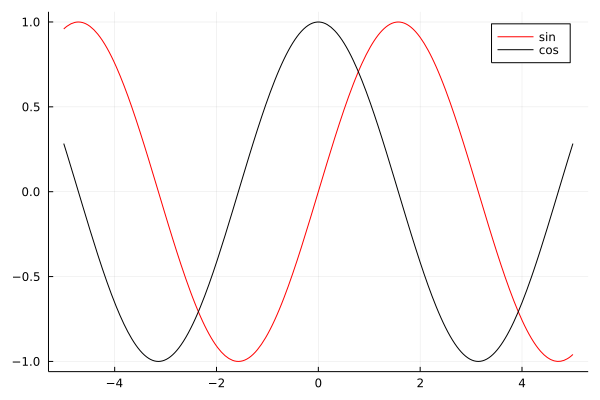
Start with the issue of multiple series in a single plot.

julia> plot([sin cos]; labels=["sin" "cos"], color=["red" "black"])

Which gives us:

Functions

First note that plot nicely plotted functions that we passed to it. The
key thing to get this plot right was to pass all arguments as 1×2 matrices
therefore in array literals I just used a space (without a comma).

Now let us discuss padding. In this example I additionally show you how to
set custom ticks in a plot.

julia> sales = [1, 5, 2, 7];

julia> plot(["winter", "spring", "summer", "autumn"], sales;
            labels=nothing, tickfontsize=10, xrot=90,
            yticks=(sales, 1000sales),
            ylim=extrema(sales) .+ (-1, 1),
            bottommargin=5Plots.mm)

The command above produces this plot:

Sales

I think that most of the passed keyword arguments have self explanatory names.
Let me comment on two things. In yticks=(sales, 1000sales) the first element
of the tuple are tick locations and the second are tick labels (in this case I
assumed that the original sales vector represented sales data in thousands).
Because x-ticks in our plot were long I needed to rotate them. However, after
rotation they get cropped. Therefore I had to add extra padding at the bottom
with bottommargin=5Plots.mm. The Plots.mm part makes sure that the padding
is measured in absolute terms (5 millimeters in this case). When setting the
margins in Plots.jl you have to pass absolute length measures. They are defined
in Measures.jl and internally imported, but not re-exported, by Plots.jl.

Conclusions

I hope that this post will be useful for new Plots.jl users and help them
avoid challenges that they might to have when using this package.