Tag Archives: julialang

The cord tying problem

By: Blog by Bogumił Kamiński

Re-posted from: https://bkamins.github.io/julialang/2023/08/03/laces.html

Introduction

During the JuliaCon 2023 conference I got several
suggestions for writing some more puzzle-solving posts.
Therefore this week I want to present a problem that I have recently
learned from Paweł Prałat:

Assume that you have an even number n of cords of equal length
lying in a bunch. They are arranged in such a way that they are
approximately straight so that you see one end of each cord in one
region (call it left) and the other end in another region
(call it right). Imagine, for example, that the cords were wrapped
around in their middles. However, this unfortunately
means, you cannot distinguish which end belongs to which cord.
Your task is to tie the ends of the cords in such a way that after
removing the middle wrapping they form a single big loop. Assuming that
you tie the cords randomly (left and right ends separately)
compute the probability that you are going to succeed.

The initial setup of the cords (before we start tying them) is
shown on a figure below (I took the image from this source):
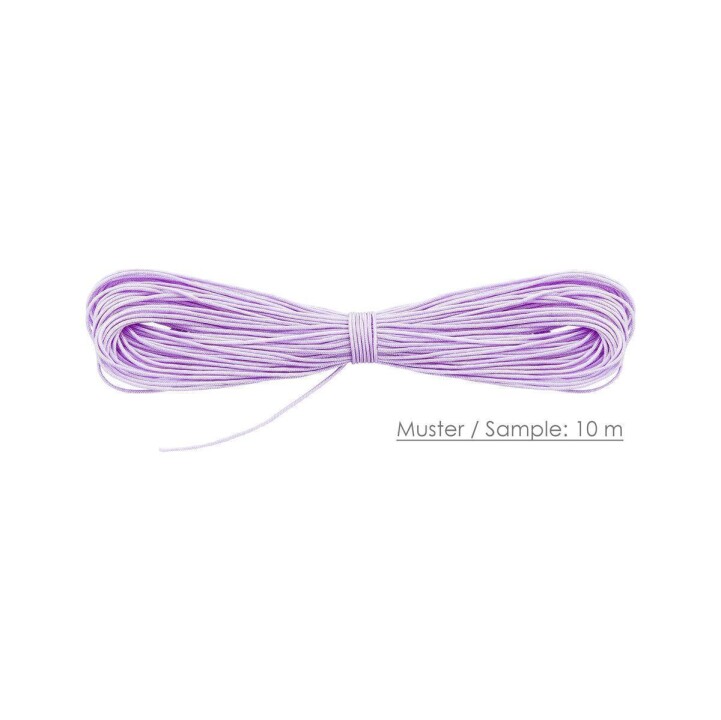
Cords

As usual, we are going to solve it analytically and computationally.

The post was written using Julia 1.9.2 and DataFrames.jl 1.6.1.

Analytical solution

Denote by p(n) the probability that we succeed with n cords.

Notice that we can assume that we can first tie n right
ends of the cords in any order.

Now let us analyze tying the left ends of the cords.
We assume that they are tied randomly.
We start tying the left ends by randomly picking cord
a and tying it to a random cord b.
Let us ask when such a tie is a success and when it is a failure.

If n = 2 we know we succeeded. We have just created a loop
using two cords. Thus p(2) = 1.

If n > 2 what we want to avoid is a situation when the cords
a and b are already tied on the right side. Why?
Because then we would create a loop
that would be smaller than the required loop including all cords.
The probability that we pick a wrong end of a cord is 1/(n-1)
as we have n-1 ends to choose from and one of them is bad.
Thus we succeed with probability (n-2)/(n-1).

Now observe that, assuming we succeeded, we have just tied three original
cords into a one longer cord. Thus we are left with a situation
when we have n-2 cords and the problem has the same structure to
what we started with.
So we get that for n > 2 we can computep(n) = p(n-2)*(n-2)/(n-1).

This means that we can write (using Julia code notation):

p(n) = prod((i-1)/i for i in n-1:-2:3)

Note that this function works correctly only for even n
that is at least 4. We will make its more careful implementation
in the computational solution section below.

However, first, let us ask ourselves if the formula for this function
can be simplified. Indeed we see that it is equivalent to:

prod(i-1 for i in n-1:-2:3) / prod(i for i in n-1:-2:3)

which in turn can be rewritten as:

prod(i-1 for i in n-1:-2:3)^2 / prod(i for i in n-1:-1:2)

Now observe that the numerator is just 2^(n-2)*factorial(n÷2-1)^2
(remember that n is even)
and the denominator is factorial(n-1). Thus the formula further
simplifies to:

2^(n-2)*factorial(n÷2-1)^2 / factorial(n-1)

And finally:

2^(n-2) / ((n-1)*binomial(n-2, n÷2-1))

Now from Stirling’s approximation we know that:

binomial(n-2, n÷2-1) ~ 2^(2n-4) / sqrt((n-2)*pi)

so for sufficiently large n:

p(n) ~ sqrt((n/2-1)*pi) / (n-1)

Thus we learn that the probability of getting a full circle
is of order O(1/sqrt(n)) for large n.

Let us now check these results computationally.

Computational solution

First start with a more careful implementation of the functions
computing p(n):

function connect_exact(n::Integer)
    @assert n > 3 && iseven(n)
    return prod((i-1)/i for i in n-1:-2:3)
end

function connect_approx(n::Integer)
    @assert n > 3 && iseven(n)
    return sqrt(pi * (n / 2 - 1)) / (n - 1)
end

Let us check how close the exact and approximate formulas are.
Let us compute percentage deviation of the approximation
from the exact result:

julia> [1 - connect_approx(n) / connect_exact(n) for n in 4:2:28]
13-element Vector{Float64}:
 0.11377307454724206
 0.060014397013374854
 0.040631211300167
 0.030689300286045995
 0.024649922854770412
 0.02059439568578203
 0.017683822837349372
 0.015493594528168564
 0.013785863139806342
 0.012417071173843053
 0.011295454766000912
 0.01035962441429672
 0.00956696079055186

We see that approximation is slightly below the exact number and that
the percentage deviation decreases as n goes up. With n=28 we are
below 1% error.

Let us check some larger value of n:

julia> 1 - connect_approx(10000) / connect_exact(10000)
2.5004688326446534e-5

We see that the values are now really close.
If you were afraid that we might be hitting numeric computation
issues with connect_approx since we are multiplying a lot of
values, we can easily switch to a more precise computation with Julia:

julia> 1 - connect_approx(big(10000)) / connect_exact(big(10000))
2.500468833607760982625749174941669517305288399515417883351990349709823151295288e-05

We see that using normal Float64 was enough for this range of values
of n to get enough accuracy.

But what if we were not sure if our derivation of the formula for p(n)
was correct? We can use simulation to check it.

Here is the implementation of a simulator:

function connect_sim(n::Integer)
    @assert iseven(n) && n > 3
    left = randperm(n)
    neis2 = zeros(Int, n)
    for i in 1:2:n
        neis2[left[i]] = left[i+1]
        neis2[left[i+1]] = left[i]
    end
    prev = 1
    loc = 2
    visited = 2
    while true
        nei1 = isodd(loc) ? loc+1 : loc-1
        nei2 = neis2[loc]
        loc, prev = (prev == nei1 ? nei2 : nei1), loc
        loc == 1 && return visited == n
        visited += 1
    end
end

The the code we assume that we numbered the cords from 1 to n
and that in the right part they are connected 1-2, 3-4, …
(note that we can always re-number them to get this).

The neis2 keeps the information about connections on left.
To get a random connection pattern we first draw a random n-element
permutation and store it in the left variable. Then we assume that
the connections are formed by cords left[1]-left[2], left[3]-left[4], …
and store these connections in the neis2 vector.

Now we are ready to check if this connection pattern is good, that
is, it creates one big loop. To do this we start from cord 1
and assume that we first moved to cord 2. The current location of
our travel is kept in variable loc. Then from each cord we move
either on right or on left to the next cord. The nei1 variable keeps
cords neighbor on right and nei2 on left. We keep track in the prev
variable which cord we have visited last. Using this information
we know which move we should make next. Notice that since we started from
1 we eventually have to reach it. The number of steps taken to reach
1 is tracked by the visited variable. If when loc == 1 we have
that visited == n this means that we have formed a big cycle and
we return true. Otherwise we return false.

Let us check if our simulation indeed returns values close to theoretical
ones. For this we will record the mean of 100,000 runs of our simulation
(and here the power of Julia shines – it is not a problem to run that many
samples). We check the results for the values of n we investigated above:

using DataFrames
using Random
using Statistics
connect_sim_mean(n) =
    mean(connect_sim(n) for _ in 1:100_000)
Random.seed!(1234)
df = DataFrame(n=[4:2:28; 10_000])
transform(df, :n .=> ByRow.([connect_exact,
                             connect_approx,
                             connect_sim_mean]))

The results of running this code are given below:

14×4 DataFrame
 Row │ n      n_connect_exact  n_connect_approx  n_connect_sim_mean
     │ Int64  Float64          Float64           Float64
─────┼──────────────────────────────────────────────────────────────
   1 │     4        0.666667          0.590818              0.66662
   2 │     6        0.533333          0.501326              0.53622
   3 │     8        0.457143          0.438569              0.45843
   4 │    10        0.406349          0.393879              0.40671
   5 │    12        0.369408          0.360302              0.36978
   6 │    14        0.340992          0.33397               0.33996
   7 │    16        0.31826           0.312631              0.31743
   8 │    18        0.299538          0.294897              0.29848
   9 │    20        0.283773          0.279861              0.28399
  10 │    22        0.27026           0.266904              0.26879
  11 │    24        0.25851           0.25559               0.25528
  12 │    26        0.248169          0.245598              0.24755
  13 │    28        0.238978          0.236692              0.24052
  14 │ 10000        0.0125335         0.0125331             0.01266

We can see that simulation results match the exact calculations well.

Conclusions

I hope you liked the puzzle and the solution. Next week I plan to
present the results of some experiments involving machine learning
models in Julia.

Julia basics: replace

By: Blog by Bogumił Kamiński

Re-posted from: https://bkamins.github.io/julialang/2023/07/27/replace.html

Introduction

Today I want to write about a basic vector manipulation pattern that I often need when cleaning data.
The topic is replacing values in a vector.

I want to discuss the basic options Base Julia offers you in this area and the considerations of their usage.

The post was written under Julia 1.9.2.

The problem statement

Assume you have the following vector of strings:

julia> using Random

julia> Random.seed!(1234);

julia> v = [randstring('a':'z', 2) for _ in 1:10^7]
10000000-element Vector{String}:
 "io"
 "fx"
 "jk"
 "yu"
 "mt"
 "ps"
 ⋮
 "ji"
 "zx"
 "yo"
 "db"
 "gy"
 "dg"

It consists of randomly drawn strings of length 2 consisting of two lowercase letters.

Let us check how many unique values it has (we expect 26 * 26 = 676):

julia> Set(v)
Set{String} with 676 elements:
  "ao"
  "gi"
  "gy"
  "ea"
  "an"
  "ec"
  "fs"
  "qq"
  "ys"
  "gd"
  "ow"
  "gu"
  ⋮

Now we have two tasks (similar, but not identical):

  • In all cases when the first and the second letter is the same uppercase the string and otherwise set data to missing.
  • In all cases when the first and the second letter is the same uppercase the string and keep the rest of the data as it is.

Both patterns are often needed in practice so I thought it is useful to cover them. Let us discuss them in the following sections.

Replacing a non-matching value by a flag

This pattern is often needed when we have many categories in our data, and want to keep most important ones, while flagging the less important ones as other. In our task the other signaling flag is missing.

How can we achieve the desired result? A direct approach would be to use a comprehension with a condition like this:

julia> sort!(unique([allequal(x) ? uppercase(x) : missing for x in v]))
27-element Vector{Union{Missing, String}}:
 "AA"
 "BB"
 "CC"
 "DD"
 "EE"
 "FF"
 ⋮
 "VV"
 "WW"
 "XX"
 "YY"
 "ZZ"
 missing

I have used the unique and sort! functions to check that indeed we get 27 values in the result (26 uppercase strings + missing).

This approach works, but it relies on a special structure of our condition (all equal letters in a string). What would be a more general pattern? In such cases it is convenient to use a dictionary. Let us first define the desired mapping:

julia> mapping = Dict(c^2 => uppercase(c)^2 for c in 'a':'z')
Dict{String, String} with 26 entries:
  "ff" => "FF"
  "bb" => "BB"
  "hh" => "HH"
  "ii" => "II"
  "oo" => "OO"
  "vv" => "VV"
  "zz" => "ZZ"
  "dd" => "DD"
  "tt" => "TT"
  "ee" => "EE"
  "jj" => "JJ"
  "ww" => "WW"
  ⋮    => ⋮

Now we can use the get function. Its beauty is that it allows us to define a default value that should be returned
when a key is missing in a dictionary. Let us use it in two ways:

julia> sort!(unique([get(mapping, x, missing) for x in v]))
27-element Vector{Union{Missing, String}}:
 "AA"
 "BB"
 "CC"
 "DD"
 "EE"
 "FF"
 ⋮
 "VV"
 "WW"
 "XX"
 "YY"
 "ZZ"
 missing

julia> sort!(unique(get.(Ref(mapping), v, missing)))
27-element Vector{Union{Missing, String}}:
 "AA"
 "BB"
 "CC"
 "DD"
 "EE"
 "FF"
 ⋮
 "VV"
 "WW"
 "XX"
 "YY"
 "ZZ"
 missing

The first uses a comprehension and the second broadcasting. Which one should be preferred. Let us run a minimal benchmark:

julia> @time [get(mapping, x, missing) for x in v];
  1.309264 seconds (31.70 k allocations: 78.387 MiB, 10.17% compilation time)

julia> @time get.(Ref(mapping), v, missing);
  0.660786 seconds (7 allocations: 76.294 MiB)

Broadcasting is noticeably faster. What is the reason? The issue is that we are working in top-level scope and comprehension is not type stable and also needs to get compiled each time it is run. Let us first make it type stable using let:

julia> let mapping=mapping
           @time [get(mapping, x, missing) for x in v]
       end;
  0.828514 seconds (39.49 k allocations: 78.991 MiB, 22.09% compilation time)

We already made it faster but still we are hit by compilation time. Let us define a helper function:

julia> helper1(x, mapping) = [get(mapping, x, missing) for x in v];

julia> @time helper1(x, mapping);
  0.921935 seconds (180.41 k allocations: 88.752 MiB, 31.15% compilation time)

julia> @time helper1(x, mapping);
  0.655153 seconds (5 allocations: 76.294 MiB)

Now we get the same timing. So the lesson is: within a function broadcasting and comprehension should have a similar timing, but in top-level scope (which is often the case when working interactively with data) it is better to use broadcasting.

Retaining non-matching values

If we want to retain non-matching values we cannot use the dictionary get function, because it always returns the same value in case of a miss.

Here we have two basic options: use a custom comprehension or use the replace function. Let us see them both in action:

julia> reshape(sort!(unique(replace(v, mapping...))), 26, :)
26×26 Matrix{String}:
 "AA"  "ab"  "bc"  "cd"  "de"  "ef"  "fg"  "gh"  "hi"  "ij"  "jk"  …  "pq"  "qr"  "rs"  "st"  "tu"  "uv"  "vw"  "wx"  "xy"  "yz"
 "BB"  "ac"  "bd"  "ce"  "df"  "eg"  "fh"  "gi"  "hj"  "ik"  "jl"     "pr"  "qs"  "rt"  "su"  "tv"  "uw"  "vx"  "wy"  "xz"  "za"
 "CC"  "ad"  "be"  "cf"  "dg"  "eh"  "fi"  "gj"  "hk"  "il"  "jm"     "ps"  "qt"  "ru"  "sv"  "tw"  "ux"  "vy"  "wz"  "ya"  "zb"
 "DD"  "ae"  "bf"  "cg"  "dh"  "ei"  "fj"  "gk"  "hl"  "im"  "jn"     "pt"  "qu"  "rv"  "sw"  "tx"  "uy"  "vz"  "xa"  "yb"  "zc"
 "EE"  "af"  "bg"  "ch"  "di"  "ej"  "fk"  "gl"  "hm"  "in"  "jo"     "pu"  "qv"  "rw"  "sx"  "ty"  "uz"  "wa"  "xb"  "yc"  "zd"
 "FF"  "ag"  "bh"  "ci"  "dj"  "ek"  "fl"  "gm"  "hn"  "io"  "jp"  …  "pv"  "qw"  "rx"  "sy"  "tz"  "va"  "wb"  "xc"  "yd"  "ze"
 "GG"  "ah"  "bi"  "cj"  "dk"  "el"  "fm"  "gn"  "ho"  "ip"  "jq"     "pw"  "qx"  "ry"  "sz"  "ua"  "vb"  "wc"  "xd"  "ye"  "zf"
 "HH"  "ai"  "bj"  "ck"  "dl"  "em"  "fn"  "go"  "hp"  "iq"  "jr"     "px"  "qy"  "rz"  "ta"  "ub"  "vc"  "wd"  "xe"  "yf"  "zg"
 "II"  "aj"  "bk"  "cl"  "dm"  "en"  "fo"  "gp"  "hq"  "ir"  "js"     "py"  "qz"  "sa"  "tb"  "uc"  "vd"  "we"  "xf"  "yg"  "zh"
 "JJ"  "ak"  "bl"  "cm"  "dn"  "eo"  "fp"  "gq"  "hr"  "is"  "jt"     "pz"  "ra"  "sb"  "tc"  "ud"  "ve"  "wf"  "xg"  "yh"  "zi"
 "KK"  "al"  "bm"  "cn"  "do"  "ep"  "fq"  "gr"  "hs"  "it"  "ju"  …  "qa"  "rb"  "sc"  "td"  "ue"  "vf"  "wg"  "xh"  "yi"  "zj"
 "LL"  "am"  "bn"  "co"  "dp"  "eq"  "fr"  "gs"  "ht"  "iu"  "jv"     "qb"  "rc"  "sd"  "te"  "uf"  "vg"  "wh"  "xi"  "yj"  "zk"
 "MM"  "an"  "bo"  "cp"  "dq"  "er"  "fs"  "gt"  "hu"  "iv"  "jw"     "qc"  "rd"  "se"  "tf"  "ug"  "vh"  "wi"  "xj"  "yk"  "zl"
 "NN"  "ao"  "bp"  "cq"  "dr"  "es"  "ft"  "gu"  "hv"  "iw"  "jx"     "qd"  "re"  "sf"  "tg"  "uh"  "vi"  "wj"  "xk"  "yl"  "zm"
 "OO"  "ap"  "bq"  "cr"  "ds"  "et"  "fu"  "gv"  "hw"  "ix"  "jy"     "qe"  "rf"  "sg"  "th"  "ui"  "vj"  "wk"  "xl"  "ym"  "zn"
 "PP"  "aq"  "br"  "cs"  "dt"  "eu"  "fv"  "gw"  "hx"  "iy"  "jz"  …  "qf"  "rg"  "sh"  "ti"  "uj"  "vk"  "wl"  "xm"  "yn"  "zo"
 "QQ"  "ar"  "bs"  "ct"  "du"  "ev"  "fw"  "gx"  "hy"  "iz"  "ka"     "qg"  "rh"  "si"  "tj"  "uk"  "vl"  "wm"  "xn"  "yo"  "zp"
 "RR"  "as"  "bt"  "cu"  "dv"  "ew"  "fx"  "gy"  "hz"  "ja"  "kb"     "qh"  "ri"  "sj"  "tk"  "ul"  "vm"  "wn"  "xo"  "yp"  "zq"
 "SS"  "at"  "bu"  "cv"  "dw"  "ex"  "fy"  "gz"  "ia"  "jb"  "kc"     "qi"  "rj"  "sk"  "tl"  "um"  "vn"  "wo"  "xp"  "yq"  "zr"
 "TT"  "au"  "bv"  "cw"  "dx"  "ey"  "fz"  "ha"  "ib"  "jc"  "kd"     "qj"  "rk"  "sl"  "tm"  "un"  "vo"  "wp"  "xq"  "yr"  "zs"
 "UU"  "av"  "bw"  "cx"  "dy"  "ez"  "ga"  "hb"  "ic"  "jd"  "ke"  …  "qk"  "rl"  "sm"  "tn"  "uo"  "vp"  "wq"  "xr"  "ys"  "zt"
 "VV"  "aw"  "bx"  "cy"  "dz"  "fa"  "gb"  "hc"  "id"  "je"  "kf"     "ql"  "rm"  "sn"  "to"  "up"  "vq"  "wr"  "xs"  "yt"  "zu"
 "WW"  "ax"  "by"  "cz"  "ea"  "fb"  "gc"  "hd"  "ie"  "jf"  "kg"     "qm"  "rn"  "so"  "tp"  "uq"  "vr"  "ws"  "xt"  "yu"  "zv"
 "XX"  "ay"  "bz"  "da"  "eb"  "fc"  "gd"  "he"  "if"  "jg"  "kh"     "qn"  "ro"  "sp"  "tq"  "ur"  "vs"  "wt"  "xu"  "yv"  "zw"
 "YY"  "az"  "ca"  "db"  "ec"  "fd"  "ge"  "hf"  "ig"  "jh"  "ki"     "qo"  "rp"  "sq"  "tr"  "us"  "vt"  "wu"  "xv"  "yw"  "zx"
 "ZZ"  "ba"  "cb"  "dc"  "ed"  "fe"  "gf"  "hg"  "ih"  "ji"  "kj"  …  "qp"  "rq"  "sr"  "ts"  "ut"  "vu"  "wv"  "xw"  "yx"  "zy"

julia> reshape(sort!(unique([haskey(mapping, x) ? mapping[x] : x for x in v])), 26, :)
26×26 Matrix{String}:
 "AA"  "ab"  "bc"  "cd"  "de"  "ef"  "fg"  "gh"  "hi"  "ij"  "jk"  …  "pq"  "qr"  "rs"  "st"  "tu"  "uv"  "vw"  "wx"  "xy"  "yz"
 "BB"  "ac"  "bd"  "ce"  "df"  "eg"  "fh"  "gi"  "hj"  "ik"  "jl"     "pr"  "qs"  "rt"  "su"  "tv"  "uw"  "vx"  "wy"  "xz"  "za"
 "CC"  "ad"  "be"  "cf"  "dg"  "eh"  "fi"  "gj"  "hk"  "il"  "jm"     "ps"  "qt"  "ru"  "sv"  "tw"  "ux"  "vy"  "wz"  "ya"  "zb"
 "DD"  "ae"  "bf"  "cg"  "dh"  "ei"  "fj"  "gk"  "hl"  "im"  "jn"     "pt"  "qu"  "rv"  "sw"  "tx"  "uy"  "vz"  "xa"  "yb"  "zc"
 "EE"  "af"  "bg"  "ch"  "di"  "ej"  "fk"  "gl"  "hm"  "in"  "jo"     "pu"  "qv"  "rw"  "sx"  "ty"  "uz"  "wa"  "xb"  "yc"  "zd"
 "FF"  "ag"  "bh"  "ci"  "dj"  "ek"  "fl"  "gm"  "hn"  "io"  "jp"  …  "pv"  "qw"  "rx"  "sy"  "tz"  "va"  "wb"  "xc"  "yd"  "ze"
 "GG"  "ah"  "bi"  "cj"  "dk"  "el"  "fm"  "gn"  "ho"  "ip"  "jq"     "pw"  "qx"  "ry"  "sz"  "ua"  "vb"  "wc"  "xd"  "ye"  "zf"
 "HH"  "ai"  "bj"  "ck"  "dl"  "em"  "fn"  "go"  "hp"  "iq"  "jr"     "px"  "qy"  "rz"  "ta"  "ub"  "vc"  "wd"  "xe"  "yf"  "zg"
 "II"  "aj"  "bk"  "cl"  "dm"  "en"  "fo"  "gp"  "hq"  "ir"  "js"     "py"  "qz"  "sa"  "tb"  "uc"  "vd"  "we"  "xf"  "yg"  "zh"
 "JJ"  "ak"  "bl"  "cm"  "dn"  "eo"  "fp"  "gq"  "hr"  "is"  "jt"     "pz"  "ra"  "sb"  "tc"  "ud"  "ve"  "wf"  "xg"  "yh"  "zi"
 "KK"  "al"  "bm"  "cn"  "do"  "ep"  "fq"  "gr"  "hs"  "it"  "ju"  …  "qa"  "rb"  "sc"  "td"  "ue"  "vf"  "wg"  "xh"  "yi"  "zj"
 "LL"  "am"  "bn"  "co"  "dp"  "eq"  "fr"  "gs"  "ht"  "iu"  "jv"     "qb"  "rc"  "sd"  "te"  "uf"  "vg"  "wh"  "xi"  "yj"  "zk"
 "MM"  "an"  "bo"  "cp"  "dq"  "er"  "fs"  "gt"  "hu"  "iv"  "jw"     "qc"  "rd"  "se"  "tf"  "ug"  "vh"  "wi"  "xj"  "yk"  "zl"
 "NN"  "ao"  "bp"  "cq"  "dr"  "es"  "ft"  "gu"  "hv"  "iw"  "jx"     "qd"  "re"  "sf"  "tg"  "uh"  "vi"  "wj"  "xk"  "yl"  "zm"
 "OO"  "ap"  "bq"  "cr"  "ds"  "et"  "fu"  "gv"  "hw"  "ix"  "jy"     "qe"  "rf"  "sg"  "th"  "ui"  "vj"  "wk"  "xl"  "ym"  "zn"
 "PP"  "aq"  "br"  "cs"  "dt"  "eu"  "fv"  "gw"  "hx"  "iy"  "jz"  …  "qf"  "rg"  "sh"  "ti"  "uj"  "vk"  "wl"  "xm"  "yn"  "zo"
 "QQ"  "ar"  "bs"  "ct"  "du"  "ev"  "fw"  "gx"  "hy"  "iz"  "ka"     "qg"  "rh"  "si"  "tj"  "uk"  "vl"  "wm"  "xn"  "yo"  "zp"
 "RR"  "as"  "bt"  "cu"  "dv"  "ew"  "fx"  "gy"  "hz"  "ja"  "kb"     "qh"  "ri"  "sj"  "tk"  "ul"  "vm"  "wn"  "xo"  "yp"  "zq"
 "SS"  "at"  "bu"  "cv"  "dw"  "ex"  "fy"  "gz"  "ia"  "jb"  "kc"     "qi"  "rj"  "sk"  "tl"  "um"  "vn"  "wo"  "xp"  "yq"  "zr"
 "TT"  "au"  "bv"  "cw"  "dx"  "ey"  "fz"  "ha"  "ib"  "jc"  "kd"     "qj"  "rk"  "sl"  "tm"  "un"  "vo"  "wp"  "xq"  "yr"  "zs"
 "UU"  "av"  "bw"  "cx"  "dy"  "ez"  "ga"  "hb"  "ic"  "jd"  "ke"  …  "qk"  "rl"  "sm"  "tn"  "uo"  "vp"  "wq"  "xr"  "ys"  "zt"
 "VV"  "aw"  "bx"  "cy"  "dz"  "fa"  "gb"  "hc"  "id"  "je"  "kf"     "ql"  "rm"  "sn"  "to"  "up"  "vq"  "wr"  "xs"  "yt"  "zu"
 "WW"  "ax"  "by"  "cz"  "ea"  "fb"  "gc"  "hd"  "ie"  "jf"  "kg"     "qm"  "rn"  "so"  "tp"  "uq"  "vr"  "ws"  "xt"  "yu"  "zv"
 "XX"  "ay"  "bz"  "da"  "eb"  "fc"  "gd"  "he"  "if"  "jg"  "kh"     "qn"  "ro"  "sp"  "tq"  "ur"  "vs"  "wt"  "xu"  "yv"  "zw"
 "YY"  "az"  "ca"  "db"  "ec"  "fd"  "ge"  "hf"  "ig"  "jh"  "ki"     "qo"  "rp"  "sq"  "tr"  "us"  "vt"  "wu"  "xv"  "yw"  "zx"
 "ZZ"  "ba"  "cb"  "dc"  "ed"  "fe"  "gf"  "hg"  "ih"  "ji"  "kj"  …  "qp"  "rq"  "sr"  "ts"  "ut"  "vu"  "wv"  "xw"  "yx"  "zy"

You might wonder which approach is fester in practice. Let us check it (including all options for the comprehension we have used above):

julia> @time replace(v, mapping...);
  2.896812 seconds (461 allocations: 76.314 MiB)

julia> @time [haskey(mapping, x) ? mapping[x] : v for x in v];
  1.389256 seconds (31.67 k allocations: 154.680 MiB, 9.80% compilation time)

julia> @time let mapping=mapping
           [haskey(mapping, x) ? mapping[x] : v for x in v]
       end;
  1.053450 seconds (33.60 k allocations: 154.853 MiB, 15.47% compilation time)

julia> helper2(x, mapping) = [haskey(mapping, x) ? mapping[x] : v for x in v];

julia> @time helper2(x, mapping);
  0.952112 seconds (70.00 k allocations: 157.290 MiB, 19.68% compilation time)

julia> @time helper2(x, mapping);
  0.910453 seconds (9 allocations: 152.588 MiB, 20.39% gc time)

As you can see replace is slower even than the type unstable version of the comprehension.
What is the underlying reason for this? The answer is that replace checks each key => value
pair linearly, which is much slower than using a dictionary if you have many such pairs.

Conclusions

In summary the basic lessons from the tests we discussed today are:

  • If you are replacing values and a a non-matching value should be replaced by some flag the simplest and fast option is to use broadcasted get;
  • If you are replacing values and want to retain non-matching values then:
    • if you have multiple key=>value paris use a comprehension with haskey (preferably making it type stable with let or a function);
    • if you have few key=>value pairs replace should be easiest and fast enough.

DataFrames.jl 1.6 for JuliaCon 2023

By: Blog by Bogumił Kamiński

Re-posted from: https://bkamins.github.io/julialang/2023/07/21/graphpuzzle.html

Introduction

Next week the whole Julia community is invited to attend the
JuliaCon 2023 conference.

As each year wanted to have a fresh DataFrames.jl release for
this event so a few days ago DataFrames.jl 1.6 was registered.

Today I want to briefly highlight selected features of this release
that are, in my opinion, going to be useful most often in users’ workflows.
If you are interested in a full list of changes please check NEWS.md.

The post was written under Julia 1.9.2 and DataFrames.jl 1.6.0.

More flexible negation selector

The Not selector is one of the little things that make users’ life a lot easier.

Here is a basic example of how it is used:

julia> using DataFrames

julia> df = DataFrame(a1=1, a2=2, a3=3, b1=4, b2=5, b3=6)
1×6 DataFrame
 Row │ a1     a2     a3     b1     b2     b3
     │ Int64  Int64  Int64  Int64  Int64  Int64
─────┼──────────────────────────────────────────
   1 │     1      2      3      4      5      6

julia> df[:, Not(:a2)]
1×5 DataFrame
 Row │ a1     a3     b1     b2     b3
     │ Int64  Int64  Int64  Int64  Int64
─────┼───────────────────────────────────
   1 │     1      3      4      5      6

julia> df[:, Not([:a2, :b1])]
1×4 DataFrame
 Row │ a1     a3     b2     b3
     │ Int64  Int64  Int64  Int64
─────┼────────────────────────────
   1 │     1      3      5      6

In the last example you might think that adding [...] brackets is redundant.
With DataFrames.jl release 1.6 it is not needed anymore:

julia> df[:, Not(:a2, :b1)]
1×4 DataFrame
 Row │ a1     a3     b2     b3
     │ Int64  Int64  Int64  Int64
─────┼────────────────────────────
   1 │     1      3      5      6

This flexibility extends to arbitrary column selectors:

julia> df[:, Not(r"a", r"2")]
1×2 DataFrame
 Row │ b1     b3
     │ Int64  Int64
─────┼──────────────
   1 │     4      6

In the example we dropped columns that contained substrings "a" or "2".

Allow column renaming when constructing a data frame

Often we have source data that has some predefined column names.
For example consider the following named tuple of vectors:

julia> nt = (a=1:2, b=3:4, c=5:6)
(a = 1:2, b = 3:4, c = 5:6)

We can easily create a DataFrame from it:

julia> DataFrame(nt)
2×3 DataFrame
 Row │ a      b      c
     │ Int64  Int64  Int64
─────┼─────────────────────
   1 │     1      3      5
   2 │     2      4      6

Note that column names in the created data frame were inherited from
the source table. In the past, if we wanted different column names we
would need to rename them:

julia> rename!(DataFrame(nt), ["x", "y", "z"])
2×3 DataFrame
 Row │ x      y      z
     │ Int64  Int64  Int64
─────┼─────────────────────
   1 │     1      3      5
   2 │     2      4      6

Since DataFrames.jl release 1.6 you can do data frame creation and column renaming in one step:

julia> DataFrame(nt, ["x", "y", "z"])
2×3 DataFrame
 Row │ x      y      z
     │ Int64  Int64  Int64
─────┼─────────────────────
   1 │     1      3      5
   2 │     2      4      6

In the example – the first argument is the source table, and the second argument are target column names.

Conclusions

I hope all users will enjoy the new release of DataFrames.jl.

If you plan to attend JuliaCon 2023 let me highlight several events
that will happen during the conference in which I am involved:

  • on Tuesday, July 25 there will be “Working with DataFrames.jl beyond CSV files” workshop.
  • on Wednesday, July 26, I plan to be present at the “book authors’ booth” in the conference
    where I can answer any questions you have regarding my “Julia for Data Analysis” book.
    I will have several print and electronic versions of the book to share with interested
    people.
  • on Thursday, July 27, There is a “Tools and techniques of working with tabular data” minisymposium.
    I will give a talk about the development status of DataFrames.jl.
  • on Friday, July 28, the “Statistics symposium” minisymposium; I will give a talk on doing
    basic econometrics with GLM.jl. Next the “Future of JuliaData ecosystem” Birds of Feather meetup will take place.