Delving into Advanced Types within the Julia Type System

By: Justyn Nissly

Re-posted from: https://blog.glcs.io/julia-types-advanced

In a previous post we covered the building blocks of the Julia type system and discussed just how powerful it can be.

What if I were to tell you that Julia’s type system has even more to offer?Well, welcome back to class, my friends! Today, we will see what else the Julia type system offers us. Let’s dive right in and look at our first topic: Type Unions.

Type Unions

Type unions are exactly what you think they are. They are a union of two or more types that create a new abstract type.With this new abstract type that you create with the Union keyword, you can assign values to a variable with that type that matches any of the types specified in the Union.Let’s look at an example:

    julia> IntOrString = Union{Int,AbstractString}    Union{Int64, AbstractString}    julia> function testUnionTypes(aType::IntOrString)            print(`The type of aType is $(typeof(aType))`)        end    testUnionTypes (generic function with 1 method)    julia> testUnionTypes(1)    `The type of aType is Int64`    julia> testUnionTypes("Testing Union Types")    `The type of aType is String`    julia> testUnionTypes(3.14)    ERROR: MethodError: no method matching testUnionTypes(::Float64)    Closest candidates are:    testUnionTypes(::Union{Int64, AbstractString})    @ Main REPL[8]:1    Stacktrace:    [1] top-level scope    @ REPL[11]:1

You’ll notice that when we test our new Union type, it rejects the float value we gave it, but it accepts both the integer and the string! Just like the Any type we discussed in a previous article on types, this allows us to develop generic code that works with several types. Julia itself actually uses this concept to allow for nullable types. Julia uses Union{T, Nothing} where T has any type you want. For example, Union{AbstractString, Nothing} would allow you to assign a string or a null (written with the symbol nothing in Julia).

A generic triangle

Parametric Types

Parametric types are a very interesting part of Julia, and yes, they are exactly what they sound like. They are types that can take parameters. Let’s look at an example of the syntax and then discuss its use.

julia> struct Triangle{T}           a::T           b::T       endjulia> myFloatTriangle = Triangle{AbstractFloat}(1.0,2.0)Triangle{AbstractFloat}(1.0, 2.0)julia> myFloatTriangle.a1.0julia> myFloatTriangle.b2.0

Now that we have created a parametric type, let’s see how we can use it.

julia> function calculate_hypotenuse(myShape::Triangle)           println("The hypotenuse is: $(sqrt(myShape.a^2 + myShape.b^2))")       endjulia> calculate_hypotenuse(myFloatTriangle)The hypotenuse is: 3.605551275463989julia> myIntTriangle = Triangle(1,2)Triangle{Int64}(1, 2)julia> calculate_hypotenuse(myIntTriangle)The hypotenuse is: 3.605551275463989

In our example above, we defined our “Triangle” variable in two ways.In one, we specified the type; in the other, we simply gave the values for the parameters.Julia was able to figure out the rest. This is all possible because T can be any type we give it.We don’t have to specify the type upfront, so we can make our code much more flexible and reusable. In fact, not specifying the type (as we did with myIntTriangle) is the preferred way to do it in Julia.


Tuple Types

You can think of Tuples more like boxes that hold items.After you put the items into the box, the box is “sealed,” and those items are set in that order with those values…FOREVER…Okay, maybe that is a bit dramatic, but I think you get the point.Tuple types are immutable containers with any number or combination of types.Let’s look at the syntax of Tuples:

julia> typeof((42,"Don't panic",10.9))Tuple{Int64, String, Float64}

One primary use for this is returning multiple types from a single function. Because Tuples are immutable, they ensure that the data stays structured in the order you tell it and remains constant. You can see several more examples of how Tuples are used in the Julia documentation or if you want a great explanation of how Tuples work, check out this video by DoggoDotJl. DoggoDotJl does a fantastic job explaining several different parts of the Julia language, and I highly recommend you check him out at DoggoDotJl on Youtube. #notsponsored

Named Tuples

Named Tuples are just Tuples…but with names. I bet you didn’t see that coming.Well, okay… Named Tuples are a little more than just Tuples with names.Let’s look at the syntax and then talk a little more about it:

julia> tupleWithNames = (           language = "Julia",           isTheBest = true,           type = "NamedTuple",       )(language = "Julia", isTheBest = true, type = "NamedTuple")julia> typeof(tupleWithNames)@NamedTuple{language::String, isTheBest::Bool, type::String}

A NamedTuple functions like a JSON object in that you have key-value pairs. They are a fantastic data structure to use when you want to organize your code but don’t need the flexibility of an array. When you want to access the elements of a NamedTuple you can do it in two different ways.

julia> function testingTuples(ourTuple)            println("We can use $(ourTuple.type) to check if $(ourTuple.language) is better than Python")            println("Is $(ourTuple.language) the best? $(ourTuple[2] ? "Yes it is! .jl > .py" : "No, use Python noob")")endtestingTuples (generic function with 1 method)julia> testingTuples(tupleWithNames)We can use NamedTuple to check if Julia is better than PythonIs Julia the best? Yes it is! .jl > .py

You can see in the above example that Julia is indeed better than Python! Okay, maybe this example proves nothing about Julia’s superiority and may need to be the topic of another post. But this example does show how you can access elements inside NamedTuples. You can access elements in tuples using the tuple name, the . operator, and then the name of the element you want to access. You can also access it by indexing. Indexing is also how to access data in Tuples that weren’t special enough for you to give names to. Now, with access to Tuples and NamedTuples, you can organize data in the same way you would with JSON objects.

NOTE: Just like Tuples, NamedTuples are immutable. Once the values are set, they cannot be changed later.

Picture of a cool lizard

UnionAll Types

Now I know what you are probably thinking: What is up with the lizard?That can be explained with two simple points:

  • Lizards are cool.
  • I like to compare UnionAll types to chameleons.

Now, let me elaborate on that a bit. Just like chameleons change color, UnionAll types can change form and adapt to any data type. Chameleons don’t change their color to yellow and suddenly become bananas. They are still chameleons. Similarly, you may have a UnionAll type that is a float in one instance and an integer the next, but it still has the same structure. Enough with the lizard talk; let’s look at a more practical example to make sense of this reptilian elucidation.

julia> abstract type Shape{T} endjulia> struct Circle{T} <: Shape{T}           radius::T       endjulia> struct Square{T} <: Shape{T}           side::T       endjulia> circle_float = Circle(2.5)Circle{Float64}(2.5)julia> square_int = Square(4)Square{Int64}(4)julia> square_int isa Shapetruejulia> square_int isa Squaretruejulia> square_int isa Circlefalse

You can see that we created an abstract type called Shape, and then we created two other types called Square and Circle. By doing this, we have created a universal way to handle shapes without tying ourselves to any specific numeric type. We aren’t limited to just integers or just floats. UnionAll types, similar to other topics we covered, allow you to build very flexible code that is type-stable, generic, and optimal for machine code generation.

Type Aliases

The last thing we will cover is type aliases.Julia allows type aliases to give a new name to an existing type.The idea here is the same as many other concepts we discussed: generic and reusable code.Take Int, for example. When you specify a number as an Int, Julia will check if it needs to be an Int32 or Int64,depending on your system. The Int alias is a convenience operator, removing the abstraction of 32-bit or 64-bit values. You specify a variable as Int, and Julia takes care of the rest.We should probably note that Julia does not have Float as an alias for specific size floating point numbers (such as Float64).Int reflects the exact size of the pointer native to the machine you are running your code on, whilefloating points, on the other hand, are specified by the IEEE-754 standard. So, just like in real school, you have some homework to do later…or not. I won’t judge.

Summary

To recap, we have covered Type Unions, Parametric Types, Tuple Types, UnionAll Types, and Type Aliases.Hopefully, you have a better understanding of the Julia type system and the power it wields.If you want to learn more about Julia or some other interesting topics,be sure to check out our other blog posts on blog.glcs.io!

Additional Links

Background for article cover image by Freepik

How to (Almost) Never Lose A Game

By: Alec Loudenback

Re-posted from: https://alecloudenback.com/posts/counting-chickens/index.html

Count Your Chickens is a cooperative game for children. I have very much enjoyed playing it with my daughter but an odd pattern appeared across many attempts: we never lost.

The game is entirely luck-based and is fairly straightforward. There are a bunch of chicks out of the chicken coop, and as you move from one space to another, you collect and return the chicks to the coop based on how many spaces you moved. You simply spin a spinner and move to the next icon that matches what you spun. There are some bonus spaces (in blue) where you get to collect an extra chick and you can also spin a fox which removes a chick from the coop.

I had a suspicion that if you were missing chicks from the game, that the game would quickly become much easier to “win” by getting all of the chicks back into the coop. Simultaneously, I had learned about SumTypes.jl and wanted to try it out. So could we simulate the game by using enumerated types? Yes, and here’s how it worked:

Setup

We’ll use four packages:

1using SumTypes
2using CairoMakie
3using ColorSchemes
4using DataFramesMeta
1
Used to model the different types of squares.
2
We’ll use this to plot outcomes of games.
3
To show the distribution of outcomes, we’ll use a custom color set for the plot.
4
Dataframe manipulation will help transform our simulated results for plotting.

Sum Types

What they are is nicely summarized as:

Sum types, sometimes called ‘tagged unions’ are the type system equivalent of the disjoint union operation (which is not a union in the traditional sense). In the Rust programming language, these are called “Enums”, and they’re more general than what Julia calls an enum.

At the end of the day, a sum type is really just a fancy word for a container that can store data of a few different, pre-declared types and is labeled by how it was instantiated.

Users of statically typed programming languages often prefer Sum types to unions because it makes type checking easier. In a dynamic language like Julia, the benefit of these objects is less obvious, but there are cases where they’re helpful, like performance sensitive branching on heterogeneous types, and enforcing the handling of cases.

We have two sets of things in this game which are similar and candidates for SumTypes:

  1. The animals on the spinner, and
  2. The different types of squares on the board.

It’s fairly simple for Animal, but Square needs a little explanation:

"Animal resprents the type of creature on the spinner and board."
@sum_type Animal begin
    Cow
    Tractor
    Sheep
    Dog
    Pig
    Fox
end

"""
Square represents the three different kinds of squares, including regular and bonus squares that contain data indicating the `Animal` in the square.
"""
@sum_type Square begin
    Empty
1    Regular(::Animal)
    Bonus(::Animal)
end
1
@sum_type will create variants that are all of the same type (Square in this case). The syntax Regular(::Animal) indicates that when, e.g, we create a Regular(Dog) we will get a Square that encloses data indicating it’s both a Regular variant of a Square in addition to holding the Dog instance of an Animal. That is, Regular(Dog) is an instance of Square type and does not create a distinct subtype of Square.

A couple of examples to show how this works:

typeof(Pig), Pig isa Animal
(Animal, true)
typeof(Bonus(Dog)), Bonus(Dog) isa Square
(Square, true)

Game Logic

I’ll first define a function that outlines how the game works and allow the number of chicks in play to vary since that’s the thesis for why it might be easier to win with missing pieces. Then I define two helper functions which give us the right behavior depending on the result of the spinner and the current state of the board. They are described in the docstrings.

"""
    playgame(board,total_chicks=40)

Simulate a game of Count Your Chickens and return how many chicks are outside of the coop at the end. The players win if there are no chicks outside of the coop. 
"""
function playgame(board, total_chicks=40)
    position = 0
    chicks_in_coop = 0
    while position < length(board)
        spin = rand((Cow, Tractor, Sheep, Dog, Pig, Fox))
        if spin == Fox
            if chicks_in_coop > 1
                chicks_in_coop -= 1
            end
        else
            result = move(board, position, spin)
            # limit the chicks in coop to available chicks remaining
            moved_chicks = min(total_chicks - chicks_in_coop, result.chicks)
            chicks_in_coop += moved_chicks
            position += result.spaces
        end
    end
    return total_chicks - chicks_in_coop

end
"""
    move(board,cur_position,spin)

Represents the result of a single turn of the game. 
Returns a named pair (tuple) of the number of spaces moved and chicks collected for that turn. 
"""
function move(board, cur_position, spin)
    next_square = findnext(space -> ismatch(space, spin), board, max(cur_position, 1))

    if isnothing(next_square)
        # nothing found that matches, so we must be at the end of the board
        l = length(board) - cur_position + 1
        (spaces=l, chicks=l)
    else
        n_spaces = next_square - cur_position
1        @cases board[next_square] begin
            Empty => (spaces=n_spaces, chicks=n_spaces)
            Bonus => (spaces=n_spaces, chicks=n_spaces + 1)
            Regular => (spaces=n_spaces, chicks=n_spaces)
        end
    end
end
1
SumTypes.jl provides a way to match the value of the board at the next square to Empty (which shouldn’t actually happen), Bonus, or Regular and the result depends on which kind of board we landed on.
"""
    ismatch(space,spin)

True or false depending on if the `spin` (an `Anmial`) matches the data within the `square` (`Animal` if not an `Empty` `Square`). 
"""
function ismatch(square, spin)
    @cases square begin
        Empty => false
1        [Regular, Bonus](a) => spin == a
    end
end
1
The [...] lets us simplify repeated cases while the (a) syntax allows us to reference the encapsulated data within the Square SumType.

Last part of the setup is declaring what the board looks like (unhide if you want to see – it’s just a long array representing each square on the board):

Code
board = [
    Empty,
    Regular(Sheep),
    Regular(Pig),
    Bonus(Tractor),
    Regular(Cow),
    Regular(Dog),
    Regular(Pig),
    Bonus(Cow),
    Regular(Dog),
    Regular(Sheep),
    Regular(Tractor),
    Empty,
    Regular(Cow),
    Regular(Pig),
    Empty,
    Empty,
    Empty,
    Regular(Tractor),
    Empty,
    Regular(Tractor),
    Regular(Dog),
    Bonus(Sheep),
    Regular(Cow),
    Regular(Dog),
    Regular(Pig),
    Regular(Tractor),
    Empty,
    Regular(Sheep),
    Regular(Cow),
    Empty,
    Empty,
    Regular(Tractor),
    Regular(Pig),
    Regular(Sheep),
    Bonus(Dog),
    Empty,
    Regular(Sheep),
    Regular(Cow),
    Bonus(Pig),]

Examples

Here are a couple examples of how the above works. First, here’s an example where we check if our spin (a Pig matches a candidate square Bonus(Pig)):

ismatch(Bonus(Pig), Pig)
true

If our first spin was a Pig, then we would move 3 spaces and collect 3 chicks:

move(board, 0, Pig)
(spaces = 3, chicks = 3)

And a simulation of a game:

playgame(board, 40)
0

Game Dynmaics

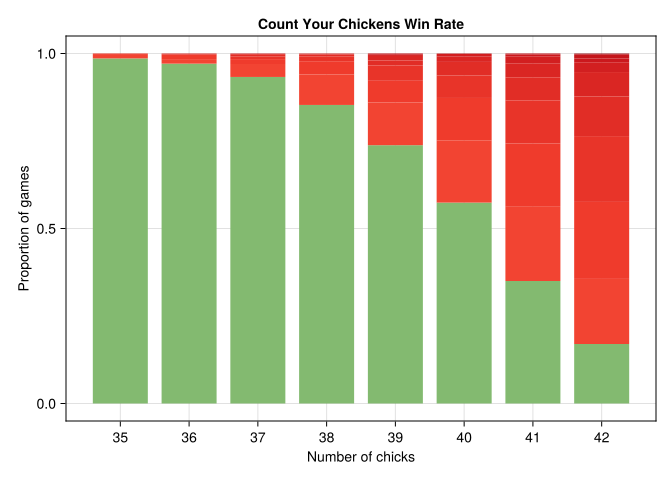
To understand the dynamics, we will simulate 1000 games for each variation of chicks from 35 (less than should come with the game) to 42 (more than should come with the game).

chick_range = 35:42
n = 1000
n_chicks = repeat(chick_range, n)
outcomes = playgame.(Ref(board), n_chicks)

df = DataFrame(; n_chicks, outcomes)


df = @chain df begin
    # create a wide table with the first column being the 
    # number of remaining chicks while the others 
    # total chicks
    unstack(:outcomes, :n_chicks, :outcomes, combine=length)
    # turn the missing values into 0 times this combination occurred
    coalesce.(_, 0)
    # # calculate proportion of outcomes within each column
    transform(Not(:outcomes) .=> x -> x / sum(x), renamecols=false)
    # restack back into a long table
    stack(Not(:outcomes))
end
# parse the column names which became strings when unstacked to column name
df.n_chicks = parse.(Int, df.variable)
df
104×4 DataFrame
79 rows omitted
Row outcomes variable value n_chicks
Int64 String Float64 Int64
1 0 35 0.986 35
2 2 35 0.004 35
3 1 35 0.01 35
4 5 35 0.0 35
5 3 35 0.0 35
6 6 35 0.0 35
7 4 35 0.0 35
8 7 35 0.0 35
9 8 35 0.0 35
10 14 35 0.0 35
11 11 35 0.0 35
12 9 35 0.0 35
13 10 35 0.0 35
93 2 42 0.22 42
94 1 42 0.186 42
95 5 42 0.07 42
96 3 42 0.188 42
97 6 42 0.028 42
98 4 42 0.113 42
99 7 42 0.011 42
100 8 42 0.01 42
101 14 42 0.001 42
102 11 42 0.001 42
103 9 42 0.002 42
104 10 42 0.0 42

Now to visualize the results, we want to create a custom color scheme where the color is green if we “win” and an increasingly intense red color the further we were from winning the game (not all chicks made it back to the coop).

colors = vcat(get(ColorSchemes.rainbow, 0.5), get.(Ref(ColorSchemes.Reds_9), 0.6:0.025:1.0))

let
    f = Figure()
    ax = Axis(f[1, 1],
        title="Count Your Chickens Win Rate",
        xticks=chick_range,
        xlabel="Number of chicks",
        ylabel="Proportion of games",
    )
    bp = barplot!(df.n_chicks, df.value,
        stack=df.outcomes,
        color=colors[df.outcomes.+1],
        label=df.outcomes,
    )

    f
end
┌ Warning: Found `resolution` in the theme when creating a `Scene`. The `resolution` keyword for `Scene`s and `Figure`s has been deprecated. Use `Figure(; size = ...` or `Scene(; size = ...)` instead, which better reflects that this is a unitless size and not a pixel resolution. The key could also come from `set_theme!` calls or related theming functions.
└ @ Makie ~/.julia/packages/Makie/fyNiH/src/scenes.jl:220

We can see that if we have 40 chicks (probably by design) we’d expect to win just over 50% of the time (which is less often that I would have guessed for the game’s family friendly approach).

However, if you were missing a few pieces like we were, your probability of winning dramatically increases and explains our family’s winning streak.

Endnotes

Environment

Julia Packages:

using Pkg;
Pkg.status();
Status `~/prog/alecloudenback.com/posts/counting-chickens/Project.toml`
  [13f3f980] CairoMakie v0.11.5
  [35d6a980] ColorSchemes v3.24.0
  [1313f7d8] DataFramesMeta v0.14.1
  [8e1ec7a9] SumTypes v0.5.5

Acknowledgements

Thanks to Mason Protter who provided some clarifications on the workings of SumTypes.jl.

A little exercise in CSV.jl and DataFrames.jl

By: Blog by Bogumił Kamiński

Re-posted from: https://bkamins.github.io/julialang/2024/01/19/puzzles.html

Introduction

This week I have discussed with my colleague the Lichess puzzle dataset
that I use in my Julia for Data Analysis book.

The dataset contains a list of puzzles along with information about them,
such as puzzle difficulty, puzzle solution, and tags describing puzzle type.

We were discussing if tags assigned to puzzles in this dataset are accurate.
In this post I give you an example how one can check it
(and practice a bit CSV.jl and DataFrames.jl).

The post was written under Julia 1.10.0, CSV.jl 0.10.12, and DataFrames.jl 1.6.1.

Getting the data

In this post I show you a relatively brief code. Therefore I assume that first
you download the file with the puzzle dataset and unpack it manually.
(In the book I show how to do it using Julia. You can find the source code on
GitHub repository of the book.)

Assuming you downloaded and unpacked the dataset into the puzzles.csv file
we read it in. We are interested only in columns 3 and 8 of this file,
so I use the following commands:

julia> using CSV

julia> using DataFrames

julia> df = CSV.read("puzzles.csv", DataFrame; select=[3, 8], header=false)
2132989×2 DataFrame
     Row │ Column3                            Column8
         │ String                             String
─────────┼──────────────────────────────────────────────────────────────────────
       1 │ f2g3 e6e7 b2b1 b3c1 b1c1 h6c1      crushing hangingPiece long middl…
       2 │ d3d6 f8d8 d6d8 f6d8                advantage endgame short
       3 │ b6c5 e2g4 h3g4 d1g4                advantage middlegame short
       4 │ g5e7 a5c3 b2c3 c6e7                advantage master middlegame short
       5 │ e8f7 e2e6 f7f8 e6f7                mate mateIn2 middlegame short
       6 │ a6a5 e5c7 a5b4 c7d8                crushing endgame fork short
       7 │ d4b6 f6e4 h1g1 e4f2                crushing endgame short trappedPi…
       8 │ d8f6 d1h5 h7h6 h5c5                advantage middlegame short
    ⋮    │                 ⋮                                  ⋮
 2132982 │ d2c2 c5d3 c2d3 c4d3                crushing fork middlegame short
 2132983 │ b8d7 c3b5 d6b8 a1c1 e8g8 b5c7      crushing long middlegame quietMo…
 2132984 │ g7g6 d5c6 c5c4 b3c4 b4c4 c6d6      crushing defensiveMove endgame l…
 2132985 │ g1h1 e3e1 f7f1 e1f1                endgame mate mateIn2 short
 2132986 │ g5c1 d5d6 d7f6 h7h8                advantage middlegame short
 2132987 │ d2f3 d8a5 c1d2 a5b5                advantage fork opening short
 2132988 │ f7f2 b2c2 c1b1 e2d1                endgame mate mateIn2 queensideAt…
 2132989 │ c6d4 f1e1 e8d8 b1c3 d4f3 g2f3      advantage long opening
                                                            2132973 rows omitted

julia> rename!(df, ["moves", "tags"])
2132989×2 DataFrame
     Row │ moves                              tags
         │ String                             String
─────────┼──────────────────────────────────────────────────────────────────────
       1 │ f2g3 e6e7 b2b1 b3c1 b1c1 h6c1      crushing hangingPiece long middl…
       2 │ d3d6 f8d8 d6d8 f6d8                advantage endgame short
       3 │ b6c5 e2g4 h3g4 d1g4                advantage middlegame short
       4 │ g5e7 a5c3 b2c3 c6e7                advantage master middlegame short
       5 │ e8f7 e2e6 f7f8 e6f7                mate mateIn2 middlegame short
       6 │ a6a5 e5c7 a5b4 c7d8                crushing endgame fork short
       7 │ d4b6 f6e4 h1g1 e4f2                crushing endgame short trappedPi…
       8 │ d8f6 d1h5 h7h6 h5c5                advantage middlegame short
    ⋮    │                 ⋮                                  ⋮
 2132982 │ d2c2 c5d3 c2d3 c4d3                crushing fork middlegame short
 2132983 │ b8d7 c3b5 d6b8 a1c1 e8g8 b5c7      crushing long middlegame quietMo…
 2132984 │ g7g6 d5c6 c5c4 b3c4 b4c4 c6d6      crushing defensiveMove endgame l…
 2132985 │ g1h1 e3e1 f7f1 e1f1                endgame mate mateIn2 short
 2132986 │ g5c1 d5d6 d7f6 h7h8                advantage middlegame short
 2132987 │ d2f3 d8a5 c1d2 a5b5                advantage fork opening short
 2132988 │ f7f2 b2c2 c1b1 e2d1                endgame mate mateIn2 queensideAt…
 2132989 │ c6d4 f1e1 e8d8 b1c3 d4f3 g2f3      advantage long opening
                                                            2132973 rows omitted

Note that the file does not have a header so when reading it we passed header=false
and then manually named the columns using rename!.

The task

I wanted only these two columns since today I want to check if the tags related
to mating are accurate. You can notice in the above printout that in the "tags"
column we have a tag "mateIn2". It indicates that the puzzle is mate in two moves.
This is the case for example for rows 5, 2132985, and 2132988.
In the matching "moves" column we see that we have 4 corresponding moves.
The reason is that we have two players making the move (and 2 + 2 = 4).

What we want to check if these "mateInX" tags are correct. I will check the
values of X from 1 to 5 (as only these five options are present in tags,
I leave it to you as an exercise to verify).

When should we call the tags correct. There are two conditions:

  • there is no duplicate tagging (e.g. a puzzle cannot be "mateIn1" and "mateIn2" at the same time);
  • the number of moves in a puzzle matches the tag.

Let us check it.

The solution

As a first step we (in place, i.e. modifying our df data frame) transform the original columns
into more convenient form. Instead of the raw "moves" I want the "nmoves" column that gives me
a number of moves in the puzzle. Similarly instead of "tags" I want indicator columns "mateInX"
for X ranging from 1 to 5 showing me the puzzle type. Here is how you can achieve this:

julia> select!(df,
               "moves" => ByRow(length∘split) => "nmoves",
               ["tags" => ByRow(contains("mateIn$i")) => "mateIn$i" for i in 1:5])
2132989×6 DataFrame
     Row │ nmoves  mateIn1  mateIn2  mateIn3  mateIn4  mateIn5
         │ Int64   Bool     Bool     Bool     Bool     Bool
─────────┼─────────────────────────────────────────────────────
       1 │      6    false    false    false    false    false
       2 │      4    false    false    false    false    false
       3 │      4    false    false    false    false    false
       4 │      4    false    false    false    false    false
       5 │      4    false     true    false    false    false
       6 │      4    false    false    false    false    false
       7 │      4    false    false    false    false    false
       8 │      4    false    false    false    false    false
    ⋮    │   ⋮        ⋮        ⋮        ⋮        ⋮        ⋮
 2132982 │      4    false    false    false    false    false
 2132983 │      6    false    false    false    false    false
 2132984 │      6    false    false    false    false    false
 2132985 │      4    false     true    false    false    false
 2132986 │      4    false    false    false    false    false
 2132987 │      4    false    false    false    false    false
 2132988 │      4    false     true    false    false    false
 2132989 │      6    false    false    false    false    false
                                           2132973 rows omitted

Now we see that some of the rows are not tagged as "mateInX". Let us filter them out,
to have only tagged rows left (again, we do the operation in-place):

julia> filter!(row -> any(row[Not("nmoves")]), df)
491743×6 DataFrame
    Row │ nmoves  mateIn1  mateIn2  mateIn3  mateIn4  mateIn5
        │ Int64   Bool     Bool     Bool     Bool     Bool
────────┼─────────────────────────────────────────────────────
      1 │      4    false     true    false    false    false
      2 │      4    false     true    false    false    false
      3 │      2     true    false    false    false    false
      4 │      4    false     true    false    false    false
      5 │      2     true    false    false    false    false
      6 │      4    false     true    false    false    false
      7 │      4    false     true    false    false    false
      8 │      2     true    false    false    false    false
   ⋮    │   ⋮        ⋮        ⋮        ⋮        ⋮        ⋮
 491736 │      6    false    false     true    false    false
 491737 │      4    false     true    false    false    false
 491738 │      2     true    false    false    false    false
 491739 │      4    false     true    false    false    false
 491740 │      2     true    false    false    false    false
 491741 │      2     true    false    false    false    false
 491742 │      4    false     true    false    false    false
 491743 │      4    false     true    false    false    false
                                           491727 rows omitted

Note that in the condition I used the row[Not("nmoves")] selector, as I wanted to check all columns except the "nmoves".

Now we are ready to check the correctness of tags:

julia> combine(groupby(df, "nmoves"), Not("nmoves") .=> sum)
10×6 DataFrame
 Row │ nmoves  mateIn1_sum  mateIn2_sum  mateIn3_sum  mateIn4_sum  mateIn5_sum
     │ Int64   Int64        Int64        Int64        Int64        Int64
─────┼─────────────────────────────────────────────────────────────────────────
   1 │      2       136843            0            0            0            0
   2 │      4            0       274135            0            0            0
   3 │      6            0            0        68623            0            0
   4 │      8            0            0            0         9924            0
   5 │     10            0            0            0            0         1691
   6 │     12            0            0            0            0          367
   7 │     14            0            0            0            0          127
   8 │     16            0            0            0            0           25
   9 │     18            0            0            0            0            7
  10 │     20            0            0            0            0            1

The table reads as follows:

  • There are no duplicates in tags.
  • Tags "mateInX" for X in 1 to 4 range are correct.
    The "mateIn5" tag actually means a situation where there are five or more moves.

So the verdict is that tagging is correct, but we need to know the interpretation of
"mateIn5" column as it is actually five or more moves. We could rename the column to
e.g. "mateIn5+" to reflect that or add a metadata to our df table where we would store
this information (I leave this to you as an exercise).

Conclusions

I hope that CSV.jl and DataFrames.jl users found the examples that I gave today useful and interesting. Enjoy!