Re-posted from: https://blog.glcs.io/parallel-processing
Julia is a relatively new,free, and open-source programming language.It has a syntaxsimilar to that of other popular programming languagessuch as MATLAB and Python,but it boasts being able to achieve C-like speeds.
While serial Julia code can be fast,sometimes even more speed is desired.In many cases,writing parallel codecan further reduce run time.Parallel code takes advantageof the multiple CPU coresincluded in modern computers,allowing multiple computationsto run at the same time,or in parallel.
Julia provides two methodsfor writing parallel CPU code:multi-threading and distributed computing.This post will coverthe basics ofhow to use these two methodsof parallel processing.
This post assumes you already have Julia installed.If you haven’t yet,check out our earlierpost on how to install Julia.
Multi-Threading
First, let’s learn about multi-threading.
To enable multi-threading,you must start Julia in one of two ways:
- Set the environment variable
JULIA_NUM_THREADSto the number of threads Julia should use,and then start Julia.For example,JULIA_NUM_THREADS=4. - Run Julia with the
--threads(or-t) command line argument.For example,julia --threads 4orjulia -t 4.
After starting Julia(either with or without specifying the number of threads),the Threads module will be loaded.We can check the number of threads Julia has available:
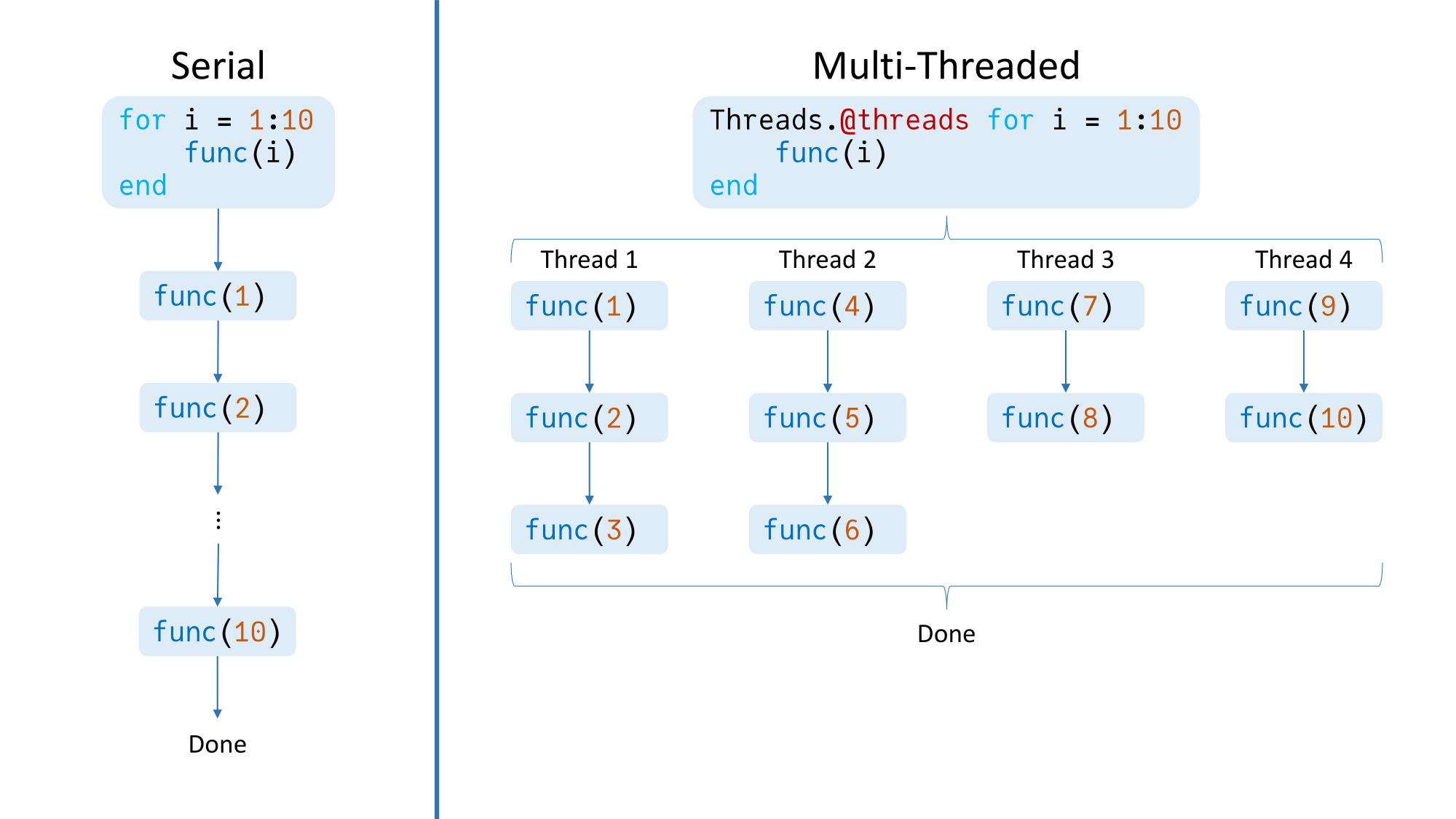
julia> Threads.nthreads()4The simplest wayto start writing parallel codeis just to use the Threads.@threads macro.Inserting this macro before a for loopwill cause the iterations of the loopto be split across the available threads,which will then operate in parallel.For example:
Threads.@threads for i = 1:10 func(i)endWithout Threads.@threads,first func(1) will run,then func(2), and so on.With the macro,and assuming we started Julia with four threads,first func(1), func(4), func(7), and func(9)will run in parallel.Then,when a thread’s iteration finishes,it will start another iteration(assuming the loop is not done yet),regardless of whether the other threadshave finished their iterations yet.Therefore,this loop will theoretically finish 10 iterationsin the time it takes a single thread to do 3.
Note that Threads.@threads is blocking,meaning code after the threaded for loopwill not run until the loop has finished.

Julia also provides another macro for multi-threading:Threads.@spawn.This macro is more flexible than Threads.@threadsbecause it can be used to run any codeon a thread,not just for loops.But let’s illustrate how to use Threads.@spawnby implementing the behavior of Threads.@threads:
# Function for splitting up `x` as evenly as possible# across `np` partitions.function partition(x, np) (len, rem) = divrem(length(x), np) Base.Generator(1:np) do p i1 = firstindex(x) + (p - 1) * len i2 = i1 + len - 1 if p <= rem i1 += p - 1 i2 += p else i1 += rem i2 += rem end chunk = x[i1:i2] endendN = 10chunks = partition(1:10, Threads.nthreads())tasks = map(chunks) do chunk Threads.@spawn for i in chunk func(i) endendwait.(tasks)Let’s walk through this code,assuming Threads.nthreads() == 4:
- First, we split the 10 iterationsevenly across the 4 threadsusing
partition.So,chunksends up being[1:3, 4:6, 7:8, 9:10].(We could have hard-coded the partitioning,but now you have a nicepartitionfunctionthat can work with more complicated partitionings!) - Then, for each chunk,we create a
TaskviaThreads.@spawnthat will callfuncon each element of the chunk.ThisTaskwill be scheduledto run on an available thread.taskscontains a referenceto each of these spawnedTasks. - Finally, we wait for the
Tasks to finishwith thewaitfunction.
To reemphasize, note that Threads.@spawn creates a Task;it does not wait for the task to run.As such, it is non-blocking,and program execution continuesas soon as the Task is returned.The code wrapped in the taskwill also run, but in parallel, on a separate thread.This behavior is illustrated below:
julia> Threads.@spawn (sleep(2); println("Spawned task finished"))Task (runnable) @0x00007fdd4b10dc30julia> 1 + 1 # This code executes without waiting for the above task to finish2julia> Spawned task finished # Prints 2 seconds after spawning the above taskjulia>Spawned tasks can also return data.While wait just waits for a task to finish,fetch waits for a taskand then obtains the result:
julia> task = Threads.@spawn (sleep(2); 1 + 1)Task (runnable) @0x00007fdd4a5e28b0julia> fetch(task)2Thread Safety
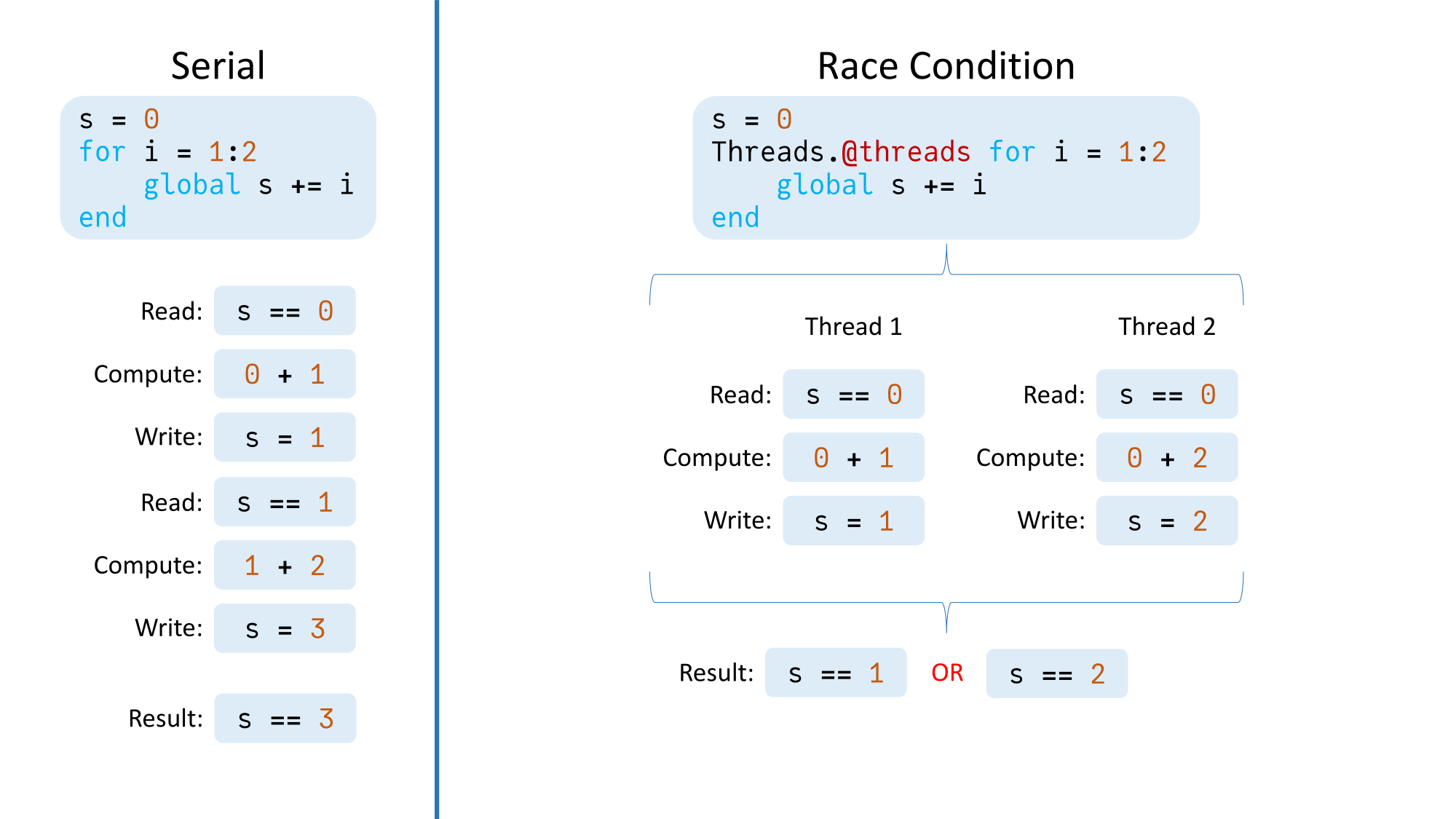
When using multi-threading,memory is shared across threads.If a thread writes to a memory locationthat is written to or read from another thread,that will lead to a race conditionwith unpredictable results.To illustrate:
julia> s = 0;julia> Threads.@threads for i = 1:1000000 global s += i endjulia> s19566554653 # Should be 500000500000
There are two methods we can useto avoid the race condition.The first involves using a lock:
julia> s = 0; l = ReentrantLock();julia> Threads.@threads for i = 1:1000000 lock(l) do global s += i end endjulia> s500000500000In this case,the addition can only occuron a given threadonce that thread holds the lock.If a thread does not hold the lock,it must wait for whatever thread controls itto release the lockbefore it can run the codewithin the lock block.
Using a lock in this exampleis suboptimal, however,as it eliminates all parallelismbecause only one thread can hold the lockat any given moment.(In other examples, however,using a lock works great,particularly when only a small portionof the code depends on the lock.)
The other way to eliminate the race conditionis to use task-local buffers:
julia> s = 0; chunks = partition(1:1000000, Threads.nthreads());julia> tasks = map(chunks) do chunk Threads.@spawn begin x = 0 for i in chunk x += i end x end end;julia> thread_sums = fetch.(tasks);julia> for i in thread_sums s += i endjulia> s500000500000In this example,each spawned task has its own xthat stores the sumof the values just in the task’s chunk of data.In particular,none of the tasks modify s.Then, once each task has computed its sum,the intermediate values are summedand stored in sin a single-threaded manner.
Using task-local buffersworks better for this examplethan using a lockbecause most of the parallelism is preserved.
(Note that it used to be advisedto manage task-local buffersusing the threadid function.However, doing so does not guaranteeeach task uses its own buffer.Therefore, the method demonstrated in the above exampleis now advised.)
Packages for Quickly Utilizing Multi-Threading
In addition to writing your own multi-threaded code,there exist packages that utilize multi-threading.Two such examples are ThreadsX.jl and ThreadTools.jl.
ThreadsX.jl provides multi-threaded implementationsof several common functionssuch as sum and sort,while ThreadTools.jl provides tmap,a multi-threaded version of map.
These packages can be greatfor quickly boosting performancewithout having to figure out multi-threadingon your own.
Distributed Computing
Besides multi-threading,Julia also provides for distributed computing,or splitting work across multiple Julia processes.
There are two ways to start multiple Julia processes:
- Load the Distributed standard library packagewith
using Distributedand then useaddprocs.For example,addprocs(2)to add two additional Julia processes(for a total of three). - Run Julia with the
-pcommand line argument.For example,julia -p 2to start Julia with three total Julia processes.(Note that running Julia with-pwill implicitly loadDistributed.)
Added processes are known as worker processes,while the original process is the main process.Each process has an id:the main process has id 1,and worker processes have id 2, 3, etc.
By default,code runs on the main process.To run code on a worker,we need to explicitly give code to that worker.We can do so with remotecall_fetch,which takes as inputsa function to run,the process id to run the function on,and the input arguments and keyword argumentsthe function needs.Here are some examples:
# Create a zero-argument anonymous function to run on worker 2.julia> remotecall_fetch(2) do println("Done") end From worker 2: Done# Create a two-argument anonymous function to run on worker 2.julia> remotecall_fetch((a, b) -> a + b, 2, 1, 2)3# Run `sum([1 3; 2 4]; dims = 1)` on worker 3.julia> remotecall_fetch(sum, 3, [1 3; 2 4]; dims = 1)1x2 Matrix{Int64}: 3 7If you don’t need to wait for the result immediately,use remotecall instead of remotecall_fetch.This will create a Futurethat you can later wait on or fetch(similarly to a Task spawned with Threads.@spawn).

Separate Memory Spaces
One significant differencebetween multi-threading and distributed processingis that memory is shared in multi-threading,while each distributed processhas its own separate memory space.This has several important implications:
-
To use a package on a given worker,it must be loaded on that worker,not just on the main process.To illustrate:
julia> using LinearAlgebrajulia> IUniformScaling{Bool}true*Ijulia> remotecall_fetch(() -> I, 2)ERROR: On worker 2:UndefVarError: `I` not definedTo avoid the error,we could use
@everywhere using LinearAlgebrato loadLinearAlgebraon all processes. -
Similarly to the previous point,functions defined on one processare not available on other processes.Prepend a function definition with
@everywhereto allow using the function on all processes:julia> @everywhere function myadd(a, b) a + b end;julia> myadd(1, 2)3# This would error without `@everywhere` above.julia> remotecall_fetch(myadd, 2, 3, 4)7 -
Global variables are not shared,even if defined everywhere with
@everywhere:julia> @everywhere x = [0];julia> remotecall_fetch(2) do x[1] = 2 end;# `x` was modified on worker 2.julia> remotecall_fetch(() -> x, 2)1-element Vector{Int64}: 2# `x` was not modified on worker 3.julia> remotecall_fetch(() -> x, 3)1-element Vector{Int64}: 0If needed,an array of data can be sharedacross processesby using a
SharedArray,provided by the SharedArrays standard library package:julia> @everywhere using SharedArrays# We don't need `@everywhere` when defining a `SharedArray`.julia> x = SharedArray{Int,1}(1)1-element SharedVector{Int64}: 0julia> remotecall_fetch(2) do x[1] = 2 end;julia> remotecall_fetch(() -> x, 2)1-element SharedVector{Int64}: 2julia> remotecall_fetch(() -> x, 3)1-element SharedVector{Int64}: 2
Now, a note about command line arguments.When adding worker processes with -p,those processes are spawnedwith the same command line argumentsas the main Julia process.With addprocs, however,each of those added processesare started with no command line arguments.Below is an example of where this behaviormight cause some confusion:
$ JULIA_NUM_THREADS=4 julia --banner=no -t 1julia> Threads.nthreads()1julia> using Distributedjulia> addprocs(1);julia> remotecall_fetch(Threads.nthreads, 2)4In this situation, we have the environment variable JULIA_NUM_THREADS(for example, because normally we run Julia with four threads).But in this particular casewe want to run Julia with just one thread,so we set -t 1.Then we add a process,but it turns out that processhas four threads, not one!This is because the environment variable was set,but no command line arguments were givento the added process.To use just one threadfor the added process,we would need to use the exeflags keyword argumentto addprocs:
addprocs(1; exeflags = ["-t 1"])As a final note, if needed,processes can be removedwith rmprocs,which removes the processesassociated with the provided worker ids.
Summary
In this post,we have provided an introductionto parallel processing in Julia.We discussed the basicsof both multi-threading and distributed computing,how to use them in Julia,and some things to watch out for.
As a parting piece of advice,when choosing whether to use multi-threading or distributed processing,choose multi-threadingunless you have a specific needfor multiple processes with distinct memory spaces.Multi-threading has lower overheadand generally is easier to use.
How do you use parallel processing in your code?Let us know in the comments below!
Additional Links
- Multi-Threading
- Official Julia documentation on multi-threading.
- Multi-processing and Distributed Computing
- Official Julia documentation on distributed computing.