Category Archives: Julia

How to Calculate Realised Volatility

By: Dean Markwick's Blog -- Julia

Re-posted from: https://dm13450.github.io/2022/04/28/Volatility-methods.html

Volatility measures the scales of price changes and is an easy way to
describe how busy markets are. High volatility means there are periods
of large price changes and vice versa, low volatility means periods of
small changes. In this post, I’ll show you how to measure realised
volatility and demonstrate how it can be used. If you just want a live
view of crypto volatility, take a look at
cryptoliquiditymetrics where I have added in a new card with the volatility over the last 24 hours.


Enjoy these types of posts? Then you should sign up for my newsletter. It’s a short monthly recap of anything and everything I’ve found interesting recently plus
any posts I’ve written. So sign up and stay informed!


To start with we will be looking at daily data. Using my
CoinbasePro.jl package in a Julia we can get the last 300 days OHLC
prices.

I’m running Julia 1.7 and all the packages were updated using
Pkg.update() at the time of this post.

using CoinbasePro
using Dates
using Plots, StatsPlots
using DataFrames, DataFramesMeta
using RollingFunctions

From my CoinbasePro.jl
package, we can pull in the daily candles of Bitcoin. 86400 is the
frequency for daily data. Coinbase restrict you to just 300 data
points

dailydata = CoinbasePro.candles("BTC-USD", now()-Day(300), now(), 86400);
sort!(dailydata, :time)
dailydata = @transform(dailydata, :time = Date.(:time))
first(dailydata, 4)

4 rows × 7 columns

close high low open unix_time volume time
Float64 Float64 Float64 Float64 Int64 Float64 Date
1 50978.6 51459.0 48909.8 48909.8 1615075200 13965.2 2021-03-07
2 52415.2 52425.0 49328.6 50976.2 1615161600 18856.3 2021-03-08
3 54916.4 54936.0 51845.0 52413.2 1615248000 21177.1 2021-03-09
4 55890.7 57402.1 53025.0 54921.6 1615334400 28326.1 2021-03-10

Plotting this gives you the typical price path. Now realised
volatility is a measure of how varied this price was
over time. Was it stable or were there wild swings?

plot(dailydata.time, dailydata.close, label = :none, 
     ylabel = "Price", title = "Bitcoin Price", titleloc = :left, linewidth = 2)
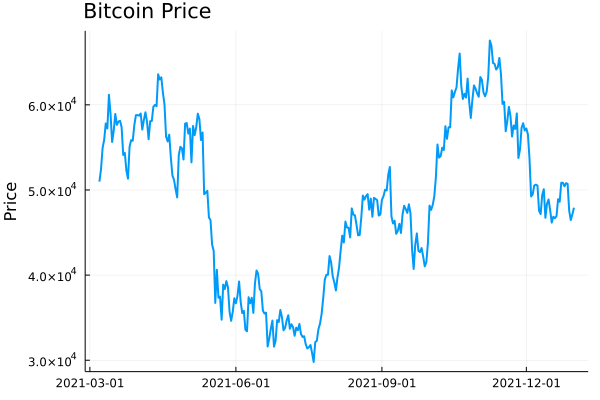
Bitcoin Daily Prices

To calculate this variation, we need to add in the log-returns.

dailydata = @transform(dailydata, :returns = [NaN; diff(log.(:close))]);
bar(dailydata.time[2:end], dailydata.returns[2:end], 
    label=:none, 
    ylabel = "Log Return", title = "Bitcoin Log Return", titleloc = :left)
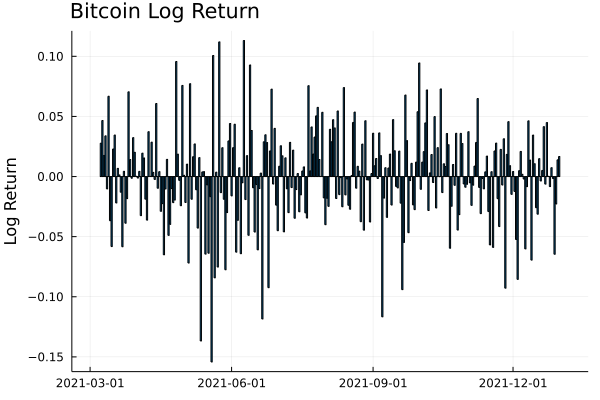
Bitcoin Daily Log Returns

We can start by looking at this from a distribution perspective. If we
assume the log-returns (\(r\)) are from a normal distribution, with
zero mean, the standard deviation of this distribution is the equivalent to the
volatility

\[r \sim N(0, \sigma ^2),\]

so \(\sigma\) is how we will refer to volatility. From this, you can
see how high volatility leads to wide variations in prices. Each
log-return sample has a wider range of values that it could be.

So by taking the running standard deviation of the log-returns we can
estimate the volatility and how it changes over time. Using the RollingFunctions.jl package this is a one-liner.

dailydata = @transform(dailydata, :volatility = runstd(:returns, 30))
plot(dailydata.time, dailydata.volatility, title = "Bitcoin Volatility", titleloc = :left, label=:none, linewidth = 2)
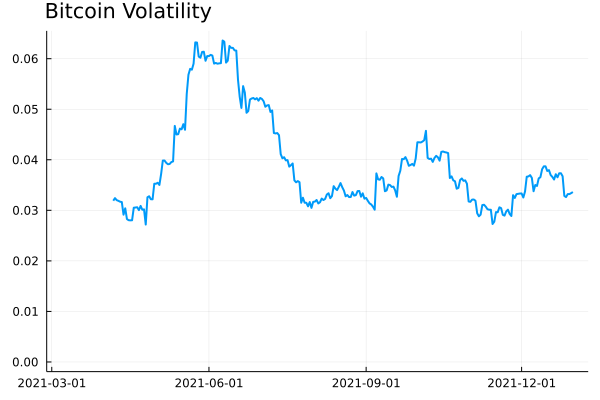
Bitcoin Daily Volatility

There was high volatility over June this year as the price of Bitcoin
crashed. It’s been fairly stable since then, hovering around 0.03
and 0.04. How does this compare though to the S&P 500 as a general
indicator of the stop market? We know Bitcoin is more volatile than
the stock market, but how much more?

I’ll load up the AlphaVantage.jl package to pull the daily prices of
the SPY ETF and repeat the calculation; adding the log-returns and
taking the rolling standard deviation.

using AlphaVantage, CSV

stockPrices = AlphaVantage.time_series_daily("SPY", datatype="csv", outputsize="full", parser = x -> CSV.File(IOBuffer(x.body))) |> DataFrame
sort!(stockPrices, :timestamp)
stockPrices = @subset(stockPrices, :timestamp .>= minimum(dailydata.time));

Again, add in the log-returns and calculate the rolling standard
deviation to estimate the volatility.

stockPrices = @transform(stockPrices, :returns = [NaN; diff(log.(:close))])
stockPrices = @transform(stockPrices, :volatility = runstd(:returns, 30));

volPlot = plot(dailydata.time, dailydata.volatility, label="BTC", 
               ylabel = "Volatility", title = "Volatility", titleloc = :left, linewidth = 2)
volPlot = plot!(volPlot, stockPrices.timestamp, stockPrices.volatility, label = "SPY", linewidth = 2)
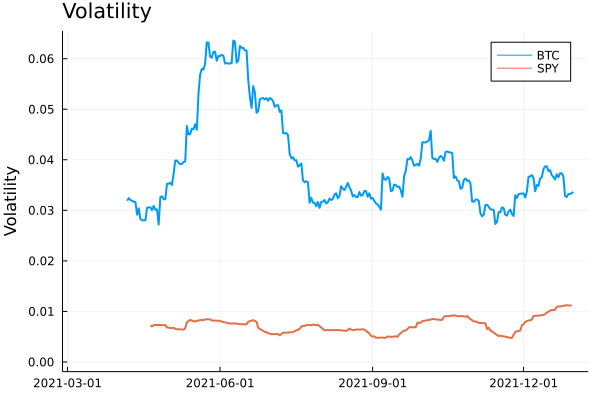
Bitcoin and SPY volatility

As expected, Bitcoin volatility is much higher. Let’s take the log of
the volatility to look zoom in on the detail.

volPlot = plot(dailydata.time, log.(dailydata.volatility), 
               label="BTC", ylabel = "Log Volatility", title = "Log Volatility", 
               titleloc = :left, linewidth = 2)
volPlot = plot!(volPlot, stockPrices.timestamp, log.(stockPrices.volatility), label = "SPY", linewidth = 2)
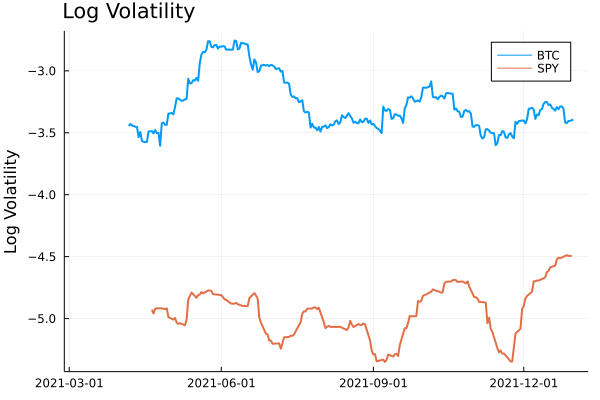
Bitcoin and SPY Log Volatility

Interestingly the SPY has had a resurgence in volatility as we move
towards the end of the year. One thing to point out though is the
slight difference in look back periods for the two products. Bitcoin
does not observe weekends or holidays, so 30 rows previously are
always 30 days, but for SPY this is the case as there are weekends and
trading holidays. In this illustrative example, it isn’t too much of an
issue, but if you were to take it further and perhaps look at the
correlation between the volatilities, this is something you would need
to account for.

A Higher Frequency Volatility

So far it has all been on daily observations, your classic dataset to
practise on. But I am always banging on about high-frequency finance,
so let’s look at more frequent data and understand how the volatility
looks at finer timescales.

This time we will pull the 5-minute candle bar data of both Bitcoin
and SPY and repeat the calculation.

  1. Calculate the log-returns of the close to close bars
  2. Calculate the rolling standard deviation by looking back 20 rows.
minuteData_spy = AlphaVantage.time_series_intraday_extended("SPY", "5min", "year1month1", parser = x -> CSV.File(IOBuffer(x.body))) |> DataFrame
minuteData_spy = @transform(minuteData_spy, :time = DateTime.(:time, dateformat"yyyy-mm-dd HH:MM:SS"))
minuteData_btc = CoinbasePro.candles("BTC-USD", maximum(minuteData_spy.time)-Day(1), maximum(minuteData_spy.time),300);

combData = leftjoin(minuteData_spy[!, [:time, :close]], minuteData_btc[!, [:time, :close]], on=[:time], makeunique=true)
rename!(combData, ["time", "spy", "btc"])
combData = combData[2:end, :]
dropmissing!(combData)
sort!(combData, :time)
first(combData, 3)

3 rows × 3 columns

time spy btc
DateTime Float64 Float64
1 2021-12-29T20:00:00 477.05 47163.9
2 2021-12-30T04:05:00 477.83 46676.3
3 2021-12-30T04:10:00 477.98 46768.8

For 5 minute data, we will use a look-back period of 20 rows, which gives us 100 minutes, so a little under 2 hours.

combData = @transform(combData, :spy_returns = [NaN; diff(log.(:spy))],
                                :btc_returns = [NaN; diff(log.(:btc))])
combData = @transform(combData, :spy_vol = runstd(:spy_returns, 20),
                                :btc_vol = runstd(:btc_returns, 20))
combData = combData[2:end, :];

Plotting it all again!

vol_tks = minimum(combData.time):Hour(6):maximum(combData.time)
vol_tkslbl = Dates.format.(vol_tks, "e HH:MM")

returnPlot = plot(combData.time[2:end], cumsum(combData.btc_returns[2:end]), 
                  label="BTC", title = "Cumulative Returns", xticks = (vol_tks, vol_tkslbl),
                  linewidth = 2, legend=:topleft)
returnPlot = plot!(returnPlot, combData.time[2:end], cumsum(combData.spy_returns[2:end]), label="SPY",
                   xticks = (vol_tks, vol_tkslbl),
                   linewidth = 2)


volPlot = plot(combData.time, combData.btc_vol * sqrt(24 * 20), 
    label="BTC", xticks = (vol_tks, vol_tkslbl), titleloc = :left, linewidth = 2)
volPlot = plot!(combData.time, combData.spy_vol * sqrt(24 * 20), label="SPY", title = "Volatility",
               xticks = (vol_tks, vol_tkslbl), titleloc = :left, linewidth = 2)

plot(returnPlot, volPlot)
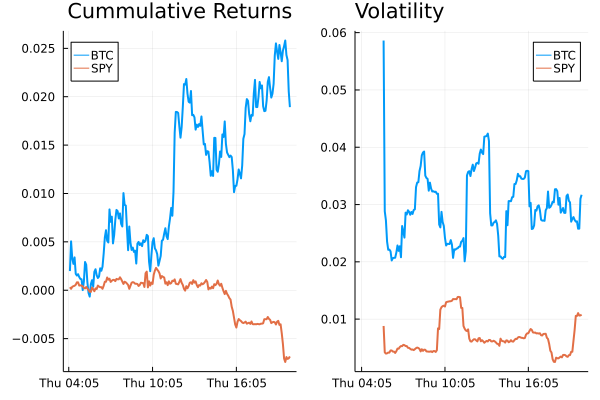
5 minute returns and volatility

On the left-hand side, we have the cumulative return of the two
assets on the 30th of December, and on the right the corresponding
volatility. Bitcoin still has higher volatility whereas SPY has been
relatively stable with just some jumps.

Simplifying the Calculation

Rolling the standard deviation isn’t the efficient way of calculating the volatility and can also be simplified down to a more efficient calculation.

The standard deviation is defined as:

\[\sigma ^2 = \mathbb{E} (r^2) + \mathbb{E} (r) ^2\]

if we assume there is no trend in the returns so that the average is zero:

\[\mathbb{E} (r) = 0\]

then we get just the first term

\[\sigma ^2 = \frac{1}{N} \sum _{i=1} ^N r^2\]

which is simply proportional to the sum of squares. Hence why you will
hear that the realised variance is referred to as the sum of squares.

Once again, let’s pull the data and repeat the previous calculations
but this time adding another column that is the rolling summation of
the square of the returns.

minutedata = CoinbasePro.candles("BTC-USD", now()-Day(1) - Hour(1), now(), 5*60)
sort!(minutedata, :time)
minutedata = @transform(minutedata, :close_close_return = [NaN; diff(log.(:close))])
minutedata = minutedata[2:end, :]
first(minutedata, 4)

minutedata = @transform(minutedata,
                                    :new_vol_5 = running(sum, :close_close_return .^2, 20),
                                    :vol_5 = runstd(:close_close_return, 20))
minutedata = minutedata[2:end, :]
minutedata[1:5, [:time, :new_vol_5, :vol_5]]

5 rows × 3 columns

time new_vol_5 vol_5
DateTime Float64 Float64
1 2021-12-30T13:40:00 3.05319e-6 0.00171371
2 2021-12-30T13:45:00 5.11203e-6 0.00139403
3 2021-12-30T13:50:00 5.11472e-6 0.00118951
4 2021-12-30T13:55:00 6.40417e-6 0.00107273
5 2021-12-30T14:00:00 6.55196e-6 0.00104028
vol_tks = minimum(minutedata.time):Hour(8):maximum(minutedata.time)
vol_tkslbl = Dates.format.(vol_tks, "e HH:MM")

ss_vol = plot(minutedata.time, sqrt.(288 * minutedata.new_vol_5), titleloc = :left, 
              title = "Sum of Squares", label=:none, xticks = (vol_tks, vol_tkslbl), linewidth = 2)
std_vol = plot(minutedata.time, sqrt.(288 * minutedata.vol_5), titleloc = :left, 
               title = "Standard Deviation", label=:none, xticks = (vol_tks, vol_tkslbl), linewidth = 2)
plot(ss_vol, std_vol)
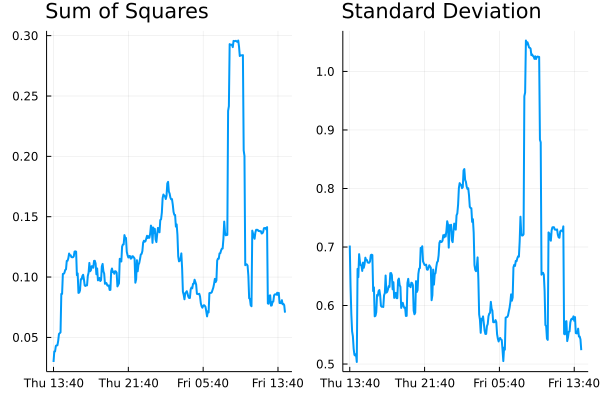
Standard deviation vs sum of squares for volatility

Both methods show represent the relative changes equally. There are
some notable edge effects in the standard deviation method, but
overall, our assumptions look fine. The y-scales are different though
as there are some constant factor differences between the two methods.

Comparing Crypto Volatilities

Let’s see how the volatility changes across some different
currencies. We define a function that calculates the close to close
return and iterate through some different currencies.

function calc_vol(ccy)
    minutedata = CoinbasePro.candles(ccy, now()-Day(1) - Hour(1), now(), 5*60)
    sort!(minutedata, :time)
    minutedata = @transform(minutedata, :close_close_return = [NaN; diff(log.(:close))])
    minutedata = minutedata[2:end, :]
    minutedata = @transform(minutedata, :var = 288*running(sum, :close_close_return .^2, 20))
    minutedata
    minutedata[21:end, :]
end

Let’s choose the classics BTC and ETH, the meme that is SHIB and
finally EURUSD (the crypto version).

p = plot(legend=:topleft, ylabel = "Realised Volatility")
for ccy in ["BTC-USD", "ETH-USD", "USDC-EUR", "SHIB-USD"]
    voldata = calc_vol(ccy)
    vol_tks = minimum(voldata.time):Hour(4):maximum(voldata.time)
    vol_tkslbl = Dates.format.(vol_tks, "e HH:MM")
    plot!(voldata.time, sqrt.(voldata.var), label = ccy, 
          xticks = (vol_tks, vol_tkslbl), linewidth = 2)
end
p
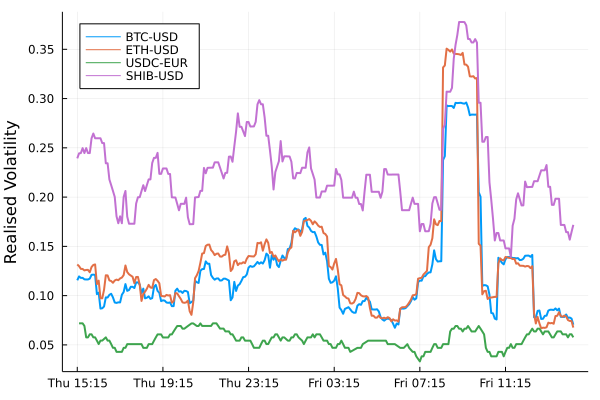
Volatility comparison between different currencies.

SHIB has higher overall volatility. ETH and BTC have very comparable
volatilities moving together. EURUSD has the lowest overall (as we
would expect), but interesting to see how it moved higher just as the
cryptos did at about 9 am.

An Update to CryptoLiquidityMetrics

So I’ve taken everything we’ve learnt here and implemented it into
cryptoliquiditymetrics.com. It is a new panel (bottom right) and
calculated all through Javascript.

Screenshot of cryptoliquiditymetrics.com

How does this help you?

Knowing the volatility helps you get an idea of how easy it is to trade
or what strategy to use. When volatility is high and the price is
moving about it might be better to be more aggressive and make sure your trade
happens. Whereas if it is a stable market without too much volatility
you could be more passive and just wait, trading slowly and picking
good prices.

Just another addition to my Javascript side project!

Testing Julia

By: Blog by Bogumił Kamiński

Re-posted from: https://bkamins.github.io/julialang/2022/04/22/testing.html

Introduction

Recently I was invited by Talk Julia to take part in the podcast.
Today it has been released and you can watch it on YouTube.
In the discussion I share my thoughts on DataFrames.jl design principles
and discuss several examples from my upcoming Julia for Data Analysis
book.

One of the things I discuss in the podcast is that in DataFrames.jl development
process we are putting a lot of emphasis on tests so I thought that it is worth
to expand on this topic a bit more in this post.

The codes I use were tested under Julia 1.7.2 and InlineStrings.jl 1.2.2.

Testing and reproducibility of tests

When one develops some software ensuring its proper test coverage is one of the
key practices that help maintaining good quality of code.

My experience with DataFrames.jl is that taking care of proper test coverage
serves three important goals:

  1. Making sure the functionality we provide follows the contract specified in
    its documentation. This is particularly important when testing corner case
    situations, since they happen rarely in practice (so there is lower
    probability that users spot problems and report them) and also allow us to
    make sure our design is logically consistent.
  2. Making sure that as we add new functionalities to the package we do not
    accidentally break something.
  3. Making sure that upgrading dependencies of DataFrames.jl to newer versions
    does not break something (and the biggest such dependency is Base Julia).

A crucial part of writing tests is ensuring their reproducibility. What I mean
by this is that when you run your test suite twice on you should get the same
results. This intends to avoid situations in which you run your tests and get a
bug report. Then you run the tests again and the bug is not present. Such
situation is unwanted, as it is later hard to locate the root cause of the
reported bug.

Randomized tests

When one implements complex algorithms it is hard to cover all possible
hard testing scenarios by writing them down by hand. In such situations,
one of the possible testing methods is to use randomized tests.

An example, old and already resolved, problem that potentially could have been
caught by randomized tests is an issue related to pasting Unicode
characters in Julia REPL. Let me here present a minimal working example of a
code having a similar problem.

Assume I want to write a code that strips last character from a string. Here
is an attempt to implement it:

julia> mychop(s::AbstractString) = isempty(s) ? s : s[1:end-1]
mychop (generic function with 1 method)

Let us write a simple test set for this function:

julia> using Test

julia> @testset "basic test" begin
           @test mychop("") == ""
           @test mychop("a") == ""
           @test mychop("abc") == "ab"
       end
Test Summary: | Pass  Total
basic test    |    3      3
Test.DefaultTestSet("basic test", Any[], 3, false, false)

All looks good so far. However, let us run some more advanced testing
of mychop using randomized tests:

julia> using Random

julia> @testset "advanced tests" begin
           Random.seed!(1234)
           for _ in 1:40
               len = rand(1:10)
               input = rand(UInt8, len) |> String
               output = join(collect(input)[1:end-1])
               @test output == mychop(input)
           end
       end
advanced tests: Error During Test at REPL[83]:7
  Test threw exception
  Expression: output == mychop(input)
  StringIndexError: invalid index [9], valid nearby indices [8]=>'˄', [10]=>'�'
Test Summary:  | Pass  Error  Total
advanced tests |   39      1     40
ERROR: Some tests did not pass: 39 passed, 0 failed, 1 errored, 0 broken.

What I do in this test is generateing input string using randoom bits and then
use a slow method to get a desired output string by going through individual
characters of the original string. I ensure reproducibility of this test on a
given version of Julia by setting the seed of random number generator using
Random.seed!(1234).

From the bug report we can see that something is not right with indexing. The
problem occurs if the second character from the end of the string is not ASCII.
Let us check it:

julia> mychop("∀a")
ERROR: StringIndexError: invalid index [3], valid nearby indices [1]=>'∀', [4]=>'a'

The point of randomized test is that guessing the test scenario
second character from the end of the string is not ASCII
is not easy.

Let us fix mychop to resolve this problem:

julia> mychop(s::AbstractString) = isempty(s) ? s : s[1:prevind(s, end)]
mychop (generic function with 1 method)

julia> @testset "basic test" begin
           @test mychop("") == ""
           @test mychop("a") == ""
           @test mychop("abc") == "ab"
       end
Test Summary: | Pass  Total
basic test    |    3      3
Test.DefaultTestSet("basic test", Any[], 3, false, false)

julia> @testset "advanced tests" begin
           Random.seed!(1234)
           for _ in 1:32768 # pick some round larger number to be sure all works well
               len = rand(1:10)
               input = rand(UInt8, len) |> String
               output = join(collect(input)[1:end-1])
               @test output == mychop(input)
           end
       end
Test Summary:  |  Pass  Total
advanced tests | 32768  32768
Test.DefaultTestSet("advanced tests", Any[], 32768, false, false)

Are we done now? Not yet. We should check our function with some other
AbstractString than String. Let me use InlineStrings.jl:

julia> using InlineStrings
julia> @testset "InlineStrings.jl test" begin
           @test "ab" == @inferred mychop(InlineString("abc"))
       end
InlineStrings.jl test: Error During Test at REPL[110]:2
  Test threw exception
  Expression: "ab" == #= REPL[110]:2 =# @inferred(mychop(InlineString("abc")))
  return type SubString{String3} does not match inferred return type Union{SubString{String3}, String3}
Test Summary:         | Error  Total
InlineStrings.jl test |     1      1
ERROR: Some tests did not pass: 0 passed, 0 failed, 1 errored, 0 broken.

As you can see there is still some more work to be done, as our mychop
function is not type stable, which is checked by the @inferred macro. The
problem is that indexing into String3 that happens if the passed string is not
empty produces a SubString. Let us fix it by making sure that in every branch
of code we apply the same operation to our source string (in the code, like in
the codes above, we use the fact that AbstractString is guaranteed to use
1-based indexing).

julia> mychop(s::AbstractString) = s[1:prevind(s, max(1, end))]
mychop (generic function with 1 method)

julia> @testset "advanced tests" begin
           Random.seed!(1234)
           for _ in 1:32768 # pick some round larger number to be sure all works well
               len = rand(0:10) # make sure to cover 0-length strings
               input = rand(UInt8, len) |> String
               output = join(collect(input)[1:end-1])
               @test output == @inferred mychop(input)
               @test output == @inferred mychop(InlineString(input))
           end
       end
Test Summary:  |  Pass  Total
advanced tests | 65536  65536
Test.DefaultTestSet("advanced tests", Any[], 65536, false, false)

Now all works as expected and we are done.

Conclusions

I hope you found my thoughts on writing tests useful. As usual, I have some
additional comments regarding the presented codes:

  • I used Random.seed! explicitly in my tests. However, the @testset macro,
    before the execution of its body, makes a call to Random.seed!(seed) where
    seed is the current seed of the global RNG. Therefore, if you design a
    larger test suite you do not have to set the seed in every @testset. It is
    enough to set it once per all tests you run.
  • As I have already commented, the presented codes are reproducible on a given
    version of Julia. If you want them to be reproducible across different
    versions of Julia I recommend you to use for example the
    StableRNGs.jl package as a source of randomness in your tests.

Where for (loop) ARt Thou?

By: Jonathan Carroll

Re-posted from: https://jcarroll.com.au/2022/04/22/where-for-loop-art-thou/

I’ve long been interested in exactly how R works – not quite enough for me to learn all the
internals, but I was surprised that I could not find a clear guide towards exactly how vectorization works at the deepest level.

Let’s say we want to add two vectors which we’ve defined as x and y

x <- c(2, 4, 6)
y <- c(1, 3, 2)

One way to do this (the verbose, elementwise way) would be to add each pair of elements

c(x[1] + y[1], x[2] + y[2], x[3] + y[3])
## [1] 3 7 8

but if you are familiar with not repeating yourself, you might write this in a loop. Best practice
involves pre-filling the result to the correct size

res <- c(NA, NA, NA)
for (i in 1:3) {
  res[i] <- x[i] + y[i]
}
res
## [1] 3 7 8

There, we wrote a for loop.

Now, if you’ve ever seen R tutorials or discussions, you’ve probably had it drilled into you that
this is “bad” and should be replaced with something else. One of those options is an apply family
function

plus <- function(i) {
  x[i] + y[i]
}
sapply(1:3, plus)
## [1] 3 7 8

or something ‘tidier’

purrr::map_dbl(1:3, plus)
## [1] 3 7 8

(yes, yes, these functions are ‘bad’ because they don’t take x or y as arguments) but this stil
performs the operation elementwise. If you’ve seen even more R tutorais/discussions you’ve
probably been seen that vectorization is very handy – The R function + knows what to do with objects that
aren’t just a single value, and does what you might expect

x + y
## [1] 3 7 8

Now, if you’ve really read a lot about R, you’ll know that ‘under the hood’ a for-loop
is involved in every one of these, but it’s “lower down”, “at the C level”. Jenny Bryan makes the
point that “Of course someone has to write loops / It doesn’t have to be you” and for this reason,
vectorization in R is of great benefit.

So, there is a loop, but where exactly does that happen?

At some point, the computer needs to add the elements of x to the elements of y, and the simplest versions of this
happens one element at a time, in a loop. There’s a big sidetrack here about SIMD
which I’ll try to avoid, but I will mention that the Microsoft fork of R (artist, formerly known as Revolution R) running on Intel chips can do SIMD in MKL.

So, let’s start at the operator.

`+`
## function (e1, e2)  .Primitive("+")

Digging into primitives is a little tricky, but {pryr} can help

pryr::show_c_source(.Primitive("+"))
+ is implemented by do_arith with op = PLUSOP

We can browse a copy of the source for do_arith (in arithmetic.c) here where we see some
logic paths for scalars and vectors. Let’s assume we’re working with our example which has length(x) == length(y) > 1. With two non-scalar arguments

if !IS_SCALAR and argc == length(arg) == 2

This leads us to call R_binary

Depending on the class of the arguments, we need to call different functions, but for the sake of our example let’s say we have non-integer real numbers so we fork to real_binary. This takes a code argument for which type of operation we’re performing, and in our case it’s PLUSOP (noted above). There’s a case branch for this in which case, provided the arguments are of the same length (n1 == n2) we call

R_ITERATE_CHECK(NINTERRUPT, n, i, da[i] = dx[i] + dy[i];);

That’s starting to look a lot like a loop – there’s an iterator i and we’re going to call another function.

This jumps us over to a different file where we see LOOP_WITH_INTERRUPT_CHECK definitely performs some sort of loop. This takes the body above and the argument LOOP_ITERATE_CORE which is finally the actual loop!

#define R_ITERATE_CORE(n, i, loop_body) do {    \
   for (; i < n; ++i) { loop_body } \
} while (0)

so, that’s where the actual loop in a vectorized R call happens! ALL that sits behind the innocent-looking +.

That was thoroughly satisfying, but I did originally have in mind comparing R to another language – one where loops aren’t frowned upon because of performance, but rather encouraged… How do Julia loops differ?

Julia is not a vectorized language per se, but it has a neat ability to “vectorize” any operation, though in Julia syntax it’s “broadcasting”.

Simple addition can combine scalar values

3+4
## 7

Julia actually has scalar values (in R, even a single value is just a vector of length 1) so a single value could be

typeof(3)
## Int64

whereas several values need to be an Array, even if it only has 1 dimension

Vector{Int64}([1, 2, 3])
## 3-element Array{Int64,1}:
##  1
##  2
##  3

Trying to add two Arrays does work

[1, 2, 3] + [4, 5, 6]
## 3-element Array{Int64,1}:
##  5
##  7
##  9

but only because a specific method has been written for this case, i.e.

methods(+, (Array, Array))
## # 1 method for generic function "+":
## [1] +(A::Array, Bs::Array...) in Base at arraymath.jl:43

One thing I particularly like is that we can see exactly which method was called using the @which macro

@which [1, 2, 3, 4] + [1, 2, 3, 4]
+(A::Array, Bs::Array...) in Base at arraymath.jl:43

something that I really wish was easier to do in R. The @edit macro even jumps us right into the actual code for this dispatched call.

This ‘add vectors’ problem can be solved through broadcasting, which performs an operation elementwise

[1, 2, 3] .+ [4, 5, 6]
## 3-element Array{Int64,1}:
##  5
##  7
##  9

The fun fact about this I recently learned was that broadcasting works on any operation, even if that’s the pipe itself

["a", "list", "of", "strings"] .|> [uppercase, reverse, titlecase, length]
## 4-element Array{Any,1}:
##   "A"
##   "tsil"
##   "Of"
##  7

Back to our loops, the method for + on two Arrays points us to arraymath.jl (linked to current relevant line) which contains

function +(A::Array, Bs::Array...)
    for B in Bs
        promote_shape(A, B) # check size compatibility
    end
    broadcast_preserving_zero_d(+, A, Bs...)
end

The last part of that is the meaningful part, and that leads to Broadcast.broadcast_preserving_zero_d.

This starts to get out of my depth, but essentially

@inline function broadcast_preserving_zero_d(f, As...)
    bc = broadcasted(f, As...)
    r = materialize(bc)
    return length(axes(bc)) == 0 ? fill!(similar(bc, typeof(r)), r) : r
end

@inline broadcast(f, t::NTuple{N,Any}, ts::Vararg{NTuple{N,Any}}) where {N} = map(f, t, ts...)

involves a map operation to achieve the broadcasting.

Perhaps that’s a problem to tackle when I’m better at digging through Julia.

As always, comments, suggestions, and anything else welcome!

devtools::session_info()
## ─ Session info ───────────────────────────────────────────────────────────────
##  setting  value                       
##  version  R version 4.1.2 (2021-11-01)
##  os       Pop!_OS 21.04               
##  system   x86_64, linux-gnu           
##  ui       X11                         
##  language en_AU:en                    
##  collate  en_AU.UTF-8                 
##  ctype    en_AU.UTF-8                 
##  tz       Australia/Adelaide          
##  date     2022-04-22                  
## 
## ─ Packages ───────────────────────────────────────────────────────────────────
##  package     * version date       lib source        
##  blogdown      1.8     2022-02-16 [1] CRAN (R 4.1.2)
##  bookdown      0.24    2021-09-02 [1] CRAN (R 4.1.2)
##  brio          1.1.1   2021-01-20 [3] CRAN (R 4.0.3)
##  bslib         0.3.1   2021-10-06 [1] CRAN (R 4.1.2)
##  cachem        1.0.3   2021-02-04 [3] CRAN (R 4.0.3)
##  callr         3.7.0   2021-04-20 [1] CRAN (R 4.1.2)
##  cli           3.2.0   2022-02-14 [1] CRAN (R 4.1.2)
##  crayon        1.5.0   2022-02-14 [1] CRAN (R 4.1.2)
##  desc          1.4.1   2022-03-06 [1] CRAN (R 4.1.2)
##  devtools      2.4.3   2021-11-30 [1] CRAN (R 4.1.2)
##  digest        0.6.27  2020-10-24 [3] CRAN (R 4.0.3)
##  ellipsis      0.3.2   2021-04-29 [1] CRAN (R 4.1.2)
##  evaluate      0.14    2019-05-28 [3] CRAN (R 4.0.1)
##  fastmap       1.1.0   2021-01-25 [3] CRAN (R 4.0.3)
##  fs            1.5.0   2020-07-31 [3] CRAN (R 4.0.2)
##  glue          1.6.1   2022-01-22 [1] CRAN (R 4.1.2)
##  htmltools     0.5.2   2021-08-25 [1] CRAN (R 4.1.2)
##  jquerylib     0.1.4   2021-04-26 [1] CRAN (R 4.1.2)
##  jsonlite      1.7.2   2020-12-09 [3] CRAN (R 4.0.3)
##  JuliaCall   * 0.17.4  2021-05-16 [1] CRAN (R 4.1.2)
##  knitr         1.37    2021-12-16 [1] CRAN (R 4.1.2)
##  lifecycle     1.0.1   2021-09-24 [1] CRAN (R 4.1.2)
##  magrittr      2.0.1   2020-11-17 [3] CRAN (R 4.0.3)
##  memoise       2.0.0   2021-01-26 [3] CRAN (R 4.0.3)
##  pkgbuild      1.2.0   2020-12-15 [3] CRAN (R 4.0.3)
##  pkgload       1.2.4   2021-11-30 [1] CRAN (R 4.1.2)
##  prettyunits   1.1.1   2020-01-24 [3] CRAN (R 4.0.1)
##  processx      3.5.2   2021-04-30 [1] CRAN (R 4.1.2)
##  ps            1.5.0   2020-12-05 [3] CRAN (R 4.0.3)
##  purrr         0.3.4   2020-04-17 [3] CRAN (R 4.0.1)
##  R6            2.5.0   2020-10-28 [3] CRAN (R 4.0.2)
##  Rcpp          1.0.6   2021-01-15 [3] CRAN (R 4.0.3)
##  remotes       2.4.2   2021-11-30 [1] CRAN (R 4.1.2)
##  rlang         1.0.1   2022-02-03 [1] CRAN (R 4.1.2)
##  rmarkdown     2.13    2022-03-10 [1] CRAN (R 4.1.2)
##  rprojroot     2.0.2   2020-11-15 [3] CRAN (R 4.0.3)
##  rstudioapi    0.13    2020-11-12 [3] CRAN (R 4.0.3)
##  sass          0.4.0   2021-05-12 [1] CRAN (R 4.1.2)
##  sessioninfo   1.1.1   2018-11-05 [3] CRAN (R 4.0.1)
##  stringi       1.5.3   2020-09-09 [3] CRAN (R 4.0.2)
##  stringr       1.4.0   2019-02-10 [3] CRAN (R 4.0.1)
##  testthat      3.1.2   2022-01-20 [1] CRAN (R 4.1.2)
##  usethis       2.1.5   2021-12-09 [1] CRAN (R 4.1.2)
##  withr         2.5.0   2022-03-03 [1] CRAN (R 4.1.2)
##  xfun          0.30    2022-03-02 [1] CRAN (R 4.1.2)
##  yaml          2.2.1   2020-02-01 [3] CRAN (R 4.0.1)
## 
## [1] /home/jono/R/x86_64-pc-linux-gnu-library/4.1
## [2] /usr/local/lib/R/site-library
## [3] /usr/lib/R/site-library
## [4] /usr/lib/R/library