Category Archives: Julia

ABC of Plots.jl

By: Blog by Bogumił Kamiński

Re-posted from: https://bkamins.github.io/julialang/2022/07/01/plotting.html

Introduction

Visualization is an important part of any data analysis project.
When I started preparing my Julia for Data Analysis book
I had to choose which plotting framework to use in it.

The challenge was that there are many great plotting packages in
the Julia ecosystem. Let me mention a few here:

  • Gadfly.jl will be appealing for ggplot2 users;
  • Makie.jl is extremely flexible and performant; I especially
    appreciate how nicely you can create 3D animations using it;
  • Unicode.jl can be used if you want the plots to be directly
    displayed in the terminal.

In the end I decided to use Plots.jl. The reason is that it is,
in my opinion, easy to get started with while at the same time it is very mature
and feature rich.

In this post I want to discuss my experience as a user of Plots.jl.
This will be a simplified treatment of the topic. If you would like to learn
more details I recommend you to visit the documentation of Plots.jl.

All the codes were run under Julia 1.7.2 and Plots.jl 1.31.1.

Getting started with Plots.jl

There are many plotting functions provided by Plots.jl. The ones that
I use most frequently are:

  • plot: creates a new plot object;
  • plot!: adds additional drawing to an existing plot;
  • scatter: creates a new scatterplot;
  • scatter!: adds a scatterplot to an existing plot.
  • hline!: adds horizonal lines to an existing plot (there is also hline but
    I do not use it much);
  • vline!: adds vertical lines to an existing plot (similarly there is vline);
  • heatmap: creates a new plot with a heatmap (similarly there is heatmap!);
  • annotate!: adds annotation to an existing plot;
  • savefig: save a plot to a file.

The fact that you have the ! versions of plotting functions is quite
convenient since it allows you to easily build your plot step-by-step by
interactively adding new elements to it.

The most important rule of Plots.jl is that almost everything in Plots.jl
is done by specifying plot attributes passed as keyword arguments.

Let me list the basic attributes I use most often:

  • title: sets plot title;
  • xlabel: x-axis label;
  • ylabel: y-axis label;
  • legend: legend position;
  • labels: labels for a series that appear in the legend.

Having this knowledge create a simple plot to see all these elements in action:

julia> using Plots

julia> z = exp.(range(0, 2π, 65)im)
65-element Vector{ComplexF64}:
                1.0 + 0.0im
 0.9951847266721969 + 0.0980171403295606im
 0.9807852804032304 + 0.19509032201612825im
                    ⋮
 0.9807852804032303 - 0.19509032201612872im
 0.9951847266721969 - 0.0980171403295605im
                1.0 - 2.4492935982947064e-16im

julia> plot(z; title="Circle", legend=:bottomright, labels="z")

julia> scatter!(z; xlabel="Re", ylabel="Im", labels=nothing)

julia> savefig("plot1.png")

Which produces the following plot:

Circle

Note that Plots.jl nicely handles plotting a series of complex numbers.

The only problem with this figure is that it is not a circle. Let us fix it.

Some more parameters

To make the plot be a circle we must set aspect ratio in it to be equal.
Additionally to make it look nice I adjust figure size to be square and I add
a marker option in plot command to get both the line and points in one go.

julia> plot(z; title="Circle", xlabel="Re", ylabel="Im", legend=:bottomright,
            labels="z", marker=:o, aspectratio=:equal, size=(400, 400))

We now have the following plot:

Circle

You might wonder where you can learn about various attributes that Plots.jl
allows for. Fortunately there is a section on attributes in the
documentation which allows you to browse through many available options.

Common challenges when using Plots.jl

There are two types of common challenges people often encounter when using
Plots.jl. The first is that is when you plot n series with a single
plot command you need to pass a 1xn matrix to of attributes that apply to
each of the series (users often incorrectly pass a vector). The second is that
sometimes text printed on a plot gets cropped and you need to adjust padding to
fix this problem. Let us investigate these issues one by one.

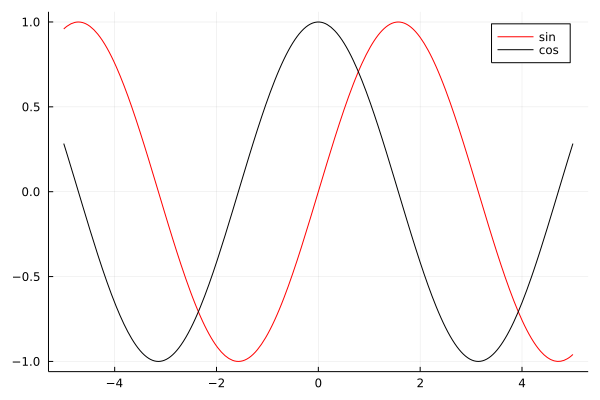
Start with the issue of multiple series in a single plot.

julia> plot([sin cos]; labels=["sin" "cos"], color=["red" "black"])

Which gives us:
Functions

First note that plot nicely plotted functions that we passed to it. The
key thing to get this plot right was to pass all arguments as 1×2 matrices
therefore in array literals I just used a space (without a comma).

Now let us discuss padding. In this example I additionally show you how to
set custom ticks in a plot.

julia> sales = [1, 5, 2, 7];

julia> plot(["winter", "spring", "summer", "autumn"], sales;
            labels=nothing, tickfontsize=10, xrot=90,
            yticks=(sales, 1000sales),
            ylim=extrema(sales) .+ (-1, 1),
            bottommargin=5Plots.mm)

The command above produces this plot:

Sales

I think that most of the passed keyword arguments have self explanatory names.
Let me comment on two things. In yticks=(sales, 1000sales) the first element
of the tuple are tick locations and the second are tick labels (in this case I
assumed that the original sales vector represented sales data in thousands).
Because x-ticks in our plot were long I needed to rotate them. However, after
rotation they get cropped. Therefore I had to add extra padding at the bottom
with bottommargin=5Plots.mm. The Plots.mm part makes sure that the padding
is measured in absolute terms (5 millimeters in this case). When setting the
margins in Plots.jl you have to pass absolute length measures. They are defined
in Measures.jl and internally imported, but not re-exported, by Plots.jl.

Conclusions

I hope that this post will be useful for new Plots.jl users and help them
avoid challenges that they might to have when using this package.

Artifacts!

By: Josh Day

Re-posted from: https://www.juliafordatascience.com/artifacts/

Artifacts!

In this article we'll cover what artifacts are and how to use them, both as a package user and a package developer.

What is an Artifact?

In Julia, an artifact is simply a fixed/immutable something that a package needs (that isn't Julia code).  This could be an executable binary, a text file, or any other kind of immutable data.  

The "rules" for artifacts are the following:

  • Artifacts must be immutable.
  • Artifacts must be a (optionally g-zipped) tarfile (ends with .tar or .tar.gz).
  • Artifacts must be publicly available on the internet.

What's the Point of Artifacts?

To understand the usefulness of artifacts, let's take a look at some alternatives:

❌ Storing binary data directly in the git repo.

This is bad practice because git is only meant for tracking changes in text files.  A change to a binary file will require git to save an entirely new version of the file.

❌ Using a deps/build.jl script.

Before artifact support was added to Pkg, this was how you included artifacts along with a package.  When you install a package, this script will run (if it exists).  The script can include downloading files the package needs.  

Downsides to this approach are:

  • If two packages use the same artifact, they will both download their own copy.
  • Packages that use this method are incompatible with PackageCompiler.jl.
  • It is tricky to get platform-specific dependencies working properly.

In other words, Pkg's artifact support allows you to:

✅ Avoid bloat in git repos.
✅ Make source code immutable (a package directory's state isn't changed by a build.jl script).
✅ Have packages that share dependencies.
✅ Use PackageCompiler.
✅ Install platform-specific dependencies in a more robust way.

Artifacts as a Package User

As a user, you don't need to make yourself concerned with artifacts.  Whenever a package is installed on your machine, Julia's package manager will automatically download the artifacts it needs!

Artifacts as a Package Developer

As a developer, we highly recommend using the ArtifactUtils package.  See the docs for more info, but here we'll walk through creating a package from scratch that needs an artifact.

1) Let's make a package called Hello

using PkgTemplates

t = Template()

generate(t, "Hello")
c

2) Navigate to the root directory of Hello

path = joinpath(homedir(), ".julia", "dev", "Hello")

cd(path)

3) Create what we need

  • We'll write a file called "hello.txt" into a temporary directory with the contents "Hello!  I am an artifact!".
dir = mktempdir()

file = touch(joinpath(dir, "hello.txt"))

open(file, "w") do io 
    write(io, "Hello!  I am an artifact!")
end

4) Get the ID for our artifact

using ArtifactUtils

artifact_id = artifact_from_directory(dir)

5) Upload the artifact somewhere

gist = upload_to_gist(artifact_id)

6) Create an Artifacts.toml in your Hello package directory

add_artifact!("Artifacts.toml", "hello_artifact", gist)

7) Use the artifact in the package

  • Every package can have an __init__ function that runs right after the package is loaded.  In this case, we'll use __init__ to print out the contents of our "hello.txt" artifact.
sourcecode = """
module Hello 

using Artifacts 

function __init__()
    path = joinpath(artifact"hello_artifact", "hello.txt")
    
    println(read(path,String))
end

end #module
"""

open(io -> write(io, sourcecode), joinpath("src", "Hello.jl"), "w")

8) Add the Artifacts dependency and you're done!

using Pkg

# activate the Hello project
Pkg.activate(".")  

# Make sure we add the Artifact dependency.
Pkg.add("Artifacts")  

# get all of Hello's dependencies including artifacts
Pkg.instantiate()     

🎉 Hey it works!

julia> using Hello
Hello!  I am an artifact!


🚀 That's It!

You now know the basics of Julia's artifact system!

Still confused about something?  Did we miss anything important?  Let us know on Twitter at @JuliaForDataSci!


Enjoying Julia For Data Science?  Please share us with a friend and follow us on Twitter at @JuliaForDataSci.

Want to write an article for Julia For Data Science?  Get in touch!  [email protected]


Julia For Data Science Numbers:

Hey, this section is new.  We thought it would be fun to include some statistics about Julia For Data Science.  We'll include our member/follower numbers in each post from here on out.

  • Newsletter members: 166
  • Twitter followers: 836

Broadcasting in Julia: the Good, the Bad, and the Ugly

By: Blog by Bogumił Kamiński

Re-posted from: https://bkamins.github.io/julialang/2022/06/24/broadcasting.html

Introduction

Recently I have written a post about @view and @views macros.
In what followed I got a feedback, that the topic I touched there was
indeed useful. Therefore for today I decided to write about another macro.
This time I will share my thoughts on the @. macro.

This post was written under Julia 1.7.2.

Understanding what @. macro does

The @. macro is used to inject broadcasting into every function call
in an expression passed to it.

Let us have a look at its docstring:

Convert every function call or operator in expr into a “dot call”
(e.g. convert f(x) to f.(x)), and convert every
assignment in expr to a “dot assignment” (e.g. convert += to .+=).

If you want to avoid adding dots for selected function calls in expr, splice
those function calls in with $. For example,
@. sqrt(abs($sort(x))) is equivalent to sqrt.(abs.(sort(x))) (no dot for sort).

The @. marco is quite useful when we work with long expressions that
involve several operations that we want to be broadcasted together. Here
is a minimal example:

julia> using Statistics

julia> x = 1:10
1:10

julia> @. sin(x)^2 + cos(x)^2
10-element Vector{Float64}:
 1.0
 1.0
 0.9999999999999999
 1.0
 0.9999999999999999
 0.9999999999999999
 0.9999999999999999
 1.0
 0.9999999999999999
 1.0

Writing @. sin(x)^2 + cos(x)^2 is much more convenient than writing
sin.(x).^2 .+ cos.(x).^2.

However, what if we wanted to compute variance of x? A direct approach
would be to write this operation as:

julia> sum((x .- mean(x)) .^ 2) / (length(x) - 1)
9.166666666666666

As you can see I use broadcasting in only two places, while most of the
operations are not broadcasted. If we wanted to use @. macro we would
need to use $ escaping and write something like:

julia> @. $/($sum((x - $mean(x)) ^ 2), $-($length(x), 1))
9.166666666666666

which is equivalent and ugly. You can check it by using @macroexpand:

julia> @macroexpand @. $/($sum((x - $mean(x))^2), $-($length(x), 1))
:(sum((^).((-).(x, mean(x)), 2)) / (length(x) - 1))

In this case also correct (but not equivalent) and simpler way would be:

julia> @. $sum((x - $mean(x))^2) / ($length(x) - 1)
9.166666666666666

However, in this case you need to know and be sure that by not escaping-out the
/ and - function calls in the second part of the expression you will not
affect the correctness of your calculation.

In summary, I do not use @. in complex expressions as it is usually hard to
reason about it.

Let us now switch to some special cases of using @..

Be careful with broadcasted assignment

Other common source of bugs when using @. is broadcasted assignment.

Let us analyze the following code:

julia> x = ["a", "b"]
2-element Vector{String}:
 "a"
 "b"

julia> x = @. length(x)
2-element Vector{Int64}:
 1
 1

julia> x
2-element Vector{Int64}:
 1
 1

julia> y = ["a", "b"]
2-element Vector{String}:
 "a"
 "b"

julia> @. y = length(y)
ERROR: MethodError: Cannot `convert` an object of type Int64 to an object of type String

In the case of x variable the @. macro is on the right hand side of the
assignment. In this case we get a fresh binding of value to variable x.

In the case of y the @. encompasses the left hand side of the assignment.
In this case the operation is in-place. Therefore in this case we get an error,
because you cannot store integers in a vector of strings.

Things, of course, can be silently wrong, as in the following example of
Vector{Char}, as Char supports conversion from integer:

julia> z = ['a', 'b']
2-element Vector{Char}:
 'a': ASCII/Unicode U+0061 (category Ll: Letter, lowercase)
 'b': ASCII/Unicode U+0062 (category Ll: Letter, lowercase)

julia> @. z = length(z)
2-element Vector{Char}:
 '\x01': ASCII/Unicode U+0001 (category Cc: Other, control)
 '\x01': ASCII/Unicode U+0001 (category Cc: Other, control)

julia> z
2-element Vector{Char}:
 '\x01': ASCII/Unicode U+0001 (category Cc: Other, control)
 '\x01': ASCII/Unicode U+0001 (category Cc: Other, control)

Incorrect handling of named tuples

Consider the following code:

julia> v = 1:3
1:3

julia> [x in (a=1, c=3) for x in v]
3-element Vector{Bool}:
 1
 0
 1

We can rewrite it using broadcasting as:

julia> in.(v, Ref((a=1, c=3)))
3-element BitVector:
 1
 0
 1

Now we think we could use the @. here as follows:

julia> @. in(v, $Ref((a=1, c=3)))
ERROR: UndefVarError: c not defined

However, this fails as @. macro incorrectly handles = inside NamedTuple
definition. We have to write:

julia> @. in(v, $Ref((; a=1, c=3)))
3-element BitVector:
 1
 0
 1

The ; at the beginning of NamedTuple definition gives an equivalent object
but changes how the code expression is transformed by the Julia compiler
and it works. Here is how we can check the difference in the representation
of (a=1, c=3) and (; a=1, c=3):

julia> dump(:(a=1, c=3))
Expr
  head: Symbol tuple
  args: Array{Any}((2,))
    1: Expr
      head: Symbol =
      args: Array{Any}((2,))
        1: Symbol a
        2: Int64 1
    2: Expr
      head: Symbol =
      args: Array{Any}((2,))
        1: Symbol c
        2: Int64 3

julia> dump(:(; a=1, c=3))
Expr
  head: Symbol tuple
  args: Array{Any}((1,))
    1: Expr
      head: Symbol parameters
      args: Array{Any}((2,))
        1: Expr
          head: Symbol kw
          args: Array{Any}((2,))
            1: Symbol a
            2: Int64 1
        2: Expr
          head: Symbol kw
          args: Array{Any}((2,))
            1: Symbol c
            2: Int64 3

Fortunately the case of NamedTuple is not likely to be problematic in practice
as it is extremely rare.

Conclusions

The @. macro can be very convenient. However, in my experience, you
need to be careful when you use it as it is easy to get surprising results
if you work with complex expressions. Out of the possible problematic situations
I have covered in my post a most common one is forgetting to add $ to avoid
broadcasting of some function calls in a complex expression.

I hope that you will find this post useful and it will help you to avoid
bugs in your Julia code using broadcasting!