Category Archives: Julia

Working with Julia projects

By: Uwe

Re-posted from: https://ufechner7.github.io/2022/08/16/julia-projects.html

Introduction

When you start to use Julia you might ask yourself: How shall I structure my code?
There are different approaches for different use cases.

Simple scripts

If you just write short, simple scripts that are not using any packages you can just keep them in one file and put them in any folder, no special folder structure needed. If you care about performance you should put everything in a function. Example:

# constants
const LANG="DE"

# functions
function hello(name)
    if LANG == "DE"
        println("Hallo liebe/r $name !")
    else
        println("Hello dear $name !")
    end
end

# main program
function main()
    hello("Peter")
    hello("Jane")
end

main()
nothing

The structure is:

  • constants
  • functions
  • main function
  • call the main function
  • return nothing

Do not use global variables! That kills your performance [1].

If you store this code in a file with the name hello.jl you can execute it from the REPL with the command:

include("hello.jl")

The advantage of having a main() function is that you can include some error checks and return an error code if they fail. Furthermore you can measure the performance by running:

@time("hello.jl")
@time main()

The first timing you get includes the compilation time, the second number shows the pure execution time.

It is a good habit to return nothing, unless you want to return your result, e.g. a plot (diagram) or a dataset.

Scripts that are using packages

If you are using any packages, you should create a proper project to keep track of your dependencies and their versions.

That is simple:
Creating a project does not mean to create a package. It is much simpler:

mkdir my_project
cd my_project
mkdir src
julia --project="."

Now add the packages you need:

using Pkg
pkg"add Plots"
pkg"add DataFrames"

Now put your code in a file in the src folder, for example like this:

cd src
gedit my_plot.jl

and put the following code into it:

using Plots, DataFrames

function main()
    time = 0:0.01:10             # step range from 0 to 10 step 0.1
    u    = sin.(time*5)          # signal with a frequency of 5 rad/s
    step = 1 .- 1 ./ exp.(time)  # step response
    df  = DataFrame(;time, u, step)
    plt = plot(df.time,  u, legend=false)
    plot!(df.time, step)
    plt
end
plt = main()

and save it.
If you want to run it, make sure you are in the my_project folder and then
start julia with:

julia --project

and execute your script with:

include("src/my_plot.jl")

You should see the following plot:

myplot

When you are happy with your code and the packages you are using, make a backup copy
of your Manifest.toml file:

cp Manifest.toml Manifest.toml.bak

If you – half a year later – update your packages and your code stops to work, just restore the Manifest file:

cp Manifest.toml.bak Manifest.toml

No need to create any module or Julia package…

Using compat to improve long term robustness

If you add compat bounds to the versions of the packages you are using your project becomes more robust. This means,
if you are adding new packages in the future the currently used packages will not be unintentionally upgraded.

If you are using Julia 1.8 or newer you can use the following approach:

  1. launch julia with julia --project
  2. enter the package manager mode by pressing the key ]
  3. list the status of your project:
    (my_project) pkg> st
    Status `~/repos/my_project/Project.toml`
      [a93c6f00] DataFrames v1.3.4
      [91a5bcdd] Plots v1.31.7
    

    If you are careful allow only bugfixes for the installed packages which means only the last number of the version string is allowed to be increased. To achieve that, type

    (my_project) pkg> compat
       Compat `~/repos/my_project/Project.toml`
      Select an entry to edit:
     >            julia      none
    [a93c6f00] DataFrames none
    [91a5bcdd] Plots      none
    

    Now select julia and enter ~1.8, DataFrames and enter ~1.3 and Plots and enter ~1.31. Use the first two numbers of the version strings of the currently installed packages as shown by the command st.
    If you now type compat again it should look like this:

    (my_project) pkg> compat
       Compat `~/repos/my_project/Project.toml`
      Select an entry to edit:
     >            julia      ~1.8
    [a93c6f00] DataFrames ~1.3
    [91a5bcdd] Plots      ~1.31
    

    Press q to quit and then backspace to quit the package manager mode.

Congratulations!

You have now set limits for your package versions, and if you should type up in the package manger the next time you will only get bugfixes for the installed packages, but nothing that could brake your current code.

Your Project.toml file should now look like this:

 ufechner@desktop:~/repos/my_project$ cat Project.toml
[deps]
DataFrames = "a93c6f00-e57d-5684-b7b6-d8193f3e46c0"
Plots = "91a5bcdd-55d7-5caf-9e0b-520d859cae80"

[compat]
DataFrames = "~1.3"
Plots = "~1.31"
julia = "~1.8"

If you have a Julia version older than 1.8 you can also just edit the file Project.toml manually with your preferred editor to add the compat section. If your code was tested with multiple package or Julia versions, you can create a list, for example:

 [compat]
 julia = "~1.6,~1.7,~1.8"

Further reading

If you want to understand the meaning of the semantic versioning that is used by Julia packages, please read the section Compatibility in the documentation of the package manager.

Outlook

If you want to create re-usable packages that you want to use in multiple programs/ projects consider to create real Julia packages. This is a little bit more complicated, but it has the advantage of automated unit tests and easy installation for yourself and others. I will talk about that in one of my future blog posts.


[1] You can assign a value with a different type to global variables. As a result Julia has to generate more generic code that is valid for potentially all types which is bad for the performance. From Julia 1.8 onwards you can annotate global variables with a concrete type, e.g. NUMBER::Int64. In this case the performance is better, but still not as good as it is for local variables.

Why am I using Julia?

By: Uwe

Re-posted from: https://ufechner7.github.io/2022/08/13/why-julia.html

Introduction

I started programming in 1976 using the KIM 1 and the 6502 machine language. Since then I learned and used many languages, Assembler, Pascal, Delphi, Basic, Foxpro, Java, C, C++, Bash, Matlab, Python and more…

KIM 1
KIM 1

Why do I think that Julia is superior to all of them in many (not all) applications?

What is so great about Julia?

Reason no. one: speed

When you need to process large amounts of data speed is important. Julia is a just-in-time compiled language using the mature LLVM compiler infrastructure, so you get fast machine code for different processors. In contrast to Python also multi threading is well supported. I wrote a simulation package in Python+Numba, and re-wrote it in Julia.

Performance advantage of Julia vs Python+Numba

Depending on the test case Julia was 7 to 70 times faster than Python+Numba. And writing the Julia code was much easier because mixing Python with Numba is a real pain because they look similar, but behave very differently.

If you only use Python with algorithms for which C++ or Fortran libraries are available, then you will not see much of an advantage from using Julia. But if you write new programs or libraries using new algorithms Julia is much faster (if you follow the Performance Tips).

Reason no. two: simplicity and elegance

You can operate with vectors as you would do it in mathematical notation, you can use × for the cross product and for the dot product. And functions can return tuples (multiple values), which is very useful.

# pos:        vector of tether particle positions
# v_apparent: apparent wind speed vector
function kite_ref_frame(pos, v_apparent)
    c = pos[end-1] - pos[end]
    z = normalize(c)
    y = normalize(v_apparent × c)
    x = normalize(y × c)
    x, y, z
end

And you can use greek letters in the code:

using Distributions, Random

T = [84.5, 83.6, 83.6] # temperature measurements
μ = mean(T)            # average cpu temperature
σ = 2.5                # 95.45 % of the measurements are within ± 5 deg
d = Normal(μ, σ)
good = cdf(d, 88.0)    # this percentage of the cpus will not start to throttle

And you can write arrays cleanly:

julia> A = [1 2π
            3 4π]
2×2 Matrix{Float64}:
 1.0   6.28319
 3.0  12.5664

And any scalar function incl. user defined functions can be applied on a vector using the dot syntax:

julia> sin.([1,2,3])
3-element Vector{Float64}:
 0.8414709848078965
 0.9092974268256817
 0.1411200080598672

Reason no. three: Great REPL (Read, Evaluate and Print Loop)

Normally, compiled languages don’t have any REPL, but if you ever used it you do not want to miss it again:

Julia REPL
Julia REPL

You can do basic calculations, but also try out any function you want to use. You get help by typing ? and press <Enter>, or help for a specific function by typing for example:

?sin

You can run your scripts using the include function, for example:

include("hello_world.jl")

It has four modes of operation, the julia mode for executing julia code, the help modus, the shell modus (which you reach by pressing ;) and the package manager mode explained in the next section. I always develop code in the REPL and when a line of code (or a function) works I copy it into the script. If you wounder how to get the character π: just type \pi and then the TAB key.

Reason no. four: Built-in package manager

In Python it can be very difficult to install packages. There is pip that might work, but not good for binary dependencies. There is easy_install, there is conda… Many package managers, but all of them only work sometimes, for some packages on some operating systems… On Julia is only one package manager and it works fine with all packages on all supported operating systems (Windows, Mac, Linux…) on ARM and X86.

You can reach the prompt of the package manager by typing ]. It looks like this:

(@v1.8) pkg> st
Status `~/.julia/environments/v1.8/Project.toml`
  [e1d33f9a] DLMReader v0.4.5
  [31c24e10] Distributions v0.25.66
  [5c01b14b] InMemoryDatasets v0.7.7
 [14b8a8f1] PkgTemplates v0.7.26
 [91a5bcdd] Plots v1.29.0
  [0c614874] TerminalPager v0.3.1
Info Packages marked with  have new versions available

The prompt tells you which environment is active, and you can add, update and delete packages, but also display statistics or download the source code of a package for development. Each Julia package has a clear definition of the versions of the dependencies it works with in a file called Project.toml.

Therefore it is easy to write code that will never brake in the future. From my point of view thats a killer feature. If required, the package manager also installs pre-compiled C++ or Fortran libraries which works very well.

If you are looking for a specific package, JuliaHub will help you to find it.

Reason no. five: the composability of packages

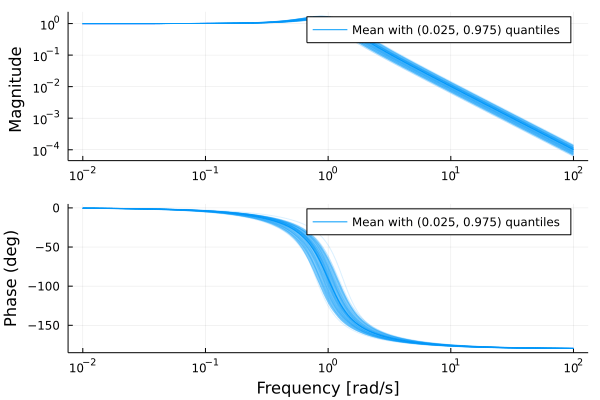
Julia packages that are written independently often (not always) work together surprisingly well. Example: We have designed a control system, but now we want to do a monte-carlo analysis to find out how robust it is in the presence of parameter uncertainties.

using ControlSystems, MonteCarloMeasurements, Plots

ω = 1 ± 0.1  # create an uncertain Gaussian parameter
ζ = 0.3..0.4 # create an uncertain uniform parameter

G = tf(ω^2, [1, 2ζ*ω, ω^2]) # systems accept uncertain parameters

Output:

TransferFunction{Continuous, ControlSystems.SisoRational{Particles{Float64, 2000}}}
            1.01 ± 0.2
----------------------------------
1.0s^2 + 0.7 ± 0.092s + 1.01 ± 0.2

Continuous-time transfer function model

The function tf that was originally written for real parameters only, when supplied with uncertain parameters it calculates and prints the correct result. Magic! ?

Now lets plot the result for the frequency range 0.01 to 100 rad/s on a logarithmic scale:

w = exp10.(-2:0.02:2)
bodeplot(G, w)

Bodeplot

Plotting of diagrams with uncertainty works, even though the packages Plot.jl and MonteCarloMeasurements.jl were developed independently by different authors. You can also combine calculations with physical units and get plots that show the correct physical units. Just magic! ?

This is so much better than Python or C++ where every library comes with its own implementation of types like vectors that are not compatible with each other. In Julia you write a generic library, and then it can work with StaticArrays.jl (stack allocated) or normal arrays (heap allocated) or sparse arrays or whatever and it just works.

Reason no. six: an awesome community

If you ask a question on discourse you usually get an answer within 15 minutes. And half of the people that reply are scientists, they know what they are talking about. So you get very qualified answers quickly, often some extra infos that might help you to improve your approach.

State-of-the-art solvers for differential equations

If you are creating models of physical, chemical or biological systems, you will often need to solve differential equations. The package DifferentialEquations.jl provides the world best set of solvers for these kind of problems.

State-of-the-art optimizers

If you want to optimize a system, for example minimize the costs or the time or other properties of a system you need a mathematical optimizer. JuMP provides a domain-specific modeling language for mathematical optimization embedded in Julia. This is easy to use, fast and powerful. As example here a solution of the Rosenbrock function:

using JuMP
import Ipopt

model = Model(Ipopt.Optimizer)

@variable(model, x)
@variable(model, y)
@NLobjective(model, Min, (1 - x)^2 + 100 * (y - x^2)^2)

optimize!(model)

println("x: ", value(x))
println("y: ", value(y))

The Scientific Machine Learning ecosystem

The SciML ecosystem provides a unified interface to libraries for scientific computing and machine learning. So far I mainly used NonlinearSolve and Optimization.jl for root-finding and for optimization problems where JuMP is not the best choice. The unified interfaces make it easy to try different solvers to find the best one for your problem.

If you are modelling real world problems like the Corona disease then combining differential equations and machine learning can give superior results.

Limitations

Limitations of language/ compiler and tooling

Compilation and load times

Loading packages takes some time, and also the just-in-time compilation kicks in when you make you first function call. This is known as the time-to-first-plot problem (TTFP). Simple example:

using Plots
p = plot(rand(2,2))
display(p)

If we now save this code in the file ttfp.jl run the program with the command:

@time include("ttfp.jl")

we will see that it takes about 9 seconds on a computer with an i7-7700K CPU. This is quite a lot of time for
such a small program. There a different approaches to mitigate this issue. What I usually do is to create a system image with all packages I use for a curtain project and do an ahead-of-time compilation of these packages.
I will explain in a separate blog post how to do that. If you are curious already, have a look at PackageCompiler.jl.

There is ongoing effort to use binary caches of the compiled code so that you need to recompile only when the source code has changed, but it will take some time until this will work without any user interaction.

For use on embedded systems

Currently, with Julia 1.8 the first issue is the amount of RAM that is needed: Using Julia
with less than 4GB RAM is not very enjoyable. A cross compiler is missing. For these
reasons writing code for smaller embedded systems is not feasible. The smallest system
I would use with Julia is a Raspberry Pi 4 and a 64 bit OS.

I know that the Julia developers work hard to mitigate these issues, so in a few years
Julia will hopefully also be usable for smaller embedded systems.

Working with modules

While working with modules is supported by the language, using modules that are NOT packages is not well supported by the tooling. The VSCode Julia plugin will NOT find symbols of modules in the LOAD_PATH, see this bug report. Workarounds exist, but I find them ugly. As a consequence I use only one module per app/ package and split the program using includes. This is not so good because a file is no longer a stand-alone unit of code which you can read on its own and requires some adaptation of your habits if you are an experienced C++ or Python programmer.

Limitations of the ecosystem

  • The first limitation I see is that there is no easy to use, well integrated GUI library. Yes, you can use QML.jl or GTK.jl and many others, but they all have their issues, one of the issues is the lack of Julia specific documentation.

  • My preferred solver for stiff differential algebraic equations is the Radau5DAE solver, which is available in Fortran and Python, but not yet wrapped or re-written in Julia. There is an open issue for this.

Luckily you can use most Python and R libraries from within Julia, so the lack of a specific library is usually no show-stopper. Have a look at PythonCall.jl and RCall.jl. Also Fortran and C code can be called directly from Julia, for C++ you need an interface library like CxxWrap.

Conclusions

If you want to analyze data, model physical systems, design control systems or create a web portal with dynamic data Julia is a good choice for you. Also if you do number crunching on graphic cards or clusters. So far it is not a good choice for mobile apps or small embedded systems. It can also be used for machine learning, but I am not qualified to say how well that works (I guess it depends…)

So give Julia a try if you are now using Python, Matlab, Fortran or C++ for one of the mentioned tasks. Your life will become happier…

Acknowledgements

Thanks to Fredrik Bagge Carlson for providing the example for composability .

How to safely use the vec and reshape functions in Julia?

By: Blog by Bogumił Kamiński

Re-posted from: https://bkamins.github.io/julialang/2022/08/12/vec.html

Introduction

Julia users often want to squeeze-out maximum performance from their programs.
In the search for efficiency, they soon discover the vec and reshape
functions that allow for changing of the shape of the input array without
copying data. In this post I want do discuss how these functions work
and share with you the rules I use when deciding if I want to use them.

The post was written under Julia 1.7.2.

The contract

When you first learn some function you must look up its contract in its
docstring. Let us check vec and reshape (I abbreviated the docstrings to
focus on the key parts):

help?> vec
  vec(a::AbstractArray) -> AbstractVector

  Reshape the array a as a one-dimensional column vector.
  Return a if it is already an AbstractVector.
  The resulting array shares the same underlying data as a,
  so it will only be mutable if a is mutable,
  in which case modifying one will also modify the other.

help?> reshape
search: reshape promote_shape

  reshape(A, dims...) -> AbstractArray

  Return an array with the same data as A,
  but with different dimension sizes or number of dimensions.
  The two arrays share the same underlying data, so that the result is mutable
  if and only if A is mutable,
  and setting elements of one alters the values of the other.

In short, both functions allow you to change the shape of some array without
copying of the data. vec always returns a vector, while reshape is more
flexible and allows you to produce an array of any dimension.

Let me show you some use cases of these functions. First, assume I want to
produce a cartesian product of two collections:

julia> collect(Iterators.product('a':'b', 1:3))
2×3 Matrix{Tuple{Char, Int64}}:
 ('a', 1)  ('a', 2)  ('a', 3)
 ('b', 1)  ('b', 2)  ('b', 3)

By default the collect function produced me a matrix. If for some reason
I needed a vector instead I could write:

julia> vec(collect(Iterators.product('a':'b', 1:3)))
6-element Vector{Tuple{Char, Int64}}:
 ('a', 1)
 ('b', 1)
 ('a', 2)
 ('b', 2)
 ('a', 3)
 ('b', 3)

The important benefit of this operation is that vec is non-copying so adding
this step is efficient. Let me give you another example, this time using
broadcasting:

julia> string.(['a' 'b'], 1:3)
3×2 Matrix{String}:
 "a1"  "b1"
 "a2"  "b2"
 "a3"  "b3"

julia> vec(string.(['a' 'b'], 1:3))
6-element Vector{String}:
 "a1"
 "a2"
 "a3"
 "b1"
 "b2"
 "b3"

Now let us have a look at reshape:

julia> reshape(1:6, 2, 3)
2×3 reshape(::UnitRange{Int64}, 2, 3) with eltype Int64:
 1  3  5
 2  4  6

Why reshape would be useful? Consider for example a simple function changing
pairs of consecutive elements of a vector into a tuple. One of the ways
(for sure not the only way) to implement this would be:

julia> totuples(x::AbstractVector) = Tuple.(eachcol(reshape(x, 2, :)))
totuples (generic function with 1 method)

julia> totuples(1:6)
3-element Vector{Tuple{Int64, Int64}}:
 (1, 2)
 (3, 4)
 (5, 6)

The dangers

While the vec and reshape functions can be useful there are some risks
of using them. Let me discuss some common pitfalls.

The first is that when you reshape a collection you may leave a permanent mark
in the source that it was used in reshape (even though reshape has no !
as its suffix). This can lead to hard to catch bugs. Let us check the following
code:

julia> x = [1, 2, 3, 4]
4-element Vector{Int64}:
 1
 2
 3
 4

julia> totuples(x)
2-element Vector{Tuple{Int64, Int64}}:
 (1, 2)
 (3, 4)

julia> push!(x, 5)
ERROR: cannot resize array with shared data

As you can see, although the use of reshape was done in the totuples
function and the reshaped matrix we created there with reshape(x, 2, :)
is already out of scope the fact that we used reshape on x permanently
disallows its resizing.

The second risk is that vec and reshape may, or may not, create a new
object, as they might just return a source object. Let us check the following
code that extends the original totuples function to accept any
AbstractArray. In the code I write y = vec(x), but the same behavior
would be present with y = reshape(x, :).

julia> function totuples2(x::AbstractArray)
           y = vec(x)
           isodd(length(x)) && push!(y, last(y))
           return totuples(y)
       end
totuples2 (generic function with 1 method)

julia> x = [1;;]
1×1 Matrix{Int64}:
 1

julia> totuples2(x)
1-element Vector{Tuple{Int64, Int64}}:
 (1, 1)

julia> x
1×1 Matrix{Int64}:
 1

julia> x = [1]
1-element Vector{Int64}:
 1

julia> totuples2(x)
1-element Vector{Tuple{Int64, Int64}}:
 (1, 1)

julia> x
2-element Vector{Int64}:
 1
 1

As you can see our totuples2 function left [1;;] unchanged, since it is
a matrix, but [1] was updated. The reason is that vec(x) in this case just
returned its argument.

Finally, as an another application of the same rule, note that that the vec
function (and similarly reshape when reshaping to a vector), may or may not
produce a vector that can be resized:

julia> totuples2([1 2; 3 4])
2-element Vector{Tuple{Int64, Int64}}:
 (1, 3)
 (2, 4)

julia> totuples2(reshape(1:4, 2, 2))
2-element Vector{Tuple{Int64, Int64}}:
 (1, 2)
 (3, 4)

julia> totuples2([1;;])
1-element Vector{Tuple{Int64, Int64}}:
 (1, 1)

julia> totuples2(reshape(1:1, 1, 1))
ERROR: MethodError: no method matching resize!(::UnitRange{Int64}, ::Int64)

As you can see, this is tricky, as the function you use, like totuples2 in our
case, might throw an error only in some cases, but work in other cases. In the
totuples2 case the reason is that we use push! only if the length of the
collection is odd.

The point of all these examples is that code using vec or reshape can lead
to hard-to-diagnose errors. The reason is that you might notice the problems
caused by using them much later in the code than when you used them.

Conclusions

The vec and reshape functions are nice utilities and I use them quite often.
However, to safely use them I always follow the following two rules:

  • when writing a function never use reshape on an array that is an argument
    of the function; the reason is, that in some cases reshape will silently
    leave the “no resize” mark on the source vector; if I use reshape I make
    sure that its source is always some short lived object from a local scope;
  • do not resize the vector produced by vec/reshape as such resizing may,
    or may not affect the source and keeping a mental record if this is the case
    is hard (and most likely readers of such code will not be able to easily
    know it); as a softer rule I generally avoid any mutation of the output of
    vec/reshape as it is not guaranteed that it will be mutable.

In short: the best uses for vec and reshape are situations when their source
is a short lived object and you do not want to mutate their output in any way.