By: Dean Markwick's Blog -- Julia
Re-posted from: https://dm13450.github.io/2023/03/01/Downtrend-Extremes.html
I’m exploring whether there are more extreme moves in the equity
market when we are in a downtrend. I think anecdotally we
all notice these big red numbers when the market has been grinding
lower over a period as it is the classic loss aversion of human
psychology. This is loosely related to my Ph.D. in point processes and
also a blog post from last year when I investigated trend following –
Trend Following with ETFs. I’m
going to take two approaches, a simple binomial model and a Hawkes
process. For the data, we will be pulling the daily data from Alpaca Markets using my AlpacaMarkets.jl package.
Enjoy these types of posts? Then you should sign up for my newsletter. It’s a short monthly recap of anything and everything I’ve found interesting recently plus
any posts I’ve written. So sign up and stay informed!
A few packages to get started and I’m running Julia 1.8 for this
project.
using AlpacaMarkets
using DataFrames, DataFramesMeta
using Dates
using Plots, PlotThemes, StatsPlots
using RollingFunctions, Statistics, StatsBase
using GLM
All good data analysis starts with the data. I’m downloading the
daily statistics of SPY the S&P 500 stock index ETF which will represent
the overall stock market.
function parse_date(t)
   Date(string(split(t, "T")[1]))
end

function clean(df, x)
    df = @transform(df, :Date = parse_date.(:t), :Ticker = x, :NextOpen = [:o[2:end]; NaN])
   @select(df, :Date, :Ticker, :c, :o, :NextOpen)
end

spyPrices = stock_bars("SPY", "1Day"; startTime = now() - Year(10), limit = 10000, adjustment = "all")[1]
spyPrices = clean(spyPrices, "SPY")
last(spyPrices, 3)
| 1 |
2023-02-22 |
SPY |
398.54 |
399.52 |
401.56 |
| 2 |
2023-02-23 |
SPY |
400.66 |
401.56 |
395.42 |
| 3 |
2023-02-24 |
SPY |
396.38 |
395.42 |
NaN |
I’m doing the usual close-to-close returns and then taking the 100-day moving average as my trend signal.
spyPrices = @transform(spyPrices, :Return = [missing; diff(log.(:c))])
spyPrices = @transform(spyPrices, :Avg = lag(runmean(:Return, 100), 1))
spyPrices = @transform(spyPrices, :BigMove = abs.(:Return) .>= 0.025)
dropmissing!(spyPrices);
sp = scatter(spyPrices[spyPrices.BigMove, :].Date, spyPrices[spyPrices.BigMove, :].Return, legend = :none)
sp = scatter!(sp, spyPrices[.!spyPrices.BigMove, :].Date, spyPrices[.!spyPrices.BigMove, :].Return)

plot(sp, plot(spyPrices.Date, spyPrices.Avg), layout = (2,1), legend=:none)
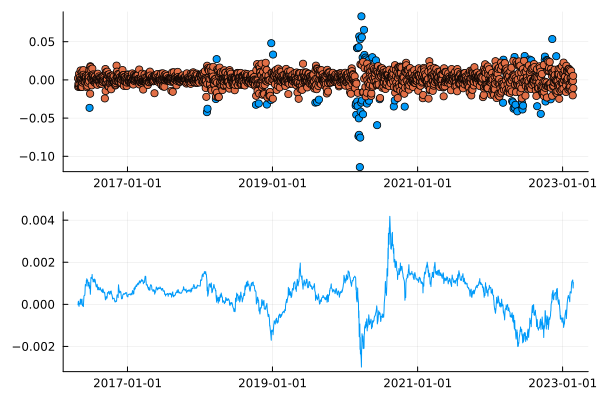
By calling a ‘big move’ anything greater than \(\pm\) 0.025 (in log terms)
we can see that they, the blue dots, are slightly clustered around
common periods. In the plot below, the 100-day rolling average of
the returns, our trend signal, also appears to be slightly correlated with these big returns.
scatter(spyPrices.Avg, abs.(spyPrices.Return), label = :none,
            xlabel = "Trend Signal", ylabel = "Daily Return")
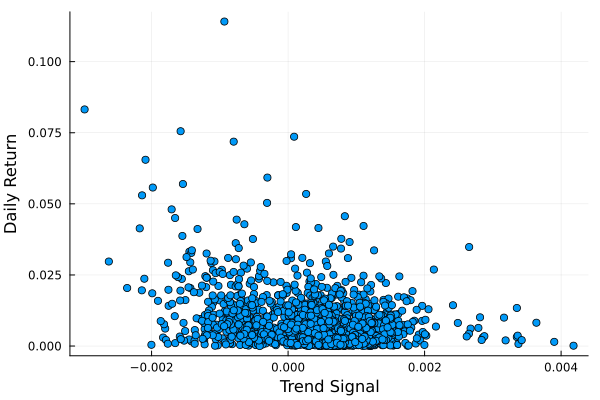
Here we have the 100-day rolling average on the x-axis and the
absolute return on that day on the y-axis. If we squint a little we
can imagine there is a slight quadratic pattern, or at the least, these
down trends appear to correspond with the more extreme day moves. We
want to try and understand if this is a significant effect.
A Binomial Model
We will start by looking at the probability that each day might
have a ‘large move’. We first split into a train/test split of 70/30.
trainData = spyPrices[1:Int(floor(nrow(spyPrices)*0.7)), :]
testData = spyPrices[Int(ceil(nrow(spyPrices)*0.7)):end, :];
The GLM.jl package lets you write out the formula and fit a wide
variety of linear models. We have two models, the proper one that uses
the Avg column (our trend signal) as our features and a null model
that just fits an intercept.
binomialModel = glm(@formula(BigMove ~ Avg + Avg^2), trainData, Binomial())
nullModel = glm(@formula(BigMove ~ 1), trainData, Binomial())

spyPrices[!, :Binomial] = predict(binomialModel, spyPrices);
To look at the model we can plot the output of the model relative to
the signal at the time.
plot(scatter(spyPrices.Avg, spyPrices[!, :Binomial], label ="Response Function"),
    plot(spyPrices.Date, spyPrices[!, :Binomial], label = "Probability of a Large Move"), layout = (2,1))
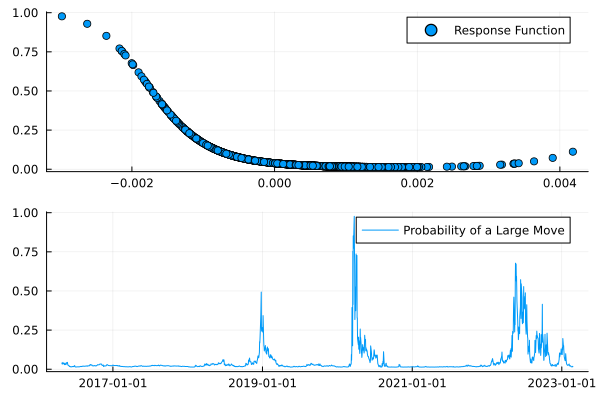
From the top graph, we see the higher probability of an extreme move comes from when the moving average is a large negative number. The probability then flatlines beyond zero, which suggests there isn’t that much of an effect for large moves when the momentum in the market is positive.
We also plot the daily probability of a large move and see that it
has been pretty bad in the few months lots of big moves!
We need to check if the model is any good though. We will just check
the basic accuracy.
using Metrics
binary_accuracy(predict(binomialModel, testData), testData.BigMove)
binary_accuracy(predict(nullModel)[1] .* ones(nrow(testData)), testData.BigMove)
So the null model has an accuracy of 95% on the test set, but the
fitted model has an accuracy of 93%. Not good, looks like the trend
signal isn’t adding anything. We might be able to salvage the model
with a robust windowed fit and test procedure or look at a
single stock name but overall, I think it’s more of a testament to how
hard it is to model this data rather than anything too specific.
We could also consider the self-exciting nature of these large moves. If one happens, is there a higher probability of another happening? Given my Ph.D. was in Hawkes processes, I have done lots of writing around them before and this is just another example of how they can be applied.
Hawkes Processes
Hawkes processes! The bane of my life for four years. Still, I am
forever linked with them now so might as well put that Ph.D. to use. If
you haven’t come across Hawkes processes before it is a self-exciting
point process where the occurrence of one event can lead to further
events. In our case, this means one extreme event can cause further
extreme events, something we are trying to use the downtrend to
predict. With the Hawkes process, we are checking whether the events
are just self-correlated.
I’ve built the HawkesProcesses.jl package to make it easy to work
with Hawkes processes.
using HawkesProcesses, Distributions
Firstly, we get the data in the right shape by pulling the number of
days since the start of the data of each big event.
startDate = minimum(spyPrices.Date)
allEvents = getfield.(spyPrices[spyPrices.BigMove, :Date] .- startDate, :value);
allDatesNorm = getfield.(spyPrices.Date .- startDate, :value);
maxT = getfield.(maximum(spyPrices[spyPrices.BigMove, :Date]) .- startDate, :value)
We then fit the Hawkes process using the standard Bayesian method for
5,000 iterations.
bgSamps1, kappaSamps1, kernSamps1 = HawkesProcesses.fit(allEvents .+ rand(length(allEvents)), maxT, 5000)
bgSamps2, kappaSamps2, kernSamps2 = HawkesProcesses.fit(allEvents .+ rand(length(allEvents)), maxT, 5000)

bgEst = mean(bgSamps1[2500:end])
kappaEst = mean(kappaSamps1[2500:end])
kernEst = mean(kernSamps1[2500:end])

intens = HawkesProcesses.intensity(allDatesNorm, allEvents, bgEst, kappaEst, Exponential(1/kernEst));
spyPrices[!, :Intensity] = intens;
We get three parameters out of the Hawkes process. The background rate
\(\mu\), the self-exciting parameter \(\kappa\) and an exponential
parameter that describes how long each event has an impact on the
probability of another event, \(\beta\).
(bgEst, kappaEst, kernEst)
We get \(\kappa = 0.84\) and \(\beta = 0.07\) which we can interpret
as a high probability that another large move follows and that takes
around 14 days (business days) to decay. So with each large move,
expect another large move within 3 weeks.
When we compare the Hawkes intensity to the previous binomial
intensity we get a similar shape between both models.
plot(spyPrices.Date, spyPrices.Binomial, label = "Binomial")
plot!(spyPrices.Date, intens, label = "Hawkes")
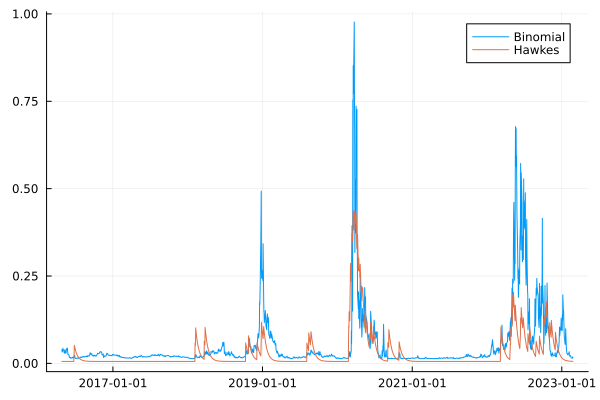
They line up quite well, which is encouraging and shows they are on a similar path. If we zoom in specifically to 2022.
plot(spyPrices[spyPrices.Date .>= Date("2022-01-01"), :].Date,
     spyPrices[spyPrices.Date .>= Date("2022-01-01"), :].Binomial, label = "Binomial")
plot!(spyPrices[spyPrices.Date .>= Date("2022-01-01"), :].Date,
      spyPrices[spyPrices.Date .>= Date("2022-01-01"), :].Intensity, label = "Hawkes")
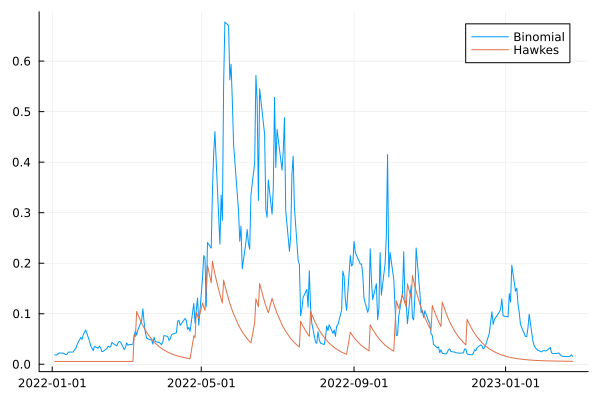
Here we can see the binomial intensity stays higher for longer whereas
the Hawkes process goes through quicker bursts of intensity. This is
intuitive as the binomial model is using a 100-day moving average
under the hood, whereas the Hawkes process is much more reactive to
the underlying events.
To check whether the Hawkes process is any good we compare its
likelihood to a null likelihood of a constant Poisson process.
We first fit the null point process model by optimising the
null_likelihood across the events.
using Optim
null_likelihood(events, lambda, maxT) = length(events)*log(lambda) - lambda*maxT

opt = optimize(x-> -1*null_likelihood(allEvents, x[1], maxT),  0, 10)
Optim.minimizer(opt)
Which gives a likelihood of:
null_likelihood(allEvents, Optim.minimizer(opt), maxT)
Whereas the Hawkes process has a likelihood of:
likelihood(allEvents, bgEst, kappaEst, Exponential(1/kernEst), maxT)
A substantial improvement, so all in the Hawkes process looks pretty
good.
Overall, the Hawkes model subdues quite quickly, but the binomial model can remain elevated. They are covering two different behaviours. The Hawkes model can describe what happens after one of these large moves happens. The binomial model is mapping the momentum onto a probability of a large event.
How do we combine both the binomial and the Hawkes process model?
Point Process Model
To start with, we need to consider a point process with variable intensity. This is known as an inhomogeneous point process. In our case, these events depend on the value of the trend signal.
\[\lambda (t) \propto \hat{r} (t)\]
\[\lambda (t) = \beta _0 + \beta _1 \hat{r} (t) + \beta_2 \hat{r} ^2 (t)\]
Like the binomial model, we will use a quadratic combination of the values. Then, given we know how to write the likelihood for a point process, we can do some maximum likelihood estimation to find the appropriate parameters.
Our rhat function need to return the signal at a given time.
function rhat(t, spy)
    dt = minimum(spy.Date) + Day(Int(floor(t)))
    spy[spy.Date .<= dt, :Avg][end]
end
And our likelihood which uses the rhat function, plus making it compatible with arrays.
function lambda(t, params, spy)
   exp(params[1] + params[1] * rhat(t, spy) + params[2] * rhat(t, spy) * rhat(t, spy))
end

lambda(t::Array{<:Number}, params::Array{<:Number}, spy::DataFrame) = map(x-> lambda(x, params, spy), t)
The likelihood of a point process is
\[\mathcal{L} = \sum _{t_i} log(\lambda (t_i)) – \int _0 ^T \lambda (t) \mathrm{d}\]
We have to use numerical integration to do the second half of the equation which is where the QuadGK.jl package comes in. We pass it a function and it will do the integration for us. Job done!
function likelihood(params, rate, events, maxT, spy)
    sum(log.(rate(events, params, spy))) - quadgk(t-> rate(t, params, spy), 0, maxT)[1]
end
With all the functions ready we can optimise and find the correct parameters.
using Optim, QuadGK
opt = optimize(x-> -1*likelihood(x, lambda, allEvents, maxT, spyPrices), rand(3))
Optim.minimizer(opt)
3-element Vector{Float64}:
 -3.4684622926014783
  1.6204408269570916
  2.902098418452392
This also has a maximum likelihood of -334. Which if you scroll up
isn’t much better compared to the null model. So warning bells should
be ringing that this isn’t a good model.
plot(minimum(spyPrices.Date) + Day.(Int.(collect(0:maxT))),
     lambda(collect(0:maxT), Optim.minimizer(opt), spyPrices), label = :none,
     title = "Poisson Intensity")
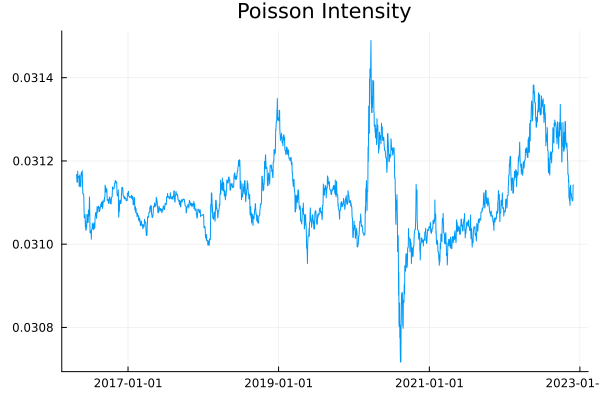
The intensity isn’t showing too much structure over time.
To check the fit of this model we simulate some events with the same
intensity pattern.
lambdaMax = maximum(lambda(collect(0:0.1:maxT), Optim.minimizer(opt), spyPrices)) * 1.1
rawEvents = rand(Poisson(lambdaMax * maxT), 1)[1]
unthinnedEvents = sort(rand(Uniform(0, maxT), rawEvents))
acceptProb = lambda(unthinnedEvents, Optim.minimizer(opt), spyPrices) / lambdaMax
events = unthinnedEvents[rand(length(unthinnedEvents)) .< acceptProb];
histogram(events,label= "Simulated", bins = 100)
histogram!(allEvents, label = "True", bins = 100)
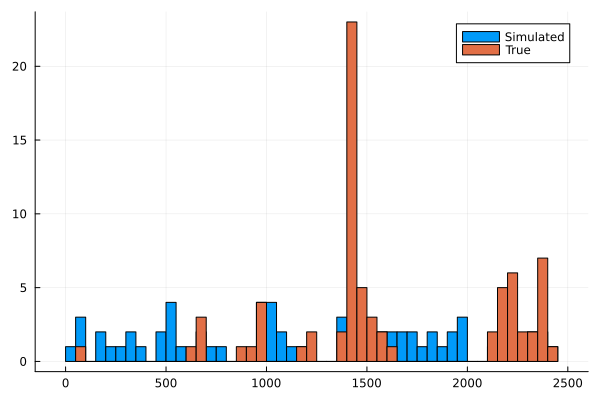
It’s not a great model as the simulated events don’t line up with the
true events. Looking back at the intensity function we can see it
doesn’t vary much around 0.03, so whilst the intensity function looks
varied, zooming out shows it is quite flat.
Next Steps
I wanted to integrate the variable background into the Hawkes process
so we could combine both models. As my Hawkes sampling is Bayesian I
have an old blog post to turn the above from an MLE to full Bayesian
estimation, but that code doesn’t work anymore. You need to use the
LogDensityProblems.jl package to get it working, so I’m going to
have to invest some time in learning that. I’ll be honest, I’m not
sure how bothered I can be, I’ve got a long list of other things I
want to explore and learning some abstract interface doesn’t feel like
it’s a good use of my time. Frustrating because the whole point of
Julia is composability, I could write a pure Julia function and
use HCMC on it, but now I’ve got to get another package involved. I’m sure
there is good reason and the LogDensityProblems package solves some issues but it feels a bit like the Javascript ecosystem where everything changes and the way to do something is outdated the minute it is pushed to main.
Conclusion
So overall we’ve shown that the large moves don’t happen more often in
down-trending markets, at least in the broad S&P500 view of the market.
Both a binomial and point process model showed no improvement on a
null model for predicting these extreme days whereas the Hawkes model shows that they are potentially self-exciting.
