By: Dean Markwick's Blog -- Julia
Re-posted from: https://dm13450.github.io/2023/04/27/Predicting-a-Successful-Mt-Everest-Climb.html
Climbing Mount Everest is a true test of human endurance with a real risk of death. The Himalayan Database is a data repository, available for free, that records various details about the peaks, people, and expeditions to climb the different Nepalese Himalayan mountains and provides the data for this analysis. In this blog post, I’ll show you how to load the database and explore some of the features before building a model that tries to predict how you can successfully climb Mount Everest.
Enjoy these types of posts? Then you should sign up for my newsletter.
Over the past few months, I’ve been training for a marathon and have been trying to understand the best way to train and maximise my performance. This means extensive research and reading to get an idea of what the science says. Endure by Alex Hutchinson is a book I recommend and it takes a look at the way the human body functions over long distances/extreme tasks – such as climbing Mount Everest with no oxygen or ultra, ultra marathoners with an overarching reference to the Breaking2 project by Nike.
In one section the book references something called the Himalayan Database which is a database of expeditions to Mount Everest and other mountains in the Himalayas. As a data lover, this piqued my interest as an interesting data source and something a bit different from my usual data explorations around finance/sports. So I downloaded the database, worked out how to load it, and had a poke around the data.
If you go to the website, himalayandatabase, you can download the data yourself and follow along.
The database is distributed in the DBF format and the website itself is a bit of a blast from the past. It expects you to download a custom data viewer program to look at the data, but thankfully there are people in the R world that demonstrated how to load the raw DBF files. I’ve taken inspiration from this, downloaded the DBF files, loaded up DBFTables.jl and loaded the data into Julia.
using DataFrames, DataFramesMeta
using Plots, StatsPlots
using Statistics
using Dates
I hit a roadblock straight away and had to patch DBFTables.jl with a new datatype that the Himalayan database uses that isn’t in the original spec. Pull request here if you are interested: DBFTables.jl – Add M datatype. Another feather to my open-source contributions hat!
There are 6 tables in the database but we are only interested in 3 of them:
exped details the expeditions. So each trip up a mountain by one or more people.peaks has the details on the mountains in the mountains in the Himalayas.members which has information on each person that has attempted to climb one of the mountains.
function load_dbf(fn)
    dbf = DBFTables.Table(fn)
    DataFrame(dbf)
end

exped = load_dbf("exped.DBF")
peaks = load_dbf("peaks.DBF")
members = load_dbf("members.DBF");
Taking a look at the mountains with the most entries.
first(sort(@combine(groupby(exped, :PEAKID), :N = length(:YEAR)),
       :N, rev=true), 3)
| 1 |
EVER |
2191 |
| 2 |
AMAD |
1456 |
| 3 |
CHOY |
1325 |
Unsurprisingly Mount Everest is the most attempted mountain with Ama Dablam in second and Cho Oyu in third place.
Exploring the Himalayas Data
We start with some basic groupings to look at how the data is distributed per year.
expSummary = @combine(groupby(@subset(members, :CALCAGE .> 0), :EXPID),
         :N = length(:CALCAGE),
         :YoungestAge=minimum(:CALCAGE),
         :AvgAge = mean(:CALCAGE),
         :NFemale = sum(:SEX .== "F"))

expSummary = leftjoin(expSummary,
              @select(exped, :EXPID, :PEAKID, :BCDATE, :SMTDATE, :MDEATHS, :HDEATHS, :SUCCESS1), on = :EXPID)
expSummary = leftjoin(expSummary, @select(peaks, :PEAKID, :PKNAME), on = :PEAKID)

everest = dropmissing(@subset(expSummary, :PKNAME .== "Everest"))
everest = @transform(everest, :DeathRate = (:MDEATHS .+ :HDEATHS) ./ :N, :Year = floor.(:BCDATE, Dates.Year))
everestYearly = @combine(groupby(everest, :Year), :N = sum(:N),
                          :Deaths = sum(:MDEATHS + :HDEATHS),
                        :Success = sum(:SUCCESS1))
everestYearly = @transform(everestYearly, :DeathRate = :Deaths ./ :N, :SuccessRate = :Success ./ :N)
everestYearly = @transform(everestYearly,
                            :DeathRateErr = sqrt.(:DeathRate .* (1 .- :DeathRate)./:N),
                            :SuccessRateErr = sqrt.(:SuccessRate .* (1 .- :SuccessRate)./:N));
What is the average age of those who climb Mount Everest?
scatter(everest.SMTDATE, everest.AvgAge, label = "Average Age of Attempting Everest")
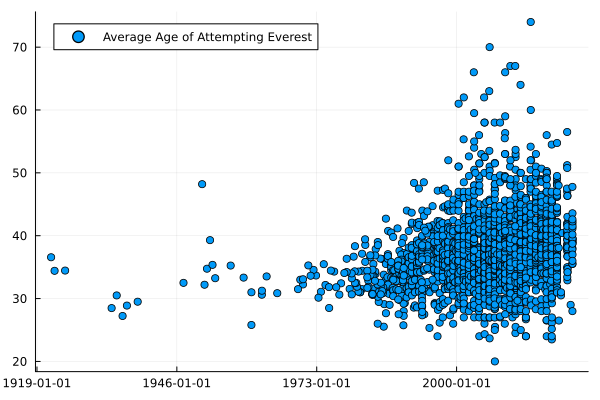
By eye, it looks like the average age has been steadily increasing. Generally, your expedition’s average age needs to be at least 30. Given it costs a small fortune to climb Everest this is probably more of a ‘need money’ rather than a look at the overall fitness of a 30-year-old.
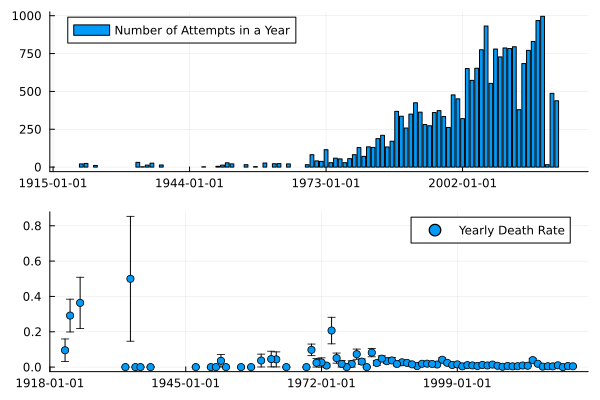
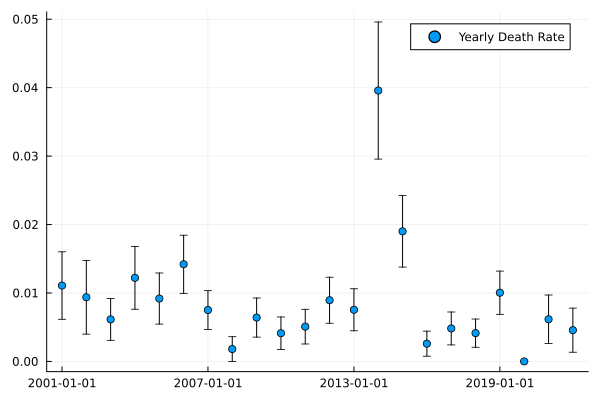
When we look at the number of attempts yearly and the annual death rate:
plot(bar(everestYearly.Year, everestYearly.N, label = "Number of Attempts in a Year"),
    scatter(everestYearly.Year, everestYearly.DeathRate, yerr=everestYearly.DeathRateErr,
            label = "Yearly Death Rate"),
     layout = (2,1))
scatter(everestYearly[everestYearly.Year .> Date("2000-01-01"), :].Year,
        everestYearly[everestYearly.Year .> Date("2000-01-01"), :].DeathRate,
        yerr=everestYearly[everestYearly.Year .> Date("2000-01-01"), :].DeathRateErr,
        label = "Yearly Death Rate")
But how ‘easy’ has it been to conquer Everest over the years? Looking at the success rate at best 10% of attempted expeditions are completed, which highlights how tough it is. Given some of the photos of people queueing to reach the summit, you’d think it would be much easier, but out of the 400 expeditions, less than 100 will make it.
scatter(everestYearly.Year, everestYearly.SuccessRate, yerr=everestYearly.SuccessRateErr,
        label = "Mt. Everest Success Rate")
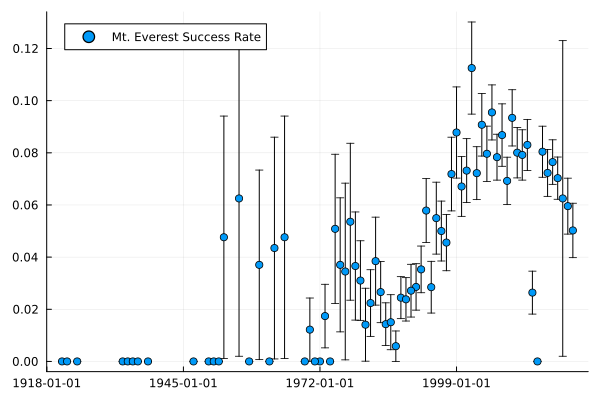
A couple of interesting points from this graph:
- 2014 was an outlier due to an avalanche that lead to Mount Everest being closed from April until the rest of the year.
- No one successfully climbed Mt Everest in 2015 because of the earthquake.
- Only 1 success in 2020 before the pandemic closed everything.
So a decent amount of variation in what can happen in a given year on Mt Everest.
Predicting Success
The data has some interesting quirks and we now turn to our next step, trying to build a model. Endurance was about what it takes to complete impressive human feats. So let’s do that here, can we use the database to predict and explain what leads to success?
We will be using the MLJ.jl package again to fit some machine learning models easily.
To start with we are going to pull out the relevant factors that we think will help climb a mountain. Not specifically Everest, but any of the Himalayan peaks from the database.
modelData = members[:, ["MSUCCESS", "PEAKID","MYEAR",
                        "MSEASON", "SEX", "CALCAGE", "CITIZEN", "STATUS",
                         "MROUTE1", "MO2USED"]]
modelData = @subset(modelData, :PEAKID .== "EVER")
modelData.MROUTE1 = modelData.PEAKID .* "_" .* string.(modelData.MROUTE1)
modelData = dropmissing(modelData)
modelData.MYEAR = parse.(Int, modelData.MYEAR)
modelData = @subset(modelData, :CALCAGE .> 0)

print(size(modelData))
| 1 |
false |
EVER |
1963 |
1 |
M |
36 |
USA |
Climber |
EVER_2 |
true |
| 2 |
true |
EVER |
1963 |
1 |
M |
31 |
USA |
Climber |
EVER_1 |
true |
| 3 |
false |
EVER |
1963 |
1 |
M |
27 |
USA |
Climber |
EVER_1 |
false |
| 4 |
false |
EVER |
1963 |
1 |
M |
26 |
USA |
Climber |
EVER_2 |
true |
Just over 22k rows and 10 columns, so plenty of data to sink our teeth into. MLJ needs us to define the Multiclass type of the factor variables and we also want to split out the predictor and predictors then split out into the test/train sets.
modelData2 = coerce(modelData,
                    :MSUCCESS => OrderedFactor,
                    :MSEASON => Multiclass,
                    :SEX => Multiclass,
                    :CITIZEN => Multiclass,
                    :STATUS => Multiclass,
                    :MROUTE1 => Multiclass,
                    :MO2USED => OrderedFactor);
y, X = unpack(modelData2, ==(:MSUCCESS), colname -> true; rng=123);

train, test = partition(eachindex(y), 0.7, shuffle=true);
All these multi-class features need to be one-hot encoded, so we use the continuous encoder. The workflow is:
- Create the encoder/standardizer.
- Train on the data
- Transform the data
This gives confidence that you aren’t leaking the training data into the test data.
encoder = ContinuousEncoder()
encMach = machine(encoder, X) |> fit!
X_encoded = MLJ.transform(encMach, X);

X_encoded.MO2USED = X_encoded.MO2USED .- 1;
standardizer = @load Standardizer pkg=MLJModels
stanMach = fit!(machine(
                 standardizer(features = [:CALCAGE]),X_encoded);
                rows=train)
X_trans = MLJ.transform(stanMach, X_encoded);
X_trans.MYEAR = X_trans.MYEAR .- minimum(X_trans.MYEAR);
plot(
    histogram(X_trans.CALCAGE, label = "Age"),
    histogram(X_trans.MYEAR, label = "Year"),
    histogram(X_trans.MO2USED, label = "02 Used")
    )
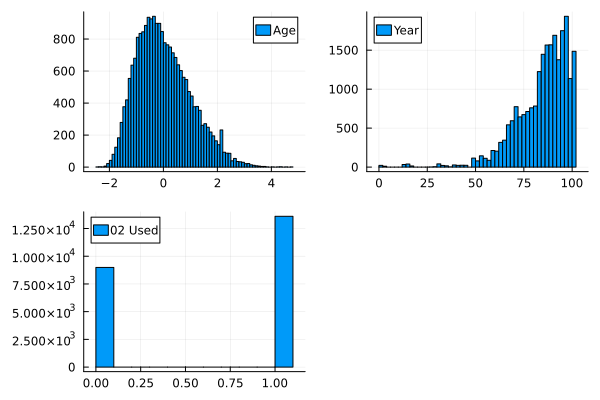
Looking at the distribution of the transformed data gives a good indication of how varied these variables change post-transformation.
Model Fitting using MLJ.jl
I’ll now explore some different models using the MLJ.jl workflow similar to my previous post on Machine Learning Property Loans for Fun and Profit. MLJ.jl gives you a common interface to fit a variety of different models and evaluate their performance all from one package, so handy here when we want to look at a simple linear model and also an XGBoost model.
Let’s start with our null model to get the baseline.
constantModel = @load ConstantClassifier pkg=MLJModels

constMachine = machine(constantModel(), X_trans, y)

evaluate!(constMachine,
        rows=train,
         resampling=CV(shuffle=true),
         operation = predict_mode,
         measures=[accuracy, balanced_accuracy, kappa],
         verbosity=0)
| Model |
Accuracy |
Kappa |
| Null |
0.512 |
0.0 |
For classification tasks, the null model is essentially tossing a coin, so the accuracy will be around 50% and the \(\kappa\) is zero.
Next we move on to the simple linear model using all the features.
logisticClassifier = @load LogisticClassifier pkg=MLJLinearModels verbosity=0

lmMachine = machine(logisticClassifier(lambda=0), X_trans, y)

fit!(lmMachine, rows=train, verbosity=0)

evaluate!(lmMachine,
          rows=train,
          resampling=CV(shuffle=true),
          operation = predict_mode,
          measures=[accuracy, balanced_accuracy, kappa], verbosity = 0)
| Model |
Accuracy |
Kappa |
| Null |
0.512 |
0.0 |
| Linear Regression |
0.884 |
0.769 |
This gives a good improvement over the null model, so indicates our included features have some sort of information useful in predicting success.
Inspecting the parameters indicates how strong each variable is. Route 0 leads to a large reduction in the probability of success whereas using oxygen increases the probability of success. Climbing in the Autumn or Winter also looks like it reduces your chance of success.
params = mapreduce(x-> DataFrame(Param=collect(x)[1], Value = collect(x)[2]),
                   vcat, fitted_params(lmMachine).coefs)
params = sort(params, :Value)

vcat(first(params, 5), last(params, 5))
| 1 |
MROUTE1__EVER_0 |
-4.87433 |
| 2 |
SEX__F |
-1.97957 |
| 3 |
SEX__M |
-1.94353 |
| 4 |
MSEASON__3 |
-1.39251 |
| 5 |
MSEASON__4 |
-1.1516 |
| 6 |
MROUTE1__EVER_2 |
0.334305 |
| 7 |
CITIZEN__USSR |
0.43336 |
| 8 |
CITIZEN__Russia |
0.518197 |
| 9 |
MROUTE1__EVER_1 |
0.697601 |
| 10 |
MO2USED |
3.85578 |
XGBoost Time
What’s a model if we’ve not tried xgboost to squeeze the most performance out of all the data? Easy to fit using MLJ and without having to do any special lifting.
xgboostModel = @load XGBoostClassifier pkg=XGBoost verbosity = 0

xgboostmodel = xgboostModel()

xgbMachine = machine(xgboostmodel, X_trans, y)

evaluate!(xgbMachine,
        rows=train,
         resampling=CV(nfolds = 6, shuffle=true),
         measures=[accuracy,balanced_accuracy, kappa],
         verbosity=0)
| Model |
Accuracy |
Kappa |
| Null |
0.512 |
0.0 |
| Linear Regression |
0.884 |
0.769 |
| XGBoost |
0.889 |
0.778 |
We get 88.9% accuracy compared to the linear regression 88.4% and a \(\kappa\) increase too, so looking like a good model.
How Do I Succeed in the Climbing Mount Everest?
The whole point of these models is to try and work out what combination of these parameters gets us the highest probability of success on a mountain. We want some idea of feature importance that can direct us to the optimal approach to a mountain. Should I be an Austrian Doctor or is there an easier route that should be taken?
With xgboost we can use the feature_importances function to do exactly what it says on the tin and look at what features are most important in the model.
fi = feature_importances(xgbMachine)
fi = mapreduce(x-> DataFrame(Param=collect(x)[1], Value = collect(x)[2]),
                   vcat, fi)
first(fi, 5)
| 1 |
MO2USED |
388.585 |
| 2 |
MROUTE1__EVER_0 |
46.3129 |
| 3 |
STATUS__H-A Worker |
15.0079 |
| 4 |
CITIZEN__Nepal |
11.6299 |
| 5 |
CITIZEN__UK |
4.25651 |
So using oxygen, taking the 0th route up, being an H-A Worker, and either being from Nepal or a UK citizen appears to have the greatest impact on being successful. Using oxygen is an obvious benefit/cannot be avoided and I don’t think anyone believes that their chance of success would be higher without oxygen. Being Nepalese is the one I would struggle with.
How does the model perform on the hold-out set? We’ve got 30% of the data that hasn’t been used in the fitting that can also validate how well the model performs.
modelNames = ["Null", "LM", "XGBoost"]
modelMachines = [constMachine,
               lmMachine,
               xgbMachine]


aucRes = DataFrame(Model = modelNames,
    AUC = map(x->auc(MLJ.predict(x,rows=test), y[test]),
                modelMachines))
kappaRes = DataFrame(Kappa = map(x->kappa(MLJ.predict_mode(x,rows=test), y[test]), modelMachines),
                     Accuracy = map(x->accuracy(MLJ.predict_mode(x,rows=test), y[test]), modelMachines),
          Model = modelNames)
evalRes = leftjoin(aucRes, kappaRes, on =:Model)
| 1 |
Null |
0.5 |
0.0 |
0.512768 |
| 2 |
LM |
0.937092 |
0.768528 |
0.883838 |
| 3 |
XGBoost |
0.939845 |
0.775408 |
0.88738 |
On the test set, the XGBoost model is only slightly better than the linear model in terms of \(\kappa\) and accuracy. It’s worse when measuring the AUC, so this is setting alarm bells ringing that the model isn’t quite there yet.
How Does Oxygen Change the Probability of Success?
X_trans2 = copy(X_trans[1:2, :])
X_trans2.MO2USED  = 1 .- X_trans2.MO2USED


predict(xgbMachine, vcat(X_trans[1:2, :], X_trans2))
4-element CategoricalDistributions.UnivariateFiniteVector{OrderedFactor{2}, Bool, UInt32, Float32}:
 UnivariateFinite{OrderedFactor{2}}(false=>0.245, true=>0.755)
 UnivariateFinite{OrderedFactor{2}}(false=>1.0, true=>0.000227)
 UnivariateFinite{OrderedFactor{2}}(false=>0.901, true=>0.0989)
 UnivariateFinite{OrderedFactor{2}}(false=>1.0, true=>0.000401)
By taking the first two entries and switching whether they used oxygen or not we can see how the outputted probability of success changes. In each case, it provides a dramatic shift in the probabilities. Again, from the feature importance output, we know this is the most important variable but it does seem to be a bit dominating in terms of what happens with and without oxygen.
Probability Calibration
Finally, let’s look at the calibration of the models.
using CategoricalArrays

modelData.Prediction = pdf.(predict(xgbMachine, X_trans), 1)

lData = @transform(modelData, :prob = cut(:Prediction, (0:0.1:1.1)))
gData = groupby(lData, :prob)
calibData = @combine(gData, :N = length(:MSUCCESS),
                            :SuccessRate = mean(:MSUCCESS),
                            :PredictedProb = mean(:Prediction))

calibData = @transform(calibData, :Err = 1.96 .* sqrt.((:PredictedProb .* (1 .- :PredictedProb)) ./ :N))


p = plot(calibData[:, :PredictedProb],
         calibData[:, :SuccessRate],
         yerr = calibData[:, :Err],
    seriestype=:scatter, label = "XGBoost Calibration")

p = plot!(p, 0:0.1:1, 0:0.1:1, label = :none)
h = histogram(modelData.Prediction, normalize=:pdf, label = "Prediction Distribution")

plot(p, h, layout = (2,1))
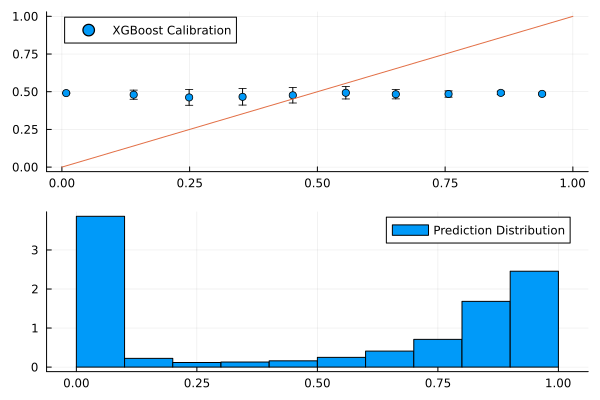
To say the model is poorly calibrated is an understatement. There is no association of an increased success rate with the increase in model probability and from the distribution of predictions we can see it’s quite binary, there isn’t an even distribution to the output.
So whilst the evaluation metrics look better than a null model, the reality is that the model isn’t doing anything. With all the different factors in the model matrix, there is likely some degeneracy in the data, such that a single occurrence of a variable ends up predicting success or not. There is potentially an issue with using the member’s table instead of the expedition table, as whether the expedition was successful or not will lead to multiple members being successful.
Conclusion
Overall it’s an interesting data set even if it does take a little work to get it loaded into Julia. There is a wealth of different features in the data that lead to some nice graphs, but using these features to predict whether you will be successful or not in climbing Mount Everest doesn’t lead to a useful model.
Similar Posts