Author Archives: Julia Computing, Inc.

Conducting analysis on LendingClub data using JuliaDB

If there is anything years of research on how to streamline data analytics has shown us, it is that working with big data is not cake walk. No matter how one looks at it, it is time consuming and computationally intensive to create, maintain, and build models based upon large datasets.

Introducing JuliaDB

In Julia v0.6, we aim to take another step towards solving this problem with our new package, JuliaDB.

JuliaDB is a high performance, distributed, column-oriented data store providing functionality for both in-memory and out-of-core calculations. Being fully implemented in Julia, JuliaDB allows for ease of integration with data loading, analytics, and visualization packages throughout the Julia language ecosystem. Such seamless integration allows for rapid development of data and compute intensive applications.

This example shall use datasets provided by LendingClub, the world’s largest online marketplace for connecting borrowers and investors. On their website, they provide publicly available, detailed datasets that contain anonymous data regarding all loans that have been issued through their system, including the current loan status and latest payment information.

The analysis conducted below is similar to that performed on the same datasets in this post by the Microsoft R Server Tiger Team for the Azure Data Science VM.

The first step in conducting this analysis is to download the following files from the website: LoanStats2016_Q1.csv, LoanStats2016_Q2.csv, LoanStats2016_Q3.csv, LoanStats2016_Q4.csv, LoanStats2017_Q1.csv, LoanStats3b.csv, LoanStats3c.csv and LoanStats3d.csv. A basic clean-up of the data files is performed by deleting the first and last line of descriptive text from each csv.

Writing the Julia code

Once the file clean-up is done, add the following packages: JuliaDB, TextParse, IndexedTables, NullableArrays, DecisionTree, CoupledFields, Gadfly, Cairo, Fontconfig, Dagger, and Compose, followed by loading the required ones.

# Packages that need to be installed with Julia 0.6
 Pkg.add("JuliaDB")
 Pkg.add("TextParse")
 Pkg.add("IndexedTables")
 Pkg.add("NullableArrays")
 Pkg.add("DecisionTree")
 Pkg.add("CoupledFields")
 Pkg.add("Gadfly")
 Pkg.add("Cairo") # Needed for PNG creation with Gadfly
 Pkg.add("Fontconfig") # Needed for PNG creation with Gadfly
 Pkg.clone("https://github.com/AndyGreenwell/ROC.jl.git")
 Pkg.add("Dagger")
 Pkg.add("Compose")
 Pkg.add("BenchmarkTools")
 using Dagger, Compose
 using ROC, Gadfly
 using DecisionTree, JuliaDB, TextParse, NullableArrays
 import TextParse: Numeric, NAToken, CustomParser, tryparsenext, eatwhitespaces, Quoted, Percentage

Now define a variable that contains a path to the directory containing the data files, and a dictionary that contains the names of all of the columns that are contained in the dataset as keys.

dir = "/home/venkat/LendingClubDemo/files"
const floatparser = Numeric(Float64)
const intparser = Numeric(Int)

t  = Dict("id"                 => Quoted(Int),
            "member_id"                      => Quoted(Int),
            "loan_amnt"                      => Quoted(Nullable{Float64}),
            "funded_amnt"                    => Quoted(Nullable{Float64}),
            "funded_amnt_inv"                => Quoted(Nullable{Float64}),
            "term"                           => Quoted(TextParse.StrRange),
            "int_rate"                       => Quoted(NAToken(Percentage())),
            "delinq_2yrs"                    => Quoted(Nullable{Int}),
            "earliest_cr_line"               => Quoted(TextParse.StrRange),
            "inq_last_6mths"                 => Quoted(Nullable{Int}),
...and so on
           )

Calling the function “loadfiles” from the JuliaDB package parses the data files, and constructs the corresponding table (providing the above dictionary as input helps it construct the table, although it doesn’t necessarily need this input). Since none of the dictionary columns are index columns, JuliaDB will itself create its own implicit index column with each row having a unique integer value, starting with 1.

LS = loadfiles(glob("*.csv", dir), indexcols=[], colparsers=t, escapechar='"')

Once done, we classify some loans as bad loans and others as good loans based upon whether the payment on the loan is late, in default, or has been charged off. We then split the table based upon whether the loans are good or bad.

bad_status = ("Late (16-30 days)","Late (31-120 days)","Default","Charged Off")
# Determine which loans are bad loans
  is_bad = map(status->(status in bad_status),
               getdatacol(LS, :loan_status)) |> collect |> Vector{Bool}
# Split the table into two based on the loan classification
  LStrue = filter(x->x.loan_status in bad_status, LS)
  LSfalse = filter(x->!(x.loan_status in bad_status), LS)

Constructing a relevant model necessitates that we identify which factors are the best in identifying good and bad loans. Over here, the feature selection method that we use is a graphical comparison based upon how each numerical column’s row values are associated with either a good or bad categorization of individual loans. We construct two density plots of the values contained in each numerical column, one for good loans and the other for bad. This process necessitates that we first figure out which columns are numerical. We do that by using the following set of “isnumeric” functions.

# Define a function for determining if a value is numeric, whether or not the
# value is a Nullable.
  isnumeric(::Number) = true
  isnumeric{T<:Number}(::Nullable{T}) = true
  isnumeric(::Any) = false
  isnumeric{T<:Number}(x::Quoted{T}) = true
  isnumeric{T<:Nullable}(x::Quoted{T}) = eltype(T) <: Number

We then map our isnumeric function over each column of the JuliaDB table, construct Gadfly layers for each density plot for the good and bad loans, and then display that collection for feature selection.

# Produce density plots of the numeric columns based on the loan classification
  varnames = map(Symbol, collect(keys(filter((k,v)->(k != "id" && k!="member_id" && isnumeric(v)), t))))
  layers = Vector{Gadfly.Layer}[]

  for s in varnames
      nt = dropnull(collect(getdatacol(LStrue,s)))
      nf = dropnull(collect(getdatacol(LSfalse,s)))
      push!(layers, layer(x = nt, Geom.density, Theme(default_color=colorant"blue")))
      push!(layers, layer(x = nf, Geom.density, Theme(default_color=colorant"red")))
  end

  # Layout the individual plots on a 2D grid
  N = length(varnames)
  M = round(Int,ceil(sqrt(N)))
  cs = Array{Compose.Context}(M,M)
  for i = 1:N
      cs[i] = render(Gadfly.plot(layers[2i-1],layers[2i],
                     Guide.title(string(varnames[i])),
                     Guide.xlabel("value"),Guide.ylabel("density")))
  end
  for i = N+1:M^2
      cs[i] = render(Gadfly.plot(x=[0],y=[0]))
  end
  draw(PNG("featureplot.png",24inch, 24inch), gridstack(cs))

The Gadfly plots would typically look like this:

In order to make sure that our analysis is as close as possible as that conducted by Microsoft, we’ll select the same set of predictor variables that they did:

revol_util, int_rate, mths_since_last_record, annual_inc_joint, dti_joint
total_rec_prncp, all_util

Creating the predictive model

Our predictive model will be created by using the random forest model of the DecisionTree.jl package. There are two steps here — one where we use a large amount of data to construct the model, and two, a smaller set of data to test the model. So we randomly split the data into two parts, one containing 75% of the data points, to be used for training the model, and the other containing the other 25%, to be used to test the model.

# Split the data into 75% training / 25% test
  n = length(LS)
  srand(1)
  p = randperm(n)
  m = round(Int,n*3/4)
  a = sort(p[1:m])
  b = sort(p[m+1:end])
  LStrain = LS[a]
  LStest  = LS[b]
  labels_train = is_bad[a]

The random forest model needs us to create two vectors — one being a vector of labels, and the other being the corresponding feature matrix. For the label vector, we reuse the index vector used above (when extracting the training subset of the original data to extract the corresponding subset of the is_bad label vector). For the construction of the feature matrix, we extract the columns for our selected features from the distributed JuliaDB table, gather those columns to the master process, and finally concatenate the resulting vectors into our feature matrix.

features_train = [revol_util_train int_rate_train mths_since_last_record_train annual_inc_joint_train total_rec_prncp_train all_util_train]

Having done this, we can now call the “build_forest” function from the DecisionTree.jl package.

model = build_forest(labels_train, features_train, 3, 10, 0.8, 6)

Should we want to save our model to reuse at a later time, we can store it to our disk.

f = open("  loanmodel.jls", "w")
serialize(f, model)
close(f)

We can now test our model on the rest of the data. To do this, we will generate predictions in parallel across all workers by mapping the “apply_forest” function onto every row of the JuliaDB dataset.

predictions = collect(map(row->DecisionTree.apply_forest(model, [row.revol_util.value; row.int_rate.value;row.mths_since_last_record.value;row.annual_inc_joint.value;row.dti_joint.value;row.total_rec_prncp.value;row.all_util.value]), LStest)).data

With our set of predictions, we construct a ROC curve using the ROC.jl package and calculate the area under the curve to find a single measure of how predictive our trained model is on the dataset.

# Receiver Operating Characteristics curve
curve = roc(convert(Vector{Float64},predictions), convert(BitArray{1},is_bad[b]))

# An ROC plot in Gadfly with data calculuated using ROC.jl
Gadfly.plot(layer(x = curve.FPR,y = curve.TPR, Geom.line),
       layer(x = linspace(0.0,1.0,101), y = linspace(0.0,1.0,101),
       Geom.point, Theme(default_color=colorant"red")), Guide.title("ROC"),
       Guide.xlabel("False Positive Rate"),Guide.ylabel("True Positive Rate"))

The ROC would look like this.

Area under the curve would be:

# Area Under Curve
AUC(curve)
0.5878135617540067

There. That is how you would create a model that can predictively determine the quality of a loan using JuliaDB.

FemtoCleaner – A bot to automatically upgrade your Julia syntax

TL;DR: FemtoCleaner is a GitHub bot that upgrades old Julia syntax to new syntax. It has been installed
in more than 700 repositories, submitted 100+ pull requests and touched 10000 lines of code since
last Friday. Scroll down for instructions, screen shots and pretty plots.

Background

As julia is approaching its 1.0 release, we have been revisiting
several key areas of the language. We want to ensure that the 1.0
release is of sufficient quality that it can serve as a stable
foundation of the Julia ecosystem for many years to come without
requiring breaking changes. In effect, however, prioritizing such
breaking changes over ones that can be safely done in a non-breaking
fashion after 1.0 means that we are currently making many more
breaking changes than we otherwise might. Two particularly disruptive
such changes were the syntax changes to type keywords and parametric
function syntax, both of which were introduced in 0.6. The old syntax
is now deprecated on master will be removed in 1.0. The former change
involves changing the type definition keywords from type/immutable to
mutable struct/struct, e.g.

immutable RGB{T}
    r::T
    g::T
    b::T
end

becomes

struct RGB{T}
    r::T
    g::T
    b::T
end

The parametric function syntax change is a bit more tricky.
In the simplest case, it involves rewriting functions like:

eltype{T}(::Array{T}) = T

to

eltype(::Array{T}) where {T} = T

which is relatively straightforward. However, there are more complicated corner cases
involving inner constructors such as:

immutable Wrapper{T}
    data::Vector{T}
    Wrapper{S}(data::Vector{S}) = new(convert(Vector{T}, data))
end

which now has to read

struct Wrapper{T}
    data::Vector{T}
    Wrapper{T}(data::Vector{S}) where {T,S} = new(convert(Vector{T}, data))
end

This last example also shows why this syntax was changed. In prior versions of julia,
the braces syntax (F{T} for some F,T) was inconsistent between meaning parameter application
and introducing parameters for a method. Julia 0.6 features a significantly more powerful (and correct) type
system. At the same time, the F{T} syntax was changed to always mean parameter application
(modulo support for parsing the deprecated syntax for backwards compatibility of course),
reducing confusion and making it possible to more easily express some of the new method signatures
now made possible by the new type system improvements. For further information see also
Stefan’s Discourse post
and the 0.6 release notes.

Realizing the magnitude of the required change and the growing amount of Julia code that exists in the wild,
several julia contributors suggested on Discourse that we attempt to automate these syntax upgrades.
Unfortunately, is not simply a of search/replace in a source file. The rewrite can be quite complex
and depends on the scope in which it is used. Nevertheless, we set out to build such an automated system, with the following goals in mind:

  • Correctness – Being able to upgrade syntax is not very useful if we have to go in and clean up after the automated process’ mistakes,
    it probably would have been faster to just do it ourselves in the first place.
  • Style preservation – Many programmers carefully write their code in their own preferred style and we should try hard to preserve
    such choices whenever possible (otherwise people might not want to use the tool)
  • Convenience – Ideally no setup would be required to use the tool

CSTParser

The first goal, correctness, forces us to use a proper parser for our undertaking, rather than
relying on simple find/replace or regular expressions. Unfortunately, while julia’s parser is
accessible from within the language and can be used to find these instances of deprecated syntax,
it cannot be used for our purposes. This is because it does not support our second goal – style preservation.
In going from the input text to the Abstract Syntax Tree, the parser discards a significant amount
of semantically-irrelevant information (formatting, comments, distinctions between different syntax
forms that are otherwise semantically equivalent). Instead, we need a parser that retains and exposes
all of this information. There are several names of this concept, “round-tripable representation”,
“Concrete Syntax Tree (CST)” or “Lossless Syntax Tree” being perhaps the most common. Luckily,
in the Julia ecosystem we have not one, but two choices for such a parser:

  • JuliaParser.jl – a slightly older translation of the scheme parser from the main julia codebase into Julia,
    later retrofitted with precise location information.
  • CSTParser.jl – a ground up rewrite of the parser with the explicit goal of writing a high performance, correct,
    lossless parser, originally for use in the VS Code IDE extension

Ultimately the decision came down to the fact that CSTParser.jl was actively maintained, while JuliaParser.jl had
not yet been updated to the new Julia syntax. With a number of small enhancements and additional features I
contributed in order to make it useful for this project, CSTParser is now able to parse essentially all publicly
available Julia code correctly, while retaining the needed formatting information.

The design of CSTParser.jl is somewhat similar to that of the Roslyn parser (a good overview can be found here). Each leaf node in the AST stores
only its total size (but not its absolute position in the file), as well as what part of its contents are semantically significant
as opposed to leading or trailing trivia (comments, whitespace, semicolons etc). This is useful for the IDE use case,
since it allows efficient reparsing when small changes are made to a file (since a local change does not invalidate any
data in a far away node). The resulting tree can be a little awkward to work with, but as we shall see it is easy to work
around this for our use case.

Deprecations.jl

The new Deprecations.jl package is the heart of this project. It contains all the
logic to rewrite Julia code making use of deprecated syntax constructs. It supports two modes of specifying such rewrites:

  • Using CST matcher templates
  • By working with the raw CST api
    Independent of the mode, a new rewrite is introduced as such:

      struct OldStructSyntax; end
      register(OldStructSyntax, Deprecation(
          "The type-definition keywords (type, immutable, abstract) where changed in Julia 0.6",
          "julia",
          v"0.6.0",
          v"0.7.0-DEV.198",
          typemax(VersionNumber)
      ))
    

    which gives a description, as well as some version bounds. This is important because we need to make sure
    to only apply rewrites that are compatible with the package’s declared minimum supported julia version
    (i.e. we need to make sure not to introduce julia 0.6 syntax to a package that still supports julia 0.5).
    Each Julia package provides a REQUIRE file specifying it’s supported minimum versions.

Having declared the new rewrite, let’s actually make it work by adding some CST matcher templates to it:

    match(OldStructSyntax,
        "immutable \$name\n\$BODY...\nend",
        "struct\$name\n\$BODY!...\nend",
        format_paramlist
    )
    match(OldStructSyntax,
        "type \$name\n\$BODY...\nend",
        "mutable struct\$name\n\$BODY!...\nend",
        format_paramlist
    )

The way this works is fairly straightforward. For each match call, the first line is the template to
match and the second is its replacement. Under the hood, this works by parsing both expressions, pattern
matching the resulting template tree against the tree we want to update and then splicing in the replacement
tree (with the appropriate parameters taken from the tree we’re matching against). The whole thing is implemented
in about 200 lines of code.

In this description I’ve skipped a bit of magic. Simply splicing together a new tree of CST nodes, doesn’t quite
work. As mentioned above the CST nodes only know their kind and size and very little else. In particular,
they know neither their position in the original buffer, nor what text is at that position. Instead, the replacement
tree is made out of different kind of node that retains both pieces of information (which the original buffer is
and where in the buffer that node is located). Conceptually this is again similar to Roslyn’s red-green trees. However, there
is very little code
associated with this abstraction. Most of the functionality is provided by the AbstractTrees.jl package by lifting the tree structure of the underlying CST nodes.

Lastly, there’s a couple of other node types to be found in this “replacement tree” to insert or replace
whitespace or other trivia. This is useful for formatting purposes. E.g. the example above, we passed format_paramlist
as a formatter. This function runs after the matching and adjusts formatting. To see this consider:

immutable RGB{RT,
              GT,
              BT}
    r::RT
    g::GT
    b::BT
end

Naively, this would end up as

struct RGB{RT,
              GT,
              BT}
    r::RT
    g::GT
    b::BT
end

leaving us with unhappy users. Instead, the formatter turns this into

struct RGB{RT,
           GT,
           BT}
    r::RT
    g::GT
    b::BT
end

by adjusting the leading trivia of the GT and BT nodes (or rather the trailing trivia of their predecessors).

Lastly, while the CST templates shown above are powerful, they are still limited to simple pattern matching.
Sometimes we need to perform more complicated kinds of transformation to decide which rewrites to perform.
One example is code like:

if VERSION > v"0.5"
    do_this()
else
    do_that()
end

which, depending on the current julia version, executes either one branch or the other. Of course, if
the package declares that it requires julia 0.6 at a minimum, the condition is true for any supported
julia version, so we can “constant fold” the expression and remove the else branch. Doing so with simple
templates is infeasible, since we need to recognize all patterns of the form “comparison of VERSION against
some version number” and then compute whether the condition is actually always true (or false) given the declared
version bounds. Such transformations are possible using the raw API. Writing such transformations is more complicated
(and beyond the scope of this post), but can be very powerful.

FemtoCleaner

Having addressed the first two goals, let’s get to the third goal – convenience. The vast majority of public Julia code
is hosted on GitHub, so the natural way to do this is create a GitHub bot that clones a repository, applies the rewrites
and submits a pull request to the relevant repository. The simplest way to do would be to clone all the repositories,
apply the rewrites, and then programmatically submit pull requests to all of them (the PkgDev.jl packages has a function
to automatically submit a pull request against a Julia package). However, this approach falls short for several reasons:

  • It’s very manual. When new features are added, we have to manually perform a new such run. This is also problematic,
    because in practice it means that these runs have to always be done by the person who knows how the setup works. He’s
    a very busy guy.
  • It would only catch registered Julia packages. There are a significant number of repositories that use Julia code,
    but are not registered Julia packages. Of course one could go the other way and submit pull requests to repositories
    that look like Julia code, but that risks creating a significant number of useless pull request (because of forks,
    long dead codebases, etc)
  • It wouldn’t work on private packages
  • It doesn’t allow the user to control and interact with the process

A better alternative that addresses all these problems is to create a GitHub bot (also called a GitHub app) to perform these functions. The
Julia community is quite familiar with these already. We have the venerable nanosoldier, which performs on-demand performance benchmarking of julia commits, attobot which assists Julia users in registering their packages with METADTA and (perhaps less well known) jlbuild which controls the julia buildbots (which build releases and perform some additional continous integration on secondary platforms).

Joining these now is femtocleaner (phew that took a while to get to – I hope the background above was useful though), which performs exactly this function. Let’s see how it works. First go to https://github.com/apps/femtocleaner and click “Configure”. You’ll be presented with a
choice of accounts to install femtocleaner into:

Choosing an account will give you the option to install femtocleaner on either one or all of
the repositories in that account:

In this case, I will install femtocleaner in all repositories of the JuliaParallel organization.
Without any further ado, femtocleaner will go to work, cloning each repository, applying
the rewrites it knows about and then submitting a pull request to each repository where it was
able to make a change:

From now on, FemtoCleaner will listen to events on these repositories and submit another pull
request whenever these packages decide to drop support for an older julia version, thus allowing
the bot remove more deprecated syntax. The bot can also be triggered manually by opening an
issue with the title “Run femtocleaner”.

The bot has a few additional features meant to make interacting with it easier. The most used one
is the bad bot command, which is used to inform the developers that the bot has made a mistake.
It can be triggered by simply creating a “Changes Requested” GitHub PR review, and annotating an incorrect
change with the review comment bad bot, like so:

In response the bot will open an issue on its source code repository giving the relevant context
and linking back to the PR:

Enabling this functionality right from the the pull request review window has proven very powerful.
Rather than requiring the user to leave their current context (reviewing a pull request) and navigate
to a different repository to file an issue, everything can be done right there in the pull request
review. Lastly, once the rewrite bug has been addressed, the bot will come back, update the pull
request and leave a comment to inform the user it did so:

This workflow is also very convenient from the other side. All the issues are in one place (rather
than having to monitor activity on all pull requests filed by the bug) and addressing the bug is
as simple as fixing the code and pushing it to the source code repository. The bot will automatically,
update itself and go back and fix up any pull requests that would now differ as a result of the new code:

Results

The whole project from the first line of code written in support of it until this blog post (which
represents its completion) took about three weeks. As part of it, I made a number of changes
to CSTParser and its dependencies (which should prove very useful for future parsing endeavors) as
well as GitHub.jl (which will hopefully help write more of these kinds of bots to support the Julia
community). After some initial testing and an alpha run on JuliaStats on Aug 8 (huge thanks to Alex Arslan for aggreeing to diligently review and try out the process), we announced the public availability of
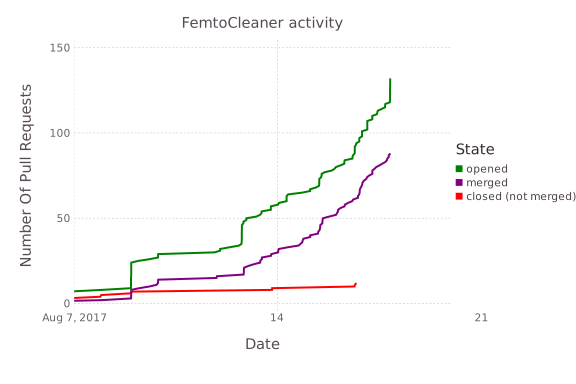
femtocleaner on discourse last friday (Aug 11). Since then, the bot has been installed on 759 repositories (though about 200 of them were ineligible for femtocleaner processing, either because they had missing or malformed REQUIRE files or because they were not actually Julia packages), submitting 132 pull requests that add 8850 lines and
delete 9331. Most of these pull requests have been merged:

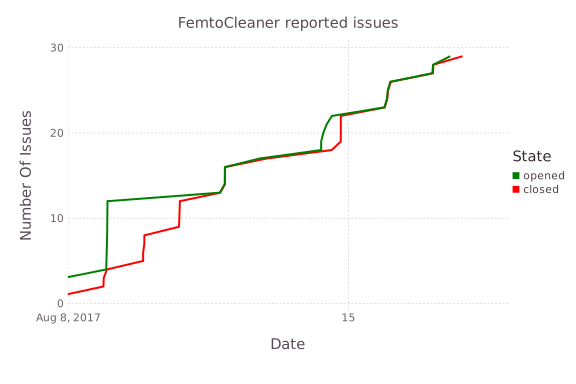
As people started using femtocleaner, a number of issues were discovered, but developers took advantage
of the bad bot mechanism described above to report them and we did our best to address them quickly.
The following graph shows the number of open/closed such issues over the time period that femtocleaner has
been active:

Alex Arslan’s original testing on Aug 8 is well visible (and took a few days to catch up to), but all known
issues have been addressed. Another interesting data point is the distribution of supported julia versions
that femtocleaner was installed on. As discussed above, it was primarily written to aid in moving to the new
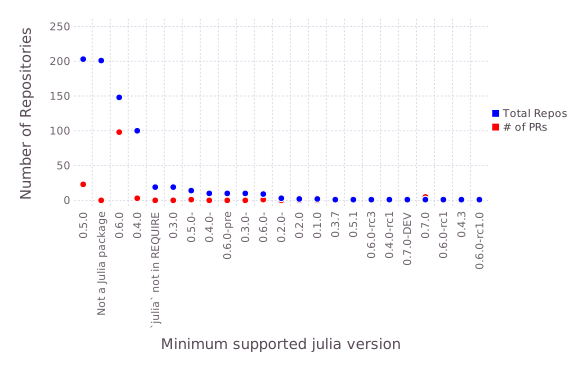
syntax available in julia 0.6, though a few rewrites (such as the generic VERSION comparisons) are also applicable to older versions. The following shows the number of repositories as well as the number of open
prs by minimum supported julia version (no pr opened means that the bot found no deprecated syntax):

As expected, packages supporting 0.6.0 got proportionally the most pull requests. However, this just means that
femtocleaner will be back for the remaining 0.5.0 packages once they decide to drop support for 0.5.0.
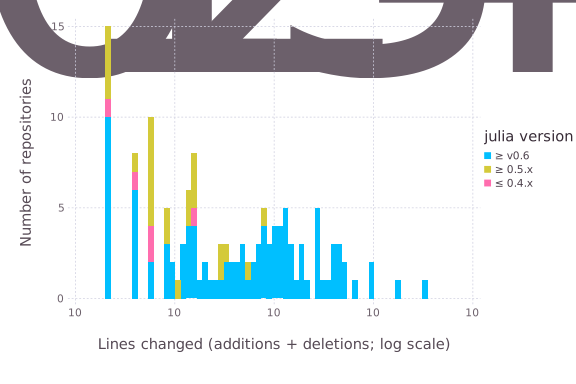
We can also look at the number of changed lines by the package’s supported minimum version:

Again the bias of the bot for upgrading 0.6 syntax stands out. It is perhaps interesting to note that
most of the 0.6 packages with a small to medium number of changes had already been upgraded manually to
the new syntax. Still, the bot was able to find a few changes that were missed in this process and clean
them up automatically.

Conclusions

Overall, this work should accelerate the movement of the package ecosystem
towards 1.0 by making upgrading code easier. Generally, the package ecosystem lags
behind the julia release by a few months as package maintainers upgrade their code bases.
We hope this system will help make sure that 1.0 is released with a full set of up-to-date
packages, as well as ease the burden on package maintainers, allowing them to spend their time
on improving their packages instead of being forced to spend a lot of time performing tedious
syntax upgrades. We are very happy with the outcome of this work. There are already almost ten thousand
fewer deprecation warnings across the Julia ecosystem and more will be removed automatically once
the package developers are ready for it. Additionally, the underlying technology should help
with a number of other developer-productivity tools and improvements, such as IDE support, better
error messages and the debugger. All code is open source and available on GitHub.
You are welcome to contribute, improve the code or build your own GitHub bots.

We would like to thank GitHub for providing a rich enough API to allow this convenient workflow.

Lastly, we thank and acknowledge the Sloan foundation for their continued supported of the Julia
ecosystem by providing the funding for this work.

Newsletter August 2017

We wanted to thank all Julia users and well wishers for the support and for being part of the Julia Community, and to give an update on some exciting developments for 2017:

  1. Julia Joins Petaflop Club: Celeste is the first application written in a dynamic high-level language to exceed 1 petaflop per second
  2. JuliaRun: new and vastly improved for deployment and scaling with Julia v0.6
  3. JuliaFin: updated with JuliaDB and Julia v0.6
  4. Julia v0.6 and JuliaPro v0.6.0.1
  5. JuliaCon 2017
  6. Julia Computing Funding and Grant Announcements
  7. Julia and Julia Computing in the News
  8. Julia Case Studies
  9. Contact Us


  1. Julia Joins Petaflop Club: Celeste joins the rarified list of applications to exceed 1 petaflop per second
    performance,
    and is the first to do so in a dynamic high-level language. The Celeste research team processed 55
    terabytes of visual data and classified 188 million astronomical objects in just 15 minutes, resulting in the
    first comprehensive catalog of all visible objects from the Sloan Digital Sky Survey. This is one of the largest
    problems in mathematical optimization ever solved. The Celeste team, which includes researchers from UC Berkeley,
    Lawrence Berkeley National Laboratory, National Energy Research Supercomputing Center, Intel, Julia Computing and
    the Julia Lab at MIT, used 9,300 Knights Landing (KNL) nodes on the NERSC Cori Phase II supercomputer to execute
    1.3 million threads on 650,000 KNL cores.

  2. JuliaRun allows you to run and deploy Julia applications
    in production at scale, including parallel and distributed computing on private or public clusters. JuliaRun works
    seamlessly with AWS and Microsoft Azure, and can be configured to run with any private cloud. You can start a
    JuliaRun instance today with just a few minutes of setup time. Write to us at [email protected] for an
    evaluation version.

  3. JuliaFin is a suite of Julia packages that simplify the
    workflow for quantitative finance including storage, retrieval, analysis and action. These include: Miletus, a
    domain specific language (DSL) for defining financial contracts; JuliaDB, a high performance in-memory
    database, with best performance time series analytics, in-memory and out-of-core analytics; integration with
    Bloomberg, Excel and other proprietary systems. Click here for
    details and to download for evaluation.

  4. Julia v0.6 and JuliaPro v0.6.0.1 were released last month with the following upgrades:

    Highlights of Julia v0.6:

    • New type system capabilities that make Julia even more expressive and accurate
    • Automatic broadcasting and loop fusion for all operators and functions
    • Significantly faster strings
    • Improved inter-task communications using channels
    • Significant improvements in the standard library
    • For more details, please see the release notes of Julia
      0.6

    Highlights of JuliaPro v0.6.0.1:

    • Supports Julia v0.6
    • Updated Atom to the latest version (1.18.0), updated all Atom packages
    • Updated all bundled Julia packages to Julia v0.6
    • Added the following packages
    • In the interest of getting this release out in as timely a fashion as possible, this release unfortunately does
      not include Gallium or MXNet. Updating
      both of these packages for Julia 0.6 is in progress and they will be included in the next release of JuliaPro.
  5. JuliaCon 2017 was the biggest and most successful JuliaCon yet. It featured more than 300 participants and
    presenters, including presentations on how Julia is being used for deep learning, quantitative finance, energy,
    astrophysics, agriculture, medicine and more. Presentation videos are available on YouTube.

  6. Julia Computing Funding and Grant Announcements: Julia Computing has announced completion of our first round of
    seed funding and a significant grant from the
    Sloan Foundation which includes dedicated funding
    to promote diversity in the Julia community.

  7. Julia and Julia Computing in the News: There has been a huge increase in Julia and Julia Computing
    news mentions so far this year, consistent with significant increases in Julia
    adoption.

  8. Julia Case Studies: Several exciting new Julia case studies are available on the Julia Computing Website
    including:

    • San Jose Semaphore – When Science Meets Art:
      High school math teacher Jimmy Waters from Powell, Tennessee used Julia to solve a Silicon Valley cryptography
      stumper that had gone unsolved for nearly 5 years.
    • Milk Output Optimizer (MOO): Oscar Dawson from the University of Auckland Electric Power Optimization Centre (EPOC) is using Julia to optimize dairy farming.
    • Mapping Global Genetic Diversity:
      Researchers are using Julia to conduct analysis and mapping of global genetic diversity. Their results have been
      published in Science.
    • Cancer Genomics: UK scientists used Julia to model tumor
      growth, informing interpretation of cancer genomes. Their results have been published in Nature Genetics.
  9. Contact Us: Please contact us at [email protected] if you wish to:

    • Purchase or obtain license information for Julia products such as JuliaPro, JuliaRun, JuliaFin or JuliaBox.
    • Obtain pricing for Julia consulting projects for your enterprise.
    • Schedule Julia training for your organization.
    • Share information about exciting new Julia case studies or use cases.

About Julia and Julia Computing

Julia is the fastest modern high performance open source computing language for data, analytics, algorithmic
trading, machine learning and artificial intelligence. Julia combines the functionality and ease of use of Python, R,
Matlab, SAS and Stata with the speed of C++ and Java. Julia delivers dramatic improvements in simplicity, speed,
capacity and productivity. Julia provides parallel computing capabilities out of the box and unlimited scalability
with minimal effort. With more than 1 million downloads and +161% annual growth, Julia is one of the top 10
programming languages developed on GitHub and adoption is growing rapidly in finance, insurance, energy, robotics,
genomics, aerospace and many other fields.

Julia users, partners and employers hiring Julia programmers in 2017 include Amazon, Apple, BlackRock, Capital One,
Comcast, Disney, Facebook, Ford, Google, Grindr, IBM, Intel, KPMG, Microsoft, NASA, Oracle, PwC, Raytheon and Uber.

  1. Julia is lightning fast. Julia provides speed improvements up to 1,000x for insurance model estimation, 225x for parallel supercomputing image analysis and 10x for macroeconomic modeling.

  2. Julia provides unlimited scalability. Julia applications can be deployed on large clusters with a click of a button and can run parallel and distributed computing quickly and easily on tens of thousands of nodes.

  3. Julia is easy to learn. Julia’s flexible syntax is familiar and comfortable for users of Python, R and Matlab.

  4. Julia integrates well with existing code and platforms. Users of C, C++, Python, R and other languages can
    easily integrate their existing code into Julia.

  5. Elegant code. Julia was built from the ground up for mathematical, scientific and statistical computing. It
    has advanced libraries that make programming simple and fast and dramatically reduce the number of lines of code
    required – in some cases, by 90% or more.

  6. Julia solves the two language problem. Because Julia combines the ease of use and familiar syntax of Python, R
    and Matlab with the speed of C, C++ or Java, programmers no longer need to estimate models in one language and
    reproduce them in a faster production language. This saves time and reduces error and cost.

Julia Computing was founded in 2015 by the creators of the open source Julia language to develop products and
provide support for businesses and researchers who use Julia.