Author Archives: Dean Markwick's Blog -- Julia

Hawkes Processes and DIC

By: Dean Markwick's Blog -- Julia

Re-posted from: https://dm13450.github.io/2020/08/26/Hawkes-and-DIC.html

My post on the deviance information criteria on my blog is one of the most popular ones I’ve ever written. So to take that theoretical concept and apply it to my new package HawkesProcesses.jl and show you how to construct the different functions needed to calculate the DIC.

Firstly, a recap on the DIC,

\[\begin{align*}
\text{DIC} & = – 2 \log p (y \mid \hat{\theta}) + 2 p_\text{DIC}, \\
p_\text{DIC} & = 2 \left( \log p(y \mid \hat{\theta} ) – \mathbb{E} \left[
\log p (y \mid \theta ) \right] \right),
\end{align*}\]

where these components are balancing up both the variation in the
parameters and how well the parameters fit the model to come up with a
number to assess the overall performance. Think of it as a more
intelligent likelihood calculation.

To calculate the DIC we need to construct the posterior distribution of the Hawkes process

\[p(\theta \mid y) = p(y \mid \theta) p(\theta),\]

where \(y\) are the event times. We’ve got the likelihood, \(p(y \mid \theta)\), already exposed from the package, so just have to add on the prior distribution of the parameters.

using HawkesProcesses
using Distributions

function posterior(events::Array{<:Number}, bg::Number, kappa::Number, kernelParam::Number, maxT::Number)
    kernel = Distributions.Exponential(1/kernelParam)
    lik::Float64 = HawkesProcesses.likelihood(events, bg, kappa, kernel, maxT)
    bgPrior = logpdf(Distributions.Gamma(0.01, 0.01), bg)
    kappaPrior = logpdf(Distributions.Gamma(0.01, 0.01), bg)
    kernPrior = logpdf(Distributions.Gamma(0.01, 0.01), kernelParam)
    lik + bgPrior + kappaPrior + kernPrior
end

This allows us evaluate the posterior for one sample, but what about multiple samples? Thankfully in Julia you don’t get punished for using for loops, so we can simply iterate through all the samples to calculate the posterior values.

function posterior(events::Array{<:Number}, bg::Array{<:Number}, kappa::Array{<:Number}, kernelParam::Array{<:Number}, maxT::Number)
    posteriorVals = Array{Float64}(undef, length(bg))
    for i in 1:length(bg)
        posteriorVals[i] = posterior(events, bg[i], kappa[i], kernelParam[i], maxT)
    end
    posteriorVals
end

We’ve got some functions, now just need some events and parameter samples to put everything into practise. Lets set up a standard Hawkes process.

bg = 0.5
kappa = 0.5
kernel = Distributions.Exponential(1/0.5)

simEvents = HawkesProcesses.simulate(bg, kappa, kernel, 1000)

bgSamples, kappaSamples, kernelSamples = HawkesProcesses.fit(simEvents, 1000, 1000)

bgSamples = bgSamples[500:end]
kappaSamples = kappaSamples[500:end]
kernelSamples = kernelSamples[500:end]

(mean(bgSamples), mean(kappaSamples), mean(kernelSamples))
(0.41608630082628845, 0.5735136278565907, 0.45633101066029247)

The final posterior samples are quite close the actually values, which is reassuring! We can now calculate the components of the DIC.

posteriorSamples = posterior(simEvents, bgSamples, kappaSamples, kernelSamples, 1000)
posteriorMean = posterior(simEvents, mean(bgSamples), mean(kappaSamples), mean(kernelSamples), 1000)
pdic = 2*(posteriorMean - mean(posteriorSamples))
dic = -2*mean(posteriorSamples) + 2*pdic
2147.693328671947

There we have it, simple to calculate and can now be used to critique the model. For example, we could fit another Hawkes model with a different kernel, calculate the DIC using the new samples and compare the values, the better fitting model will have a lower DIC value.

Bonus: Multithreading

using BenchmarkTools

The above function for calculating the posterior across the parameter samples can be easily parallelised in Julia 1.5 with some multithreading. Giving Julia access to the threads and the decorating the for loop with Threads.@threads will give us an easy speed boost in calculating the values.

To let Julia know you’ve got threads available you’ll need to prefix
your Julia startup:

> NUM_JULIA_THREADS=4 julia

To see if it worked then call (in Julia)

Threads.nthreads()

which should print out what ever number you set it too above (or the
maximum number of threads you’ve got on your machine).

We can now adapt the posterior function to take advantage of
threads.

function posterior_threaded(events::Array{<:Number}, bg::Array{<:Number}, kappa::Array{<:Number}, kernelParam::Array{<:Number}, maxT::Number)
    posteriorVals = Array{Float64}(undef, length(bg))
    Threads.@threads for i in 1:length(bg)
        posteriorVals[i] = posterior(events, bg[i], kappa[i], kernelParam[i], maxT)
    end
    posteriorVals
end

Call both functions to make sure they are compiled then we are ready to benchmark them using the same data that we calculated the DIC with.

posterior(simEvents, bgSamples, kappaSamples, kernelSamples, 1000)
posterior_threaded(simEvents, bgSamples, kappaSamples, kernelSamples, 1000);

And now to benchmark:

benchmarkBasic = @benchmarkable posterior($simEvents, $bgSamples, $kappaSamples, $kernelSamples, $1000)
benchmarkThreaded = @benchmarkable posterior_threaded($simEvents, $bgSamples, $kappaSamples, $kernelSamples, $1000)

benchmarkBasic = run(benchmarkBasic, seconds=300)
benchmarkThreaded = run(benchmarkThreaded, seconds=300)
judge(median(benchmarkThreaded), median(benchmarkBasic))
BenchmarkTools.TrialJudgement: 
  time:   -36.63% => improvement (5.00% tolerance)
  memory: +0.00% => minvariant (1.00% tolerance)

There we have it, using 4 threads instead of just the 1 gives us a 35% time improvement without too much hard work, which is nice.
AlphaVantage.jl – Getting Market Data into Julia

By: Dean Markwick's Blog -- Julia

Re-posted from: https://dm13450.github.io/2020/07/05/AlphaVantage.html

AlphaVantage is a market data provider that is nice enough to provide
free access to a wide variety of data. It is my goto financial data
provider ( State of the Market – Infinite State Hidden Markov Models ) , because a) it’s free and b) there is an R package that
accesses the API easily. However, there was no Julia package for
AlphaVantage, so I saw a gap in the market.

After searching GitHub I found the AlphaVantage.jl repository that was two years out
of date, but had the bare bones of functionality that I knew I would
be able to build upon. I forked the project, brought it up to date
with all the AlphaVantage functions and have now released it to the
world in the Julia registry. You can easily install the package just
like any other Julia package using Pkg.add("AlphaVantage").


Enjoy these types of posts? Then you should sign up for my newsletter. It’s a short monthly recap of anything and everything I’ve found interesting recently plus
any posts I’ve written. So sign up and stay informed!


This blog post will detail all the different function available and
illustrate how you can pull the data, massage it into a nice format
and plot using the typical Julia tools.

Available Functionality from AlphaVantage

  1. Stock data at both intraday, daily, weekly and monthly
    frequencies.
  2. Technical indicators for stocks.
  3. FX rates at both intraday, daily, weekly and monthly frequencies.
  4. Crypto currencies, again, at the intraday, daily, weekly and monthly
    time scales.

So jump into the section that interests you.

The package is designed to replicate the API functions from the
AlphaVantage documentation,
so you can look up any of the functions there and find the
equivalent in this Julia package. If I’ve missed any or one isn’t
working correctly, raise on issue on Github
here.

These are the Julia packages I use in this blog post:

using AlphaVantage
using DataFrames
using DataFramesMeta
using Dates
using Plots

Plus we define some helper functions to convert between the raw
data and Julia dataframes.

function raw_to_dataframe(rawData)
    df = DataFrame(rawData[1])
    dfNames = Symbol.(vcat(rawData[2]...))
    df = rename(df, dfNames)

    df.Date = Date.(df.timestamp)
    for x in (:open, :high, :low, :close, :adjusted_close, :dividend_amount)
        df[!, x] = Float64.(df[!, x])
    end 
    df.volume = Int64.(df.volume)
    return df
end

function intra_to_dataframe(rawData)
    df = DataFrame(rawData[1])
    dfNames = Symbol.(vcat(rawData[2]...))
    df = rename(df, dfNames)

    df.DateTime = DateTime.(df.timestamp, "yyyy-mm-dd HH:MM:SS")
    for x in (:open, :high, :low, :close)
        df[!, x] = Float64.(df[!, x])
    end 
    df.volume = Int64.(df.volume)
    return df
end

Stock Market Data

AlphaVantage provides daily, weekly and monthly historical stock data from 2000 right up to when you call the function. With the adjusted functions you also get dividends and adjusted closing prices to account for these dividends.

tslaRaw = AlphaVantage.time_series_daily_adjusted("TSLA", outputsize="full", datatype="csv")
tsla = raw_to_dataframe(tslaRaw);
first(tsla, 5)

5 rows × 10 columns (omitted printing of 2 columns)

timestamp open high low close adjusted_close volume dividend_amount
Any Float64 Float64 Float64 Float64 Float64 Int64 Float64
1 2020-06-29 969.01 1010.0 948.52 1009.35 1009.35 8871356 0.0
2 2020-06-26 994.78 995.0 954.87 959.74 959.74 8854908 0.0
3 2020-06-25 954.27 985.98 937.15 985.98 985.98 9254549 0.0
4 2020-06-24 994.11 1000.88 953.141 960.85 960.85 10959593 0.0
5 2020-06-23 998.88 1012.0 994.01 1001.78 1001.78 6365271 0.0
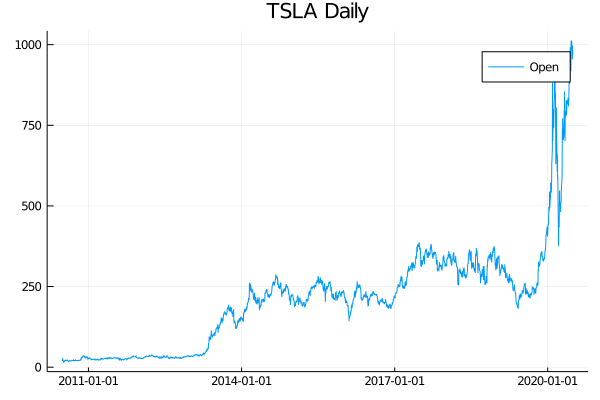
plot(tsla.Date, tsla.open, label="Open", title="TSLA Daily")

Daily TSLA Prices from AlphaVantage

Here is the Tesla daily opening stock price.

Intraday Stock Data

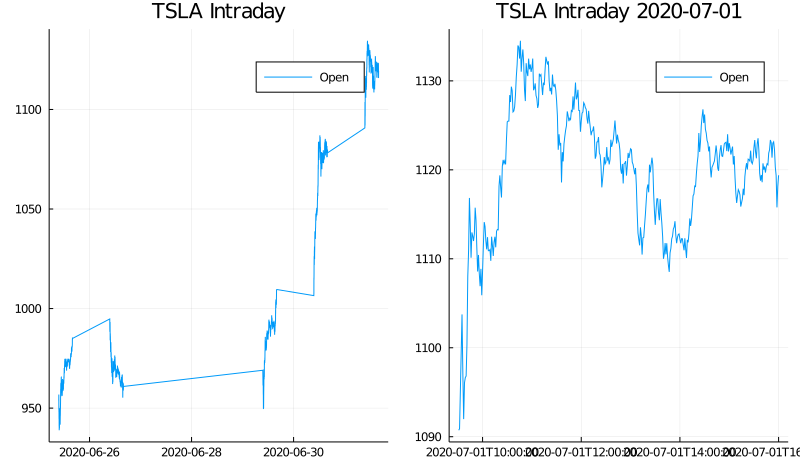
What separates AlphaVantage from say google or yahoo finance data is the intraday data. They provide high frequency bars at intervals from 1 minute to an hour. The only disadvantage is that the maximum amount of data appears to be 5 days for a stock. Still better than nothing!

tslaIntraRaw = AlphaVantage.time_series_intraday("TSLA", "1min", outputsize="full", datatype="csv");
tslaIntra = intra_to_dataframe(tslaIntraRaw)
tslaIntraDay = @where(tslaIntra, :DateTime .> DateTime(today()-Day(1)))
subPlot = plot(tslaIntraDay.DateTime, tslaIntraDay.open, label="Open", title="TSLA Intraday $(today()-Day(1))")
allPlot = plot(tslaIntra.DateTime, tslaIntra.open, label="Open", title = "TSLA Intraday")
plot(allPlot, subPlot, layout=(1,2))

Intraday TSLA Prices from AlphaVantage

Stock Technical Indicators

AlphaVantage also provide a wide range of technical indicators, the
most of which I don’t understand and will probably never use. But,
they provide them, so I’ve written an interface for them. In this
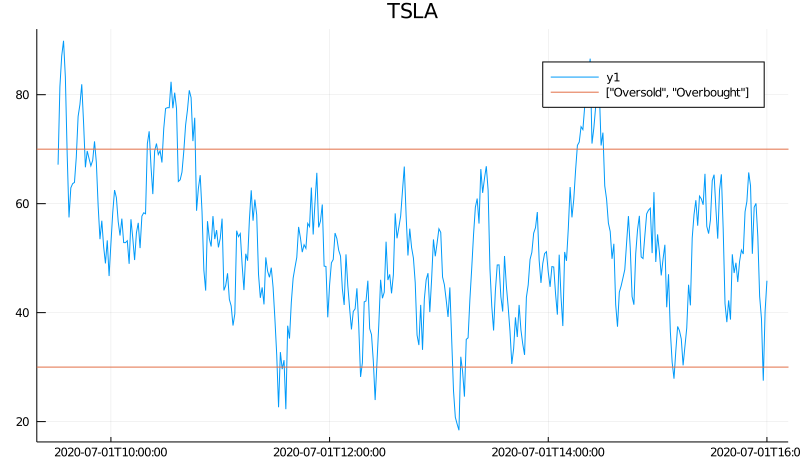
example I’m using the Relative Strength Index.

rsiRaw = AlphaVantage.RSI("TSLA", "1min", 10, "open", datatype="csv");
rsiDF = DataFrame(rsiRaw[1])
rsiDF = rename(rsiDF, Symbol.(vcat(rsiRaw[2]...)))
rsiDF.time = DateTime.(rsiDF.time, "yyyy-mm-dd HH:MM:SS")
rsiDF.RSI = Float64.(rsiDF.RSI);

rsiSub = @where(rsiDF, :time .> DateTime(today() - Day(1)));
plot(rsiSub[!, :time], rsiSub[!, :RSI], title="TSLA")
hline!([30, 70], label=["Oversold", "Overbought"])

RSI Values from AlphaVantage

In this case, adding the threshold lines make a nice channel that the value falls between.

Sector Performance

AlphaVantage also provides the sector performance on a number of timescales through one API call.

sectorRaw = AlphaVantage.sector_performance()
sectorRaw["Rank F: Year-to-Date (YTD) Performance"]
Dict{String,Any} with 11 entries:
  "Health Care"            => "-3.46%"
  "Financials"             => "-25.78%"
  "Consumer Discretionary" => "4.79%"
  "Materials"              => "-9.33%"
  "Consumer Staples"       => "-7.80%"
  "Energy"                 => "-38.38%"
  "Real Estate"            => "-11.37%"
  "Information Technology" => "12.06%"
  "Utilities"              => "-12.96%"
  "Communication Services" => "-2.26%"
  "Industrials"            => "-16.05%"

Great year for IT, not so great for energy.

Forex Market Data

Moving onto the foreign exchange market, again, AlphaVantage provide multiple time scales and many currencies.

eurgbpRaw = AlphaVantage.fx_weekly("EUR", "GBP", datatype="csv");
eurgbp = DataFrame(eurgbpRaw[1])
eurgbp = rename(eurgbp, Symbol.(vcat(eurgbpRaw[2]...)))
eurgbp.Date = Date.(eurgbp.timestamp)
eurgbp.open = Float64.(eurgbp.open)
eurgbp.high = Float64.(eurgbp.high)
eurgbp.low = Float64.(eurgbp.low)
eurgbp.close = Float64.(eurgbp.close)
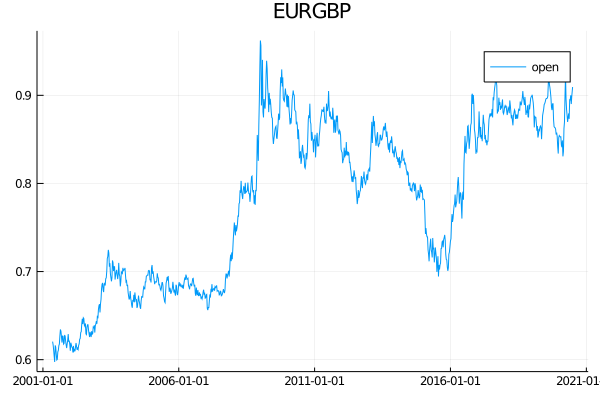
plot(eurgbp.Date, eurgbp.open, label="open", title="EURGBP")

AlphaVantage Weekly FX Data

Which looks great for a liquid currency like EURGBP, but they have a whole host of currencies so don’t limit yourself to just the basics, explore some NDF’s.

usdkrwRaw = AlphaVantage.fx_monthly("USD", "KRW", datatype="csv");
usdkrw = DataFrame(usdkrwRaw[1])
usdkrw = rename(usdkrw, Symbol.(vcat(usdkrwRaw[2]...)))
usdkrw.Date = Date.(usdkrw.timestamp)
usdkrw.open = Float64.(usdkrw.open)
usdkrw.high = Float64.(usdkrw.high)
usdkrw.low = Float64.(usdkrw.low)
usdkrw.close = Float64.(usdkrw.close)
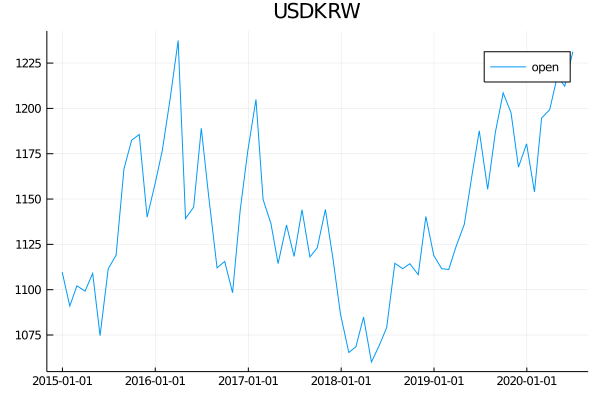
plot(usdkrw.Date, usdkrw.open, label="open", title="USDKRW")

AlphaVantage Monthly FX Data

Although I’m not sure exactly what they are providing here, be it a
spot price or a 1 month forward that is more typical for NDFs.

FX Intraday Data

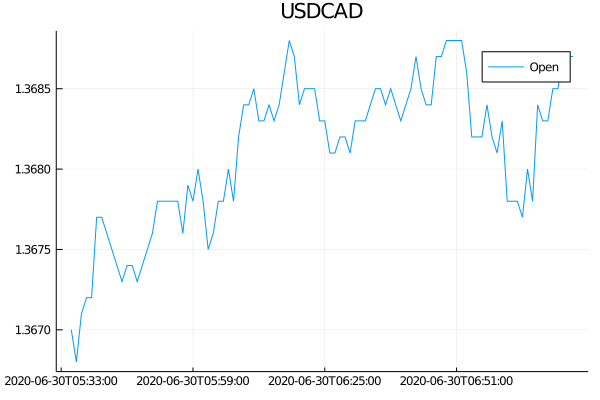
Again, intraday data is available for the FX pairs.

usdcadRaw = AlphaVantage.fx_intraday("USD", "CAD", datatype="csv");
usdcad = DataFrame(usdcadRaw[1])
usdcad = rename(usdcad, Symbol.(vcat(usdcadRaw[2]...)))
usdcad.timestamp = DateTime.(usdcad.timestamp, "yyyy-mm-dd HH:MM:SS")
usdcad.open = Float64.(usdcad.open)
plot(usdcad.timestamp, usdcad.open, label="Open", title="USDCAD")

Alphva Vantage Intraday FX Data

Crypto Market Data

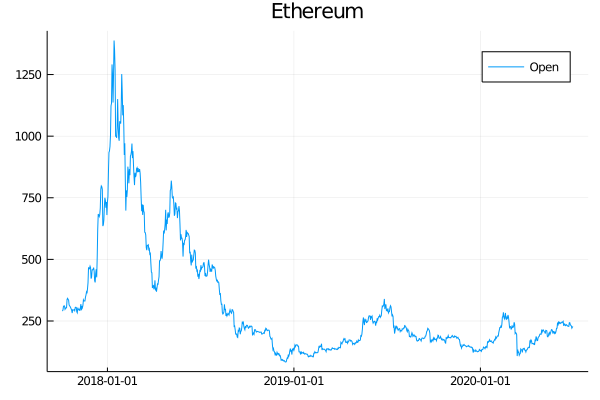
Now for digital currencies. The API follows the same style as traditional currencies and again has more digital currencies than you can shake a stick at. Again daily, weekly and monthly data is available plus a ‘health-index’ monitor that reports how healthy a cryptocurrency is based on different features.

ethRaw = AlphaVantage.digital_currency_daily("ETH", "USD", datatype="csv")
ethHealth = AlphaVantage.crypto_rating("ETH");
titleString = ethHealth["Crypto Rating (FCAS)"]
Dict{String,Any} with 9 entries:
  "7. utility score"         => "972"
  "9. timezone"              => "UTC"
  "1. symbol"                => "ETH"
  "2. name"                  => "Ethereum"
  "4. fcas score"            => "957"
  "5. developer score"       => "964"
  "6. market maturity score" => "843"
  "8. last refreshed"        => "2020-06-29 00:00:00"
  "3. fcas rating"           => "Superb"

The health rating looks like that, four scores, a qualitative rating
and some meta information. The price charts look like as you would expect.

eth = DataFrame(ethRaw[1])
eth = rename(eth, Symbol.(vcat(ethRaw[2]...)), makeunique=true)
eth.Date = Date.(eth.timestamp)
eth.Open = Float64.(eth[!, Symbol("open (USD)")])

plot(eth.Date, eth.Open, label="Open", title = "Ethereum")

ETH Daily Prices from AlphaVantage

Conclusion

If you’ve ever wanted to explore financial timeseries you can’t really
do much better than using AlphaVantage. So go grab yourself an API
key, download this package and see if you can work out what Hilbert
transform, dominant cycle phase (HT_DCPHASE in the package) represents for a stock!

Be sure to checkout my other tutorials for AlphaVantage: