Author Archives: Dean Markwick's Blog -- Julia

Predicting a Successful Mt Everest Climb

By: Dean Markwick's Blog -- Julia

Re-posted from: https://dm13450.github.io/2023/04/27/Predicting-a-Successful-Mt-Everest-Climb.html

Climbing Mount Everest is a true test of human endurance with a real risk of death. The Himalayan Database is a data repository, available for free, that records various details about the peaks, people, and expeditions to climb the different Nepalese Himalayan mountains and provides the data for this analysis. In this blog post, I’ll show you how to load the database and explore some of the features before building a model that tries to predict how you can successfully climb Mount Everest.


Enjoy these types of posts? Then you should sign up for my newsletter.


Over the past few months, I’ve been training for a marathon and have been trying to understand the best way to train and maximise my performance. This means extensive research and reading to get an idea of what the science says. Endure by Alex Hutchinson is a book I recommend and it takes a look at the way the human body functions over long distances/extreme tasks – such as climbing Mount Everest with no oxygen or ultra, ultra marathoners with an overarching reference to the Breaking2 project by Nike.

In one section the book references something called the Himalayan Database which is a database of expeditions to Mount Everest and other mountains in the Himalayas. As a data lover, this piqued my interest as an interesting data source and something a bit different from my usual data explorations around finance/sports. So I downloaded the database, worked out how to load it, and had a poke around the data.

If you go to the website, himalayandatabase, you can download the data yourself and follow along.

The database is distributed in the DBF format and the website itself is a bit of a blast from the past. It expects you to download a custom data viewer program to look at the data, but thankfully there are people in the R world that demonstrated how to load the raw DBF files. I’ve taken inspiration from this, downloaded the DBF files, loaded up DBFTables.jl and loaded the data into Julia.

using DataFrames, DataFramesMeta
using Plots, StatsPlots
using Statistics
using Dates

I hit a roadblock straight away and had to patch DBFTables.jl with a new datatype that the Himalayan database uses that isn’t in the original spec. Pull request here if you are interested: DBFTables.jl – Add M datatype. Another feather to my open-source contributions hat!

using DBFTables

There are 6 tables in the database but we are only interested in 3 of them:

  • exped details the expeditions. So each trip up a mountain by one or more people.
  • peaks has the details on the mountains in the mountains in the Himalayas.
  • members which has information on each person that has attempted to climb one of the mountains.
function load_dbf(fn)
    dbf = DBFTables.Table(fn)
    DataFrame(dbf)
end

exped = load_dbf("exped.DBF")
peaks = load_dbf("peaks.DBF")
members = load_dbf("members.DBF");

Taking a look at the mountains with the most entries.

first(sort(@combine(groupby(exped, :PEAKID), :N = length(:YEAR)),
       :N, rev=true), 3)
Row PEAKID N
String Int64
1 EVER 2191
2 AMAD 1456
3 CHOY 1325

Unsurprisingly Mount Everest is the most attempted mountain with Ama Dablam in second and Cho Oyu in third place.

Exploring the Himalayas Data

We start with some basic groupings to look at how the data is distributed per year.

expSummary = @combine(groupby(@subset(members, :CALCAGE .> 0), :EXPID),  
         :N = length(:CALCAGE),
         :YoungestAge=minimum(:CALCAGE), 
         :AvgAge = mean(:CALCAGE),
         :NFemale = sum(:SEX .== "F"))

expSummary = leftjoin(expSummary, 
              @select(exped, :EXPID, :PEAKID, :BCDATE, :SMTDATE, :MDEATHS, :HDEATHS, :SUCCESS1), on = :EXPID)
expSummary = leftjoin(expSummary, @select(peaks, :PEAKID, :PKNAME), on = :PEAKID)

everest = dropmissing(@subset(expSummary, :PKNAME .== "Everest"))
everest = @transform(everest, :DeathRate = (:MDEATHS .+ :HDEATHS) ./ :N, :Year = floor.(:BCDATE, Dates.Year))
everestYearly = @combine(groupby(everest, :Year), :N = sum(:N), 
                          :Deaths = sum(:MDEATHS + :HDEATHS),
                        :Success = sum(:SUCCESS1))
everestYearly = @transform(everestYearly, :DeathRate = :Deaths ./ :N, :SuccessRate = :Success ./ :N)
everestYearly = @transform(everestYearly, 
                            :DeathRateErr = sqrt.(:DeathRate .* (1 .- :DeathRate)./:N),
                            :SuccessRateErr = sqrt.(:SuccessRate .* (1 .- :SuccessRate)./:N));

What is the average age of those who climb Mount Everest?

scatter(everest.SMTDATE, everest.AvgAge, label = "Average Age of Attempting Everest")
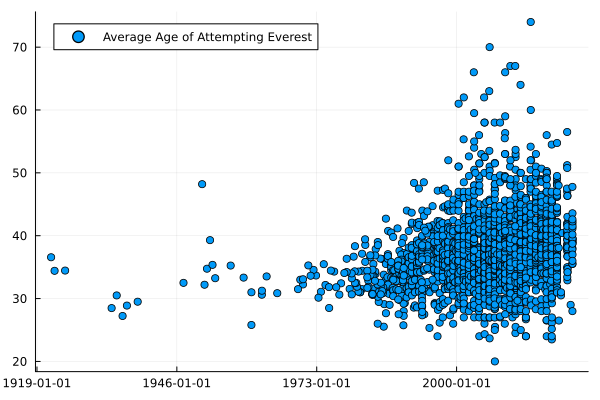
Average age of climbing Mount Everest

By eye, it looks like the average age has been steadily increasing. Generally, your expedition’s average age needs to be at least 30. Given it costs a small fortune to climb Everest this is probably more of a ‘need money’ rather than a look at the overall fitness of a 30-year-old.

When we look at the number of attempts yearly and the annual death rate:

plot(bar(everestYearly.Year, everestYearly.N, label = "Number of Attempts in a Year"),
    scatter(everestYearly.Year, everestYearly.DeathRate, yerr=everestYearly.DeathRateErr, 
            label = "Yearly Death Rate"),
     layout = (2,1))
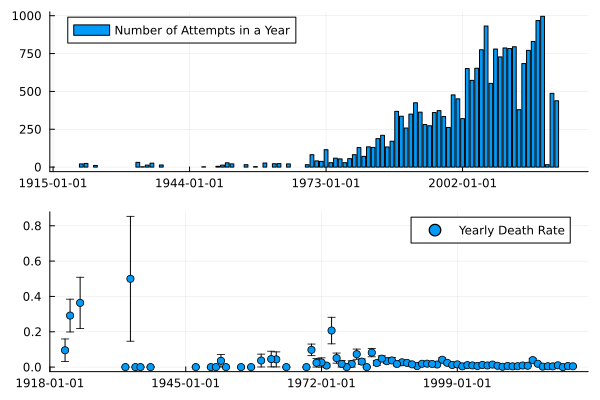
Yearly death rate on Mount Everest

scatter(everestYearly[everestYearly.Year .> Date("2000-01-01"), :].Year, 
        everestYearly[everestYearly.Year .> Date("2000-01-01"), :].DeathRate, 
        yerr=everestYearly[everestYearly.Year .> Date("2000-01-01"), :].DeathRateErr, 
        label = "Yearly Death Rate")
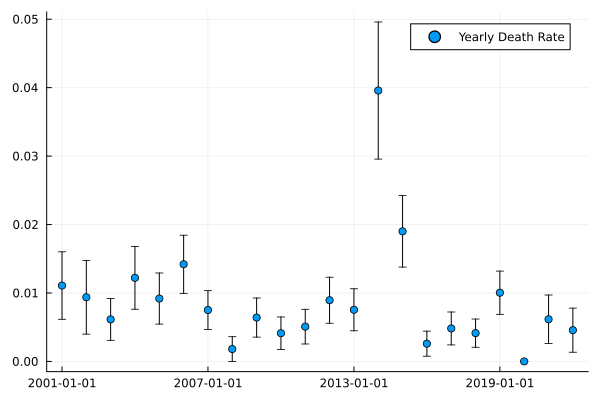
20th century death rate

But how ‘easy’ has it been to conquer Everest over the years? Looking at the success rate at best 10% of attempted expeditions are completed, which highlights how tough it is. Given some of the photos of people queueing to reach the summit, you’d think it would be much easier, but out of the 400 expeditions, less than 100 will make it.

scatter(everestYearly.Year, everestYearly.SuccessRate, yerr=everestYearly.SuccessRateErr, 
        label = "Mt. Everest Success Rate")
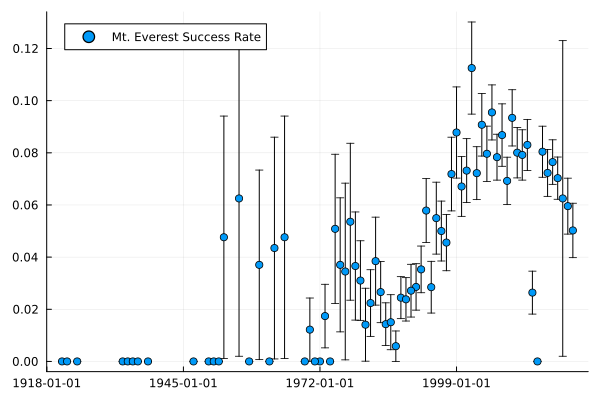
Mount Everest success rate

A couple of interesting points from this graph:

  • 2014 was an outlier due to an avalanche that lead to Mount Everest being closed from April until the rest of the year.
  • No one successfully climbed Mt Everest in 2015 because of the earthquake.
  • Only 1 success in 2020 before the pandemic closed everything.

So a decent amount of variation in what can happen in a given year on Mt Everest.

Predicting Success

The data has some interesting quirks and we now turn to our next step, trying to build a model. Endurance was about what it takes to complete impressive human feats. So let’s do that here, can we use the database to predict and explain what leads to success?

We will be using the MLJ.jl package again to fit some machine learning models easily.

using MLJ, LossFunctions

To start with we are going to pull out the relevant factors that we think will help climb a mountain. Not specifically Everest, but any of the Himalayan peaks from the database.

modelData = members[:, ["MSUCCESS", "PEAKID","MYEAR", 
                        "MSEASON", "SEX", "CALCAGE", "CITIZEN", "STATUS", 
                         "MROUTE1", "MO2USED"]]
modelData = @subset(modelData, :PEAKID .== "EVER")
modelData.MROUTE1 = modelData.PEAKID .* "_" .* string.(modelData.MROUTE1)
modelData = dropmissing(modelData)
modelData.MYEAR = parse.(Int, modelData.MYEAR)
modelData = @subset(modelData, :CALCAGE .> 0)

print(size(modelData))
(22583, 10)
first(modelData, 4)
4×10 DataFrame
Row MSUCCESS PEAKID MYEAR MSEASON SEX CALCAGE CITIZEN STATUS MROUTE1 MO2USED
Bool String Int64 Int64 String Int64 String String String Bool
1 false EVER 1963 1 M 36 USA Climber EVER_2 true
2 true EVER 1963 1 M 31 USA Climber EVER_1 true
3 false EVER 1963 1 M 27 USA Climber EVER_1 false
4 false EVER 1963 1 M 26 USA Climber EVER_2 true

Just over 22k rows and 10 columns, so plenty of data to sink our teeth into. MLJ needs us to define the Multiclass type of the factor variables and we also want to split out the predictor and predictors then split out into the test/train sets.

modelData2 = coerce(modelData,
                    :MSUCCESS => OrderedFactor,
                    :MSEASON => Multiclass,
                    :SEX => Multiclass,
                    :CITIZEN => Multiclass,
                    :STATUS => Multiclass, 
                    :MROUTE1 => Multiclass,
                    :MO2USED => OrderedFactor);
y, X = unpack(modelData2, ==(:MSUCCESS), colname -> true; rng=123);

train, test = partition(eachindex(y), 0.7, shuffle=true);

All these multi-class features need to be one-hot encoded, so we use the continuous encoder. The workflow is:

  • Create the encoder/standardizer.
  • Train on the data
  • Transform the data

This gives confidence that you aren’t leaking the training data into the test data.

encoder = ContinuousEncoder()
encMach = machine(encoder, X) |> fit!
X_encoded = MLJ.transform(encMach, X);

X_encoded.MO2USED = X_encoded.MO2USED .- 1;
standardizer = @load Standardizer pkg=MLJModels
stanMach = fit!(machine(
                 standardizer(features = [:CALCAGE]),X_encoded); 
                rows=train)
X_trans = MLJ.transform(stanMach, X_encoded);
X_trans.MYEAR = X_trans.MYEAR .- minimum(X_trans.MYEAR);
plot(
    histogram(X_trans.CALCAGE, label = "Age"),
    histogram(X_trans.MYEAR, label = "Year"),
    histogram(X_trans.MO2USED, label = "02 Used")
    )
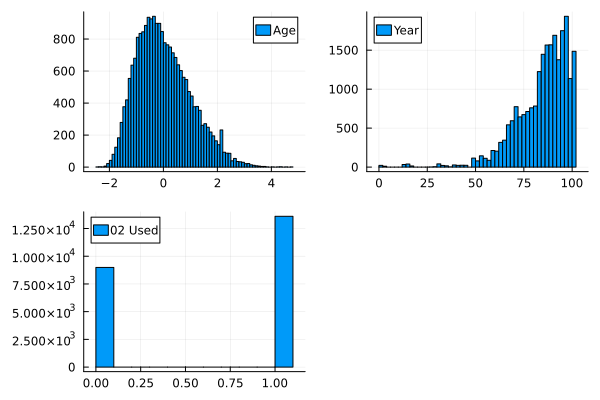
Variable distribution

Looking at the distribution of the transformed data gives a good indication of how varied these variables change post-transformation.

Model Fitting using MLJ.jl

I’ll now explore some different models using the MLJ.jl workflow similar to my previous post on Machine Learning Property Loans for Fun and Profit. MLJ.jl gives you a common interface to fit a variety of different models and evaluate their performance all from one package, so handy here when we want to look at a simple linear model and also an XGBoost model.

Let’s start with our null model to get the baseline.

constantModel = @load ConstantClassifier pkg=MLJModels

constMachine = machine(constantModel(), X_trans, y)

evaluate!(constMachine,
        rows=train,
         resampling=CV(shuffle=true),
         operation = predict_mode,
         measures=[accuracy, balanced_accuracy, kappa],
         verbosity=0)
Model Accuracy Kappa
Null 0.512 0.0

For classification tasks, the null model is essentially tossing a coin, so the accuracy will be around 50% and the \(\kappa\) is zero.

Next we move on to the simple linear model using all the features.

logisticClassifier = @load LogisticClassifier pkg=MLJLinearModels verbosity=0

lmMachine = machine(logisticClassifier(lambda=0), X_trans, y)

fit!(lmMachine, rows=train, verbosity=0)

evaluate!(lmMachine, 
          rows=train, 
          resampling=CV(shuffle=true), 
          operation = predict_mode,
          measures=[accuracy, balanced_accuracy, kappa], verbosity = 0)
Model Accuracy Kappa
Null 0.512 0.0
Linear Regression 0.884 0.769

This gives a good improvement over the null model, so indicates our included features have some sort of information useful in predicting success.

Inspecting the parameters indicates how strong each variable is. Route 0 leads to a large reduction in the probability of success whereas using oxygen increases the probability of success. Climbing in the Autumn or Winter also looks like it reduces your chance of success.

params = mapreduce(x-> DataFrame(Param=collect(x)[1], Value = collect(x)[2]), 
                   vcat, fitted_params(lmMachine).coefs)
params = sort(params, :Value)

vcat(first(params, 5), last(params, 5))
10×2 DataFrame
Row Param Value
Symbol Float64
1 MROUTE1__EVER_0 -4.87433
2 SEX__F -1.97957
3 SEX__M -1.94353
4 MSEASON__3 -1.39251
5 MSEASON__4 -1.1516
6 MROUTE1__EVER_2 0.334305
7 CITIZEN__USSR 0.43336
8 CITIZEN__Russia 0.518197
9 MROUTE1__EVER_1 0.697601
10 MO2USED 3.85578

XGBoost Time

What’s a model if we’ve not tried xgboost to squeeze the most performance out of all the data? Easy to fit using MLJ and without having to do any special lifting.

xgboostModel = @load XGBoostClassifier pkg=XGBoost verbosity = 0

xgboostmodel = xgboostModel()

xgbMachine = machine(xgboostmodel, X_trans, y)

evaluate!(xgbMachine,
        rows=train,
         resampling=CV(nfolds = 6, shuffle=true),
         measures=[accuracy,balanced_accuracy, kappa],
         verbosity=0)
Model Accuracy Kappa
Null 0.512 0.0
Linear Regression 0.884 0.769
XGBoost 0.889 0.778

We get 88.9% accuracy compared to the linear regression 88.4% and a \(\kappa\) increase too, so looking like a good model.

How Do I Succeed in the Climbing Mount Everest?

The whole point of these models is to try and work out what combination of these parameters gets us the highest probability of success on a mountain. We want some idea of feature importance that can direct us to the optimal approach to a mountain. Should I be an Austrian Doctor or is there an easier route that should be taken?

With xgboost we can use the feature_importances function to do exactly what it says on the tin and look at what features are most important in the model.

fi = feature_importances(xgbMachine)
fi = mapreduce(x-> DataFrame(Param=collect(x)[1], Value = collect(x)[2]), 
                   vcat, fi)
first(fi, 5)
5×2 DataFrame
Row Param Value
Symbol Float32
1 MO2USED 388.585
2 MROUTE1__EVER_0 46.3129
3 STATUS__H-A Worker 15.0079
4 CITIZEN__Nepal 11.6299
5 CITIZEN__UK 4.25651

So using oxygen, taking the 0th route up, being an H-A Worker, and either being from Nepal or a UK citizen appears to have the greatest impact on being successful. Using oxygen is an obvious benefit/cannot be avoided and I don’t think anyone believes that their chance of success would be higher without oxygen. Being Nepalese is the one I would struggle with.

How does the model perform on the hold-out set? We’ve got 30% of the data that hasn’t been used in the fitting that can also validate how well the model performs.

modelNames = ["Null", "LM", "XGBoost"]
modelMachines = [constMachine, 
               lmMachine, 
               xgbMachine]


aucRes = DataFrame(Model = modelNames,
    AUC = map(x->auc(MLJ.predict(x,rows=test), y[test]), 
                modelMachines))
kappaRes = DataFrame(Kappa = map(x->kappa(MLJ.predict_mode(x,rows=test), y[test]), modelMachines),
                     Accuracy = map(x->accuracy(MLJ.predict_mode(x,rows=test), y[test]), modelMachines),
          Model = modelNames)
evalRes = leftjoin(aucRes, kappaRes, on =:Model)
3×4 DataFrame
Row Model AUC Kappa Accuracy
String Float64 Float64? Float64?
1 Null 0.5 0.0 0.512768
2 LM 0.937092 0.768528 0.883838
3 XGBoost 0.939845 0.775408 0.88738

On the test set, the XGBoost model is only slightly better than the linear model in terms of \(\kappa\) and accuracy. It’s worse when measuring the AUC, so this is setting alarm bells ringing that the model isn’t quite there yet.

How Does Oxygen Change the Probability of Success?

X_trans2 = copy(X_trans[1:2, :])
X_trans2.MO2USED  = 1 .- X_trans2.MO2USED


predict(xgbMachine, vcat(X_trans[1:2, :], X_trans2))
4-element CategoricalDistributions.UnivariateFiniteVector{OrderedFactor{2}, Bool, UInt32, Float32}:
 UnivariateFinite{OrderedFactor{2}}(false=>0.245, true=>0.755)
 UnivariateFinite{OrderedFactor{2}}(false=>1.0, true=>0.000227)
 UnivariateFinite{OrderedFactor{2}}(false=>0.901, true=>0.0989)
 UnivariateFinite{OrderedFactor{2}}(false=>1.0, true=>0.000401)

By taking the first two entries and switching whether they used oxygen or not we can see how the outputted probability of success changes. In each case, it provides a dramatic shift in the probabilities. Again, from the feature importance output, we know this is the most important variable but it does seem to be a bit dominating in terms of what happens with and without oxygen.

Probability Calibration

Finally, let’s look at the calibration of the models.

using CategoricalArrays

modelData.Prediction = pdf.(predict(xgbMachine, X_trans), 1)

lData = @transform(modelData, :prob = cut(:Prediction, (0:0.1:1.1)))
gData = groupby(lData, :prob)
calibData = @combine(gData, :N = length(:MSUCCESS), 
                            :SuccessRate = mean(:MSUCCESS), 
                            :PredictedProb = mean(:Prediction))

calibData = @transform(calibData, :Err = 1.96 .* sqrt.((:PredictedProb .* (1 .- :PredictedProb)) ./ :N))


p = plot(calibData[:, :PredictedProb], 
         calibData[:, :SuccessRate], 
         yerr = calibData[:, :Err],
    seriestype=:scatter, label = "XGBoost Calibration")

p = plot!(p, 0:0.1:1, 0:0.1:1, label = :none)
h = histogram(modelData.Prediction, normalize=:pdf, label = "Prediction Distribution")

plot(p, h, layout = (2,1))
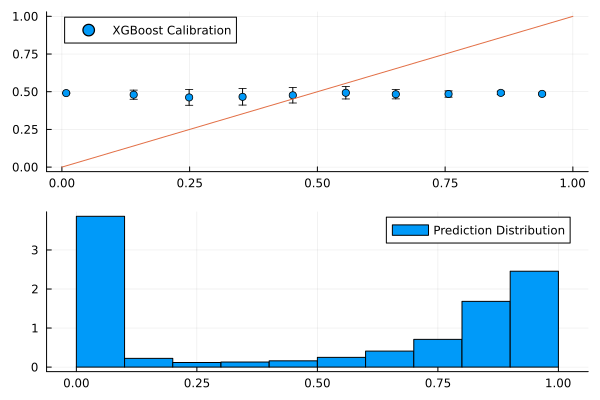
Calibration plot

To say the model is poorly calibrated is an understatement. There is no association of an increased success rate with the increase in model probability and from the distribution of predictions we can see it’s quite binary, there isn’t an even distribution to the output.
So whilst the evaluation metrics look better than a null model, the reality is that the model isn’t doing anything. With all the different factors in the model matrix, there is likely some degeneracy in the data, such that a single occurrence of a variable ends up predicting success or not. There is potentially an issue with using the member’s table instead of the expedition table, as whether the expedition was successful or not will lead to multiple members being successful.

Conclusion

Overall it’s an interesting data set even if it does take a little work to get it loaded into Julia. There is a wealth of different features in the data that lead to some nice graphs, but using these features to predict whether you will be successful or not in climbing Mount Everest doesn’t lead to a useful model.
Similar Posts

More Extreme Moves in a Downtrending Market?

By: Dean Markwick's Blog -- Julia

Re-posted from: https://dm13450.github.io/2023/03/01/Downtrend-Extremes.html

I’m exploring whether there are more extreme moves in the equity
market when we are in a downtrend. I think anecdotally we
all notice these big red numbers when the market has been grinding
lower over a period as it is the classic loss aversion of human
psychology. This is loosely related to my Ph.D. in point processes and
also a blog post from last year when I investigated trend following –
Trend Following with ETFs. I’m
going to take two approaches, a simple binomial model and a Hawkes
process. For the data, we will be pulling the daily data from Alpaca Markets using my AlpacaMarkets.jl package.


Enjoy these types of posts? Then you should sign up for my newsletter. It’s a short monthly recap of anything and everything I’ve found interesting recently plus
any posts I’ve written. So sign up and stay informed!


A few packages to get started and I’m running Julia 1.8 for this
project.

using AlpacaMarkets
using DataFrames, DataFramesMeta
using Dates
using Plots, PlotThemes, StatsPlots
using RollingFunctions, Statistics, StatsBase
using GLM

All good data analysis starts with the data. I’m downloading the
daily statistics of SPY the S&P 500 stock index ETF which will represent
the overall stock market.

function parse_date(t)
   Date(string(split(t, "T")[1]))
end

function clean(df, x) 
    df = @transform(df, :Date = parse_date.(:t), :Ticker = x, :NextOpen = [:o[2:end]; NaN])
   @select(df, :Date, :Ticker, :c, :o, :NextOpen)
end

spyPrices = stock_bars("SPY", "1Day"; startTime = now() - Year(10), limit = 10000, adjustment = "all")[1]
spyPrices = clean(spyPrices, "SPY")
last(spyPrices, 3)
3×5 DataFrame
Row Date Ticker c o NextOpen
Date String Float64 Float64 Float64
1 2023-02-22 SPY 398.54 399.52 401.56
2 2023-02-23 SPY 400.66 401.56 395.42
3 2023-02-24 SPY 396.38 395.42 NaN

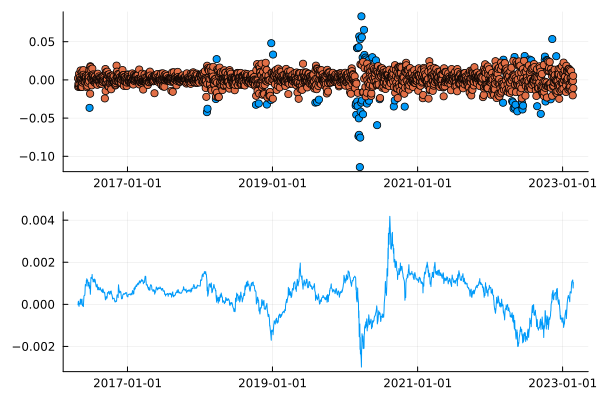
I’m doing the usual close-to-close returns and then taking the 100-day moving average as my trend signal.

spyPrices = @transform(spyPrices, :Return = [missing; diff(log.(:c))])
spyPrices = @transform(spyPrices, :Avg = lag(runmean(:Return, 100), 1))
spyPrices = @transform(spyPrices, :BigMove = abs.(:Return) .>= 0.025)
dropmissing!(spyPrices);
sp = scatter(spyPrices[spyPrices.BigMove, :].Date, spyPrices[spyPrices.BigMove, :].Return, legend = :none)
sp = scatter!(sp, spyPrices[.!spyPrices.BigMove, :].Date, spyPrices[.!spyPrices.BigMove, :].Return)

plot(sp, plot(spyPrices.Date, spyPrices.Avg), layout = (2,1), legend=:none)

Daily big moves and trend signal

By calling a ‘big move’ anything greater than \(\pm\) 0.025 (in log terms)
we can see that they, the blue dots, are slightly clustered around
common periods. In the plot below, the 100-day rolling average of
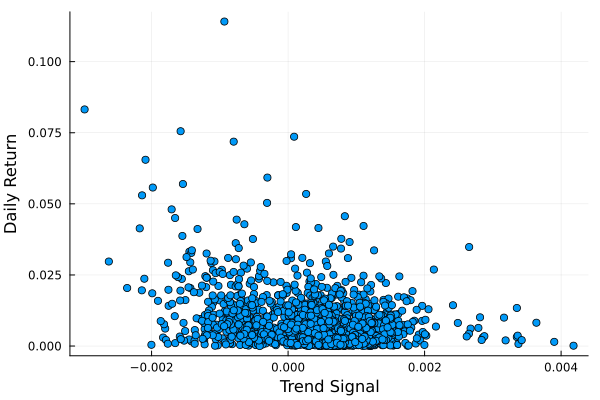
the returns, our trend signal, also appears to be slightly correlated with these big returns.

scatter(spyPrices.Avg, abs.(spyPrices.Return), label = :none,
            xlabel = "Trend Signal", ylabel = "Daily Return")

Trend signal vs daily return

Here we have the 100-day rolling average on the x-axis and the
absolute return on that day on the y-axis. If we squint a little we
can imagine there is a slight quadratic pattern, or at the least, these
down trends appear to correspond with the more extreme day moves. We
want to try and understand if this is a significant effect.

A Binomial Model

We will start by looking at the probability that each day might
have a ‘large move’. We first split into a train/test split of 70/30.

trainData = spyPrices[1:Int(floor(nrow(spyPrices)*0.7)), :]
testData = spyPrices[Int(ceil(nrow(spyPrices)*0.7)):end, :];

The GLM.jl package lets you write out the formula and fit a wide
variety of linear models. We have two models, the proper one that uses
the Avg column (our trend signal) as our features and a null model
that just fits an intercept.

binomialModel = glm(@formula(BigMove ~ Avg + Avg^2), trainData, Binomial())
nullModel = glm(@formula(BigMove ~ 1), trainData, Binomial())

spyPrices[!, :Binomial] = predict(binomialModel, spyPrices);

To look at the model we can plot the output of the model relative to
the signal at the time.

plot(scatter(spyPrices.Avg, spyPrices[!, :Binomial], label ="Response Function"), 
    plot(spyPrices.Date, spyPrices[!, :Binomial], label = "Probability of a Large Move"), layout = (2,1))

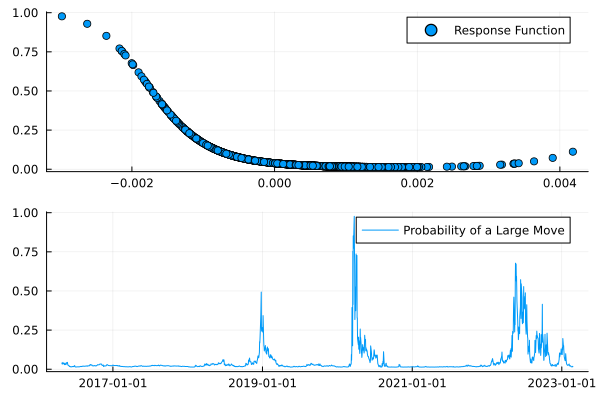
From the top graph, we see the higher probability of an extreme move comes from when the moving average is a large negative number. The probability then flatlines beyond zero, which suggests there isn’t that much of an effect for large moves when the momentum in the market is positive.

We also plot the daily probability of a large move and see that it
has been pretty bad in the few months lots of big moves!

Binomial Intensity

We need to check if the model is any good though. We will just check
the basic accuracy.

using Metrics
binary_accuracy(predict(binomialModel, testData), testData.BigMove)
binary_accuracy(predict(nullModel)[1] .* ones(nrow(testData)), testData.BigMove)
0.93

0.95

So the null model has an accuracy of 95% on the test set, but the
fitted model has an accuracy of 93%. Not good, looks like the trend
signal isn’t adding anything. We might be able to salvage the model
with a robust windowed fit and test procedure or look at a
single stock name but overall, I think it’s more of a testament to how
hard it is to model this data rather than anything too specific.

We could also consider the self-exciting nature of these large moves. If one happens, is there a higher probability of another happening? Given my Ph.D. was in Hawkes processes, I have done lots of writing around them before and this is just another example of how they can be applied.

Hawkes Processes

Hawkes processes! The bane of my life for four years. Still, I am
forever linked with them now so might as well put that Ph.D. to use. If
you haven’t come across Hawkes processes before it is a self-exciting
point process where the occurrence of one event can lead to further
events. In our case, this means one extreme event can cause further
extreme events, something we are trying to use the downtrend to
predict. With the Hawkes process, we are checking whether the events
are just self-correlated.

I’ve built the HawkesProcesses.jl package to make it easy to work
with Hawkes processes.

using HawkesProcesses, Distributions

Firstly, we get the data in the right shape by pulling the number of
days since the start of the data of each big event.

startDate = minimum(spyPrices.Date)
allEvents = getfield.(spyPrices[spyPrices.BigMove, :Date] .- startDate, :value);
allDatesNorm = getfield.(spyPrices.Date .- startDate, :value);
maxT = getfield.(maximum(spyPrices[spyPrices.BigMove, :Date]) .- startDate, :value)

We then fit the Hawkes process using the standard Bayesian method for
5,000 iterations.

bgSamps1, kappaSamps1, kernSamps1 = HawkesProcesses.fit(allEvents .+ rand(length(allEvents)), maxT, 5000)
bgSamps2, kappaSamps2, kernSamps2 = HawkesProcesses.fit(allEvents .+ rand(length(allEvents)), maxT, 5000)

bgEst = mean(bgSamps1[2500:end])
kappaEst = mean(kappaSamps1[2500:end])
kernEst = mean(kernSamps1[2500:end])

intens = HawkesProcesses.intensity(allDatesNorm, allEvents, bgEst, kappaEst, Exponential(1/kernEst));
spyPrices[!, :Intensity] = intens;

We get three parameters out of the Hawkes process. The background rate
\(\mu\), the self-exciting parameter \(\kappa\) and an exponential
parameter that describes how long each event has an impact on the
probability of another event, \(\beta\).

(bgEst, kappaEst, kernEst)
(0.005, 0.84, 0.067)

We get \(\kappa = 0.84\) and \(\beta = 0.07\) which we can interpret
as a high probability that another large move follows and that takes
around 14 days (business days) to decay. So with each large move,
expect another large move within 3 weeks.

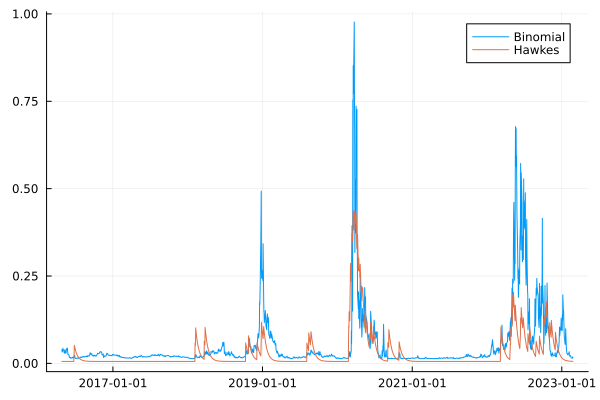
When we compare the Hawkes intensity to the previous binomial
intensity we get a similar shape between both models.

plot(spyPrices.Date, spyPrices.Binomial, label = "Binomial")
plot!(spyPrices.Date, intens, label = "Hawkes")

Binomial and Hawkes Intensity

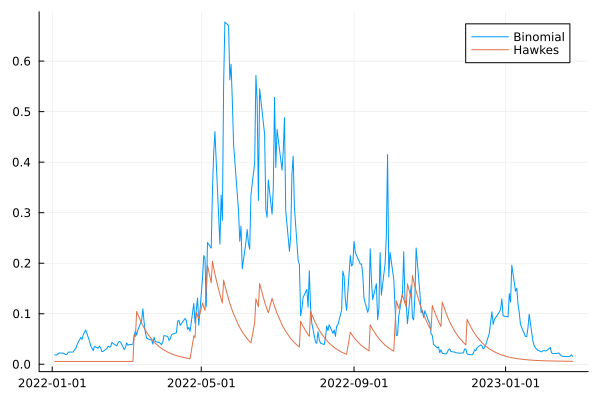
They line up quite well, which is encouraging and shows they are on a similar path. If we zoom in specifically to 2022.

plot(spyPrices[spyPrices.Date .>= Date("2022-01-01"), :].Date, 
     spyPrices[spyPrices.Date .>= Date("2022-01-01"), :].Binomial, label = "Binomial")
plot!(spyPrices[spyPrices.Date .>= Date("2022-01-01"), :].Date, 
      spyPrices[spyPrices.Date .>= Date("2022-01-01"), :].Intensity, label = "Hawkes")

2022 Intensity

Here we can see the binomial intensity stays higher for longer whereas
the Hawkes process goes through quicker bursts of intensity. This is
intuitive as the binomial model is using a 100-day moving average
under the hood, whereas the Hawkes process is much more reactive to
the underlying events.

To check whether the Hawkes process is any good we compare its
likelihood to a null likelihood of a constant Poisson process.

We first fit the null point process model by optimising the
null_likelihood across the events.

using Optim
null_likelihood(events, lambda, maxT) = length(events)*log(lambda) - lambda*maxT

opt = optimize(x-> -1*null_likelihood(allEvents, x[1], maxT),  0, 10)
Optim.minimizer(opt)
0.031146179404103084

Which gives a likelihood of:

null_likelihood(allEvents, Optim.minimizer(opt), maxT)
-335.1797769669301

Whereas the Hawkes process has a likelihood of:

likelihood(allEvents, bgEst, kappaEst, Exponential(1/kernEst), maxT)
-266.63091365640366

A substantial improvement, so all in the Hawkes process looks pretty
good.

Overall, the Hawkes model subdues quite quickly, but the binomial model can remain elevated. They are covering two different behaviours. The Hawkes model can describe what happens after one of these large moves happens. The binomial model is mapping the momentum onto a probability of a large event.

How do we combine both the binomial and the Hawkes process model?

Point Process Model

To start with, we need to consider a point process with variable intensity. This is known as an inhomogeneous point process. In our case, these events depend on the value of the trend signal.

\[\lambda (t) \propto \hat{r} (t)\]

\[\lambda (t) = \beta _0 + \beta _1 \hat{r} (t) + \beta_2 \hat{r} ^2 (t)\]

Like the binomial model, we will use a quadratic combination of the values. Then, given we know how to write the likelihood for a point process, we can do some maximum likelihood estimation to find the appropriate parameters.

Our rhat function need to return the signal at a given time.

function rhat(t, spy)
    dt = minimum(spy.Date) + Day(Int(floor(t)))
    spy[spy.Date .<= dt, :Avg][end]
end

And our likelihood which uses the rhat function, plus making it compatible with arrays.

function lambda(t, params, spy)
   exp(params[1] + params[1] * rhat(t, spy) + params[2] * rhat(t, spy) * rhat(t, spy))
end

lambda(t::Array{<:Number}, params::Array{<:Number}, spy::DataFrame) = map(x-> lambda(x, params, spy), t)

The likelihood of a point process is

\[\mathcal{L} = \sum _{t_i} log(\lambda (t_i)) – \int _0 ^T \lambda (t) \mathrm{d}\]

We have to use numerical integration to do the second half of the equation which is where the QuadGK.jl package comes in. We pass it a function and it will do the integration for us. Job done!

function likelihood(params, rate, events, maxT, spy)
    sum(log.(rate(events, params, spy))) - quadgk(t-> rate(t, params, spy), 0, maxT)[1]
end

With all the functions ready we can optimise and find the correct parameters.

using Optim, QuadGK
opt = optimize(x-> -1*likelihood(x, lambda, allEvents, maxT, spyPrices), rand(3))
Optim.minimizer(opt)
3-element Vector{Float64}:
 -3.4684622926014783
  1.6204408269570916
  2.902098418452392

This also has a maximum likelihood of -334. Which if you scroll up
isn’t much better compared to the null model. So warning bells should
be ringing that this isn’t a good model.

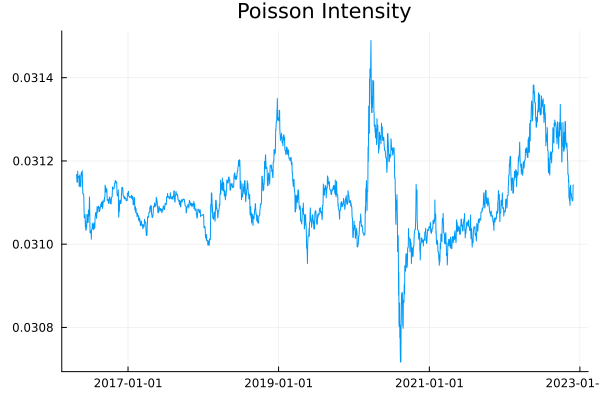
plot(minimum(spyPrices.Date) + Day.(Int.(collect(0:maxT))), 
     lambda(collect(0:maxT), Optim.minimizer(opt), spyPrices), label = :none,
     title = "Poisson Intensity")

Poisson Intensity

The intensity isn’t showing too much structure over time.

To check the fit of this model we simulate some events with the same
intensity pattern.

lambdaMax = maximum(lambda(collect(0:0.1:maxT), Optim.minimizer(opt), spyPrices)) * 1.1
rawEvents = rand(Poisson(lambdaMax * maxT), 1)[1]
unthinnedEvents = sort(rand(Uniform(0, maxT), rawEvents))
acceptProb = lambda(unthinnedEvents, Optim.minimizer(opt), spyPrices) / lambdaMax
events = unthinnedEvents[rand(length(unthinnedEvents)) .< acceptProb];
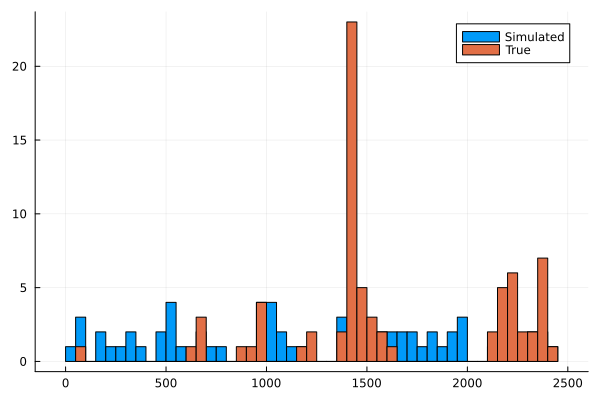
histogram(events,label= "Simulated", bins = 100)
histogram!(allEvents, label = "True", bins = 100)

Simulated Events

It’s not a great model as the simulated events don’t line up with the
true events. Looking back at the intensity function we can see it
doesn’t vary much around 0.03, so whilst the intensity function looks
varied, zooming out shows it is quite flat.

Next Steps

I wanted to integrate the variable background into the Hawkes process
so we could combine both models. As my Hawkes sampling is Bayesian I
have an old blog post to turn the above from an MLE to full Bayesian
estimation, but that code doesn’t work anymore. You need to use the
LogDensityProblems.jl package to get it working, so I’m going to
have to invest some time in learning that. I’ll be honest, I’m not
sure how bothered I can be, I’ve got a long list of other things I
want to explore and learning some abstract interface doesn’t feel like
it’s a good use of my time. Frustrating because the whole point of
Julia is composability, I could write a pure Julia function and
use HCMC on it, but now I’ve got to get another package involved. I’m sure
there is good reason and the LogDensityProblems package solves some issues but it feels a bit like the Javascript ecosystem where everything changes and the way to do something is outdated the minute it is pushed to main.

Conclusion

So overall we’ve shown that the large moves don’t happen more often in
down-trending markets, at least in the broad S&P500 view of the market.
Both a binomial and point process model showed no improvement on a
null model for predicting these extreme days whereas the Hawkes model shows that they are potentially self-exciting.

Trend Following with ETFs

By: Dean Markwick's Blog -- Julia

Re-posted from: https://dm13450.github.io/2022/11/18/Trend-Following-with-ETFs.html

Trend following is a rebranded name for momentum trading strategies. It looks at assets where the price has gone up and buying them because it believes the price will continue to rise and likewise for falling prices where it sells. I’ll use this post to show you how to build a basic trend-following strategy in Julia with free market data.


Enjoy these types of posts? Then you should sign up for my newsletter. It’s a short monthly recap of anything and everything I’ve found interesting recently plus
any posts I’ve written. So sign up and stay informed!


Trend following is one of the core quant strategies out there and countless pieces are written, podcasts made, and threads discussed all over Twitter about how to build and use a trend following strategy effectively. This blog post is my exploration of trend-following and uses ETFs to explore the ideas of momentum.

Over the past few months, we have been experiencing the first actual period of sustained volatility and general negative performance across all asset classes. Stocks no longer just go up. This is driven by inflation, the strengthening of the dollar, and the rise in global interest rates it feels like always buying equities 100% isn’t a foolproof plan and diversifying can help. This is where trend following comes in. It wants to try and provide positive returns whether the market is going up or down and, give diversification in regimes like we appear to be in today.

As ever I’ll be using AlpacaMarkets.jl for data and walking you through all the steps. My inspiration comes from the Cantab Capital (now part of GAM) where they had a beautiful blog post doing similar: Trend is not your only friend. Since moving over to the GAM website it no longer looks as good!

using AlpacaMarkets
using DataFrames, DataFramesMeta
using Dates
using Plots, PlotThemes
using RollingFunctions, Statistics
theme(:bright)

ETFs vs Futures in Trend Following

In the professional asset management world trend following is implemented using futures. They are typically cheaper to trade and easier to use leverage. For the average retail investor though, trading futures is a bit more of a headache as you need to roll them as they expire. So ETFs can be the more stress-free option that represents the same underlying.

More importantly, Alpaca Markets has data on ETFs for free whereas I think I would have to pay for the futures market data.

So let’s start by getting the data and preparing it for the strategy.

We will be using three ETFs that represent the different assets classes:

  • SPY for stocks
  • BND for bonds
  • GLD for gold

We expect the three of these ETFs to move in a somewhat independent manner to each other given their different durations, sensitivity to interest rates, and risk profiles.

The stock_bars function from AlpacaMarkets.jl returns the daily OHCL data that we will be working with. You also want to use the adjustment="all" flag so that dividends and stock splits are accounted for.

spy = stock_bars("SPY", "1Day"; startTime = now() - Year(10), limit = 10000, adjustment = "all")[1]
bnd = stock_bars("BND", "1Day"; startTime = now() - Year(10), limit = 10000, adjustment = "all")[1];
gld = stock_bars("GLD", "1Day"; startTime = now() - Year(10), limit = 10000, adjustment = "all")[1];

We do some basic cleaning, formatting the time into a DateTime and just pulling the columns we want, Open, Close Next Open.

function parse_date(t)
   Date(string(split(t, "T")[1]))
end

function clean(df, x) 
    df = @transform(df, :Date = parse_date.(:t), :Ticker = x, :NextOpen = [:o[2:end]; NaN])
   @select(df, :Date, :Ticker, :c, :o, :NextOpen)
end

spy = clean(spy, "SPY")
bnd = clean(bnd, "BND")
gld = clean(gld, "GLD");

Joining it all into one long data frame gives us the model data going forward

allPrices = vcat(spy, bnd, gld)
allPrices = sort(allPrices, :Date)
last(allPrices, 6)

6 rows × 5 columns

Date Ticker c o NextOpen
Date String Float64 Float64 Float64
1 2022-10-31 SPY 386.21 386.44 390.14
2 2022-10-31 BND 70.35 70.36 70.58
3 2022-10-31 GLD 151.91 152.16 153.82
4 2022-11-01 SPY 384.52 390.14 NaN
5 2022-11-01 BND 70.26 70.58 NaN
6 2022-11-01 GLD 153.46 153.82 NaN
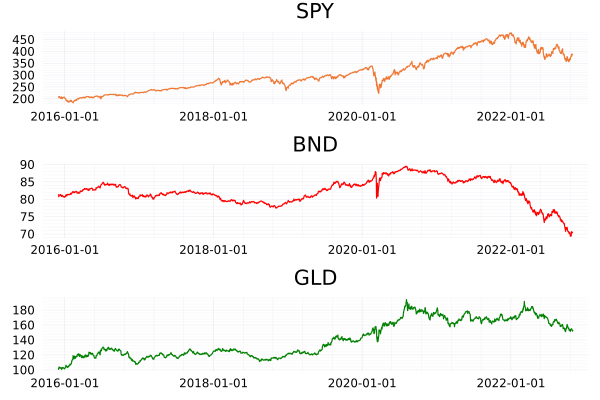
plot(plot(spy.Date, spy.c, label = :none, title = "SPY"),
plot(bnd.Date, bnd.c, label = :none, title = "BND", color = "red"),
plot(gld.Date, gld.c, label = :none, title= "GLD", color = "green"), layout = (3,1))

ETF Closing Prices

The prices of each ETF are on different scales. BND is between 70-80, GLD in the 100’s and SPY is in the 300-400 range. The scale on which they move is also different. SPY has doubled since 2016, GLD 80% increase, and BND hasn’t done much. Therefore we need to normalise both of these factors to something comparable across all three. To achieve this we first calculate the log-returns of the close-to-close move of each ETF. We then calculate the rolling standard deviation of the price series to represent the volatility which is used to normalise the log returns

\[\hat{r} = 0.1 \frac{\ln p_t – \ln p_{ti}}{\sigma}.\]

allPrices = @transform(groupby(allPrices, :Ticker), 
                      :Return = [NaN; diff(log.(:c))],
                      :ReturnTC = [NaN; diff(log.(:NextOpen))]);

We also calculate the returns of using the NextOpen time series as a way to assess the transaction costs of the trend-following strategy, but more on that later.

runvar calculates the 256-day moving variance, which we take the square root of to get the running volatility. There the normalisation step is a simple multiplication and division.

allPrices = @transform(groupby(allPrices, :Ticker), :RunVol = sqrt.(runvar(:Return,  256)));
allPrices = @transform(groupby(allPrices, :Ticker), :rhat = :Return .* 0.1 ./ :RunVol);

Dropping any NaNs removes the data points before we had enough observations for the 256-day volatility calculation and calculating the cumulative sum of the returns gives us an equity curve.

allPricesClean = @subset(allPrices, .!isnan.(:rhat ))
allPricesClean = @transform(groupby(allPricesClean, :Ticker), :rhatC = cumsum(:rhat), :rc = cumsum(:Return));

To check this transformation has worked we aggregate across each ticker.

@combine(groupby(allPricesClean, :Ticker), :AvgReturn = mean(:Return), :AvgNormReturn = mean(:rhat),
                                           :StdReturn = std(:Return), :StdNormReturn = std(:rhat))

3 rows × 5 columns

Ticker AvgReturn AvgNormReturn StdReturn StdNormReturn
String Float64 Float64 Float64 Float64
1 SPY 0.000372633 0.00343358 0.0122161 0.115383
2 BND -9.4164e-5 -0.00223913 0.00349196 0.113982
3 GLD 0.000214564 0.00288888 0.0086931 0.101731

Summarising the average and standard deviation of the return and normalised return shows the standard deviation is now close to 0.1 as intended.

This is where leverage comes in because bonds have lower volatility than stocks, we have to borrow money to increase the volatility of our bond investment. For example, let’s borrow £100 with £10 of collateral and invest the £100 in BND. If BND moves up by 1% it is now worth £101, we sell and pay back our loan and we are left with £11 which is a 10% return on our original investment. So even though the price only moved by 1% the use of leverage has amplified our return by 10x.

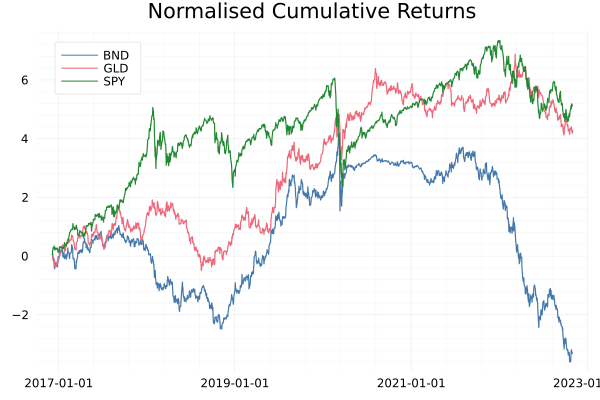
Plotting the cumulative log returns shows how they are on similar scales now.

plot(allPricesClean.Date, allPricesClean.rhatC, 
     group = allPricesClean.Ticker, legend=:topleft, title = "Normalised Cumulative Returns")

ETF Log Returns

The Trend Following Signal

With our data in a good shape, we can move on to the actual signal construction. Just like the Cantab article, we will be using the 100-day moving average. Using the RollingFunctions.jl package again we just have to set the window length to 100 and it will do the hard work for us. The actual signal is whether this running average is positive or negative. If it is greater than zero we want to go long as the signal is saying buy. Likewise, if the rolling average is less than zero then we want to go short, the signal is saying sell. So this simply means taking the sign of the rolling average each day.

If we didn’t want to go short, we just want to know when to buy or sell to cover we can simplify it further by just using the signal when it is positive. We will call this the long only signal.

Using data frame manipulation we can calculate the signal per day for each ETF.

allPricesClean = @transform(groupby(allPricesClean, :Ticker), 
                            :Signal = sign.(runmean(:rhat, 100)), 
                            :SignalLO = runmean(:rhat, 100) .> 0);

Evaluating the Trend Following Strategy

We’ve got our signal that says when to go long and short for each ETF. We need to combine the return of each ETF per day to get out the Trend Following return. As we are using log returns this is as simple as summing across the ETFs multiplied by the signal on each day. We have three ETFs so need to weight each of the returns by 1/3 otherwise when comparing to the single ETFs we would have 3x as much capital invested in the trend following strategy.

portRes = @combine(groupby(allPricesClean, :Date), 
           :TotalReturn = sum((1/3)*(:Signal .* :rhat)), 
           :TotalReturnLO = sum((1/3)*(:SignalLO .* :rhat)),
           :TotalReturnTC = sum((1/3) * (:Signal .* :ReturnTC)),
           :TotalReturnUL = sum((1/3) * (:Signal .* :Return)));

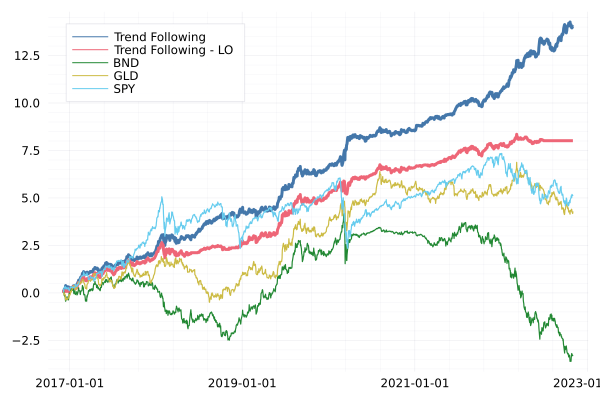
Again, plotting the cumulative returns shows that this trend-following strategy (dark blue) is great. I’ve massively outperformed just being long the SPY ETF. Even when we remove the shorting element (Trend Following – LO, red) this has done well.

portRes = @transform(portRes, :TotalReturnC = cumsum(:TotalReturn), 
                              :TotalReturnLOC = cumsum(:TotalReturnLO), 
                              :TotalReturnTCC = cumsum(:TotalReturnTC),
                              :TotalReturnULC = cumsum(:TotalReturnUL))

plot(portRes.Date, portRes.TotalReturnC, label = "Trend Following", legendposition = :topleft, linewidth=3)
plot!(portRes.Date, portRes.TotalReturnLOC, label = "Trend Following - LO", legendposition = :topleft, linewidth=3)

plot!(allPricesClean.Date, allPricesClean.rhatC, group = allPricesClean.Ticker)

Trend following results

It’s up and to the right which is a good sign. By following the trends in the market we can profit when it is both going up and down. This is without any major sophistication on predicting the direction either. Simply using the average produces enough of a signal to be profitable.

Let’s focus on just what has happened this year

portRes2022 = @transform(@subset(portRes, :Date .>= Date("2022-01-01")), 
            :TotalReturnC = cumsum(:TotalReturn), 
            :TotalReturnLOC = cumsum(:TotalReturnLO),
            :TotalReturnULC = cumsum(:TotalReturnUL))

allPricesClean2022 = @subset(allPricesClean, :Date .>= Date("2022-01-01"))
allPricesClean2022 = @transform(groupby(allPricesClean2022, :Ticker), :rhatC = cumsum(:Return))

plot(portRes2022.Date, portRes2022.TotalReturnULC, label = "Trend Following", legendposition = :topleft, linewidth = 3)
plot!(portRes2022.Date, portRes2022.TotalReturnLOC, label = "Trend Following - LO", legendposition = :topleft, linewidth =3)
plot!(allPricesClean2022.Date, allPricesClean2022.rhatC, group = allPricesClean2022.Ticker)

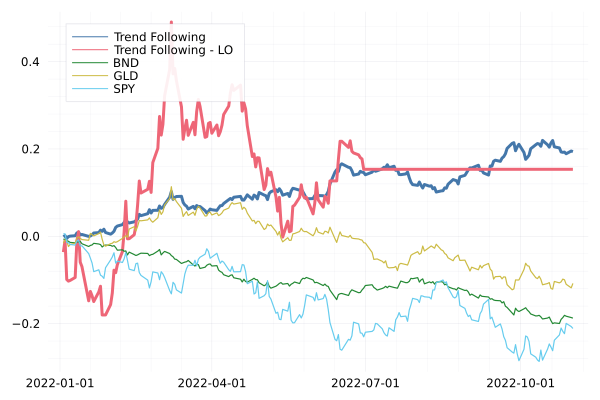
2022 Trend Following Results

The long-only (red line) staying flat is indicating that we’ve been out of the market since July. The trend-following strategy has been helped by the fact that it is all one-way traffic in the markets at the minute. It’s just been heading lower and lower across all the asset classes since the summer.

Implementation Shortfall and Thinking Practically

Everything above looks like a decent trend-following approach. But how do we implement this, or simulate an implementation? By this, I mean obtaining the trades that should be made.

The mechanics of this strategy are simple:

  1. Calculate the close-to-close return of an ETF
  2. If it is above the 100-day moving average buy, if it’s below sell or go short.

The price we can trade at though is not the close price, markets are closed, and you can’t place any more orders! Instead, you will be buying at the open on the next day. So whilst our signal has triggered, our actual price is different from the theoretical price.

Sidenote, it is possible to trade after hours, and in the small size, you might be able to get close to the closing price.

Given this is retail and the sizes are so small, we are going to assume I get the next day’s open price. We can compare our purchase price to the model price. The difference between the two is called ‘Implementation Shortfall’ and measures how close you traded relative to the actual price you wanted to trade.

If we are buying higher than the model price (or selling lower) we are missing out on some of the moves and it’s going to eat the performance of the strategy.

To calculate this Implementation Shortfall (IS) we pull out the days where the signal changed, as this indicates a trade needs to be made.

allPricesClean = @transform(groupby(allPricesClean, :Ticker), :SigChange = [NaN; diff(:Signal)])

trades = @subset(allPricesClean[!, [:Date, :Ticker, :o, :c, :Signal, :NextOpen, :SigChange]], 
             :SigChange .!= 0);

Then by calculating the difference between the next open and closing price we have our estimation of the IS value.

@combine(groupby(trades, :Ticker), 
        :N = length(:Signal), 
        :IS = mean(:Signal .* 1e4 .* (:NextOpen .- :c) ./ :c))

3 rows × 3 columns

Ticker N IS
String Int64 Float64
1 SPY 40 14.7934
2 BND 69 -6.45196
3 GLD 61 10.4055

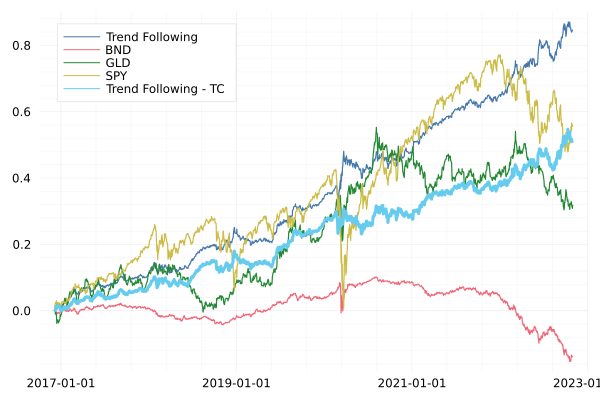
For both SPY and GLD we have lost 15bps and 10bps to this difference between the close and the next open. For BND though we actually would earn more than the close price, again, this is down to the one-way direction of bonds this year. But overall, implementation shortfall is a big drag on returns. We can plot the equity curve including this transaction cost.

plot(portRes.Date, portRes.TotalReturnULC, label = "Trend Following", legendposition = :topleft)
plot!(allPricesClean.Date, allPricesClean.rc, group = allPricesClean.Ticker)
plot!(portRes.Date, portRes.TotalReturnTCC, label = "Trend Following - TC", legendposition = :topleft, linewidth = 3)

Equity Curve with Transaction Costs

What’s the old saying:

“In theory there is no difference between theory and practice – in practice there is” (Yogi Berra)

Implementation shortfall is just one transaction cost. There are also actual physical costs to consider too:

  • Brokerage costs
  • Borrow fees
  • Capacity

Let’s start with the simple transaction costs. Each time you buy or sell you are probably paying some sort of small fee. At Interactive Brokers, it is $0.005 with a minimum of $1. So if you trade $100 of one of the ETFs you will be paying 1\% in feeds. You could get rid of this fee completely with a free broker like Robinhood which is one way to keep the costs down.

This model requires you to go short the different ETFs, so you will also need to pay borrow fees to whoever you borrow the ETF from. This is free for up to $100k in Interactive Brokers, so not a concern for the low-capacity retail trader. You can’t short sell on Robinhood directly, instead, you’ll have to use options or inverse ETFs which is just complicating matters and overall not going to bring costs down.

All these fees mean there is both a minimum amount and a maximum amount that you can implement this model with. If you have too small of a budget your returns will just be eaten up by transaction costs. If you have a large amount of money, the implementation shortfall hurts. This is what we mean by capacity.

Next Steps in Trend Following

The above implementation is the most basic possible trend following. It only uses three assets when there is a whole world of other ETFs out there. It has a simple signal (running average) and uses that to either allocate 100% long or 100% short. There are several ways in which you can go further to make this better.

  • Expand the asset universe.

Including more ETFs and ones that are uncorrelated to SPY, BND and GLD gives you a broader opportunity to go long or short. I would look at including some sort of commodity, real estate, and international equity component as the next ETFs.

  • A better trend signal.

The simple moving average is great as there are no moving parts, but nothing is stopping it from being expanded to a more sophisticated model. Including another moving average with a faster period, say 5 days, and then checking as to whether this faster average is higher or lower than the slow average is also commonly used.

  • Better asset allocation using the signal

The current signal says {-1, 1} and no in-between. This can lead to some volatile behaviour where the signal might be hovering around 0 and leading to going long and short quickly around multiple days. Instead, you should map the signal strength onto a target position with some sort of function. This could mean waiting for the signal to get strong enough before trading and then linearly adding to the position until you max out the allocation.

Conclusion

Trend following is a profitable strategy. We’ve shown that using a simple rolling average of the returns can produce a profitable signal. When scrutinising it a bit further we find that it is difficult to achieve these types of returns in practise. The overnight price movements in the ETFs means that we trade at a worse price. This combined with the general transaction costs of making the trades makes it a hard strategy to implement and to rely on another quote, there is no such thing as a free lunch, you have to put in a remarkable amount of effort to scale this kind of strategy up. We then highlight several ways you could take this research further. So you now have everything at your fingertips to explore Trend Following yourself. Let me know anything I’ve missed in the comments below.