Author Archives: Dean Markwick's Blog -- Julia

Easy Neural Nets and Finance – Part 1

By: Dean Markwick's Blog -- Julia

Re-posted from: https://dm13450.github.io/2025/07/23/Easy-Neural-Nets-and-Finance-Part-1.html

I’m fortunate enough to be participating in a lecture series at work that covers deep learning and its applications in finance. This will be a series of posts documenting what I learn and implementing the ‘homework’ (I’m 32, how am I still getting homework?) using Julia and Flux.


Enjoy these types of posts? Then you should sign up for my newsletter.


The phrase ‘deep learning’ already feels outdated, and the current hotness is more about AI and LLMs, so the lecture and topics might feel a bit out of date. But given LLMs wouldn’t be here without the deep learning, it feels like going back to the basics.

Plus, I’ve never really jumped in and explored neural nets, so this gives me a chance to do some deep learning in an applied way.

After reading this, you will be able to build your own neural net with different layers and compare it to a simpler linear model.

Predicting a Stock’s Daily Volume

If you Google neural nets and finance, you will find an infinite amount of copy-pasted quant finance Python examples of people using PyTorch/TensorFlow/JAX to predict the closing price of some stock. Kudos to these tutorials for putting something out there, but you will struggle to learn anything meaningful about either finance, modelling or neural nets.

This is my attempt to be different.

Instead of predicting prices or returns and showing that neural nets can make money, we will model the total number of shares traded per day. For starters, this is much easier as the data is a bit more signal and less noise. Plus, if I managed to build something that could predict prices, why would I share it?

So, we will be using deep learning to build a model of the total trading volume per day of the SPY ETF. A basic time series prediction task that can be approached both with linear models and deep learning.

You know the drill, fire up your Julia notebook and follow along.

using Dates, AlpacaMarkets, Plots, StatsBase
using DataFramesMeta, ShiftedArrays

Getting the Data

We are using similar data to my Cyclical Embedding post, except for this time, we will be using the SPY ETF instead of Apple.

spyRaw, npt = AlpacaMarkets.stock_bars("SPY", "1Day"; 
  startTime=Date("2000-01-01"), 
  endTime = today() - Day(1) ,
  adjustment = "all", limit = 10000)

From the raw data, we parse the timestamp and scale the volumes by a million.

spy = spyRaw[:, [:t, :v, :c]]
spy[!, "t"] = DateTime.(chop.(spy[!, "t"]));
spy[:, :vNorm] = spy[:, :v] .* 1e-6;

We also add in the returns with a lag because we are using the close-to-close return as a feature.

spy[!, "r"] = log.(spy.c) .- ShiftedArrays.lag(log.(spy.c))
spy[!, "prev_r"] = ShiftedArrays.lag(spy.r);

In this data, the daily volume isn’t stationary and it is also heavy-tailed.

plot(
  plot(spy.t, spy.vNorm, label = "IEX Daily Volume"),
  histogram(spy.vNorm, label = "Daily Volume Distribution")
  )

![Line chart showing daily trading volume for SPY ETF over time. The chart displays a fluctuating pattern with several peaks and troughs, illustrating periods of higher and lower trading activity.]{/assets/deeplearning/part1/volumes.png}

Looking at the autocorrelation, we can see a long-range dependence on the daily volumes, but when we take the daily difference in daily volume, we see a strong effect at lag 1, and the rest are much smaller.

![Bar chart displaying autocorrelation of daily trading volume for SPY ETF across multiple lags. The chart shows a prominent negative bar at lag 1, indicating strong mean reversion, followed by smaller bars for subsequent lags.]{/assets/deeplearning/part1/volumes_autocor.png}

A negative value at lag 1 indicates a mean reversion-like process, but more importantly, means modelling the difference in daily volume will be easier than just directly modelling the daily volumes.

Predicting the daily change in volume does reduce how far out we can forecast volumes, though, as it relies on using the known previous volume to produce the next day’s volume. If you estimate multiple days, then you will be compounding the error.

We lag the volume variables as required.

spy[:, :prev_vNorm] = ShiftedArrays.lag(spy[:, :vNorm])
spy[:, :delta_vNorm] = spy[:, :vNorm] .- spy[:, :prev_vNorm]
spy[:, :prev_delta_vNorm] = ShiftedArrays.lag(spy[:, :delta_vNorm])

spy = dropmissing(spy)

We add in the time-based variables and cyclically encode them.

spy[:, :DayOfMonth] = dayofmonth.(spy.t) .- 1
spy[:, :DayOfWeek] = dayofweek.(spy.t) .- 1
spy[:, :DayOfQtr] = dayofquarter.(spy.t) .- 1
spy[:, :MonthOfYear] = month.(spy.t) .- 1

spy = cyclical_encode(spy, "DayOfWeek")
spy = cyclical_encode(spy, "DayOfMonth")
spy = cyclical_encode(spy, "DayOfQtr")
spy = cyclical_encode(spy, "MonthOfYear");

We also add in if the date was the end of the month.

spy[:, :month] = floor.(spy.t, Dates.Month)
spy = @transform(groupby(spy, :month), 
                 :MonthEnd = (:t .== maximum(:t)))

Finally, train/test split.

spyTrain = spy[1:2000, :];
spyTest = spy[2001:end, :];

With the data prepared, we move on to building out the models.

The Baseline Model

We always want to make sure the neural nets are adding value, so we need something simple to compare to. In regular statistical modelling, this might be an intercept-only model, but in this case, we want the best linear model.

It’s a simple linear regression of all the available variables.

using GLM

linearModel = lm(@formula(delta_vNorm ~ prev_delta_vNorm + prev_vNorm + 
                                        MonthEnd + prev_r +
                                        DayOfWeek_sin + DayOfWeek_cos + 
                                        DayOfMonth_sin + DayOfMonth_cos +
                                        DayOfQtr_sin + DayOfQtr_cos +
                                        MonthOfYear_sin + MonthOfYear_cos
                        ), spyTrain)

This fits instantly and we get an in-sample \(R^2\) of 23% and an out-of-sample MSE of 380.

To add the predicted volume to the test set, we need to add the prediction of the model to the previous volume.

spyTest[!, "linearPred"] = spyTest.prev_vNorm .+ predict(linearModel, spyTest);
sort!(spyTest, :t);

Line chart comparing predicted and actual daily trading volumes for SPY ETF over time.

Everything lines up quite nicely. There are a couple of periods where the volume spikes and the model can’t keep up, but other than that, it looks decent.

Also interesting to look at the shape of the cyclically encoded variables.

Line plot showing the effect of cyclically encoded variables on predicted daily trading volume changes for SPY ETF. The chart displays four panels for day of the week, day of the month, day of the quarter, and month of the year, each with a smooth curve illustrating how each time-based feature influences the model output.

Plenty going on here!

  • Day of the Week – Wednesdays and Thursdays have a larger positive effect than Mondays and Tuesdays.
  • Day of the Month – The middle of the month (10-15) has the higher positive effect.
  • Day of the Quarter – Larger positive effects towards the end of the quarter.
  • Month of the Year – Summer months have the most negative effect.

A positive effect here means a larger positive change in the daily volume compared to the previous day, and similarly, the same with the negative effects.

So, an intuitive model to begin with that has produced a strong foundation to improve upon with the neural net models.

Neural Nets in Julia

Let’s increase the model complexity and introduce the neural nets. We are still using the same variables, but we expand them to include even more lags of the change in volumes.

Preparing the Data for a Neural Network

We start with the dataframe, but iterate through and add the 30 lags of the previous volume changes.

rawData = spy[:, [:t, :delta_vNorm, :prev_vNorm, :MonthEnd, :prev_r,
                      :DayOfWeek_sin, :DayOfWeek_cos,
                      :DayOfMonth_sin, :DayOfMonth_cos,
                      :DayOfQtr_sin, :DayOfQtr_cos,
                      :MonthOfYear_sin, :MonthOfYear_cos]]

maxLag = 30
for i in 1:maxLag
    rawData[:, Symbol("lag_$(i)_delta_vNorm")] = ShiftedArrays.lag(rawData.delta_vNorm, i)
end

dropmissing!(rawData)

We then need to go from dataframes to matrices and flip the dimensions so each column is an observation rather than each row.

y = permutedims(rawData.delta_vNorm)
ts = rawData.t
x = @select(rawData, Not(:delta_vNorm, :t))
x = permutedims(Matrix(x));

Again, train/test split too.

xTrain = x[:, 1:2000]
yTrain = y[:, 1:2000]
tsTrain = ts[1:2000]

xTest = x[:, 2001:end]
yTest = y[:, 2001:end]
tsTest = ts[2001:end];

Flux.jl is Julia’s neural network library and the go-to for deep learning in Julia. It provides all the tools to build and train these types of models. One such tool is the DataLoader, which enables batch training for models. Batch training uses random subsets of the full data to train the model, which is very useful if you have too much data to fit into memory. You get to train the model on all your data by breaking it down into chunks.

Now, in this specific case, it isn’t needed as our data is small, but it’s always good to understand the techniques, and Flux makes it very simple. Pass in the x and y matrices, define the batch size and whether you want to randomise the samples or not.

Here we build random batches of 5.

train_loader = Flux.DataLoader((x, y), batchsize=5, shuffle=true);

Next, we need to build the model. In Flux, each layer of the basic net needs the number of input nodes and output nodes.

flux_model = Dense(size(x, 1), 1)

Simply taking the number of rows of the x matrix as the input, and we are outputting 1 number – the expected change in volume for that day.

We also need to define a loss function for the model. We will use the mean square error (MSE). We predict the values from the model and calculate the MSE compared to the true values.

function flux_loss(flux_model, x, y)
    yhat = flux_model(x)
    Flux.mse(yhat, y)
end

A neural net has several parameters that we need to optimise using the training data. With each batch of data, we evaluate the loss function and use the gradient of the loss function to push the parameters in the right direction to minimise the loss. The mechanics of moving around the loss function are controlled by the optimiser. In this case, we will use regular gradient descent, but there are many different optimisers out there that Flux provides – Optimiser Reference.

Again, Flux makes this easy to do out of the box without really needing to understand what’s happening behind the scenes. We provide a gradient descent optimiser, Flux.setup(Descent(eta)), flux_model) (with eta (\(\eta\)) being the learning rate) and update the parameters after each batch of data.

l, gs = Flux.withgradient(m -> flux_loss(m, x, y),flux_model)
Flux.update!(opt_state, flux_model, gs[1])

After all that, we throw everything into one function to easily iterate around the models. We are batch training with gradient descent and returning the trained model plus the loss history on both the full training set and the test set.

function train(train, test, flux_model, flux_loss; batchSize=1024, epochs=10, eta=0.01)
    (xTrain, yTrain) = train
    (xTest, yTest) = test
    
    train_loader = Flux.DataLoader((xTrain, yTrain), batchsize=batchSize, shuffle=true);
    opt_state = Flux.setup(Descent(eta), flux_model);
        
    allTrainLoss = zeros(epochs)
    allTestLoss = zeros(epochs)
    
    for epoch in 1:epochs
        loss = 0.0
        for (x, y) in train_loader
            l, gs = Flux.withgradient(m -> flux_loss(m, x, y), flux_model)
            Flux.update!(opt_state, flux_model, gs[1])
            loss += l / length(train_loader)
        end
        train_loss = flux_loss(flux_model, xTrain, yTrain)
        test_loss = flux_loss(flux_model, xTest, yTest)
        allTrainLoss[epoch] = train_loss
        allTestLoss[epoch] = test_loss
        
    end
    return (flux_model, allTrainLoss, allTestLoss)
end

We can now train the models, so let’s build some models!

A 1 Layer Neural Net

The simplest neural net is 1 layer with the features as an input and 1 value as the output. Nothing else!

flux_model = Dense(size(x, 1), 1)
flux_model, allTrainLoss, allTestLoss = train((xTrain, yTrain), (xTest, yTest), flux_model, flux_loss; epochs = 1000, eta=1e-6);

Line chart showing the training loss over epochs for a one-layer neural network model predicting daily trading volume changes. The chart displays a downward trend, indicating that the model loss decreases as training progresses.

You might notice something strange here: the test loss is smaller than the training loss. This is a quirk of this data set; the test set has a tighter distribution than the training data, which is easy to see in a histogram.

Histogram comparing the distribution of daily trading volume changes for SPY ETF in the training and test datasets. The training set shows a wider spread and more extreme values, while the test set is more tightly clustered around the center. The chart highlights the difference in variability between the two datasets.

Like I said, it’s a quirk of the dataset, but something to bear in mind for the rest of the examples.

Let’s look at the predicted values of this first neural net and how they line up with reality. Plus, we can compare it to the linear model. For the linear model, you just need to run predict and pass in the test dataset. Similarly, with the neural net, we evaluate the trained model on the testing matrix.

nnTest = DataFrame(t=tsTest, delta_vNorm_nn = vec(flux_model(xTest)'))
spyTest.delta_vNorm_lin = predict(linearModel, spyTest)
spyTest = leftjoin(spyTest, nnTest, on = :t);

As we are predicting the change in the daily volume, we need to add back in the previous value to get our predicted daily volume.

spyTest = @transform(spyTest, :v_nn = :prev_vNorm .+ :delta_vNorm_nn, :v_lin = :prev_vNorm + :delta_vNorm_lin);
sort!(spyTest, :t);

And then plotting

p = plot(spyTest.t, spyTest.vNorm, label = "True",  dpi=300, background_color = :transparent)
p = plot!(p, spyTest.t, spyTest.v_nn, label = "NN")
p = plot!(p, spyTest.t, spyTest.v_lin, label = "Linear")
p

Line chart comparing predicted and actual daily trading volumes for SPY ETF over time. The chart shows three lines: one representing true daily volumes, another representing neural network predictions and another showing the linear model predictions. All the lines follow a similar pattern.

Things line up quite well, nothing outrageous.

In terms of performance, we calculate the MSE from the dataframe.

@combine(dropmissing(spyTest), 
          :NN = mean((:vNorm .- :v_nn).^2), 
          :Lin = mean((:vNorm .- :v_lin).^2))
NN Lin
405.55 370.57

The linear model is doing better so far.

2 Layer Neural Nets

We are now in the realm of multi-layer perceptrons (MLPs) and have introduced many more parameters into the model. We can also now build more complicated interactions with each layer.

In Flux, building out more layers is simple; you are chaining different dense layers together. We are choosing to have a fully connected MLP with 2 layers, with all the variables passed through.

flux_model2 = Flux.Chain(Dense(size(x, 1), size(x, 1)), Dense(size(x, 1), 1))

flux_model2, allTrainLoss, allTestLoss = train((xTrain, yTrain), (xTest, yTest), flux_model2, flux_loss; epochs = 1000, eta = 1e-6);

This trains in the same amount of time with the same train/test loss pattern. Again, assessing the MSE of this bigger model.

nnhTest = DataFrame(t=tsTest, delta_vNorm_nnh = vec(flux_model2(xTest)'))
spyTest = leftjoin(spyTest, nnhTest, on = :t);

spyTest = @transform(spyTest, :v_nnh = :prev_vNorm .+ :delta_vNorm_nnh)
@combine(dropmissing(spyTest), :NN = mean((:vNorm .- :v_nn).^2), 
                               :Lin = mean((:vNorm .- :v_lin).^2),
                               :NNH = mean((:vNorm .- :v_nnh).^2))
NN Lin NNH
405.55 370.57 401.424

This has improved on the 1-layer neural net, but still no better than the linear model.

Neural Net Regularisation

The linear model has 13 parameters, the 1-layer neural net has 42 parameters, and the 2-layer net has 1,764 parameters. This is a rapid growth in complexity which raises the likelihood that the model starts to overfit. How do we make sure the neural net models only pick out the key parameters and regularise themselves?

We have two options: add a penalisation score in the loss function that bounds the total size of the coefficients or introduce something called a dropout layer.

Penalising the Loss Function

You can extend regularisation into neural networks the same way you do linear models. You add an additional term to the loss function that penalises the total combined size of the coefficients.

function flux_loss_reg(flux_model, x, y)
    flux_loss(flux_model, x, y) + sum(x->sum(abs2, x), Flux.trainables(flux_model))
end

Therefore, if the model wants to allocate more weight to 1 parameter, it needs to take some weight from another. This acts as a balancing mechanism and should reduce the chance of overfitting.

We use this new loss function with the 2-layer net.

flux_model = Flux.Chain(Dense(size(x, 1), size(x, 1)), Dense(size(x, 1), 1))
flux_model, allTrainLoss, allTestLoss = train((xTrain, yTrain), (xTest, yTest), flux_model, flux_loss_reg; epochs = 1000, eta = 1e-6);
NN Lin NNH NNHR
405.55 370.57 401.424 388.548

So slightly better than the unregularised version.

Neural Net Dropout Layers

An alternative way of regularising a network is to introduce a dropout layer. Dropout randomly sets the output of a node to zero during the training phase, which means the net has fewer parameters to optimise over and reduces the possibility of overfitting. When it comes to inference, all of the nodes are included but rescaled by the dropout probability. The original dropout paper is an engaging read – Dropout: A Simple Way to Prevent Neural Networks from Overfitting.

Again, very simple to use dropout in Julia and Flux; it is just another type of layer.

flux_model3 = Flux.Chain(Dense(size(x, 1), size(x, 1)), Dropout(0.5), Dense(size(x, 1), 1))

flux_model3, allTrainLoss, allTestLoss = train((xTrain, yTrain), (xTest, yTest), flux_model3, flux_loss; epochs = 250, eta = 1e-6);

For the final time, let’s evaluate this model on the test set and calculate the MSE.

nndTest = DataFrame(t=tsTest, delta_vNorm_nnd = vec(flux_model3(xTest)'))
spyTest = leftjoin(spyTest, nndTest, on = :t);

spyTest = @transform(spyTest, :v_nnd = :prev_vNorm .+ :delta_vNorm_nnd)
@combine(dropmissing(spyTest), :NN = mean((:vNorm .- :v_nn).^2), 
                               :Lin = mean((:vNorm .- :v_lin).^2),
                               :NNH = mean((:vNorm .- :v_nnh).^2),
                               :NND = mean((:vNorm .- :v_nnd).^2))
NN Lin NNH NNHR NNHD
405.55 370.57 401.424 388.548 411.105

The worst model so far!

Conclusion

So the linear model is still winning. The neural net and various iterations haven’t improved on this simple model, and the best neural net was the 2-layer with regularisation.

It must be noted that this problem isn’t exactly hard, and the amount of data is relatively small, so it is unsurprising that the added complexity of the neural nets hasn’t added anything. It’s hardly a ‘deep learning’ problem!

I’ve also not gone crazy with the neural net optimisations. You can include more layers, change the number of nodes in the layers, change the activation functions, and change the loss function – all sorts of things that could be tweaked and improve the model.

Hopefully I’ve not just added to the slop of neural net finance tutorials and you’ve found something useful. Unfortunately, the neural nets haven’t beaten the linear model, which shows you can’t just jump into the fancy tools without looking at the simpler models.

Other Julia/Finance Posts

For more quant finance tutorials check out some of my older posts.
Cyclical Embedding

By: Dean Markwick's Blog -- Julia

Re-posted from: https://dm13450.github.io/2025/06/16/Cyclical-Embedding.html

Cyclical embeding (or encoding) is a basic transformation for nunmerical variables that follow a cycle. Let’s explore how they work.

I am currently attending a Deep Learning in Finance lecture series (lectured by Stefan Zohran in preparation for his new book). The ongoing homework is taking a basic time series model and applying the various deep learning techniques. In the process of doing this homework, I’ve come across Cyclical Embeddings and how they are used to transform variables that move into a cycle into something a model can understand.

Consider this blog post me reading this Kaggle notebook: Encoding Cyclical Features for Deep Learning, converting it to Julia and using some examples to convince myself Cyclical Embeddings work and are useful.


Enjoy these types of posts? Then you should sign up for my newsletter.


Cyclical variables are especially pertinent in Finance. For example, day of the week you could either use a factor (the label directly) or number (Mon=1, Tue=2 etc.) in a model. Using a factor, your model now includes 5 additional parameters. If you use the number you’ll have to specify the form of the relationship (linear or using a GAM). Each has its ups and downs, but there is also a key piece of information missing: the days of the week form a cycle where 1 follows from 5. How can we translate this into something the model will understand?

As the name suggests, cyclical embeddings lead to a cycle and the natural functions are the trigonometry sin and cos. We take the one-dimensional variable and transform it into two dimensions

\[\begin{align*}
x & = \sin \left( \frac{2 \pi t}{\text{max} (t)} \right), \\
y & = \cos \left( \frac{2 \pi t}{\text{max} (t)} \right).
\end{align*}\]

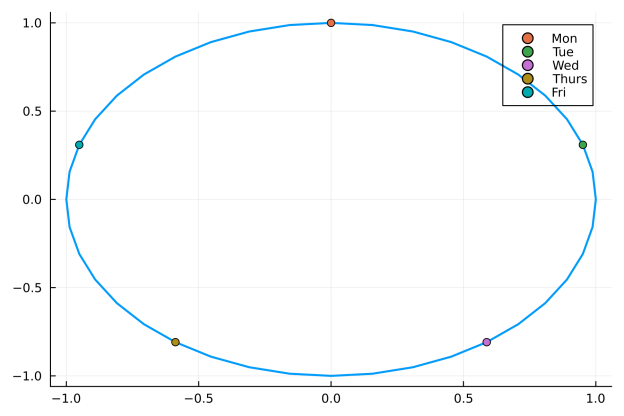
If we apply this transformation to our day of the week we go from \(t \in [0, 4]\) to a circle in \(x\) and \(y\).

A two-dimensional plot showing the cyclical embedding of days of the week, where each day is represented as a point on a circle using sine and cosine transformations. The points form a closed loop, visually demonstrating the cyclical nature of the days.

I am reminded of polar coordinates and we can now see that Monday is the same distance from Friday as it is Tuesday.
Crucially, the new variables are nicely bounded between -1 and 1 which is always helpful when building models.
All in, this looks like a sensible transformation, now to see if it has a noticeable difference in modelling performance.

Practical Cyclical Embeddings – Daily Volumes

Let’s model the daily trading volume of a stock. It feels logical that the day of the week (Mon-Fri), day of the month (1-31) and month (1-12) would affect the amount traded. The summer months might be quieter, the end of the month might be busier (month-end rebalancing) and Fridays might be quieter. All three of these time variables are cyclical so the cyclical embeddings should help.

We have 3 separate choices:

  1. Everything as a number (3 free parameters)
  2. Days of the week and months as factors (5 + 12 + 1 free parameters)
  3. Cyclically embedded the three variables (3×2=6 parameters)

So a balance between the number of parameters and the flexibility of the model.

We will use a simple linear model, nothing fancy.

As always we will be in Julia.

using Dates, AlpacaMarkets, Plots, StatsBase, GLM
using DataFramesMeta, CategoricalArrays, ShiftedArrays

To load the data in we will use my AlpacaMarkets.jl API and pull in as much daily data as possible.

aaplRaw, npt = AlpacaMarkets.stock_bars("AAPL", "1Day"; startTime=Date("2000-01-01"), endTime = today() - Day(2), adjustment = "all", limit = 10000)

Some basic cleaning and formatting.

aapl = aaplRaw[:, [:t, :v]]
aapl[!, "t"] = DateTime.(chop.(aapl[!, "t"]))

Julia makes it easy to add the factor variables and the numeric versions. As the numeric values all start at 1 we subtract one so they begin at 0.

aapl[:, :DayName] = CategoricalArray(dayname.(aapl.t))
aapl[:, :MonthName] = CategoricalArray(monthname.(aapl.t))

aapl[:, :DayOfMonth] = dayofmonth.(aapl.t) .- 1
aapl[:, :DayOfWeek] = dayofweek.(aapl.t) .- 1
aapl[:, :MonthOfYear] = month.(aapl.t) .- 1;

We normalise the volume to millions of shares and take the difference.

aapl = aaplRaw[:, [:t, :v]]
aapl[:, :vNorm] = aapl[:, :v] .* 1e-6;
aapl[:, :delta_vNorm] = aapl[:, :vNorm] .- ShiftedArrays.lag(aapl[:, :vNorm]);

As the regular volumes (vNorm) aren’t stationary, we can see a clear trend that changes, it’s better to model the difference in volumes each day.

plot(plot(aapl.t, aapl.vNorm, title = "Volume", label = :none), 
     plot(aapl.t, aapl.delta_vNorm, title = "Volume Difference", label = :none), layout=(2,1))

Two line plots showing daily trading volumes for AAPL over time. The first plot displays significant fluctuations and trends, with periods of higher and lower trading activity. The second plot is the difference in trading volumes between the days and doesn't have a trend.

To apply the cyclical encoding we need to take one column and turn it into two.

function cyclical_encode(df, col, max)
    df[:, Symbol("$(col)_sin")] = sin.(2 .* pi .* df[:, Symbol(col)]/max)
    df[:, Symbol("$(col)_cos")] = cos.(2 .* pi .* df[:, Symbol(col)]/max)
    df
end

for col in ["DayOfWeek", "DayOfMonth", "MonthOfYear"]
    aapl = cyclical_encode(aapl, col, maximum(aapl[:, col]))
end

If you’ve not seen it before the $ is like Python F-strings and lets you use a variable in the string.

We do the normal test/train split.

aaplTrain = aapl[1:2000,:]
aaplTest = aapl[2001:end,:];

Now to build the three models.

The numerical model takes in the numbers directly.

numModel = lm(@formula(delta_vNorm ~ DayOfWeek + MonthOfYear + DayOfMonth), aaplTrain)

The factor model represents the day of the week and day of the month as categories so they each get a separate parameter.

factorModel = lm(@formula(delta_vNorm ~ DayName + MonthName + DayOfMonth + 0), aaplTrain)

The embedding model takes in the sin/cos transformation of each of the variables.

embeddingModel = lm(@formula(delta_vNorm ~ DayOfWeek_sin + DayOfWeek_cos + DayOfMonth_sin + DayOfMonth_cos + MonthOfYear_sin + MonthOfYear_cos), aaplTrain);

To assess how well the models perform we look at the RMSE (in sample and out of sample), AIC (in sample) and \(R^2\) (in sample and out of sample).

Model NumCoefs RMSE RMSEOOS AIC R2 R2OOS
Numeric 4 31.1041 50.2975 21346.9 0.0336539 0.0396665
Factor 17 31.2978 50.0453 21352.8 0.0433269 0.0276647
Embedding 7 31.7484 51.1591 21420.8 0.0002655 -0.000531

Interestingly, the embedding model performs the worst both in sample and out of sample.

When we pull out the Day of the Week effect it’s easy to see what the model has learnt.

params = Dict(zip(coefnames(embedingExample), coef(embedingExample)))

x = 0:0.1:4
ySin = params["DayOfWeek_sin"] * sin.(2 .* pi .* x ./ maximum(x))
yCos = params["DayOfWeek_cos"] * cos.(2 .* pi .* x ./ maximum(x))


p = plot(x, ySin, label = "Sin")
plot!(p, x, yCos, label = "Cos")
plot!(p, x, yCos .+ ySin, label = "Combined")

Circular plot illustrating the cyclical embedding of days of the week effect from the model.

This indicates the lower volume changes are on Tuesday and the higher volume changes are on Thursday.

Based on the model performance it’s not a great showing for the embedding transformation. Let’s move on to another example where the cyclical nature might be more obvious.

Practical Cyclical Embeddings – Intraday Volumes

Another example would be the flow of trades over the day. In this case, the hour is the variable we will cyclically embed. For this, we use BTCUSD trades from AlpacaMarkets.jl and aggregate them over the day.

btcRaw, token = AlpacaMarkets.crypto_bars("BTC/USD", "1H"; startTime=Date("2025-01-01"), limit = 10000)

res = [btcRaw]
while !(isnothing(token) || isempty(token))
    println(token)
    newtrades, token = AlpacaMarkets.crypto_bars("BTC/USD", "1H"; startTime=Date("2025-01-01"), limit = 10000, page_token = token)
    println((minimum(newtrades.t), maximum(newtrades.t)))
    append!(res, [newtrades])
    sleep(AlpacaMarkets.SLEEP_TIME[])
end
res = vcat(res...);

Sidenote, I do need to wrap this functionality into the package itself.

We get the raw data into a suitable state.

btc = res[:, [:t, :v]]
btc[!, "t"] = DateTime.(chop.(btc[!, "t"]));

btc = @transform(btc, :Date = Date.(:t), :Time = Time.(:t), :DayOfWeek = dayofweek.(:t), :Hour = hour.(:t))
trainDates = unique(btc.Date)[1:140]
testDates = setdiff(unique(btc.Date), trainDates)

trainDataRaw = btc[findall(in(trainDates), btc.Date), :];
testDataRaw = btc[findall(in(testDates), btc.Date), :];

trainData = @combine(groupby(trainDataRaw, [:Hour]), :v = sum(:v))
trainData = @transform(trainData, :total_v = sum(:v), :frac = :v./sum(:v))

testData = @combine(groupby(testDataRaw, [:Hour]), :v = sum(:v))
testData = @transform(testData, :total_v = sum(:v), :frac = :v./sum(:v))

sort!(trainData, :Hour);
sort!(testData, :Hour);

Again, using a linear model we fit the embedded hour variables to the fraction of the volume traded per hour.

embedModelIntra = lm(@formula(frac ~ Hour_sin + Hour_cos), trainData)

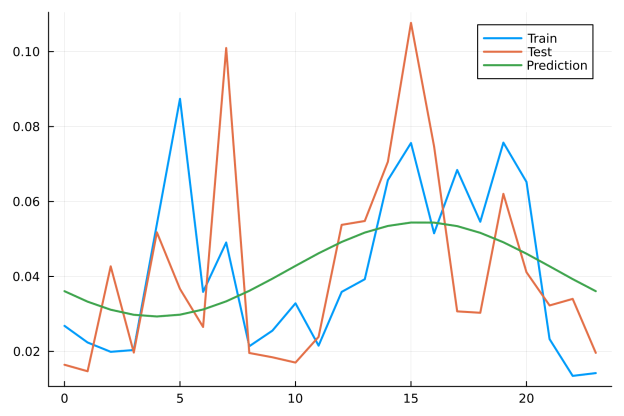
When comparing the results, we are now just looking at the intraday profile of the trades for both the train set and test set overlaid with the model.

Line plot comparing actual and predicted intraday trading volume fractions by hour. The plot shows three lines: one representing the observed fraction of trading volume for each hour of the day from the training set, another from the test set and another representing the model's predicted values using cyclical embedding.

The model has done well to pick up the peak in the afternoon but has missed the peak in the early morning. The RMSE of this model is 0.029 vs 0.026 from using the training fractions directly, so again the encoded model has done worse.
This is the limiting factor with this embedding, we have a single frequency of sin/cos when in reality this problem needs more degrees of freedom, i.e. multiple components

\[\sum _i c^1_i \sin \left(\frac{2 \pi \omega _i x}{\max (x)}\right) + c^2_i \cos \left(\frac{2 \pi \omega _i x}{\max (x)}\right).\]

This is now a GAM with trigomonic splines so we can view the cyclical encoding as a 1-spline GAM.

Conclusion

It’s an interesting transformation of time-like variables and gives you a route to smoothing out the beginning and ending of the cycles.

In these toy models, the embedding hasn’t improved performance but it’s possible that it’s more relevant in deep learning architectures where there are more parameters and more interactions. In all the above models there’s much more groundwork to do before we start eeking out performance gains from the time variables.

Fitting Price Impact Models

By: Dean Markwick's Blog -- Julia

Re-posted from: https://dm13450.github.io/2025/03/14/Fitting-Price-Impact-Models.html

A big part of market microstructure is price impact and understanding how you move the market every time you trade. In the simplest sense, every trade upends the supply and demand of an asset even for a tiny amount of time. The market responds to this change, then responds to the response, then responds to that response, etc. You get the idea. It’s a cascading effect of interactions between all the people in the market.


Enjoy these types of posts? Then you should sign up for my newsletter.


Price impact is happening both at the micro and macro level. At the micro level each trade moves the market a little bit based on the instantaneous market conditions commonly called ‘liquidity’. At the macro level, continuous trades in one direction have a compounding and overlapping effect. In reality, you can’t separate out either effect so the market impact models need to work for both small and large scales.

This post is inspired by two sources:

  1. Handbook of Price Impact Modelling – Chapter 7
  2. Stochastic Liquidity as a Proxy for Nonlinear Price Impact

Both cover very similar models but one is a fairly expensive
book and the other is on SSRN for free. The same author is involved in
both of them too.

In terms of data, there are two routes you can go down.

  1. You have your own, private, execution data and can build out a data set for the models.
  2. You use publicly available trades and adjust the models to account for the anonymous data.

In the first case, you will know when an execution started and stopped so can record how the price changed. In the second case, the data will be made up of lots of trades and less obvious when some parent execution started and stopped.

We will take the 2nd route and using Bitcoin data to look at different price impact models.

As ever I will be using Julia with some of the standard packages.

using LibPQ
using DataFrames, DataFramesMeta
using Dates
using Plots
using GLM, Statistics, Optim

Bitcoin Price Impact Data

We will use my old trusty Bitcoin data set that I collected
in 2021. It’s just over a day’s worth of Bitcoin trades and L1 prices
that I piped into QuestDB. Full detail in Using QuestDB to Build a Crypto Trade Database in Julia.

First, we connect to the database.

conn = LibPQ.Connection("""
             dbname=qdb
             host=127.0.0.1
             password=quest
             port=8812
             user=admin""");

For each trade recorded in the database, we also want to join the best bid and offer immediately before it. This is where an ASOF join is useful. It joins two tables with timestamps using the entry of the 2nd table with time before the first table row. Sounds more complicated than it really is. In short, it takes the trade table and adds in the prices using the price just before the trade.

trades = execute(conn, 
    "WITH
trades AS ( 
   SELECT * FROM coinbase_trades
   ),
prices as (
  select * from coinbase_bbo
)
select * from trades ASOF JOIN prices") |> DataFrame
dropmissing!(trades);
trades = @transform(trades, :mid = 0.5*(:ask .+ :bid))

For these small tables, it calculates pretty much instantly and we are
able to return a Julia data frame. Plus we calculate the mid-price for each row.

In all the price impact models we are aggregating this data:

  1. Group the data by some time bucket (seconds or minutes etc.)
  2. Calculate the net amount, total absolute amount and open and close prices of the bucket.
  3. Calculate the price return using the close-to-close prices.
function aggregate_data(trades, smp)
    tradesAgg = @combine(groupby(@transform(trades, :ts = floor.(:timestamp, smp)), :ts), 
             :q = sum(:size .* :side), 
             :absq = sum(:size), 
             :o = first(:mid), 
             :c = last(:mid));
    tradesAgg[!, "price_return"] .= [NaN; (tradesAgg.c[2:end]./ tradesAgg.c[1:(end-1)]) .- 1]
    tradesAgg[!, "ofi"] .= tradesAgg.q ./ tradesAgg.absq

    tradesAgg
end

We are going to bucket the data by 10 seconds.

aggData  = aggregate_data(trades, Dates.Second(10))

As ever, let’s split this data into a training and test set.

aggDataTrain = aggData[1:7500, :]
aggDataTest = aggData[7501:end, :];

It’s just a simple split on time.

plot(aggDataTrain.ts, aggDataTrain.c, label = "Train")
plot!(aggDataTest.ts, aggDataTest.c, label = "Test")

Calculating the Volatility and ADV

All the models require a volatility and ADV calculation. My data runs just over a day, so need to adjust for that.

For the ADV we take the sum of the total volume traded and divide by the length of time converted to days.

deltaT = maximum(trades.timestamp) - minimum(trades.timestamp)
deltaTDays = (deltaT.value * 1e-3)/(24*60*60)
adv = sum(trades.size)/deltaTDays
aggDataTrain[!, "ADV"] .= adv
aggDataTest[!, "ADV"] .= adv;

For the volatility, we take the square root of the sum of the 5-minute return squared. Should probably be annualised if we were comparing the parameters across different assets.

min5Agg = aggregate_data(trades, Dates.Minute(5))
volatility = sqrt(sum(min5Agg.price_return[2:end] .* min5Agg.price_return[2:end]))
aggDataTrain[!, "Vol"] .= volatility;
aggDataTest[!, "Vol"] .= volatility;

The ADV and volatility have a normalising effect across assets. So if we had multiple coins, we could use the same model even if one was a highly traded coin like BTC or ETH vs a lower volume coin (the rest of them?!). This would give us comparable model parameters to judge the impact effect.

As our data sample is so small we are only calculating 1 volatility and 1 ADV. In reality, you calculate the volatility/ADV on a rolling basis and then do the train/test split.

Models of Market Impact

The paper and book describe different market impact models that all follow a similar functional form. I’ve chosen four of them to illustrate the model fitting process.

  • The Order Flow Imbalance model (OFI)
  • The Obizhaeva-Wang (OW) model
  • The Concave Propagator model
  • The Reduced Form model

For all the models we will state the form of the market impact
\(\Delta I\) and use the price returns over the same period to find
the best parameters of the model.

The overarching idea is that the return in each bucket is proportional
to the amount of volume traded in that bucket plus some
contribution from the previous volumes earlier – suitably decayed.

Order Flow Imbalance

This is the simplest model as it just uses the imbalance over the
bucket to predict return. For the OFI we are just using the trade
imbalance, the net volume divided by the total volume in the bucket.

\[\Delta I = \lambda \sigma \frac{q_t}{| q_t | \text{ADV}}\]

As there is no dependence on the previous returns, we can use simple linear regression to estimate $\lambda$.

aggDataTrain[!, "x_ofi"] = aggDataTrain.Vol .* (aggDataTrain.ofi ./ aggDataTrain.ADV)
aggDataTest[!, "x_ofi"] = aggDataTest.Vol .* (aggDataTest.ofi ./ aggDataTest.ADV)

ofiModel = lm(@formula(price_return ~ x_ofi + 0), aggDataTrain[2:end, :])

The model has returned a significant value of \(\lambda = 59\) and has an in sample \(R^2\) of 11% and our of sample RMSE of 0.0003. Encouraging and off to a good start!

Side note, I’ve written about Order Flow Imbalance before in Order Flow Imbalance – A High Frequency Trading Signal.

The Obizhaeva-Wang (OW) Model

The OW model is a foundational model of market impact and you will see this model frequently across different microstructure papers. It suggests a linear dependence between the signed order flow and price impact but again normalising against the ADV and volatility.

\[\Delta I = -\beta I_t + \lambda \sigma \frac{q_t}{ADV}\]

Again, we create the \(x\) variable in the data frame specific for this model but this will need special attention to fit.

aggDataTrain[!, "x_ow"] = aggDataTrain.Vol .* (aggDataTrain.q ./ aggDataTrain.ADV);
aggDataTest[!, "x_ow"] = aggDataTest.Vol .* (aggDataTest.q ./ aggDataTest.ADV);

From the market impact formula, we can see that the relationship is
recursive. The impact at time \(t\) depends on the impact at time
\(t-1\). How much of the previous impact is carried over is controlled
by \(\beta\) and in the paper they fix this at \(\frac{\log 2}{\beta}
= 60 \text{ Minutes}\). This means we have to fit the model as:

  1. Calculate the \(I\) given an estimate of \(\lambda\)
  2. Adjust the price returns by this impact
  3. Regress the adjusted price returns against the \(x\) variable.
  4. Repeat with the new estimate of \(\lambda\) until converged.

This is a simple 1 parameter optimisation where we minimise the RMSE.

function calcImpact(x, beta, lambda)
    impact = zeros(length(x))
    impact[1] = x[1]
    for i in 2:length(impact)
        impact[i] = (1-beta)*impact[i-1] + lambda*x[i]
    end
    impact
end
	
function fitLambda(x, y, beta, lambda)
    I = calcImpact(x, beta, lambda)
    y2 = y .+ (beta .* I)
    model = lm(reshape(x, (length(x), 1))[2:end, :], y2[2:end])
    model
end

rmse(x) = sqrt(mean(residuals(x) .^2))

We start with \(\lambda = 1\) and let the optimiser do the work.

res = optimize(x -> rmse(fitLambda(aggDataTrain[!, "x_ow"], aggDataTrain[!, "price_return"], 0.01, x[1])), [1.0])

It’s converged! We plot the different values of the objective function and show that this process can find the minimum.

lambdaRes = rmse.(fitLambda.([aggDataTrain[!, "x_ow"]], [aggDataTrain[!, "price_return"]], 0.01, 0:1:20))
plot(0:1:20, lambdaRes, label = :none, xlabel = L"\lambda", ylabel = "RMSE", title = "OW Model")
vline!(Optim.minimizer(res), label = "Optimised Value")

We then pull out the best-fitting model and estimate the \(R^2\).
We have a nice convex relationship which is always a good sign.

owModel = fitLambda(aggDataTrain[!, "x_ow"], aggDataTrain[!, "price_return"], 0.01, first(Optim.minimizer(res)))

Which gives \(R^2 = 11\%\). So roughly the same as the OFI model. For the out-of-sample RMSE we get 0.0006.

Concave Propagator Model

This model follows the belief that market impact is a power law and
that power is close to 0.5. Using the square root of the total amount
traded and the net direction gives us the \(x\) variable.

\[\Delta I = -\beta I_t + \lambda \sigma \text{sign} (q_t) \sqrt
{\frac{| q_t |}{\text{ADV}}}\]

aggDataTrain[!, "x_cp"] = aggDataTrain.Vol .* sign.(aggDataTrain.q) .* sqrt.((aggDataTrain.absq ./ aggDataTrain.ADV));
aggDataTest[!, "x_cp"] = aggDataTest.Vol .* sign.(aggDataTest.q) .* sqrt.((aggDataTest.absq ./ aggDataTest.ADV));

Again, we optimise using the same methodology as above.

res = optimize(x -> rmse(fitLambda(aggDataTrain[!, "x_cp"], aggDataTrain[!, "price_return"], 0.01, x[1])), [1.0])
lambdaRes = rmse.(fitLambda.([aggDataTrain[!, "x_cp"]], [aggDataTrain[!, "price_return"]], 0.01, 0:0.1:1))
plot(0:0.1:1, lambdaRes, label = :none, xlabel = L"\lambda", ylabel = "RMSE", title = "Concave Propagator Model")
vline!(Optim.minimizer(res), label = "Optimised Value")

Another success! This time the \(R^2\) is 17% so an improvement on the other two models. It’s out of sample RMSE is 0.0008.

Reduced Form Model

The paper suggests that as the number of trades and time increment
increases the market impact function converges to a linear form with a
dependence on the stochastic volatility of the order flow.

\[\Delta I = -\beta I_t + \lambda \sigma \frac{q_t}{\sqrt{v_t \cdot \text{ADV}}}\]

For this, we need to calculate the stochastic liquidity parameter, \(v_t\), which is simply the moving average of the absolute market volumes.

function calcLiquidity(absq, beta)
    v = zeros(length(absq))
    v[1] = absq[1]
    for i in 2:length(v)
        v[i] = (1-beta)*v[i-1] + absq[i]
    end
    return v
end

v = calcLiquidity(aggDataTrain[!, "absq"], 0.01)
vTest = calcLiquidity(aggDataTest[!, "absq"], 0.01)

plot(aggDataTrain.ts, v, label = "Stochastic Liquidity")
plot!(aggDataTest.ts, vTest, label = "Test Set")

Adding this into our data frame and calculating the \(x\) variable is simple.

aggDataTrain[!, "v"] = v
aggDataTest[!, "v"] = vTest

aggDataTrain[!, "x_rf"] = aggDataTrain.Vol .* aggDataTrain.q ./ sqrt.((aggDataTrain.ADV .* aggDataTrain[!, "v"]));
aggDataTest[!, "x_rf"] = aggDataTest.Vol .* aggDataTest.q ./
sqrt.((aggDataTest.ADV .* aggDataTest[!, "v"]));

And again, we repeat the fitting process.

lambdaVals = 0:0.1:5
res = optimize(x -> rmse(fitLambda(aggDataTrain[!, "x_rf"], aggDataTrain[!, "price_return"], 0.01, x[1])), [1.0])
lambdaRes = rmse.(fitLambda.([aggDataTrain[!, "x_rf"]], [aggDataTrain[!, "price_return"]], 0.01, lambdaVals))
plot(lambdaVals, lambdaRes, label = :none, xlabel = L"\lambda", ylabel = "RMSE", title = "Reduced Form Model")
vline!(Optim.minimizer(res), label = "Optimised Value")

This model gives an \(R^2=10%\) and out-of-sample RMSE of 0.0009.

With all four models fitted, we can now look at the differences statistically and how the impact state evolves over the course of the day.

Model \(\lambda\) \(R^2\) OOS RMSE
OFI 43 0.11 0.0003
OW 14 0.11 0.0006
Concave Propagator 0.34 0.17 0.0008
Reduced Form 1.7 0.10 0.0009

So, the concave propagator model has the highest \(R^2\) followed by the reduced form model. The OFI and OW models have slightly lower \(R^2\).
But, looking at the RMSE values from the out-of-sample performance its
clear that the OFI model seems to be the best.

When we plot the resulting impacts from the 4 models we generally see
they agree, with only the OFI model being the most different. This
difference comes from the lack of time decay from the previous volumes.

Conclusion

Overall, I don’t think these results are that informative, my data set is tiny
compared to the paper (1 day vs months). Instead, use this as more of
an instructional on how to fit these models. We didn’t even explore
optimising the time decay (\(\beta\) values) for Bitcoin which could
be substantially different from the paper dataset on equities. So
there is plenty more to do!