Recently several users have asked how one can split one column into several
columns in DataFrames.jl.
A functionality of this kind is provided e.g. in dplyr by the spread
function, but we are currently missing it in DataFrames.jl.
In this post I comment how to obtain the expected behavior in the current version
of DataFrames.jl (i.e. v21) with a little help of the SplitApplyCombine.jl
pakage.
The codes were tested under Julia 1.5, DataFrames.jl 0.21,
and SplitApplyCombine.jl 1.1.
Spreading a column
For our example I use the data I have found in this post about most
popular first and last name combinations in the United States:
julia> using DataFrames

julia> df = DataFrame(name=["James Smith", "Michael Smith", "Robert Smith",
                            "Maria Garcia", "David Smith", "Maria Rodriguez",
                            "Mary Smith", "Maria Hernandez", "Maria Martinez",
                            "James Johnson"],
                      freq=[38_313, 34_810, 34_269, 32_092, 31_294,
                            30_507, 28_692, 27_836, 26_956, 26_850])
10×2 DataFrame
│ Row │ name            │ freq  │
│     │ String          │ Int64 │
├─────┼─────────────────┼───────┤
│ 1   │ James Smith     │ 38313 │
│ 2   │ Michael Smith   │ 34810 │
│ 3   │ Robert Smith    │ 34269 │
│ 4   │ Maria Garcia    │ 32092 │
│ 5   │ David Smith     │ 31294 │
│ 6   │ Maria Rodriguez │ 30507 │
│ 7   │ Mary Smith      │ 28692 │
│ 8   │ Maria Hernandez │ 27836 │
│ 9   │ Maria Martinez  │ 26956 │
│ 10  │ James Johnson   │ 26850 │
We want to spread :name column into :first and :last columns holding first
and last name respectively.
Here is how one can do it using just Julia Base:
julia> tmp = split.(df.name)
10-element Array{Array{SubString{String},1},1}:
 ["James", "Smith"]
 ["Michael", "Smith"]
 ["Robert", "Smith"]
 ["Maria", "Garcia"]
 ["David", "Smith"]
 ["Maria", "Rodriguez"]
 ["Mary", "Smith"]
 ["Maria", "Hernandez"]
 ["Maria", "Martinez"]
 ["James", "Johnson"]

julia> insertcols!(df, [n => getindex.(tmp, i) for (i, n) in
                        enumerate([:first, :last])]...)
10×4 DataFrame
│ Row │ name            │ freq  │ first    │ last      │
│     │ String          │ Int64 │ SubStri… │ SubStrin… │
├─────┼─────────────────┼───────┼──────────┼───────────┤
│ 1   │ James Smith     │ 38313 │ James    │ Smith     │
│ 2   │ Michael Smith   │ 34810 │ Michael  │ Smith     │
│ 3   │ Robert Smith    │ 34269 │ Robert   │ Smith     │
│ 4   │ Maria Garcia    │ 32092 │ Maria    │ Garcia    │
│ 5   │ David Smith     │ 31294 │ David    │ Smith     │
│ 6   │ Maria Rodriguez │ 30507 │ Maria    │ Rodriguez │
│ 7   │ Mary Smith      │ 28692 │ Mary     │ Smith     │
│ 8   │ Maria Hernandez │ 27836 │ Maria    │ Hernandez │
│ 9   │ Maria Martinez  │ 26956 │ Maria    │ Martinez  │
│ 10  │ James Johnson   │ 26850 │ James    │ Johnson   │
The code is a bit verbose and uses a temporaty variable. We could have written the
second step also e.g. like this:
for (i, n) in enumerate([:first, :last])
    df[!, n] = getindex.(tmp, i)
end
but it is still quite verbose.
We can have a shorter code and avoid a temporary variable using the invert
function from SplitApplyCombine.jl:
julia> using SplitApplyCombine

julia> insertcols!(df, ([:first, :last] .=> invert(split.(df.name)))...,
                   makeunique=true)
10×6 DataFrame
│ Row │ name            │ freq  │ first    │ last      │ first_1  │ last_1    │
│     │ String          │ Int64 │ SubStri… │ SubStrin… │ SubStri… │ SubStrin… │
├─────┼─────────────────┼───────┼──────────┼───────────┼──────────┼───────────┤
│ 1   │ James Smith     │ 38313 │ James    │ Smith     │ James    │ Smith     │
│ 2   │ Michael Smith   │ 34810 │ Michael  │ Smith     │ Michael  │ Smith     │
│ 3   │ Robert Smith    │ 34269 │ Robert   │ Smith     │ Robert   │ Smith     │
│ 4   │ Maria Garcia    │ 32092 │ Maria    │ Garcia    │ Maria    │ Garcia    │
│ 5   │ David Smith     │ 31294 │ David    │ Smith     │ David    │ Smith     │
│ 6   │ Maria Rodriguez │ 30507 │ Maria    │ Rodriguez │ Maria    │ Rodriguez │
│ 7   │ Mary Smith      │ 28692 │ Mary     │ Smith     │ Mary     │ Smith     │
│ 8   │ Maria Hernandez │ 27836 │ Maria    │ Hernandez │ Maria    │ Hernandez │
│ 9   │ Maria Martinez  │ 26956 │ Maria    │ Martinez  │ Maria    │ Martinez  │
│ 10  │ James Johnson   │ 26850 │ James    │ Johnson   │ James    │ Johnson   │
In this call I have used makeunique=true as we update the df data frame in
place and it already contains :first and :last columns.
So the code is not that long, but admittedly spread in dplyr is shorter.
Before we finish let us see what the invert function produces when applied
to the tmp variable we have created above:
As you can see it takes a container of containers and reverses the order
of nesting.
Conclusion
If you feel that it would be good to have an in-built function in DataFrames.jl
that would do splitting of columns in a data frame please leave a comment in this issue.
Two weeks ago I have written a blog post about comparison of byte and
character indexing of strings in Julia Base.
In the mean time I have answered several questions when users had to subset
a String in Julia using character indices. In this post I show a macro that
allows to do this.
This code is tested to work under Julia 1.5.
The implementation of @char macro
The @char macro is shown below (I hope I got all hygene right — if not
please let me know)
macro char(ex)ifMeta.isexpr(ex,:ref)&&isa(ex.args[1],Union{String,Symbol})&&length(ex.args)==2S,i=ex.argsi,_=Base.replace_ref_begin_end_!(i,(:($Base.firstindex($S)),:($Base.length($S))))ex.args[2]=Expr(:(.),Base.nextind,Expr(:tuple,S,0,i))returnesc(ex)elsethrow(ArgumentError("@char macro argument must be an expression S[i]."))endend
What this macro does is turning str[idx] expression from using byte indexing
to use character indexing by writing @char str[idx].
I think it is simplest to explain it using an example:
julia> "∀∃12??"[2:5]
ERROR: StringIndexError("∀∃12??", 2)
Stacktrace:
 [1] string_index_err(::String, ::Int64) at ./strings/string.jl:12
 [2] getindex(::String, ::UnitRange{Int64}) at ./strings/string.jl:249
 [3] top-level scope at REPL[5]:1

julia> @char "∀∃12??"[2:5]
"∃12?"

julia> str = "∀∃12??"
"∀∃12??"

julia> str[2:5]
ERROR: StringIndexError("∀∃12??", 2)
Stacktrace:
 [1] string_index_err(::String, ::Int64) at ./strings/string.jl:12
 [2] getindex(::String, ::UnitRange{Int64}) at ./strings/string.jl:249
 [3] top-level scope at REPL[17]:1

julia> @char str[2:5]
"∃12?"
Let us also check that we correctly handle begin and end when indexing:
I have limited this macro to expect that in str[idx] expression str is a
variable name or a string literal to simplify the logic of the code (allowing str to be a general expression would lead to a much more complex code).
I assume that in practice this should not be a severe limitation.
In terms of performance this macro does not do any optimizations of the lookup
of character index as nextind is called for each byte index separately,
so in some special cases this could be optimized.
Finally it is worth to remember that for most common cases of string subsetting
the first, last and chop functions defined in Julia Base are available
and they use character indexing.
Recently I have written a blog post about a simple agent-based model in
finance domain. This is a follow up post in preparation for Social Simulation Week 2020 workshop on agent-based modeling using
the Julia language that will be given by Przemysław Szufel and me.
This time I have decided to present a simple SIR model implementation
using an agent-based design.
The SIR epidemic model specification
We assume that we have a finite population of n agents that live on a discrete
torus that has (xdim, ydim) size.
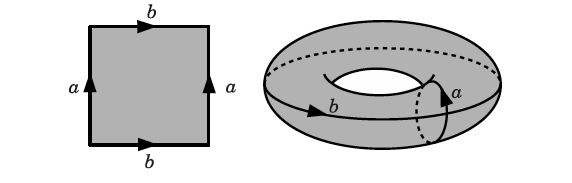
If you have not heard of such a model of the space then imagine it is a (xdim,
ydim) chessboard whose top and bottom, as well as left and right borders are
glued together. Thus you never fall-off the board — you can travel e.g. to the
right infinitely as the space is wrapped. Here is a plot illustrating the gluing process:
and here is the end result ?:
The torus model of the space is quite popular in simple agent-based models as it
is similar to a square grid, but does not have borders nor corners.
We assume that agents independently move around our torus in a discrete time.
Some agent in time moment tick randomly chooses to move up/stay/down and
left/stay/right (so in total there are nine possibilities, one of which is to
stay in place).
In particular the above rules mean that at some moment in time several
agents can occupy the same cell. This is where the SIR epidemiological model
comes into play. We assume that there is some disease and an agent can be in one
of four states:
susceptible: S
infected: I
recovered: R
dead
There are the following rules for moving between states in our model:
if in some tick a susceptible agent is on the same cell in the grid as
an infected agent then the susceptible agent becomes infected;
infected agent stays infected for duration periods after which time
the agents becomes dead with probability pdeath and otherwise becomes
recovered;
recovered and dead agents do not change their state except that recovered
agents are still allowed to move on the grid.
Initially we assume that infected number of agents is in an infected state.
We run the simulation as long as there is at least one infected agent.
In this post I present an implementation of an agent-based simulation that
captures the dynamics of this system and allows us to track changes of its state
in time.
Implementation of the model
This post is written under Julia v1.5.0, PyPlot v2.9.0, and StatsBase v0.32.2
(normally I recommend to make sure that you have exactly the given versions of
the packages installed, but in this case I only use their basic functionality
so you can safely assume that any version should work). I assume that you use
just Julia REPL (in a terminal or in an IDE like VS Code), but all examples
should also work in Jupyter notebook.
To import the required packages write:
usingStatsBaseusingPyPlot
If you get an error loading the packages most likely they are not installed. In
this case add them by running:
usingPkgPkg.add("StatsBase")Pkg.add("PyPlot")
Let us now move to definitions of data types that we will use in our model:
@enumAgentTypeagentSagentIagentRagentDstruct Agentx::Int# location of an agent in x-dimensiony::Int# location of an agent in y-dimensiontype::AgentType# type of an agenttick::Int# moment in time when agent entered type `type`endmutable struct Environmentgrid::Matrix{Vector{Int}}# for each cell of a grid a vector of numbers# of agents currently occupying a given cellagents::Vector{Agent}# a vector of all agentsduration::Int# metadata: how long agent stays in infected statepdeath::Float64# metadata: probability of death of an agent after# being infectedstats::Dict{AgentType,Vector{Int}}# a dictionary storing number of agents# of each type in consecutive ticks# of the simulationtick::Int# counter of the current tick of the simulationend
We have created three types:
AgentType which is just an enumeration allowing us to refer to the type of
the agent (agentS for susceptible, agentI for infected, agentR for
recovered, and agentD for dead); thus later in the code we can write agentS, agentI etc. specify the type of an agent;
Agent is a structure holding information about a single agent; note that
we create this type using struct keyword, which means that it is immutable
(it will have an impact how we should work with such a structure as will be
seen later in the code);
Environment is a mutable structure holding global information about the
simulation state; this time we make this structure mutable, which means that
we can change the values of variables stored in it.
Let us now move to a function that initializes the state of the simulation:
function init(n::Int,infected::Int,duration::Int,pdeath::Float64,xdim::Int,ydim::Int)grid=[Int[]for_in1:xdim,_in1:ydim]agents=[Agent(rand(1:xdim),rand(1:ydim),i<=infected?agentI:agentS,0)foriin1:n]for(i,a)inenumerate(agents)push!(grid[a.x,a.y],i)endstats=Dict(agentS=>[n-infected],agentI=>[infected],agentR=>[0],agentD=>[0])returnEnvironment(grid,agents,duration,pdeath,stats,0)end
We see that essentially it populates the Environment container. Note
that initially there are infected number of agents in the agentI state,
and the rest of them is in agentS state. Each agent initially gets a random
location on the grid. We also make sure to correctly initialize the grid and stats variables.
As we have noted above the Agent container is immutable. Therefore we have to
define functions that take an Agent object and return a new Agent object
if the Agent is to change its state.
As we have described above an agent can change its type, which is handled by
the die, recover, and infect functions, and it can move, which is handled
by the move function. Let us note a few things about the implementation of
these functions:
we use a short-form definitions of these functions of the form f(x) = expr;
this is useful when a function body is just a single expression (in particular
note that the if–else clause is a single expression — as shown in the move function);
in the move function the dims argument are the dimensions of the grid and
the expressions mod1(a.x + rand(-1:1), dims[1]) and mod1(a.y + rand(-1:1), dims[2]) handle the movement of the agent to one of
the nine new positions above and the mod1 functions makes sure that if we
move out of the boundary of the grid the movement is properly wrapped (e.g. mod1(0, 10) is 10 and mod1(11, 10) is 1);
In each tick of the simulation we first update the type of the agents, which
is handled by the following function:
function update_type!(env::Environment)tick=env.tickfor(i,a)inenumerate(env.agents)ifa.type==agentIiftick-a.tick>env.durationenv.agents[i]=ifrand()<env.pdeathdie(a,tick)elserecover(a,tick)endelsea.tick==tick&&continueforjinenv.grid[a.x,a.y]a2=env.agents[j]ifa2.type==agentSenv.agents[j]=infect(a2,tick)endendendendendend
Note that this function’s name ends with ! which is a convention that the
function changes its env argument. In this case it changes the agent types
stored in agents field of env mutable struct.
The whole logic of the update_type! function revolves around agents that have agentI type as they either can infect agents that have agentS type or can
either recover and become agentR or die and become agentD type.
Note that each time an agent type is changed we have to update the collection env.agents with a new value as Agent type is immutable.
Also the condition a.tick == tick && continue might raise some questions.
We use it to make sure that agents that became sick in a given tick to not
recursively infect other agents in the same tick (in our model it has only
performance implications as we assume that agents can get infected only
if an already infected agent stays in the same cell; but this would start
to matter if we allowed e.g. a wider infection radius — which is an easy
extension to version of the model we present — as then a chain reaction
could be triggered in a single tick, and we want to avoid this).
The other collective action of agents is their movement that is defined here:
function move_all!(grid::Matrix{Vector{Int}},agents::Vector{Agent})foreach(empty!,grid)for(i,agent)inenumerate(agents)a=move(agent,size(grid))agents[i]=apush!(grid[a.x,a.y],i)endend
Here a notable thing is that we clear entries of a grid cache with the empty!
function for each cell of grid matrix and then populate it anew with updated
locations of the agents.
The last thing we need to do in each step of the simulation is collection of the
statistics. This is a relatively simple operation and is implemented using the
following code:
function get_statistics!(env::Environment)status=countmap([a.typeforainenv.agents])for(k,v)inenv.statspush!(v,get(status,k,0))endend
In this function we use the countmap function form the StatsBase.jl package to
get numbers of agents of each type in a given tick, next we use a get function
to populate env.stats dictionary. The use of get is needed as in general the status dictionary returned by countmap does not have to contain all types of
agents (e.g. in tick one of the model agents are of type agentR or agentD are not present).
We are now ready to define the main loop of the simulation:
function run!(env::Environment)whileenv.stats[agentI][end]>0env.tick+=1update_type!(env)move_all!(env.grid,env.agents)get_statistics!(env)endend
Note that in this function we take advantage of the fact that env is mutable
and increment tick by 1 in each step. Next we repeatedly update agents’ types,
move them and collect statistics as long as there is at least one infected agent.
Running the model
Let us try running the model for some sample parameterization. We assume to have 2000 agents living on a 100x100 grid. The duration of infection is 21 ticks,
we initially place 10 infected agents (so it is 0.2% of the total population)
and assume that 5% of agents that get infected eventually die:
We see that the epidemics died out at around 300 ticks and around 80% of the
population went through the disease (agents that have agentS type at the end
of the simulation were unaffected).
As a second experiment let us check how does the fraction of infected agents
depend on the length of the infection. Here is the code (it should run under
30 seconds):
function fraction_infected(l)e=init(2000,10,l,0.05,100,100)run!(e)return1-e.stats[agentS][end]/2000endlen=5:30runs=16inf=[sum(fraction_infected(l)forrin1:runs)/runsforlinlen]plot(len,inf)
We have run the simulation for the disease length ranging from 5 to 30 with step
equal to 1 and averaged out 16 runs of the simulation for each parameter (416
runs of the simulation in total). We observe that the relationship is S-shaped
and the highest impact of the disease length change on number of infected agents
is around fifteen ticks.
Of course these are just two samples of the analysis that can be made with this
model. Feel free to change the assumptions of the model or the experiment setup
if you would like to investigate it more.
Concluding remarks
In this post I have shown how you can create a simple agent-based model without
having to use specialized packages. Still it is worth to know that there is e.g.
an excellent Agents.jl package that provides a lot of utility data
structures and functions for building agent-based simulations.
To recap the things related to the Julia language usage for building agent-based
simulations I wanted to show in this post:
you can use either struct or mutable struct types depending on what style
of data management pattern you prefer (I have shown both in this post); in
general the choice will have performance implications — using immutable struct will tend to be faster in most cases — but as the Julia language
is fast in general I recommend not to go for premature optimizations here,
but rather use the patterns that are convenient for you as a developer;
usually it is most convenient if you create just one type of agent (here Agent) and if you have subtypes of agents having different behavior to store
this trait as a field in the this type (in our case AgentType enum served
as this trait); in a blog post I have written some time ago I
discuss different possible patterns that could be used instead (with their
performance implications), but what I show in this post should serve you well
in 99% of cases from my experience;
finally let me comment that I could have easily made this simulation faster if
I wanted to sacrifice code clarity (a pet pastime of many hard-core Julia uses
?). This is a beauty of Julia that you can go really low-level in the
performance critical code to optimize things (see e.g. my recent answer to this question on Stack Overflow ); however, as noted
above — I usually recommend to go for such optimizations only if needed, as
Julia is typically fast enough if you write the code just that follows how you
think about the problem you solve, barring you do not respect general
performance recommendations described here in the Julia manual.